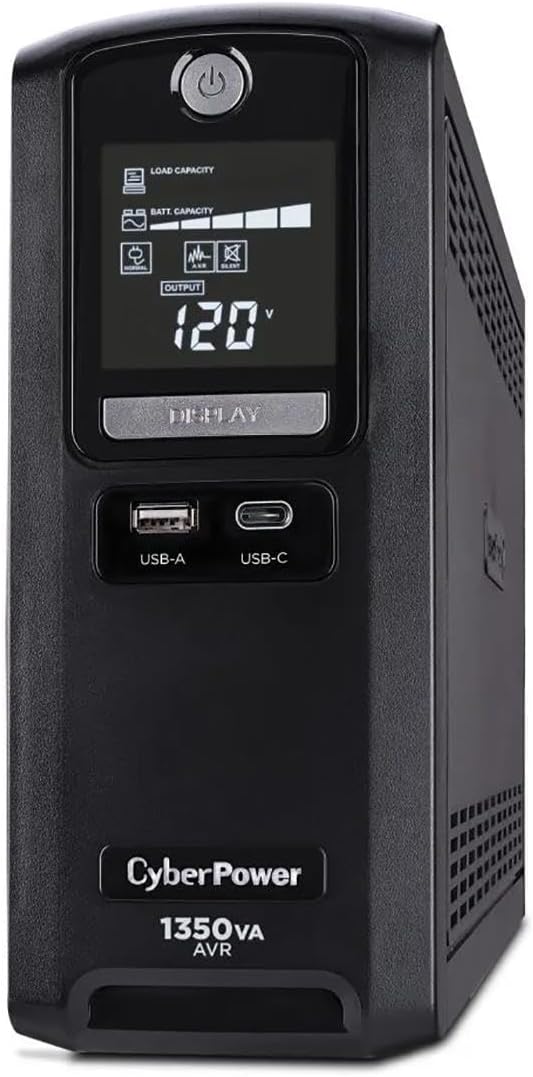
CyberPower CST135UC
4.9Editor score
High rating and extended runtime
Network coax line protection included
Energy Star certified design
This guide compares the top battery backup for small office models to help you choose reliable power protection for your workstation and network gear.
Finding reliable power protection is essential for any small office environment. A good battery backup ensures your computers and network devices stay online during sudden outages. It prevents data loss and hardware damage from unpredictable electrical surges.
We evaluated ten highly rated UPS systems based on capacity, runtime, outlet count, and additional features. Each model offers distinct advantages for different office setups and power needs. Our analysis focuses on performance reliability and ease of use.
Each pick highlights specific strengths like advanced monitoring or energy efficiency features. Prices and availability can change quickly on online marketplaces. Always verify current specs and warranty terms before making your final purchase decision today.
4.9Editor score

4.5Editor score

4.2Editor score
The following table offers a side by side comparison of all ten units. It highlights key specifications like VA rating, wattage, outlet count, and special features to help you decide quickly.


The CyberPower CP1500PFCLCD stands out as the top choice for small offices needing reliable power. With a 4.5 rating it delivers high capacity backup using a pure PFC Sinewave output. This ensures compatibility with sensitive modern computer power supplies that require clean sine waves.
We may earn a commission when you buy through this link, at no additional cost to you.
Its twelve outlets provide ample space for workstations monitors and networking gear. The color LCD panel gives immediate visual feedback on battery health and load status. Automatic Voltage Regulation corrects minor fluctuations without draining the battery which extends overall runtime during actual outages.
While the unit is pricier than entry level models the protection it offers is significant. The connected equipment guarantee provides peace of mind for valuable hardware investments. Some users may find the size requires dedicated floor space in smaller desks setups.
This model is ideal for offices with multiple high value devices like workstations and servers. If you need robust protection and clear monitoring capabilities this unit is the best option. It balances performance and features perfectly for professional environments.
The PFC Sinewave output ensures that Active PFC power supplies in modern computers run without errors or unexpected shutdowns during battery mode.
The color LCD panel displays detailed power conditions and alerts users to potential issues before they cause equipment downtime or data loss.
We may earn a commission when you buy through this link, at no additional cost to you.
This unit offers substantial capacity for protecting multiple workstations in a small office. Its Intelligent LCD panel provides clear data on battery load and runtime. The AVR feature helps maintain stable voltage levels reducing the need for battery usage during minor fluctuations.
We may earn a commission when you buy through this link, at no additional cost to you.
With twelve outlets it supports a wide range of office equipment including routers and printers. USB ports allow convenient charging of mobile devices during power events. The connected equipment guarantee adds a layer of financial protection for your setup.
The simulated sine wave may not suit every modern PC power supply but works well for most standard devices. Users should verify compatibility if they rely heavily on high end Active PFC systems. Overall it is a solid reliable choice for general office use.
Choose this model if you need high capacity protection without the premium price of pure sine wave units. It is perfect for standard computing setups where basic power conditioning is sufficient. The balance of outlets and power makes it versatile.
Automatic Voltage Regulation corrects minor power fluctuations without switching to battery power which helps extend the life of the internal battery.
The intelligent LCD display shows immediate detailed information on battery conditions so you know exactly when backup power is active.
We may earn a commission when you buy through this link, at no additional cost to you.
The EC850LCD brings energy efficiency to your office power backup. It includes an ECO Mode that automatically cuts power to peripherals when your main computer is off. This reduces idle power consumption and lowers overall energy costs in your office.
We may earn a commission when you buy through this link, at no additional cost to you.
Twelve outlets give you plenty of room to grow your setup. The multifunction LCD panel tracks battery health and load conditions clearly. It is a solid choice for small teams who want to minimize their environmental impact while staying safe.
Its lower wattage rating means it handles fewer high draw devices than larger models. However for standard desktops and networking gear it is more than sufficient. The design balances cost and functionality well for budget conscious users.
Pick this if you want a balance of protection and energy savings. It works well for individual workstations with typical office peripherals. The ECO features make it a smart choice for reducing unnecessary power usage.
When the UPS detects a computer is off it turns off power to connected peripherals to reduce power usage and lower energy costs effectively.
The multifunction LCD panel displays immediate detailed information on battery and power conditions so you can monitor status easily.
We may earn a commission when you buy through this link, at no additional cost to you.
This model is designed for efficiency and space conservation in busy offices. Its slim profile fits easily under desks or in tight server racks. The GreenPower high efficiency design reduces power consumption during normal operation which helps save on electricity costs.
We may earn a commission when you buy through this link, at no additional cost to you.
Twelve outlets ensure you can protect a wide range of devices. The stand by operation is simple and effective for routine power issues. It is a reliable backup for home offices or small teams needing basic surge protection.
The standby technology is less precise than pure sine wave but works for most standard electronics. Users needing protection for high end servers might look elsewhere. However for typical PCs and routers it is a strong value.
Opt for this unit if you have limited space and need high efficiency. It is perfect for office setups where physical footprint matters. The design proves you do not need a large box for reliable power backup.
GreenPower UPS high efficiency design reduces power consumption by utilizing a compact charger and power inverter to create an ultra-efficient backup system.
The slim profile design saves valuable desk or floor space while still providing robust power protection for your office equipment.
We may earn a commission when you buy through this link, at no additional cost to you.
The CST135UC earns a near perfect rating thanks to its robust features and reliability. It offers high capacity power along with network and coax protection to keep internet access safe. This is crucial for offices where connectivity is as important as power.
We may earn a commission when you buy through this link, at no additional cost to you.
Ten outlets provide ample protection for workstations and networking gear. The Energy Star certified design ensures it does not waste electricity while idle. Its extended runtime allows plenty of time to save work and shut down properly during long outages.
The only trade-off is the premium cost and simulated wave which may not suit every device. However the data protection features are unique and highly valuable for business continuity. The investment pays off in reduced risk of data loss.
Choose this model if you need a comprehensive solution for power and data. It is ideal for offices with multiple internet connected devices. The high rating reflects its strong performance and user satisfaction.
Advanced protection features defend against power surges and line noise for optimal performance ensuring your network lines stay safe.
This UPS provides ample time to save work and properly shut down sensitive electronics with extended runtime capabilities.
We may earn a commission when you buy through this link, at no additional cost to you.
The AVRG900LCD delivers consistent performance with a touch of data safety. It includes telephone line protection to prevent surges from traveling through your modem or router. This feature is often overlooked but vital for maintaining internet connectivity.
We may earn a commission when you buy through this link, at no additional cost to you.
Twelve outlets give you plenty of room to add more gear as needed. The Intelligent LCD panel keeps you informed on battery health at a glance. It is a practical choice for small businesses focused on keeping lines open.
While not offering advanced waveforms it handles standard office equipment well. The connected equipment guarantee adds value and security. It may not stand out as unique but it gets the job done reliably.
Select this unit if you want to protect your internet lines alongside your PCs. It is a well rounded option for typical office workstations. The data protection makes it a smart choice for connectivity dependent tasks.
Data line protection prevents power surges that travel through telephone lines from causing damage to your network electronics and routers.
The Intelligent LCD panel displays immediate detailed information on battery and power conditions to keep you informed constantly.
We may earn a commission when you buy through this link, at no additional cost to you.
This unit is the perfect entry level solution for small offices on a budget. It fits easily into tight spaces and can be mounted on walls using built in tabs. Its eight outlets are wide spaced to accommodate bulky power bricks comfortably.
We may earn a commission when you buy through this link, at no additional cost to you.
While the capacity is lower it is enough for a single PC and monitor. The silent design keeps noise down in quiet work environments. It is an excellent choice for protecting basic setups where full system backup is not critical.
The battery is replaceable which extends the product life without replacing the whole unit. This helps maintain long term affordability. However do not expect long runtimes during major outages.
Pick this if you need basic protection for a single workstation. It is great for small setups where space and cost are key factors. The value it provides makes it a strong contender.
Bottom mounting tabs allow for easy wall mount installation saving valuable desk space in smaller offices.
Eight outlets with wide spacing accommodate bulky plug-ins making it easier to connect adapters and power bricks.
We may earn a commission when you buy through this link, at no additional cost to you.
The BC350R is designed for the smallest possible footprint. Its compact size fits almost anywhere including shelves or behind monitors. The VESA mount slots allow it to be attached to monitor arms saving even more space.
We may earn a commission when you buy through this link, at no additional cost to you.
Setup is incredibly simple just plug and play with no complex menus. LED indicators tell you when power is active or if there is a fault. It is a minimal but effective tool for basic surge and battery protection.
The low capacity means it is only for very small loads like routers or small devices. It is not meant for full computers but rather for keeping connectivity alive. The replaceable battery keeps costs down over time.
Choose this if you need the tiniest backup possible for your router. It is ideal for maintaining internet access in case of short outages. Its simplicity and size make it a unique niche solution.
Keyhole mounting slots on the bottom enable easy wall mounting or attachment to monitor stands.
Small size is suitable for desktop floor and wall placement making it perfect for tight office spaces.
We may earn a commission when you buy through this link, at no additional cost to you.
APC is a trusted name in power protection and this model delivers that quality. It focuses on keeping your computer and internet router running through outages. This ensures you can save your work and stay connected without interruption.
We may earn a commission when you buy through this link, at no additional cost to you.
Five battery backed outlets are well spaced for standard plugs. A USB port lets you charge phones even when the power is out. Battery replacement is straightforward allowing you to extend the unit life easily.
The runtime is decent for light loads but it prioritizes essential gear. It is less about power capacity and more about smart protection for key devices. If you trust APC this is a safe and practical choice.
Select this model if you want to prioritize internet connectivity. It works well for home offices where staying online is a priority. The simple design makes it user friendly for non technical users.
Supplies short-term battery power during outages to maintain internet connectivity and allow safe shutdown of computer during power interruptions.
Easy battery replacement keeps costs low when the internal battery ages out.
We may earn a commission when you buy through this link, at no additional cost to you.
The ST425 is an entry level option designed for basic surge and battery protection. It offers eight outlets to protect a small set of devices like a monitor and desktop. The high efficiency design ensures it does not drain your electric bill.
We may earn a commission when you buy through this link, at no additional cost to you.
A simple LED status light indicates power on or fault conditions clearly. It does not have complex displays but provides all the essentials for light office use. The warranty and connected equipment guarantee offer basic peace of mind.
Its capacity is low so it is best for very small setups. It is not intended for heavy loads but rather for keeping small devices safe. The simplicity makes it easy to set up anywhere.
Choose this if you need a basic safety net for a home office. It is perfect for protecting gaming consoles or routers. The value and simplicity make it a solid starter option.
LED status light indicates Power-On and Wiring Fault.
GreenPower UPS high efficiency design reduces power consumption.
We may earn a commission when you buy through this link, at no additional cost to you.
Selecting the right backup system requires understanding your power needs. This guide covers the most important factors to consider before purchasing a unit.
Capacity measured in VA and watts determines how much load the unit can support. Higher capacity means more outlets can be powered and runtime is longer. Always calculate total wattage of your devices before choosing a model.
Ensure the selected unit provides enough runtime to save work and shut down safely.
Output waveform affects compatibility with sensitive electronics. Pure sine wave is required for Active PFC power supplies while simulated sine wave works for basic devices. Choose pure sine wave for modern computers and servers.
Verify your power supplies before buying a simulated sine wave unit.
More outlets allow for expanded protection of monitors and routers. Check how many battery backed versus surge only outlets are included. A good unit should offer flexibility for your growing office setup.
Look for at least ten outlets for a complete office system.
LCD panels provide real time data on battery health and load. This helps you manage power usage and detect issues early. Basic LED lights are less informative but sufficient for simple setups.
Prioritize LCD displays for better control over your power status.
AVR corrects minor voltage fluctuations without using battery power. This feature extends battery life by avoiding unnecessary switching to backup mode. It is crucial for areas with unstable grid power.
Ensure your chosen model includes AVR for better battery longevity.
Surges can travel through phone or network lines. Data line protection shields your router and modem from these events. This keeps your internet safe even during a power failure.
Select a unit with coax or network protection for connectivity.
Batteries lose capacity over time and need replacement. A unit with user replaceable batteries saves money compared to buying a new system. Check if the battery cartridge is easy to access and swap.
Choose models with replaceable batteries for lower long term costs.
USB ports allow for data communication and software monitoring. Many units include software to automate safe shutdowns during outages. This prevents data loss by shutting down your computer gracefully.
Look for USB connectivity if you need automated shutdowns.
Place your UPS unit on a solid flat surface with proper ventilation. Avoid blocking vents as heat can damage the internal battery. Ensure the power cord is securely connected to a grounded outlet.
Periodically check the LCD panel or LED indicators to monitor battery status. Run the self test if your unit offers this feature. This confirms the battery is ready for an actual outage.
Replace the internal battery every three to five years or as recommended. Follow manufacturer instructions for safe disposal of old batteries. Keeping the battery fresh ensures your system works when you need it most.
VA measures apparent power while Watts measure real power used by devices. The VA rating is always higher than Watts due to power factor. Calculate your total wattage first then choose a VA rating that exceeds it.
No units use either simulated or pure sine wave output. Pure sine wave is safer for Active PFC power supplies. If you have modern high end PCs check the product specs carefully.
Runtime depends on load. A typical unit provides 5 to 15 minutes at full load. This is enough time to save work and shut down properly. Higher capacity models offer longer runtimes.
Many modern units allow user replaceable batteries. Check if your model uses a cartridge style battery. This reduces long term costs compared to buying a new unit.
Automatic Voltage Regulation corrects minor voltage drops or spikes. It does this without using battery power which saves energy. AVR is vital for areas with unstable power grids.
If your office relies on internet you should use a unit with data protection. It shields your router and modem from surges traveling through lines. This keeps your network safe during storms.
The CyberPower CP1500PFCLCD and CST135UC stand out for high performance and data protection. For budget conscious buyers the Tripp Lite BC450 offers essential protection at a low price.
Prioritize capacity and waveform compatibility based on your specific office needs. Ensure the unit supports your most critical devices like workstations and routers.
Prices change frequently on Amazon so always verify the current price before purchasing. Choosing the right model now will protect your office from unexpected power issues.