
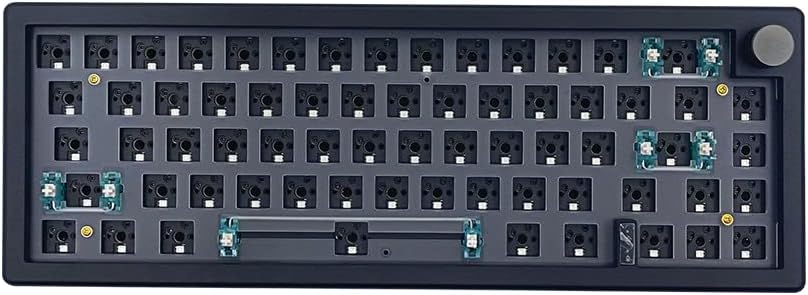
75% M87 Kit Black
4.2Editor score
Affordable Price Point
Hot Swappable Switches
South Facing RGB
Discover the top barebones keyboards for customization. This guide compares ten kits with features like gasket mounting, hot-swap support, and wireless
Barebones keyboards offer enthusiasts the ultimate freedom to build a custom typing experience. These kits provide the essential framework including the case and PCB, allowing you to choose switches and keycaps separately. This flexibility ensures your final setup matches your exact preferences for sound and feel.
We evaluated ten popular kits based on build quality, connectivity options, and customization potential. Each product was analyzed for features like gasket mounting, VIA support, and battery life. Our goal is to help you find the perfect foundation for your next mechanical keyboard project.
Every pick below highlights specific strengths such as wireless capability or premium materials. Review each product details to understand what fits your needs. Keep in mind that prices fluctuate frequently, so check current listings before making your final decision.
4.2Editor score

4.8Editor score

4.4Editor score
This table provides a side-by-side comparison of the ten top barebones keyboard kits. Review the specifications and features to quickly identify the right model for your setup.




The GMK104 White barebones kit stands out as the top choice for enthusiasts seeking a full-size solution. With a rating of 4.8, it offers exceptional value through its combination of modern features and robust construction. This kit is ideal for those who need a numpad for productivity.
We may earn a commission when you buy through this link, at no additional cost to you.
Its standout feature is the integrated smart screen and metal knob. You can customize real-time image updates directly on the screen while controlling volume with the knob. The gasket-mounted structure ensures a cushioned typing experience that minimizes noise and vibration.
Trade-offs include a higher price point compared to basic kits. The assembly process requires time and attention to detail for switches and keycaps. However, the premium features justify the cost for users wanting a high-end DIY experience.
Buyers needing a full-size keyboard with unique customization will love this model. It balances functionality with modern aesthetics perfectly. This is our top recommendation for anyone building a primary workspace keyboard.
The TFT screen allows real-time image updates for a personalized look.
Gasket mounting provides a softer and more consistent typing feel.
We may earn a commission when you buy through this link, at no additional cost to you.
The M87 Kit Black is an excellent entry point for those on a budget. Rated 4.2, it provides a solid foundation for a custom build without breaking the bank. This kit is perfect for beginners learning the ropes of mechanical keyboard assembly.
We may earn a commission when you buy through this link, at no additional cost to you.
Key strengths include high-quality silencing pads and sound absorption foam. These features absorb the clatter of keystrokes without sacrificing responsiveness. The hot-swappable PCB supports both 3-pin and 5-pin switches for flexibility.
Trade-offs involve simpler materials and a lower rating compared to premium kits. The build quality is functional but lacks the refinement of aluminum options. For the price, however, it delivers significant value.
Buyers seeking a simple and affordable build should consider this model. It is easy to customize and offers a comfortable typing experience. This is the top budget pick for DIY enthusiasts.
Silencing pads ensure a quiet typing experience without sacrificing feel.
Install switches directly without soldering for easy customization.
We may earn a commission when you buy through this link, at no additional cost to you.
The GMMK PRO 75% Black is a premium choice for enthusiasts prioritizing build quality. With a 4.4 rating, it offers CNC machined aluminum construction that feels substantial and durable. This kit is ideal for those seeking a professional and robust device.
We may earn a commission when you buy through this link, at no additional cost to you.
Its main strength is the CNC aluminum frame and modular plate system. You can swap plates for brass or polycarbonate to adjust the sound and feel. The weight adds stability to your desk setup.
Trade-offs include a higher price and the need to source switches separately. It is a frame-only kit which requires additional purchases for a full build. However, the quality justifies the cost.
Buyers looking for a professional-grade keyboard will love this kit. The aluminum build offers unmatched durability and a distinct look. This is the top premium option for serious builders.
Solid aluminum body provides high scratch resistance and durability.
Swap plates to alter typing feel and acoustic profile easily.
We may earn a commission when you buy through this link, at no additional cost to you.
The GMK104 Black offers the same great features as the white model. It has a 4.6 rating and is perfect for those needing full functionality. The smart screen and knob add a unique touch to any setup.
We may earn a commission when you buy through this link, at no additional cost to you.
Key strengths are the long-lasting battery and reliable wireless connectivity. You can switch between devices easily with the FN key. The gasket mount ensures a consistent typing feel across all keys.
Trade-offs include the cost and weight of the full-size design. It takes up significant desk space. For full-size users, it remains a top contender.
Buyers wanting a full-size keyboard with smart tech will love this. It is versatile and highly rated for performance. This is a strong recommendation for productivity.
Switch between devices with simple FN key combinations.
South-facing RGB backlighting offers aesthetic appeal.
We may earn a commission when you buy through this link, at no additional cost to you.
The M87 White is a compact option for those preferring a smaller footprint. With a 3.5 rating, it provides basic customization for a good price. It is suitable for entry-level DIY projects.
We may earn a commission when you buy through this link, at no additional cost to you.
Its strengths include sound absorption foam and hot-swap support. You can change switches without soldering to find your perfect feel. The detachable USB-C cable adds to its portability.
Trade-offs include lower ratings and basic material quality. It may not hold up as well as aluminum options over time. For the price, it is a decent starter kit.
Buyers wanting a simple white compact build will find this useful. It offers a quiet experience with custom RGB. This is a solid budget choice.
75% layout saves space while keeping essential keys.
Portability is improved with a detachable USB-C cable.
We may earn a commission when you buy through this link, at no additional cost to you.
The GMK67 Black is a gaming-focused option with solid wireless specs. It has a 4.3 rating and is great for those wanting a compact layout. The large battery ensures long play sessions.
We may earn a commission when you buy through this link, at no additional cost to you.
Key strengths include the gasket mount and triple-mode connectivity. You can switch between Bluetooth and wired easily. The multifunction knob adds convenience for volume control.
Trade-offs are the smaller layout and assembly requirements. It lacks a numpad which some may need. For gaming setups, it fits well.
Buyers needing a compact gaming keyboard will love this kit. It balances size and performance well. This is a top pick for gamers.
4000mAh battery supports extended wireless use.
65% layout saves space for mouse movement.
We may earn a commission when you buy through this link, at no additional cost to you.
The GMK67 White is a top-rated compact option. With a 4.5 rating, it is perfect for customizing your exact look. The gasket mount provides a satisfying typing feel.
We may earn a commission when you buy through this link, at no additional cost to you.
Its strengths are the VIA software support and RGB presets. You can remap keys for your workflow easily. The tri-mode connection ensures flexibility in your setup.
Trade-offs include the small layout and lack of a numpad. It is not ideal for heavy number entry. For gaming, it is an excellent choice.
Buyers wanting a custom compact setup will love this kit. It is flexible and highly rated. This is a strong recommendation for customization.
Full support for VIA allows deep customization.
16.8 million RGB colors offer aesthetic appeal.
We may earn a commission when you buy through this link, at no additional cost to you.
The GMK87 offers a unique screen feature for custom interfaces. It has a 3.9 rating and is a strong competitor for tech lovers. The screen adds a modern touch to the desk.
We may earn a commission when you buy through this link, at no additional cost to you.
Key strengths are the interactive display and wireless modes. You can update images in real-time for a dynamic look. The gasket mount ensures a satisfying feel.
Trade-offs include a mid-range rating and price. It requires assembly effort which may be a barrier. For screen enthusiasts, it is worth it.
Buyers wanting a screen on their keyboard will love this. It is unique and functional. This is a top pick for tech lovers.
Screen allows real-time image updates and customization.
Works with tablet, PC, and mobile phone.
We may earn a commission when you buy through this link, at no additional cost to you.
The GMK108 is a full-size option for productivity users. It has a 4.1 rating and is great for those needing a numpad. The 108 key layout ensures no conflicts.
We may earn a commission when you buy through this link, at no additional cost to you.
Key strengths are the wireless support and gasket mount. You can switch devices easily for flexible work. The hot-swap PCB allows for easy customization.
Trade-offs include assembly time and a mid-range price. It is not a pre-built keyboard so patience is needed. For productivity, it is a solid choice.
Buyers needing a full-size keyboard will find this useful. It supports custom layouts and has wireless features. This is a top pick for office work.
Equipped with a full set of keys.
Bluetooth 5.0 allows for flexible device connections.
We may earn a commission when you buy through this link, at no additional cost to you.
The GMMK 3 offers a unique modular gasket system. It has a 3.2 rating but excels in adjustability. The modular design allows you to fine-tune the feel.
We may earn a commission when you buy through this link, at no additional cost to you.
Key strengths are the nine points of modularity and foam. You can adjust the gaskets for a firmer or flexible feel. The sound dampening foam absorbs unwanted resonance.
Trade-offs include the lowest rating and complex build. It requires effort to set up correctly. For adjustability, it is a strong option.
Buyers wanting a customizable feel will love this kit. It is unique and flexible. This is a top pick for modularity.
Simple building block design for a firm or flexible feel.
Two layers of foam absorb unwanted resonance.
We may earn a commission when you buy through this link, at no additional cost to you.
Selecting the right barebones kit requires understanding your needs for layout, connectivity, and build quality. This guide covers key factors to help you make an informed decision.
Layout size determines the physical footprint of your keyboard. Options range from 65% to full-size. Consider your desk space and whether you need a numpad for productivity. A smaller layout saves space while a larger one offers more keys.
Choose a size that fits your workspace and usage habits.
Connectivity mode defines how your keyboard connects to devices. Many kits offer tri-mode connections including Bluetooth and wired. Wireless options provide flexibility while wired ensures low latency. Consider your need to switch between devices frequently.
Select connectivity that matches your device setup needs.
Hot swap support allows you to change switches without soldering. This feature is crucial for enthusiasts who want to experiment with different switches. Look for kits that support both 3-pin and 5-pin switches. It makes customization much easier and safer.
Always choose a kit with hot swap capabilities for flexibility.
Gasket mounting uses shock-absorbing pads between the case and PCB. This reduces vibrations and minimizes cavity sound. The result is a more satisfying and comfortable typing experience. It also helps with sound dampening significantly.
Opt for gasket mounting to improve sound and feel.
Build material affects durability and weight. Aluminum frames offer high durability and a premium feel. Plastic options are lighter but may feel less solid. Consider your preference for weight and longevity. A sturdy frame ensures the keyboard lasts longer.
Prioritize quality materials for a lasting keyboard experience.
VIA support enables deep customization of key mappings and macros. This software allows you to remap keys for specific workflows. It is essential for gamers and power users who need tailored layouts. Always check if the kit supports VIA or QMK.
Ensure VIA support for maximum key remapping flexibility.
Battery life is critical for wireless keyboards. Larger batteries support extended use without recharging. A 4000mAh battery provides significant runtime. Check battery capacity when choosing a wireless kit.
Choose a high capacity battery for long wireless sessions.
Additional features like knobs or screens add functionality. Knobs allow volume control while screens offer customization. Some kits come with sound foam pre-installed. Consider these extras to enhance your user experience.
Look for useful features like knobs or sound foam included.
Assemble your barebones kit carefully. Start by installing the PCB into the case and securing the gasket. Place switches into the hot-swap sockets without forcing them. Ensure all connections are secure before attaching keycaps.
Maintain your keyboard by cleaning it regularly. Use compressed air to remove dust between keys. If using wireless, charge the battery fully before the first use. Always handle switches with care to avoid damage.
Customize your experience using software like VIA. Remap keys for your preferred workflow. Adjust RGB lighting to suit your style. Regularly check for firmware updates to keep your keyboard functioning optimally.
A barebones keyboard kit is a pre-assembled frame that includes the case and PCB but lacks switches and keycaps. It allows you to build a custom keyboard by choosing your own components. This ensures a tailored sound and feel for your specific needs.
Barebones keyboards offer more customization options for switches and keycaps. They often feature better build materials like gasket mounting. However, they require assembly time. If you want a tailored experience, they are often better.
Most barebones kits use hot-swap sockets. Insert the switch pins into the sockets without soldering. Use a switch puller if you need to remove them later. Ensure the orientation is correct for proper function.
The difference lies in the number of stabilizer pins. A 5-pin switch has two extra plastic legs for stability. Kits supporting 5-pin switches are more versatile. Most modern kits support both 3-pin and 5-pin switches.
Yes many kits offer wireless connectivity options. They support Bluetooth 5.0 or 2.4GHz connections. Ensure the kit has a sufficient battery for your needs. This allows for a cable-free setup on your desk.
VIA support allows you to remap keys and create macros easily. It provides deep customization without needing complex software. This feature helps you tailor the keyboard to your specific workflow efficiently.
We have reviewed ten excellent barebones keyboard kits ranging from budget to premium options. The GMK104 series offers the best smart features while the M87 provides great value for beginners. Each pick highlights unique strengths for different user needs.
Prioritize features like hot swap support and connectivity modes based on your work style. If you need a full-size layout, consider the GMK104 models. For compact setups, the GMK67 series offers great flexibility.
Remember to check current prices and availability before purchasing. Prices fluctuate frequently so verify the latest deals. This guide provides a strong foundation to help you build your perfect keyboard today.