
ASRock DeskMeet X300 Mini PC Barebone Kit
4.8Editor score
Supports AMD AM4 Socket CPUs
500W power supply included
Dual M.2 storage slots
This guide compares the top 10 barebone gaming PCs for October 2026, helping you choose the right compact system for performance and budget needs.
Barebone gaming PCs offer a flexible foundation for builders who want to customize components while saving space. These compact systems typically include the chassis, motherboard, and power supply, leaving you to add the CPU, RAM, and storage. This approach allows for tailored performance and cost efficiency.
We evaluated ten leading barebone kits based on build quality, connectivity, and gaming potential. Our analysis focused on how well each unit supports modern GPUs and processors. We also considered cooling efficiency and expansion options for future upgrades.
Each selection highlights specific strengths like AMD or Intel compatibility, OCuLink support, and compact designs. Note that component compatibility and availability may vary. Always verify your chosen CPU and RAM specifications before purchasing any kit.
4.8Editor score

4.5Editor score

5.0Editor score
Below is a detailed comparison of all ten selected barebone kits to help you weigh their features and suitability for your specific gaming or productivity goals.



The ASRock DeskMeet X300 is a compact barebone Mini designed for builders seeking AMD AM4 compatibility. It rates highly for its value and robust connectivity options. The unit includes a 500W power supply to simplify initial setup.
We may earn a commission when you buy through this link, at no additional cost to you.
Supporting Ryzen 5000 processors, this kit offers solid performance potential for gaming and productivity. Its dual M.2 slots provide ample storage speed, while USB 3.2 Gen2 ensures fast data transfer. The 8-liter case fits easily on desks.
While it lacks a CPU and RAM, the open design allows custom configuration. The limited PCIe 3.0 bandwidth may slightly restrict top-tier GPU performance. However, this is acceptable given the budget-friendly nature of the kit.
This kit is ideal for gamers wanting a small form factor PC without breaking the bank. It balances cost and capability effectively. We recommend it for those comfortable installing their own components to build a tailored system.
Supports Ryzen 5000/4000/3000G series for versatile CPU choices.
Comes with a 500W 80+ Bronze PSU ready for components.
We may earn a commission when you buy through this link, at no additional cost to you.
The AOOSTAR MACO stands out with its powerful Ryzen 7 PRO 8845HS processor. This barebone kit is perfect for users needing high speeds for gaming and content creation. It supports eGPUs via OCuLink for future expansion.
We may earn a commission when you buy through this link, at no additional cost to you.
Connectivity is a strong suit with dual USB4 ports and dual 2.5G LAN. The system maintains cool temperatures through its advanced cooling solution. Its eco-friendly design uses recycled aluminum, appealing to green-conscious builders.
Note that it does not include RAM or SSD, requiring additional purchases. The lack of an OS key for barebone buyers means you must provide your own software. Still, the raw power justifies the extra steps.
This kit is excellent for professionals needing a compact workstation that can handle heavy workloads. It offers a balance of speed and expandability. We suggest it for advanced users looking to maximize their mini PC potential.
Zen 4 architecture provides up to 5.1GHz speeds for demanding tasks.
OCuLink port allows external GPU connection with minimal performance loss.
We may earn a commission when you buy through this link, at no additional cost to you.
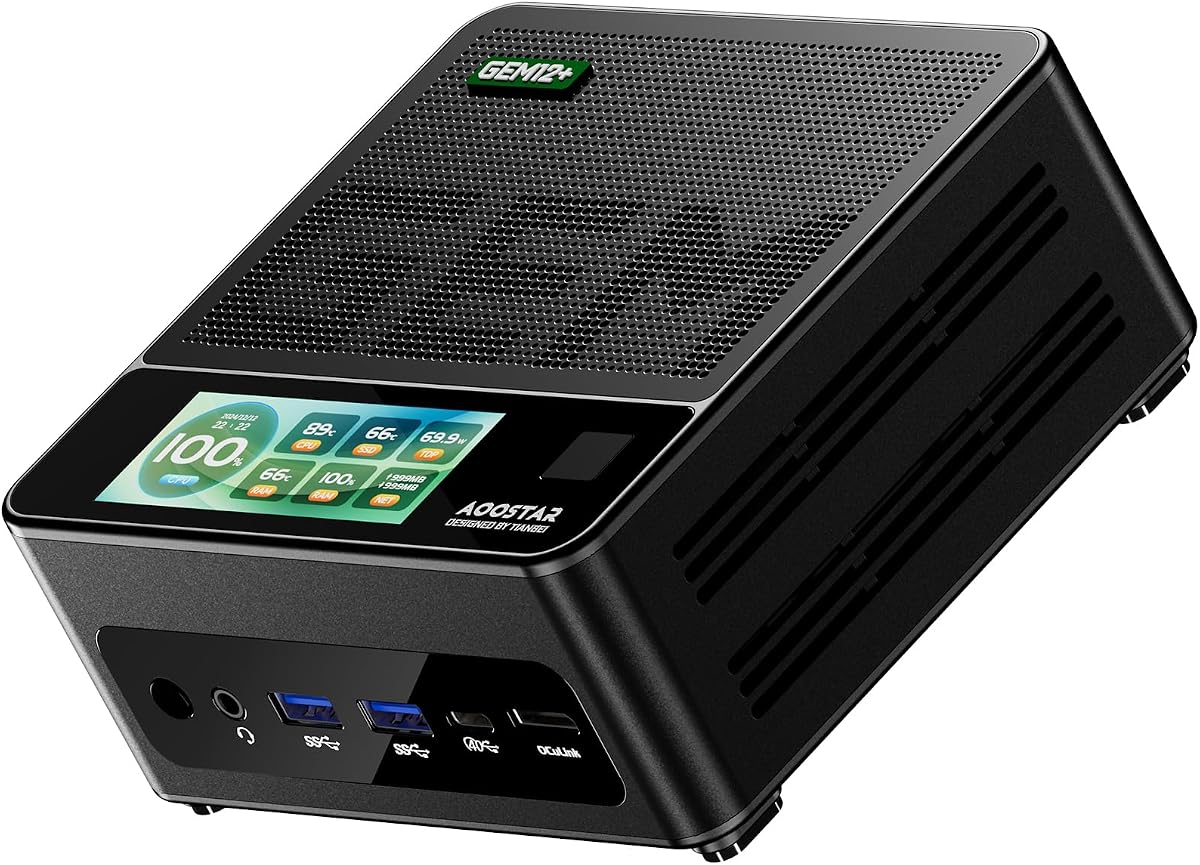
The AOOSTAR GEM12+ is a robust option with a focus on high-bandwidth connectivity. Its OCuLink port provides unmatched eGPU performance for gaming enthusiasts. The vapor chamber ensures sustained performance under heavy loads.
We may earn a commission when you buy through this link, at no additional cost to you.
Built with a powerful Ryzen 7 PRO 8845HS, it handles multitasking effortlessly. Dual M.2 slots allow massive storage expansion, ideal for large game libraries. The energy-saving design optimizes power usage during operation.
Users should note that OCuLink does not support hot-swapping, so power down before changes. The package excludes memory and storage, requiring separate procurement. Despite this, its performance capabilities are top-tier.
This system is best for enthusiasts prioritizing raw graphics performance in a small form. It delivers premium features often found in larger desktops. We recommend it for serious gamers who value efficiency and speed.
Vapor Chamber transfers heat evenly to maintain stable system temperatures.
Dual M.2 2280 PCIe 4.0 slots allow up to 8TB total storage.
We may earn a commission when you buy through this link, at no additional cost to you.
The AOOSTAR GEM12+ PRO adds convenience with fingerprint recognition security. Its barebone design supports high-performance builds for gaming and office use. The OCuLink port ensures external GPUs run at maximum efficiency.
We may earn a commission when you buy through this link, at no additional cost to you.
Three BIOS modes allow tailoring power output for silent or performance needs. The chassis is built for durability and eco-friendly use. Energy-saving architecture helps reduce overall power consumption significantly.
Users must supply their own RAM and SSD, adding to the total setup cost. Windows keys are separate unless specified otherwise. The display software offers unique customization for system monitoring.
This is a strong choice for users needing security and customization in a compact form. It balances professional and gaming needs well. We suggest it for those valuing privacy and quiet performance.
Fingerprint recognition simplifies secure access without complex passwords.
Adjustable Silent, Balanced, and Performance modes for varied needs.
We may earn a commission when you buy through this link, at no additional cost to you.
The ASRock DeskMeet B760 Series supports the latest Intel Core processors. This barebone kit is designed for those who want modern Intel architecture in a compact form. It offers robust connectivity for high-speed storage and peripherals.
We may earn a commission when you buy through this link, at no additional cost to you.
With PCIe 4.0 x16 support, it accommodates powerful discrete graphics cards. The included 500W power supply simplifies the initial build process. Memory slots allow significant RAM expansion for multitasking.
Note that it does not include the CPU or OS, requiring additional purchases. The compact 8L design may limit some larger component choices. However, it remains a strong contender for modern desktop builds.
This kit is ideal for those prioritizing Intel compatibility and modern feature sets. It balances performance with size effectively. We recommend it for users building a versatile modern office or gaming station.
Supports 14th, 13th, and 12th Gen Intel Core processors.
PCIe 4.0 x16 slot ensures top bandwidth for discrete GPUs.
We may earn a commission when you buy through this link, at no additional cost to you.
This CyberPowerPC offers a pre-built experience with solid mid-range specs. It includes a Ryzen 5 5500 processor and an RX 6500 XT GPU for entry-level gaming. The setup is straightforward with Windows 11 Home pre-installed.
We may earn a commission when you buy through this link, at no additional cost to you.
Custom RGB lighting adds a stylish touch to the tempered glass side panel. Connectivity options cover essential needs with USB and Bluetooth. The included keyboard and mouse save time on initial setup.
While not strictly a barebone kit, it shares similar appeal for quick deployment. It lacks the flexibility for deep customization compared to true barebone systems. However, it delivers immediate performance for casual gaming.
This PC suits those seeking a plug-and-play solution without the hassle of assembly. It is reliable for everyday tasks and light gaming. We suggest it for users prioritizing convenience over customizability.
Comes with OS, keyboard, and mouse for immediate setup.
RGB lighting and tempered glass panel create an attractive look.
We may earn a commission when you buy through this link, at no additional cost to you.
The BRENUC NUC 11 Extreme supports the powerful Core i9-11900KB processor. This barebone kit is engineered for professional and high-performance tasks. It offers extensive connectivity including Thunderbolt 4 and WiFi 6E.
We may earn a commission when you buy through this link, at no additional cost to you.
Three M.2 slots allow substantial storage expansion for large datasets. The design supports discrete graphics cards up to 12 inches. It is ideal for workstations requiring significant compute power.
Note that RAM and SSD are sold separately, adding to the build cost. It is a refurbed model with tested functionality. Despite its age, it remains a powerful option for niche needs.
This system is best for advanced users needing maximum CPU power in a compact form. It offers enterprise-grade reliability and performance. We recommend it for business or creative professionals requiring robust specs.
Thunderbolt 4 provides high-speed data and display options.
Three M.2 slots offer extensive NVMe storage expansion.
We may earn a commission when you buy through this link, at no additional cost to you.
The ASRock DeskMini 310W is a tiny 2-liter system fitting anywhere. It supports Intel 8th and 9th Gen CPUs for solid productivity. The included 32GB RAM makes it ready for immediate use.
We may earn a commission when you buy through this link, at no additional cost to you.
Triple video outputs allow multi-monitor setups for enhanced productivity. The M.2 slot ensures fast storage access for OS and apps. Micro SD and Wi-Fi slots add further convenience.
Note that CPU support is limited to older LGA1151 chips. While efficient, it may not handle the most demanding modern games. Still, it serves well as a media or office center.
This system is ideal for those needing a discreet, low-power solution for basic tasks. It offers excellent value for entry-level computing. We suggest it for general home or office use.
155x155x80mm footprint saves significant desk space.
Comes with 32GB RAM for immediate system functionality.
We may earn a commission when you buy through this link, at no additional cost to you.
The MINISFORUM X1 Lite supports DDR5 memory for high-speed performance. Its Ryzen 7 255 processor offers a balance of power and efficiency. The system supports OCuLink for external GPU expansion.
We may earn a commission when you buy through this link, at no additional cost to you.
Triple display outputs including HDMI 2.1 and USB4 allow versatile setups. WiFi 6E ensures fast wireless networking. The efficient heat dissipation system keeps the device cool under load.
Note that using OCuLink requires an adapter plate included in the package. The processor is less common than mainstream Ryzen 7 chips. However, it offers strong multi-threaded capabilities for the price.
This system is ideal for users needing high-speed memory and connectivity options. It serves well for work and light gaming. We recommend it for those valuing modern features in a compact device.
DDR5 RAM provides faster bandwidth for demanding applications.
HDMI 2.1 and USB4 support high-resolution multi-monitor setups.
We may earn a commission when you buy through this link, at no additional cost to you.
The ASRock DeskMini B760 offers an ultra-compact design for modern builds. It supports 14th Gen Intel Core processors for high performance. The M.2 PCIe 5.0 slot ensures blazing-fast storage speeds.
We may earn a commission when you buy through this link, at no additional cost to you.
High-speed USB 3.2 Gen2x2 Type-C provides rapid data transfer. Triple display options allow for productive multi-monitor setups. The compact footprint makes it easy to fit into tight spaces.
Note that you must purchase CPU and RAM separately. The lack of DDR5 support might limit future-proofing. However, it is an excellent choice for those needing a small modern workstation.
This kit is best for users seeking the latest Intel features in a tiny package. It delivers speed and efficiency. We suggest it for office or home setups prioritizing modern specs.
Compatible with 14th, 13th, and 12th Gen Core processors.
Blazing M.2 PCIe 5.0 slot ready for next-gen SSDs.
We may earn a commission when you buy through this link, at no additional cost to you.
Selecting the right barebone kit involves evaluating compatibility, performance, and design. This section covers key factors to consider before purchase.
Ensure the kit supports your desired CPU socket type. AMD AM4 or Intel LGA1700 sockets offer different performance levels. Check TDP limits to avoid overheating.
Choose a processor that fits your budget and performance needs.
Look for DDR5 or DDR4 slots based on availability and cost. More slots allow better multitasking. Check maximum capacity limits for future upgrades.
Prioritize dual-channel memory for optimal system performance.
Some kits support external GPUs via OCuLink. Others include PCIe slots for internal graphics. Verify physical dimensions for fit.
Consider OCuLink if you plan to upgrade graphics later.
Multiple M.2 slots offer fast storage solutions. Check if PCIe 4.0 or 5.0 is supported. SATA ports help add bulk storage.
Maximize storage speed with NVMe SSDs where possible.
Many kits include a pre-installed PSU. Verify wattage for your GPU and CPU needs. Efficient units reduce power consumption.
Adequate power ensures stable performance during gaming.
USB 4.0 and Thunderbolt support enhance peripheral options. WiFi 6E and LAN ports ensure fast network speeds. HDMI and DP allow multi-monitor setups.
Select a kit with ports that match your workflow.
Vapor chambers or VC heat spreaders help maintain stability. Efficient fans reduce noise during operation. Check reviews for thermal performance.
Good cooling extends the lifespan of your components.
8L and 2L designs fit various spaces. Ensure the case allows for your planned components. VESA mounts can save desk space.
Choose a size that fits your physical environment.
Install compatible CPU and RAM carefully by matching notches and locking levers. Ensure components are seated fully to prevent loose connections. Follow static discharge precautions during assembly.
Connect storage devices to M.2 or SATA slots. Install operating system via USB drive. Configure BIOS to prioritize boot devices. Update firmware for best stability.
Regularly clean dust from intake vents using compressed air. Keep the system in a well-ventilated area to prevent overheating. Monitor temperatures using software tools.
Barebone kits typically exclude the CPU, RAM, storage drives, and operating system. You must purchase these separately and install them. Some kits may include a power supply but always verify the listing.
Yes, many support powerful GPUs and processors ideal for gaming. Look for PCIe slots or OCuLink ports. Ensure adequate cooling and power supply for stability.
OCuLink is a high-bandwidth external GPU interface. It offers better performance than USB4. It allows connecting powerful graphics cards with minimal latency.
No, the motherboard is included in the barebone chassis. You simply add compatible CPU and memory. Ensure your components match the socket and RAM type.
Create a bootable USB drive with Windows or Linux. Install storage drives and connect USB. Boot into BIOS to select the USB. Follow on-screen prompts.
Yes, barebone kits allow easy CPU and RAM upgrades. Ensure the socket supports newer generations. Check physical clearance for larger components like GPUs.
500W is standard for mid-range systems. For high-end GPUs, 600W or more ensures stability. Check the PSU rating for efficiency.
The top picks offer diverse options from budget-friendly to high-performance models. ASRock DeskMeet X300 leads for value while AOOSTAR GEM12+ excels in features.
Prioritize CPU compatibility and cooling when selecting a kit. eGPU readiness via OCuLink extends longevity. Ensure your chosen unit matches your gaming needs.
Always verify current pricing and component availability before buying. Prices fluctuate due to market supply. Check user reviews for latest feedback.