
TONGVEO 3-in-1 4K Webcam
4.0Editor score
4K resolution at 30fps
Built-in dual microphones
Voice tracking and auto framing
This guide compares the top 10 Auto Tracking Conference Camera models for 2026, analyzing video quality, AI tracking, audio, and connectivity for modern
Selecting the right video conferencing hardware is crucial for modern businesses and institutions. An Auto Tracking Conference Camera ensures that every participant remains visible without manual adjustments during dynamic meetings or presentations.
We evaluated ten leading models based on video resolution, AI tracking accuracy, audio clarity, and connectivity options. Our analysis covers systems suitable for small huddle rooms to large auditoriums and churches.
Each pick below highlights specific strengths and ideal use cases to help you choose the best fit for your space. Please note that product availability and pricing may change frequently on retailer platforms.
4.0Editor score

4.8Editor score

4.6Editor score
The following table provides a side-by-side comparison of all ten selected models, highlighting their core specifications and ideal use scenarios for quick reference.




This system stands out as the top choice for professional environments seeking high-quality video and audio. Its 4K resolution and advanced AI tracking ensure that speakers remain perfectly framed during dynamic sessions. The included Bluetooth speakerphone adds significant value for meeting rooms needing clear audio without extra devices.
We may earn a commission when you buy through this link, at no additional cost to you.
The camera features a 1/2.8 CMOS sensor delivering sharp images at 30fps. Its 3x optical zoom and wide 93-degree angle cover small to medium spaces effectively. The AI algorithm uses face and humanoid recognition to track subjects smoothly, avoiding the jerky movements common in cheaper models. Connectivity is versatile with USB 3.0 and HDMI outputs.
While the camera itself requires a cable, the speakerphone is wireless and portable. This hybrid approach balances setup simplicity with mobility. The only minor trade-off is the price, which reflects the premium build and features. However, for professional conferencing or church streaming, the investment is justified by reliability and clarity.
Ideal for businesses and institutions needing a complete solution without complex integration. It works seamlessly with Zoom, Teams, and OBS. The system is robust enough for daily use and offers strong support. If you prioritize video fidelity and tracking accuracy, this model is the definitive choice for modern conference rooms.
The 4K output ensures text and details are sharp on large displays. This is crucial for remote participants reviewing documents or presentations.
The speakerphone connects via Bluetooth or USB, allowing flexible placement. It supports up to 8-12 people, covering most small meeting rooms easily.
We may earn a commission when you buy through this link, at no additional cost to you.
This webcam offers exceptional value for small offices or home setups needing basic auto-tracking. It combines a 4K camera, microphone array, and speaker into one compact unit. The voice tracking feature quickly locates active speakers, keeping them centered without manual panning. It is an excellent entry point for automated conferencing.
We may earn a commission when you buy through this link, at no additional cost to you.
Using a 1/2.8 inch sensor, it delivers crisp images suitable for standard video calls. The 3 adjustable fields of view allow users to switch between wide group shots and narrow solo views. Digital zoom helps focus on details, though it lacks optical quality. The included remote adds convenience for adjusting settings during meetings.
The main limitation is the reliance on digital zoom rather than optical. For large rooms, this may reduce image quality when zoomed in. However, for desks or small meeting tables, it is perfectly adequate. The privacy cover is a thoughtful addition for security and lens protection during transport.
Best suited for individual professionals or very small teams. It works with all major platforms and requires no drivers. If you need a simple, all-in-one device that saves desk space and budget, this is a reliable option. It delivers good clarity for its price range.
No external speakers or microphones are needed. This reduces cable clutter and simplifies setup for quick meetings.
Users can switch between 118, 100, and 88 degrees. This adaptability ensures the frame fits the room size perfectly.
We may earn a commission when you buy through this link, at no additional cost to you.
Designed specifically for small conference spaces, this webcam ensures everyone is visible. Its 120-degree angle covers the entire room without repositioning. AI auto framing detects attendees and keeps them centered, which is vital for team meetings. Zoom certification guarantees optimal performance with that platform.
We may earn a commission when you buy through this link, at no additional cost to you.
The dual AI noise-canceling microphones reduce background noise effectively. This ensures voices are heard clearly even in noisy offices. Presenter tracking follows active speakers, making it ideal for client presentations. The physical lens cover adds security for shared office environments. Setup is instant via USB.
While it lacks detailed connectivity specs like PoE, it covers most basic needs. The rating is slightly lower than competitors, possibly due to firmware quirks. However, its specific focus on small rooms makes it a strong niche choice. It balances performance and ease of use well.
Perfect for huddle rooms or small team areas. If you primarily use Zoom, this certification adds confidence. It delivers professional video without complexity. For businesses prioritizing simplicity and platform optimization, this webcam is a solid choice. It keeps meetings focused and clear.
Zoom certification ensures settings are pre-optimized. This reduces troubleshooting time for IT teams and users.
The physical lens cover protects privacy when not in use. This is essential for offices where devices are shared daily.
We may earn a commission when you buy through this link, at no additional cost to you.
This system prioritizes motion clarity with 60fps output. It is ideal for dynamic presentations where fluid video is preferred over high resolution. The AI tracking locks onto speakers with precision, ensuring they stay centered. Combined with a Bluetooth speakerphone, it offers a complete audio-video solution.
We may earn a commission when you buy through this link, at no additional cost to you.
The 3x optical zoom maintains quality when focusing on details. Its 114-degree view captures group interactions effectively. Full-duplex audio with echo cancellation ensures clear two-way communication. The speakerphone works via Bluetooth or USB, offering flexibility. Setup is plug-and-play for laptops or TVs.
The lack of 4K resolution is a trade-off for higher frame rates. Users prioritizing crisp text might prefer a 4K model. However, for fast-paced meetings, the smoothness is superior. The system is robust and reliable. It fits small-to-medium rooms well.
Best for environments where movement is frequent. It balances performance and cost effectively. If you need smooth tracking and good audio without 4K demands, this is a strong pick. It simplifies the meeting experience significantly.
60fps prevents blur during panning. This keeps video smooth for viewers during presentations.
Echo cancellation ensures natural conversations. This is critical for professional calls to avoid feedback.
We may earn a commission when you buy through this link, at no additional cost to you.
This model introduces unique gesture controls for easy operation. Users can switch tracking modes or zoom with hand signs. It is highly interactive for presentations. The 4K camera and speakerphone set delivers sharp visuals and audio. It supports wide compatibility with major platforms.
We may earn a commission when you buy through this link, at no additional cost to you.
The 120-degree angle covers most rooms. Digital zoom allows focusing on details. Gesture control adds a futuristic touch, though it requires practice. The speakerphone offers hands-free convenience. Setup is simple via USB3.0. It supports Windows, Mac, and Chrome OS easily.
Gesture features may not be used by everyone. However, they add flexibility for presenters. The camera lacks optical zoom, relying on digital scaling. Despite this, the image remains clear for standard use. It is a versatile tool for modern meetings.
Ideal for tech-forward environments. If interactive control is valued, this stands out. It balances innovation with standard features. For classrooms or training rooms, the tracking and gestures enhance engagement. It is a unique option in the market.
Gesture recognition allows hands-free control. This is useful when presenters move away from the computer.
Works with Windows, Mac, and Chrome OS. This ensures it fits various office setups without extra drivers.
We may earn a commission when you buy through this link, at no additional cost to you.
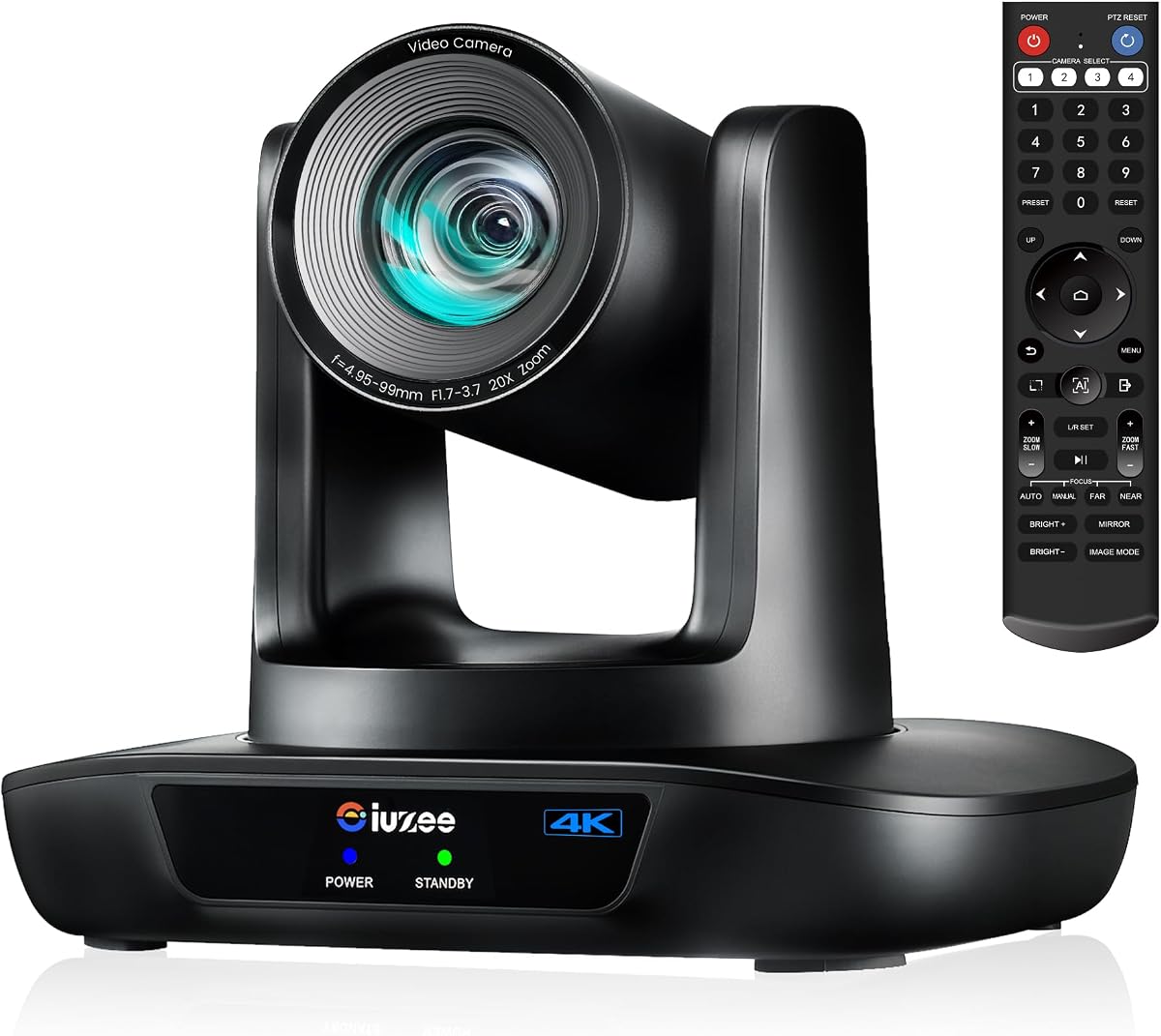
This system is designed for large spaces like churches or auditoriums. Its 20x optical zoom captures close-ups from afar without quality loss. AI tracking follows speakers automatically. PoE power simplifies installation by combining data and power in one cable. It includes a speakerphone for complete audio.
We may earn a commission when you buy through this link, at no additional cost to you.
The 4K resolution ensures clarity even when zoomed in. LAN and HDMI outputs offer flexible connectivity. PoE reduces clutter in ceiling or wall mounts. The speakerphone supports 8-12 people. It is robust for long-term streaming needs.
Setting up PoE requires a compatible switch, which may cost extra. This is a consideration for basic setups. However, for permanent installations, it is a major benefit. The camera is built for reliability and professional use.
Best for large venues needing long-range zoom. If you need to capture the back of a room, this delivers. It is reliable and supported. For churches or schools, this is a top-tier option for streaming and meetings.
PoE power reduces cables. This is vital for ceiling mounts or hard-to-reach locations.
20x zoom captures details from afar. This ensures no participant is missed in large spaces.
We may earn a commission when you buy through this link, at no additional cost to you.
Designed for broadcast applications, this camera supports RTMP and RTSP. It is ideal for live streaming platforms like YouTube. The 20x optical zoom maintains quality at distance. PoE and web control simplify setup. It is built for professional production workflows.
We may earn a commission when you buy through this link, at no additional cost to you.
AI tracking delivers smooth movement with millisecond response. You can switch between presenter and framing modes. Presets allow quick scene changes. Three outputs ensure compatibility with switches. It supports 4K via HDMI and USB.
No built-in mic means external audio is needed. This adds complexity but ensures high-quality sound. The web UI requires learning but offers deep control. It is best for users needing broadcast flexibility. It is highly reliable for events.
Perfect for streaming studios or events. If you need direct streaming control, this fits well. It is powerful and versatile. For production teams, this camera meets broadcast standards. It delivers consistent performance.
Supports RTMP and RTSP for direct broadcast. This removes the need for external capture cards.
Web browser access enables remote adjustments. This allows admins to manage settings without physical access.
We may earn a commission when you buy through this link, at no additional cost to you.
This camera is a powerhouse for live production. Official NDI integration allows seamless streaming software connection. SDI supports long cable runs. It delivers true 4K via HDMI. The tracking is precise and smooth. It fits professional broadcast and high-end conference rooms.
We may earn a commission when you buy through this link, at no additional cost to you.
20x optical zoom ensures clarity from distance. Web control and presets simplify operation. PoE support reduces cable clutter. It works with vMix and OBS easily. Support includes training and remote assistance.
The cost is high, justified by NDI and SDI. Beginners may find it complex. However, production teams value these features. It elevates streaming to broadcast quality. Reliability is excellent for events.
Best for professional studios. If you need NDI or SDI, this is the choice. It is powerful and versatile. For production teams, this is a top-tier tool. It delivers unmatched quality and integration.
Official NDI license ensures compatibility. This allows direct streaming to software without extra hardware.
SDI runs up to 300ft. This is essential for large stage or studio setups.
We may earn a commission when you buy through this link, at no additional cost to you.
This model is designed for reliability and smooth performance. It offers 4K resolution and 20x optical zoom. AI tracking ensures speakers are framed. PoE simplifies installation. It is compatible with major platforms without drivers. Setup is quick for IT teams.
We may earn a commission when you buy through this link, at no additional cost to you.
The camera supports HDMI, USB, and LAN. This flexibility fits diverse setups. It works well for church livestreaming. The resolution is sharp and clear. It is built for daily use in classrooms or offices.
No speakerphone is included, so external audio is needed. This adds cost but keeps the camera focused. The rating is average, reflecting standard performance. It is a solid, no-frills choice. Reliability is key here.
Best for standard meeting rooms. If you need consistent tracking and zoom, this delivers. It avoids complexity. For reliable performance, it is a good pick. It is easy to deploy and maintain.
Multiple interfaces allow various setups. This ensures the camera fits any network or device.
Compatible with Zoom and Teams directly. This avoids configuration issues for standard meetings.
We may earn a commission when you buy through this link, at no additional cost to you.
This device combines camera, mics, and speakers. It simplifies setup for medium rooms. Auto framing keeps participants centered. The 120-degree angle covers wide views. 4-mic array reduces noise. It is an easy all-in-one solution.
We may earn a commission when you buy through this link, at no additional cost to you.
Speaker integration eliminates extra devices. This keeps setups clean. Auto tracking follows active speakers. It supports major platforms. The unit is designed for hybrid work. Plug-and-play installation is quick.
Lacks optical zoom, limiting long-range focus. But for standard rooms, it is sufficient. High rating shows user satisfaction. It is reliable and simple. Best for offices wanting minimal setup.
Perfect for businesses wanting simplicity. If you need a single unit, this works well. It balances features and ease. For small to medium spaces, it is effective. It reduces complexity significantly.
Built-in speakers provide full audio. This reduces the need for external hardware or cables.
Auto framing detects participants. This ensures everyone is seen without manual camera adjustment.
We may earn a commission when you buy through this link, at no additional cost to you.
Selecting the right camera involves balancing resolution, zoom, tracking, and connectivity needs for your specific environment.
Resolution determines image clarity. 4K offers sharp detail but requires bandwidth. 1080p is sufficient for standard calls. Choose based on display sizes.
High resolution ensures text is legible.
Optical zoom maintains quality while digital zoom crops. 20x optical is ideal for large rooms. 3x fits small spaces. Check specs carefully.
Optical zoom is essential for large venues.
AI tracking keeps speakers centered automatically. Look for face and body recognition. Smooth motion prevents distraction. Test latency in demos.
Smooth tracking ensures professional video.
Some systems include speakers and mics. All-in-one saves space but may lack flexibility. Separate units allow better placement. Check pickup range.
Integrated audio simplifies setup.
USB is simple. HDMI suits displays. LAN and PoE enable remote power. Ensure compatibility with your existing infrastructure.
PoE reduces cabling for installations.
Small rooms need wide angles. Large rooms require zoom. Match the field of view to the space. Consider ceiling mounts.
Fit the lens to the room size.
Ensure support for your software. Zoom certification helps. Most use UVC standards. Check updates for new features.
Compatibility avoids driver issues.
Long-term reliability matters. Look for 3-year warranties. Responsive support helps troubleshooting. Check reviews for service quality.
Good support prevents downtime.
Connect the camera to your device via USB or HDMI. Install drivers if necessary. Most are plug-and-play. Ensure the camera is centered above the screen.
Adjust the field of view via the remote or software. Use presets to save common angles. Enable AI tracking in settings for automatic focus.
Clean the lens gently with a microfiber cloth. Avoid moisture. Keep firmware updated. Regular checks ensure peak performance.
1080p is standard for most meetings. 4K is ideal for large displays. Ensure bandwidth supports it. Most platforms downscale anyway.
Optical zoom preserves quality. Digital zoom crops the image. Choose optical for large rooms. Digital is fine for close-ups.
Most require a PC for conferencing. Some support direct HDMI to TVs. Others need network connections for streaming.
AI detects faces and bodies. It moves the camera automatically. This ensures speakers stay centered. It reduces manual adjustments.
For small rooms, yes. Large rooms need external audio. Check pickup range. Some systems include powerful speakerphones.
PoE delivers power via network cable. It reduces wiring. Ideal for ceiling mounts. Requires a PoE switch.
Most work with Zoom and Teams. Some support OBS. Always check platform compatibility. UVC support simplifies integration.
Mounts usually include desk and wall. Ceiling kits may be extra. Ensure stability for smooth movement. Use provided brackets.
The top picks balance video quality, tracking, and audio. Consider your room size and needs carefully. Each model offers unique strengths for different uses.
Prioritize optical zoom for large rooms. Integrated audio simplifies small setups. Ensure software compatibility for smooth operation.
Prices fluctuate on retailer platforms. Check current deals before purchasing. Reliable tools transform meetings significantly.