
ASUS Prime AP201 Micro-ATX PC Case
4.7Editor score
Quasi-Filter Mesh Panels
Tool-Free Side Panels
Optimized For Cooling
Explore the top 10 ASUS PC Case models for gaming and workstations. We compare design, cooling, and features to help you choose the perfect chassis.
Choosing the right computer chassis is vital for performance and aesthetics. ASUS offers diverse cases tailored for gamers and professionals seeking reliability.
We analyzed ten current models based on airflow, build quality, and compatibility. Our list covers full towers, mid towers, and compact designs.
Each pick highlights key strengths and ideal use cases. Note that availability and pricing fluctuate frequently, so verify details before purchasing.
4.7Editor score

4.8Editor score

4.6Editor score
This side-by-side comparison highlights the core specifications and unique attributes of each ASUS chassis to streamline your decision-making process effectively.


This mid-tower case supports EATX motherboards and features a custom TUF gaming spatter pattern. It earns a high rating for its robust build quality and cooling capabilities.
We may earn a commission when you buy through this link, at no additional cost to you.
The design includes three 120mm Aura Sync RGB fans and one 140mm rear PWM fan. It also supports top or front mounted 360mm radiators for custom liquid cooling setups.
While it is heavier than some competitors due to the steel construction, the woven-cotton carry handles make transport safer. The price reflects the premium materials used.
Gamers seeking a reliable full-tower case with excellent airflow and vertical GPU support should choose this model. It balances aesthetics and function effectively for high-end builds.
The chassis supports up to seven optional fan-mounting points and large radiators, ensuring high-performance hardware stays cool during intense sessions.
A dedicated expansion slot allows for vertical GPU installation, enhancing the visual appeal of your graphics card and optimizing cable management.
We may earn a commission when you buy through this link, at no additional cost to you.
This Micro-ATX case features quasi-filter mesh panels with over 57,000 precision-machined holes to maximize airflow. It is ideal for builders who need efficient cooling in a small form factor.
We may earn a commission when you buy through this link, at no additional cost to you.
Despite its 33L footprint, it supports ATX PSUs up to 180mm long and graphics cards up to 338mm. The tool-free clip mechanism makes panel removal secure and simple.
The main trade-off is limited expansion compared to full towers, but the spatial efficiency is industry-leading. It handles high-performance hardware thermal demands well without bulk.
Budget-conscious users looking for a compact, efficient case for micro-ATX builds will find this model perfect. It offers premium airflow features at a very accessible price point.
The mesh design increases airflow significantly while providing a compelling view of the components within your build for a clean aesthetic.
An extended motherboard tray with strategically placed cutouts and a 32mm gap allows you to tuck cables out of sight easily.
We may earn a commission when you buy through this link, at no additional cost to you.
This premium case features a sturdy diecast aluminum-alloy frame and semi-open structure for improved airflow. It supports up to 2 x 420mm radiators for large custom water cooling loops.
We may earn a commission when you buy through this link, at no additional cost to you.
Convenience is key here, with a hinged tool-free side panel and a built-in storage drawer for screws. The top bars can be used as carry handles capable of supporting up to 80KG.
The high price point may deter casual users, but the build quality and features justify the cost for enthusiasts. The integrated graphics card holder supports both vertical and horizontal installations.
High-end enthusiasts requiring maximum cooling potential and premium materials should invest in this chassis. It provides a superior building experience with unique conveniences like fast charge ports.
The structure supports massive radiators including 420mm options, ensuring even the most powerful CPUs and GPUs remain cool under extreme loads.
A convenient built-in storage drawer keeps screws and small tools close at hand during assembly without cluttering your workspace.
We may earn a commission when you buy through this link, at no additional cost to you.
The GT502 Horizon features a dual-chamber chassis that establishes independent cooling zones for the CPU and graphics cards. Tempered and tinted glass panels at the front and side offer a fully unobstructed view.
We may earn a commission when you buy through this link, at no additional cost to you.
Its front panel includes a USB 10 Gbps Type-C port for high-speed data transfer. Tool-free side panels can be easily removed by simply pressing a button hidden on the rear of the chassis.
The design prioritizes aesthetics with a modular build, though glass panels require careful handling. Independent cooling zones prevent heat transfer between components effectively.
Users wanting a visually stunning build with distinct thermal zones should consider this model. It balances style and function well with high-speed connectivity options included.
Dividing internals into two chambers establishes independent cooling zones for the CPU and graphics cards to reduce thermal throttling.
Glass panels on the front and side provide a fully unobstructed view of the main chamber to showcase your build effectively.
We may earn a commission when you buy through this link, at no additional cost to you.
This black ATX PC case is built for motherboards featuring hidden connectors to optimize cable management for a clutter-free setup. It comes with four pre-installed ARGB fans for a mesmerizing lighting display.
We may earn a commission when you buy through this link, at no additional cost to you.
Its panoramic design includes dual tempered glass panels on the front and side for unobstructed views. An 8-degree angled base enhances airflow efficiency for better thermal performance and widens the viewing angle.
The main benefit is the focus on clean cable management which suits those who prioritize aesthetics. However, the mid-range rating suggests some users may prefer more fan options.
Gamers who want a clean look with pre-installed fans should check this model. It supports large graphics cards and radiators while maintaining a sleek aesthetic profile.
Built for motherboards with hidden connectors, this case optimizes cable management to ensure a completely clutter-free internal setup.
The 8-degree angled base combines functionality and aesthetics, improving airflow efficiency and widening the viewing angle for immersive displays.
We may earn a commission when you buy through this link, at no additional cost to you.
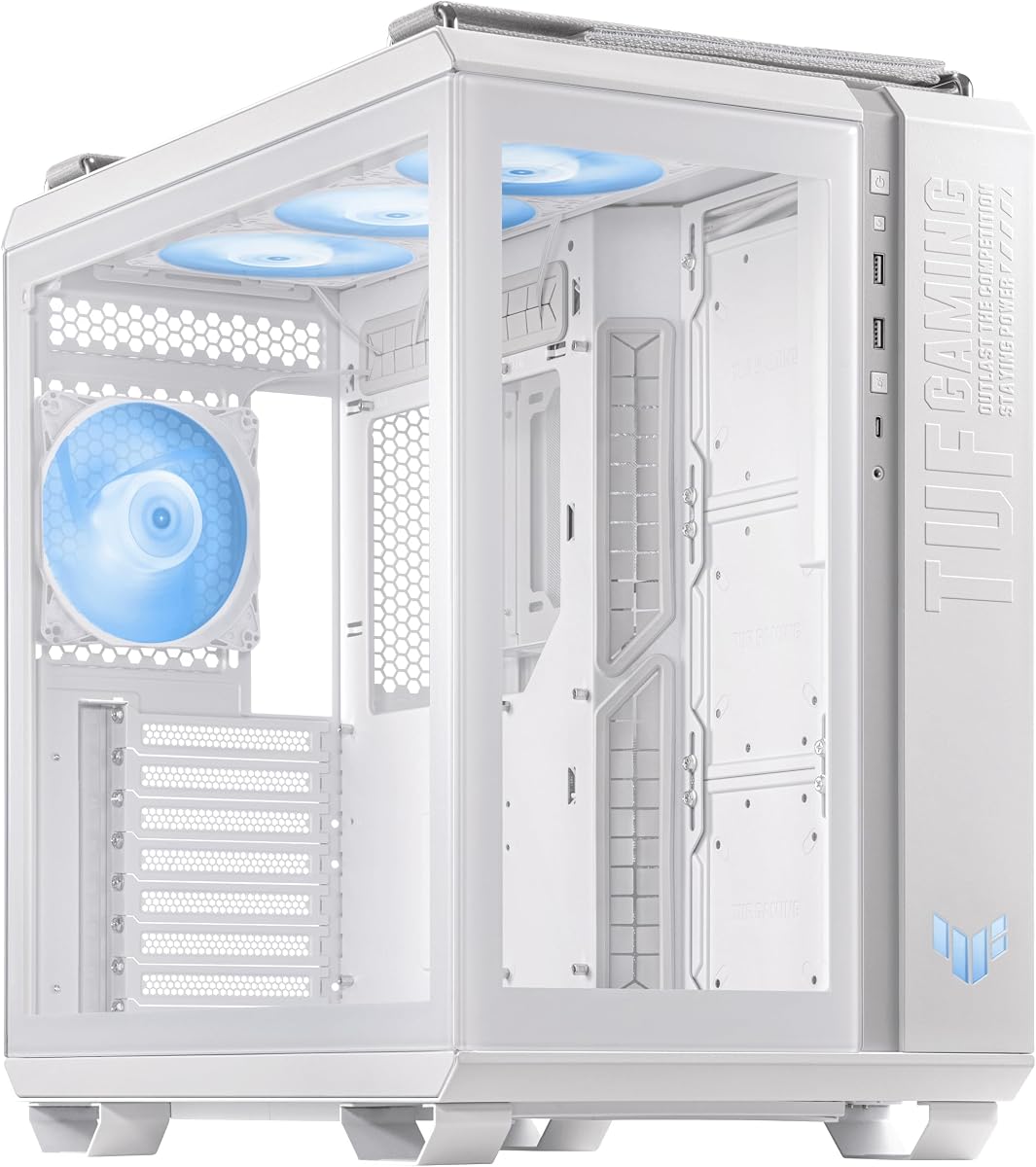
This white edition features a metal front panel with custom TUF Gaming spatter pattern and smoked tempered-glass side panel. It is designed to be noticed and supports front and top mounted 360mm radiators.
We may earn a commission when you buy through this link, at no additional cost to you.
Fan and cable placement is optimized for TUF Gaming motherboards and ready for perfect cooling control via Fan Xpert 4 software. Ergonomic woven-cotton carry handles enable easy transport.
While it shares many specs with the black version, the white finish suits those wanting a specific color theme. Dust maintenance may require slightly more attention on lighter surfaces.
White-themed builders should look for this variant to match their components. It provides the same robust performance and cooling as the standard model in a clean color.
Fan and cable placement is specifically optimized for TUF Gaming motherboards to ensure perfect cooling control via Fan Xpert 4 software.
The custom TUF Gaming spatter pattern and smoked glass panel create a distinctive look that stands out in any setup.
We may earn a commission when you buy through this link, at no additional cost to you.
This mid-tower case features a perforated honeycomb front panel to aid airflow and a tempered-glass side panel. It includes an integrated 6-port Aura Sync addressable-RGB controller hub.
We may earn a commission when you buy through this link, at no additional cost to you.
Support for 280/360mm water-cooling radiators in the front makes it capable of handling heat effectively. A dedicated headphone hanger and USB 3.2 ports add practical value.
The compact size is great for desks but may limit very large storage. The integrated RGB hub simplifies lighting control without extra controllers.
Gamers needing efficient airflow in a smaller case will appreciate this model. It supports high-performance cooling while keeping the desk footprint manageable.
The perforated honeycomb front panel aids airflow significantly while showcasing your build internals through the tempered-glass side panel.
An integrated 6-port Aura Sync addressable-RGB controller hub allows you to create stunning lighting effects with a dedicated button.
We may earn a commission when you buy through this link, at no additional cost to you.
The interior is divided into two chambers that form independent cooling zones for the CPU and graphics card. Tempered and tinted glass panels on the front and sides provide a completely unobstructed view.
We may earn a commission when you buy through this link, at no additional cost to you.
The front panel features a USB 20Gbps Type-C port for high-speed storage. Four pre-installed ARGB fans ensure balanced cooling performance and vivid lighting effects.
Its fully modular design means most panels and mounting hardware are removable to simplify hardware installation. The white finish enhances the visual impact of ARGB lighting.
Those prioritizing independent thermal zones and fast data transfer should choose this white variant. It combines superior aesthetics with advanced connectivity features.
The two-chamber housing divides the interior into independent cooling zones for the CPU and graphics card to prevent heat overlap.
A USB 20Gbps Type-C port on the front panel ensures high-speed storage transfer for quick data access during gaming sessions.
We may earn a commission when you buy through this link, at no additional cost to you.
This black ATX PC case features concealed port ready design for motherboards to optimize cable management. Tempered glass panels on the front and sides provide an unobstructed view of the main chamber.
We may earn a commission when you buy through this link, at no additional cost to you.
Supports up to 360mm radiators, graphics cards up to 380mm in length, and CPU air coolers up to 165mm high. The 8-degree angled base improves airflow efficiency and viewing angle.
The high user rating indicates strong satisfaction with its build and cable management capabilities. It supports large hardware components while maintaining a sleek aesthetic.
Builders who want a clean look with broad hardware support should check this model. It balances visual appeal with practical functionality for modern setups.
Built for motherboards with concealed connectors, this case optimizes cable management to ensure a clutter-free setup inside.
The 8-degree angled base increases the viewing angle for a more intense experience while improving airflow efficiency for better performance.
We may earn a commission when you buy through this link, at no additional cost to you.
This mid-tower case features dual chamber design and independent cooling zones for the CPU and GPU. Tempered glass panels at the front and side provide a tactfully tinted view of the main chamber.
We may earn a commission when you buy through this link, at no additional cost to you.
The front panel includes a USB 3.2 Gen 2 Type-C port for transfer speeds up to 10 Gbps. Tool-free side panels can be removed by pressing a button on the rear.
The modular design means most panels and mounts are removable to ease hardware installation. Independent cooling zones help manage thermal performance efficiently.
Those seeking independent cooling zones at a competitive price should consider this model. It balances thermal performance with modern connectivity options.
Divided into two chambers, this case configures independent cooling zones for the CPU and GPU to manage heat effectively.
The front panel features a USB 3.2 Gen 2 Type-C port with transfer speeds up to 10 Gbps for quick data access.
We may earn a commission when you buy through this link, at no additional cost to you.
Selecting the right chassis involves considering size, cooling, and compatibility to ensure your hardware fits and performs well.
Choose a case that supports your motherboard size whether EATX, ATX, or Micro-ATX. Full towers offer maximum space while mid towers balance size and expansion.
Ensure the case fits your desk space and allows enough room for airflow and cable management.
Look for mesh panels and multiple fan mounting points to ensure high-performance hardware stays cool. Pre-installed fans and radiator support are essential for thermal management.
Prioritize cases with independent cooling zones or ample space for radiators to prevent overheating.
Steel and aluminum alloys offer durability and structural integrity for your components. Thicker tempered glass panels reduce the risk of breakage during handling.
Check for robust tool-free mechanisms that make assembly easier and panels secure.
Effective cable management keeps internal airflow unobstructed and your build looking clean. Look for extended trays and cutouts for routing wires behind the motherboard.
Cases designed for hidden connectors optimize cable organization for a clutter-free setup.
Verify that the case supports your desired GPU configuration including vertical slots. USB Type-C ports on the front panel provide high-speed data transfer capabilities.
Ensure there are enough slots for your storage and peripheral connections.
Select a design that matches your build theme including glass panels and RGB lighting options. Panoramic designs provide unobstructed views of internal components.
Consider color variants such as white or black to suit your room decor.
High airflow can sometimes increase noise so look for noise dampening panels if you prefer quieter operation. Ensure fans are PWM controlled for variable speeds.
Balance cooling performance with noise requirements for your environment.
Set a budget range that covers essential features like cooling and material quality without overspending. Higher price often reflects better build quality and extra features.
Compare options to find the best balance between performance and affordability.
Install components carefully by following the manual. Use the tool-free side panels to access the interior and secure hardware firmly.
Regularly clean dust filters and fans to maintain optimal airflow. This prevents overheating and extends the lifespan of your system.
Handle the case with care to avoid scratching glass panels. Use the ergonomic carry handles if moving the PC to prevent damage.
The ASUS TUF Gaming GT501 and ROG Hyperion GR701 both support EATX motherboards. These models are designed for larger components and provide ample internal space for custom liquid cooling.
Yes, many models support large radiators up to 360mm or 420mm. The GT502 and ROG Hyperion series offer dedicated mounting points and optimized airflow for water cooling.
Most modern models like the A31 PLUS and GT502 Horizon come with pre-installed ARGB fans. The GT301 also includes multiple fans with an integrated RGB controller.
The ASUS Prime AP201 is a strong budget choice with excellent airflow and tool-free panels. It supports ATX PSUs and long graphics cards despite its compact size.
Yes, the GT501 model supports vertical GPU expansion slots. This feature allows your graphics card to be installed vertically for better aesthetics and airflow.
Several models including the GT502 Horizon and GT502 Plus feature high-speed USB Type-C ports on the front panel. These support data transfer speeds up to 20Gbps.
Use a microfiber cloth and mild glass cleaner to clean the panels gently. Avoid harsh chemicals that might damage coatings on the glass.
Yes, ASUS uses clip mechanisms that are both simple and secure. These panels stay in place during transport while allowing easy removal for maintenance.
We reviewed ten excellent options ranging from compact budget builds to premium full towers. The GT501 and AP201 stand out for specific needs.
Prioritize cooling and size compatibility to ensure your components fit perfectly. Consider aesthetics and cable management options for a clean look.
Remember to check current availability and pricing as these details change frequently. Choose the model that aligns best with your budget and performance goals.