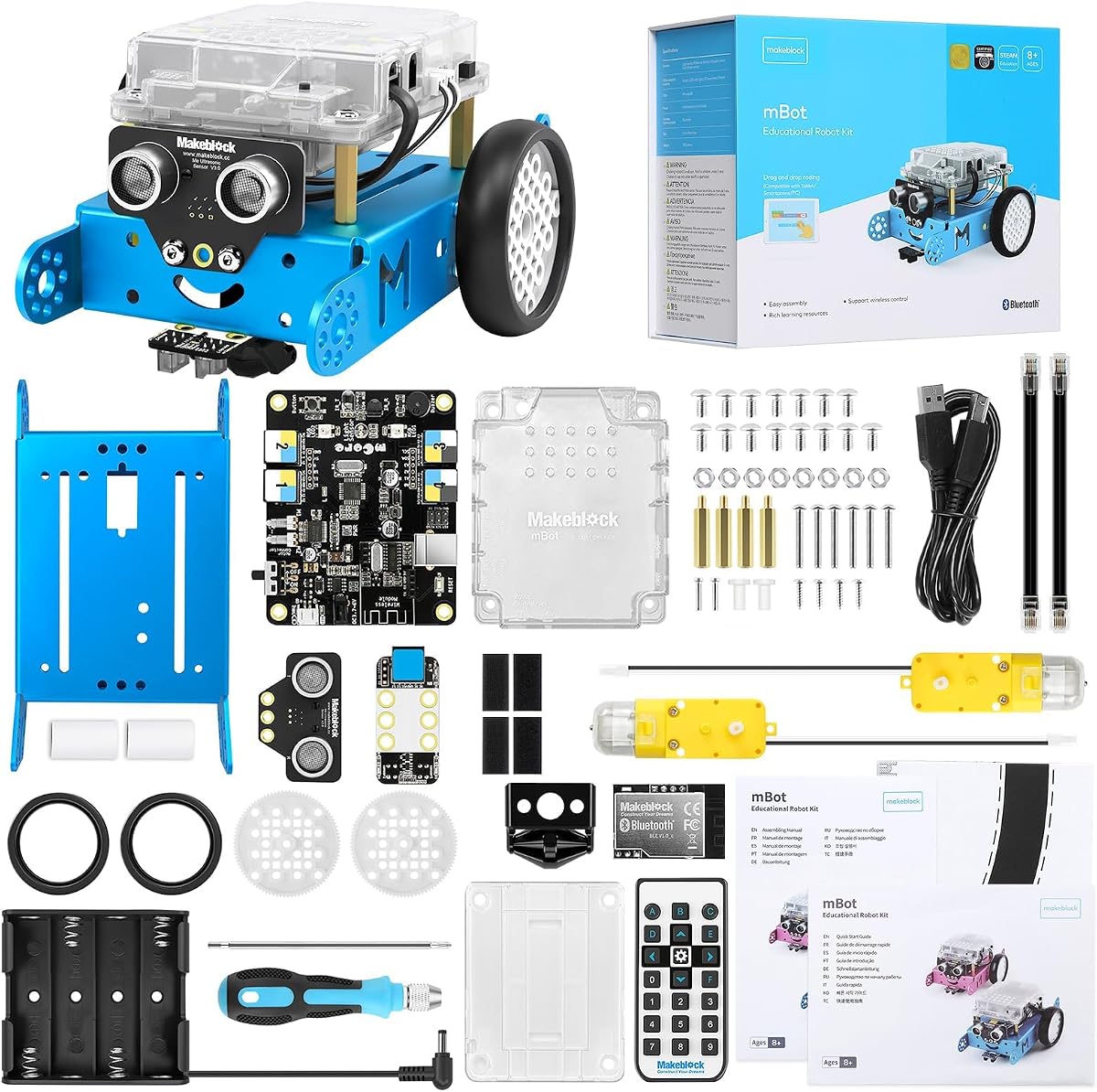
Makeblock mBot STEM Coding Toys Robotics for Kids Ages 8-12
4.6Editor score
Easy 15-minute assembly
Scratch and Arduino compatibility
Rich tutorial ecosystem
This expert guide compares the top Arduino robot kits for kids and adults, evaluating build quality, coding features, and educational value to help you choose
Arduino robot kits offer an engaging way to learn electronics and coding through hands-on building. These projects combine mechanical assembly with programmable logic, creating interactive machines that respond to sensors and user inputs. Whether you are a beginner or an experienced maker, selecting the right kit ensures a rewarding educational journey.
We evaluated ten leading Arduino robot kits based on build complexity, sensor variety, coding support, and community resources. Our analysis focuses on how well each kit teaches core STEM concepts like automation, robotics, and software development. This list covers options ranging from simple car chassis to advanced robotic arms and tanks.
Each pick highlights unique features such as camera integration, wireless control, and modular expansion capabilities. We include detailed reviews to help you understand what each robot can do and who it suits best. Please note that availability and pricing may change, so verify details on the retailer site before purchasing.
4.6Editor score

4.5Editor score

4.3Editor score
This table provides a side-by-side overview of the top ten Arduino robot kits. Each entry lists key specifications including controller type, sensor options, and special features to help you compare functionality at a glance.


The ELEGOO UNO R3 Smart Robot Car Kit V4 stands out as a top choice for enthusiasts wanting a blend of visual feedback and mechanical assembly. With a 4.5 rating from users, it delivers a robust experience for both students and hobbyists looking to explore robotics fundamentals effectively.
We may earn a commission when you buy through this link, at no additional cost to you.
This kit excels in providing a complete ecosystem including an ESP32-based camera module that streams live video to your phone. The guided wiring process reduces frustration for beginners, while the programmable features allow for advanced coding challenges using the Arduino IDE and mobile apps.
While the battery offers decent runtime, some users find they need to recharge frequently during extended coding sessions. The camera setup also requires a bit of patience to ensure the Wi-Fi connection is stable before you can fully enjoy the first-person view driving experience.
Anyone interested in STEM learning, robotics clubs, or family coding projects should consider this kit. It balances complexity and accessibility well, making it an ideal starting point for those who want to build, program, and drive their own robot with immediate visual feedback.
The included camera allows real-time streaming directly to your smartphone, offering a unique first-person driving perspective that enhances interaction and engagement.
Keyed connectors simplify the wiring process, significantly reducing common assembly errors and making the project accessible for younger builders and first-timers.
We may earn a commission when you buy through this link, at no additional cost to you.
The Makeblock mBot is a highly rated budget option that simplifies the entry into robotics and coding. With a 4.6 rating, it appeals to parents and educators seeking an affordable yet effective tool to teach electronics and programming logic to children aged eight to twelve.
We may earn a commission when you buy through this link, at no additional cost to you.
Its standout feature is the simplicity of assembly, which can be completed in just fifteen minutes with clear instructions. The kit supports both Scratch block coding and Arduino text coding, allowing kids to progress from drag-and-drop basics to more complex programming concepts seamlessly.
Users should be aware that the robot requires separate batteries for both the remote and the main unit, which adds to the initial cost. Additionally, while it handles basic tasks well, it may not support advanced sensor integration without purchasing additional expansion packs from the Makeblock platform.
This robot is perfect for classrooms or homes looking for a quick, engaging STEM project. It serves as an excellent gift for young learners interested in technology, offering a fun foundation for further exploration into robotics and engineering principles.
With straightforward building instructions and clear labeling, you can assemble the entire robot in about fifteen minutes, leaving more time for coding and play.
The kit supports both Scratch and Arduino environments, enabling a smooth learning curve from visual blocks to text-based code as skills develop.
We may earn a commission when you buy through this link, at no additional cost to you.
The Makeblock mBot Ultimate is a premium offering designed for serious builders and teenagers interested in engineering. With a 4.3 rating, it provides a comprehensive experience that moves beyond basic kits into industrial-grade components and complex programmable configurations suitable for advanced users.
We may earn a commission when you buy through this link, at no additional cost to you.
Its ability to build ten unique models, including robotic arms and tanks, showcases its versatility and expandability. The use of aluminum alloy parts ensures durability, while the MegaPi controller supports advanced automation and integration with Raspberry Pi for machine vision projects.
While the build quality is exceptional, the higher price and increased complexity may not suit very young children. The assembly process is detailed and time-consuming, which is ideal for older teens or adults who want a realistic engineering challenge rather than a quick toy.
This kit is best for aspiring engineers and makers ready to tackle complex mechanical and software challenges. It offers long-term value through its modular nature, allowing users to reuse parts for new projects as their skills and interests evolve over time.
The kit allows you to construct ten different robot models, ensuring endless possibilities for learning mechanical design and programming logic.
Powered by the MegaPi control board, this robot handles multiple motors and servos with precision, supporting complex synchronous movements and automation tasks.
We may earn a commission when you buy through this link, at no additional cost to you.
The ELEGOO Conqueror Robot Tank Kit brings a rugged military-style design to the world of educational robotics. With a 4.4 rating, it appeals to users who want a more robust chassis and the unique appeal of tank tracks combined with modern FPV camera technology.
We may earn a commission when you buy through this link, at no additional cost to you.
Its standout feature is the metal tracked chassis which offers better traction and durability compared to standard wheels. The adjustable servo-mounted camera lets you change viewing angles during operation, adding a layer of realism and control often missing in simpler kits.
Assembly is more involved due to the track system and suspension parts, which might take longer than wheeled alternatives. Additionally, the weight of the metal components means it is less portable than lighter options, though this adds to its realistic tank-like performance on various surfaces.
This kit is ideal for robotics enthusiasts who enjoy mechanical assembly and prefer a tank aesthetic. It provides a challenging but rewarding project for those ready to explore track dynamics, video streaming, and advanced navigation logic in a durable package.
The stainless-steel tracks and chassis provide superior traction on uneven surfaces, making this robot more robust for outdoor exploration and challenging environments.
The camera is mounted on a servo that can be adjusted during driving, allowing you to change the view angle without stopping the robot for inspection.
We may earn a commission when you buy through this link, at no additional cost to you.
The ELEGOO Tumbller Self-Balancing Robot Kit offers a unique take on robotics by focusing on balance and motion control. With a 4.5 rating, it teaches the principles of feedback loops and motor control through a two-wheel design that must stay upright to function correctly.
We may earn a commission when you buy through this link, at no additional cost to you.
Its self-balancing action provides a fascinating real-time experiment in engineering physics. The kit includes six ways to play, including bounce mode and auto-follow, which make it engaging while demonstrating how sensors and controllers interact to maintain stability.
Getting the robot to balance often requires precise calibration, which can be tricky for absolute beginners. The bounce mode, while fun, can cause the robot to lose control if the surface is not flat, limiting where it can be used effectively indoors or outdoors.
This kit is best for those interested in control theory and mechanics. It offers a rewarding learning experience for users who want to understand how sensors and feedback loops work together to solve complex physical problems through code.
The robot constantly adjusts motor speeds based on sensor data to stay upright, providing a clear lesson in feedback loops and real-time computing.
Switch between modes like auto-follow, obstacle avoidance, and bounce mode to explore different behaviors and keep the learning experience fresh and engaging.
We may earn a commission when you buy through this link, at no additional cost to you.
The ACEBOTT Smart Robot Car Kit stands out for its use of mecanum wheels, allowing 360-degree omnidirectional movement. With a 4.2 rating, it offers unique mobility features such as strafing and diagonal movement that standard wheeled robots cannot achieve.
We may earn a commission when you buy through this link, at no additional cost to you.
The kit includes expansion packs like a camera module and robotic arm, which encourage users to extend the robot's capabilities significantly. Its ESP32 controller supports both app control and programming, providing a versatile platform for STEM education and creative coding experiments.
However, the battery is not included, which adds to the initial setup cost for new buyers. Additionally, the programming complexity may be slightly higher than entry-level kits, requiring users to understand basic coding principles to fully utilize the advanced movement features.
This robot is excellent for those interested in robotics and movement dynamics. It is a strong choice for families or schools looking for a project that goes beyond simple driving, offering advanced control options and opportunities for mechanical innovation.
The mecanum wheels allow the robot to move sideways, diagonally, and rotate in place, providing complete control over direction without turning.
Support for camera and robotic arm expansions lets you customize the robot for specific tasks, encouraging creativity and deeper engineering exploration.
We may earn a commission when you buy through this link, at no additional cost to you.
The LAFVIN R3 Camera Smart Robot Car focuses heavily on visual feedback and remote control through Wi-Fi. With a 4.5 rating, it provides a reliable FPV experience where users can stream real-time video to mobile devices while controlling the vehicle remotely.
We may earn a commission when you buy through this link, at no additional cost to you.
Its open-source ecosystem includes extensive free resources, tutorials, and code examples that support learning. The ESP32-S3 module ensures smooth streaming, and the pan-tilt unit adds flexibility by allowing users to change the camera angle during operation.
Because it requires full self-assembly without pre-wired connectors, it may take more time and patience than plug-and-play alternatives. Users should be comfortable with wiring and basic hardware setup to ensure the connections are secure for reliable operation.
This kit is ideal for hobbyists wanting a camera-focused robotics project. It balances affordability with advanced features like streaming and remote control, making it a great option for those interested in computer vision and remote robotics applications.
A wealth of free tutorials and code examples is available to support your learning journey, making it easier to understand the underlying logic.
The camera is mounted on a pan-tilt unit that can be controlled remotely, allowing you to adjust the view angle without touching the robot.
We may earn a commission when you buy through this link, at no additional cost to you.
The ACEBOTT 4 in 1 Smart Robot Arm Kit provides a versatile platform that lets you build both a robotic arm and a tank car. With a 3.9 rating, it offers a unique combination of mechanical dexterity and mobility that appeals to teens and beginners wanting varied project types.
We may earn a commission when you buy through this link, at no additional cost to you.
Its standout feature is the 5DOF programmable robotic arm, which allows users to learn about degrees of freedom and precision movement. The tank track expansion ensures good traction for outdoor adventures, making this kit suitable for diverse environments and challenges.
The lower user rating suggests that setup and coding may present challenges for some users, often requiring reference to online assembly videos. The instructions could be clearer, and patience is needed to ensure all parts are correctly aligned during the build process.
This kit is best for students ready to tackle complex engineering concepts. It offers a strong learning opportunity in mechatronics, combining arm control with tank navigation, and serves as a comprehensive STEM gift for teens interested in robotics.
The 5DOF arm allows for complex movements like grabbing and lifting, teaching users how to control multiple joints through code.
The tank treads ensure stability on grass and slopes, making the base platform capable of handling more demanding outdoor environments.
We may earn a commission when you buy through this link, at no additional cost to you.
The SunFounder Ultimate Starter Kit is more of a comprehensive electronics lab than a single robot car. With a 4.5 rating, it offers 192 components and 87 projects, making it an excellent choice for those who want to explore IoT and smart cars alongside other electronics.
We may earn a commission when you buy through this link, at no additional cost to you.
Its partnership with Circuit Basics provides structured video tutorials that guide users through a progressive learning journey. This ensures you build knowledge from basic LED blinking to complex automation, helping you master skills systematically rather than randomly.
Because it covers so many different areas, it is less focused than a dedicated robot kit. Organizing parts and following different project guides can be challenging for younger users, but the diversity supports broad skill development over time.
This kit is ideal for students seeking a full electronics education. It is perfect for classrooms or homes where the goal is to learn a wide range of hardware concepts beyond just robotics, building a strong foundation for future engineering projects.
The online courses cater to different skill levels, ensuring you start with the basics and progress to advanced topics like IoT seamlessly.
With 192 high-quality parts, you have everything needed to build various projects without needing to purchase additional sensors or modules.
We may earn a commission when you buy through this link, at no additional cost to you.
The Freenove Hexapod Robot Kit offers a unique entry into legged robotics with six legs and eighteen independent servos. With a 4.1 rating, it provides a fascinating look at how to control complex mechanical systems to walk, crawl, and twist through code.
We may earn a commission when you buy through this link, at no additional cost to you.
Each leg has three degrees of freedom, allowing for lifelike movements that are more complex than wheeled robots. The kit supports control via remote, phone app, or computer, giving users flexibility in how they interact with the robot during development and testing.
The lack of a paper tutorial means you must rely on digital resources and code downloads found on the product box. Additionally, you must purchase batteries separately, which can be a surprise for buyers expecting a complete out-of-box experience.
This kit is perfect for enthusiasts interested in biomechanics and motion control. It is a challenging project that rewards patience, offering deep insights into how to program coordinated movement across multiple joints for a stable walking robot.
With eighteen independent motors, the robot mimics insect-like movements, teaching users about coordination and balance in mechanical systems.
You can control the robot using a remote, smartphone app, or computer, giving you multiple ways to interact and test its capabilities.
We may earn a commission when you buy through this link, at no additional cost to you.
Selecting the right robot kit depends on your goals, experience level, and the features you want to explore. We outline key factors to help you make an informed decision.
Most kits use Arduino-compatible boards like the UNO R3 or ESP32. Ensure the controller matches your existing skills or learning path. UNO boards are great for beginners, while ESP32 offers Wi-Fi and Bluetooth capabilities for advanced connectivity.
Look for a controller that supports your preferred programming language and has enough pins for future expansion.
Assembly ranges from fifteen-minute builds to several hours for metal chassis kits. Consider your patience and mechanical skills. Keyed connectors and illustrated tutorials make assembly easier, while threaded metal parts require more precision and tools.
Choose a kit with assembly instructions that match your comfort level to ensure a positive building experience.
Kits should support both block-based coding like Scratch and text-based languages like Arduino IDE or Python. This allows growth as skills improve. Check if the software is free and available on your devices for coding projects.
Select a platform that offers clear documentation and a progression path from beginner to advanced coding.
Sensors like ultrasonic, infrared, and cameras enable interactive behaviors such as obstacle avoidance. A kit with multiple sensor types offers more programming challenges. Ensure sensors are well-calibrated and easy to interface with the main controller.
Look for kits that include essential sensors for navigation and interaction to maximize learning opportunities.
Modular kits allow you to add arms, cameras, or tanks later. This keeps the project relevant as interests grow. Check for official add-ons or third-party compatibility to extend the robot's functionality over time.
A modular design ensures long-term value and encourages creativity beyond the initial build configuration.
Some kits include rechargeable batteries while others need standard AA or CR2025 cells. Rechargeable systems are more convenient for extended use. Consider runtime and charging options to avoid interruptions during coding sessions.
Prefer kits with included battery systems to avoid hidden costs and ensure immediate readiness after assembly.
Strong community support with forums, tutorials, and open-source code helps when issues arise. Brands like Makeblock and ELEGOO offer rich ecosystems for troubleshooting and project inspiration. Check for video guides and community forums before buying.
Choose a brand with active resources to ensure you can find help and new ideas when working on projects.
Consider the recommended age range to ensure the kit matches the builder's capabilities. Younger kids need simpler builds and safer components. Older teens can handle metal parts and complex logic. Always prioritize safety for first-time builders.
Match the kit complexity to the builder's age and experience to keep the project engaging and safe.
Start by assembling the chassis and connecting components according to the illustrated guide. Ensure all wires are secure and aligned correctly to avoid short circuits. Testing each sensor individually before full integration can save time during troubleshooting.
After building, upload simple test programs to verify motor movement and sensor response. Use the mobile app or remote to check functionality and calibrate the robot's behavior. Adjust code parameters to optimize performance for your specific environment.
Store the robot in a dry, cool place when not in use to protect electronics and batteries. Regularly check for loose screws or worn parts, especially on tracked or wheeled bases. Proper care extends the lifespan of your robot and ensures reliable performance.
Most kits are designed for ages eight and up with adult supervision for first-time builders. Younger children may prefer simpler options like the mBot with block coding. Older teens can handle more complex mechanical assemblies and programming challenges found in advanced kits.
No, many kits include beginner-friendly tutorials and block coding options. They teach programming from scratch through interactive lessons. However, basic familiarity with computers helps you navigate software tools and install drivers for the controller.
Yes, many kits like the mBot offer add-on packs for extra features. You can expand with cameras or robotic arms to increase complexity. Always check compatibility between the controller and expansion modules before purchasing.
It varies by product; some include rechargeable lithium-ion batteries while others require AA cells not included. Always check the product details before buying. Some kits include a battery pack while others do not to save costs.
Most support Arduino C++ and often Scratch block coding for beginners. Some advanced kits also support Python when paired with a Raspberry Pi. Check the documentation for specific language libraries and IDE requirements.
Many modern kits feature Wi-Fi or Bluetooth apps for smartphone control. You can drive the robot or view live camera feeds from your phone. Ensure your device is compatible with the manufacturer's app before use.
Assembly ranges from fifteen minutes for simple kits to several hours for complex ones. Kits with metal parts require more time than those with plastic chassis. Follow the tutorial steps carefully to avoid rework during the build.
This guide highlights ten top kits that cater to different skill levels and interests. Whether you want a simple car, a rugged tank, or a complex robotic arm, there is an option for every learner. The ELEGOO UNO R3 Smart Robot Car Kit V4 leads as an all-around choice for visual feedback.
Prioritize kits that match your experience level and learning goals. If you are new to coding, start with block support like the mBot. For advanced users, consider premium options like the Makeblock mBot Ultimate for its industrial-grade components and modularity.
Remember that availability and specific features may change. Always check current product details and reviews before purchasing. With the right kit, you can embark on a rewarding journey into robotics, coding, and engineering that lasts for years.