
HDMI to USB-C AR Glasses Adapter
4.3Editor score
Supports 4K 60Hz output
Compatible with major AR brands
Includes HDMI and power cables
This guide compares the top ten AR glasses HDMI adapter options to help you find the perfect converter for your gaming, streaming, and mobile viewing needs.
Finding the right AR glasses HDMI adapter can transform your portable viewing experience into a massive virtual theater. These adapters bridge the gap between traditional HDMI sources and modern USB-C augmented reality displays.
We evaluated ten leading models based on video quality, compatibility, power delivery, and build durability. Our analysis focuses on real-world performance for gaming, movies, and professional presentations on the go.
Each selection highlights key strengths and potential limitations to help you make an informed decision. Please note that product availability and pricing may fluctuate over time as market conditions change.
4.3Editor score

4.6Editor score

4.5Editor score
The following table provides a side-by-side comparison of all ten models featured in this guide. It highlights key specifications such as resolution support, power requirements, and general compatibility with popular AR glasses and gaming consoles.


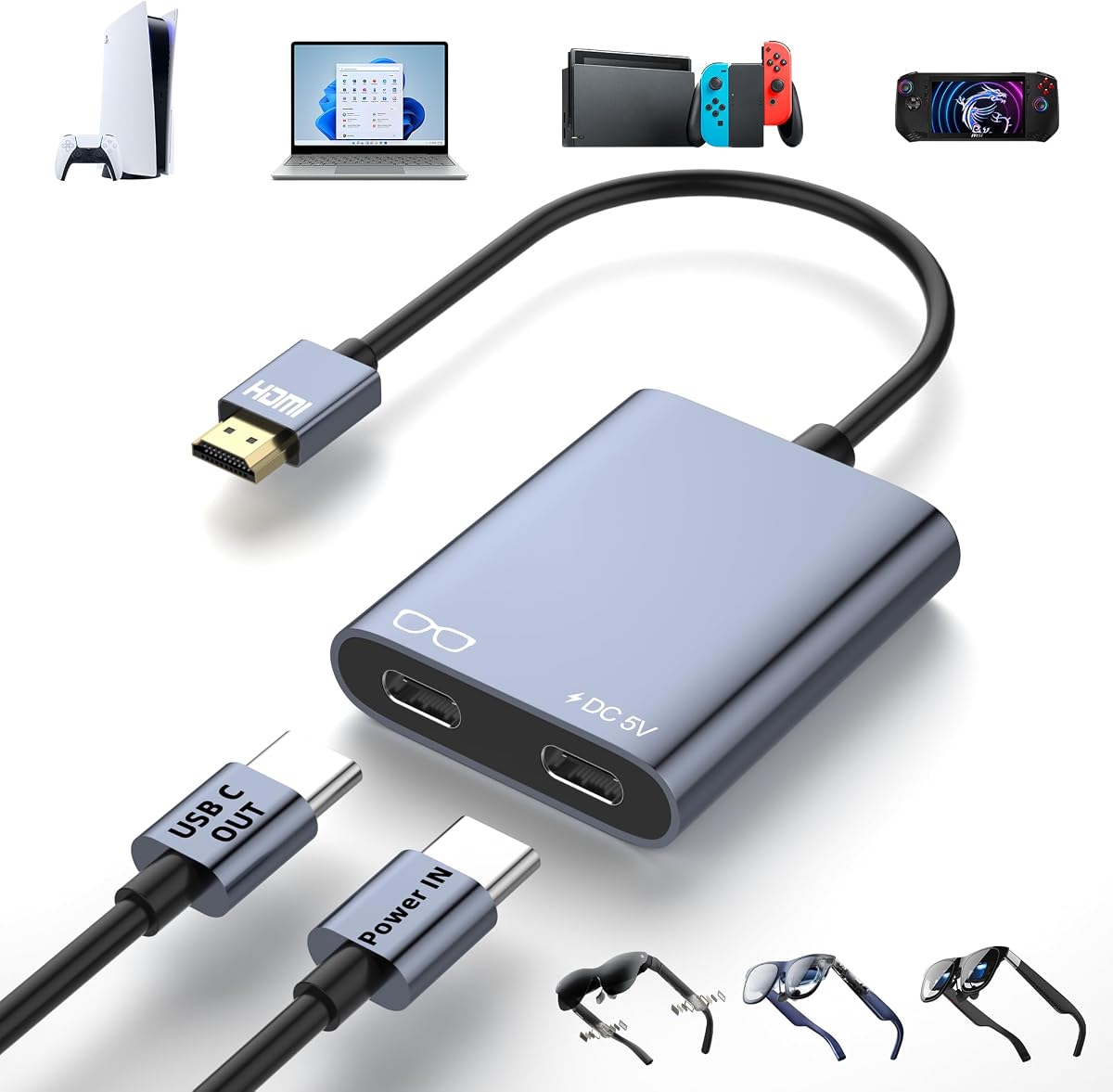


This adapter offers a solid entry point for connecting HDMI sources to USB-C AR glasses. With a rating of 4.3 stars, it is appreciated for its straightforward design and support for high-resolution output.
We may earn a commission when you buy through this link, at no additional cost to you.
It delivers 4K 60Hz video and is compatible with devices like the Switch, PS5, and Xbox. The hub supports RayNeo, VITURE, Xreal, and Rokid glasses. It includes a 4K HDMI cable and power cable in the box.
Users should note that Xreal glasses require switching to DP mode for audio. The hub does not support the DHCP feature on PS4/PS5 or laptops. You must disable this before connecting.
This model is ideal for budget-conscious users who need reliable performance without extra features. It solves the connectivity issue effectively for gaming and media consumption on portable displays.
It supports up to 4K@60Hz and 1080p@120Hz, providing sharp visuals for compatible inputs.
The hub supplies up to 10W to glasses or displays, but source devices need separate charging.
We may earn a commission when you buy through this link, at no additional cost to you.
The Guermok adapter focuses on portability and low-latency performance for mobile setups. It has a rating of 4.2 stars and includes a 1-meter full-function USB-C cable for flexible connection.
We may earn a commission when you buy through this link, at no additional cost to you.
It supports 4K@60Hz and 1080P@120Hz on compatible AR glasses and USB-C displays. The aluminum alloy housing helps dissipate heat during extended use. It works with Xreal, RayNeo, and Rokid glasses.
It is important to note that studio display may show video without audio through this adapter. You need to provide a 5V power source for stable operation. Without it, signals may flicker or disconnect.
This adapter is a good choice for travelers who want a lightweight hub. Its compact design and included cable make it convenient for presentations or gaming on the go without needing extra accessories.
The design delivers low-latency video output suitable for AR gaming and real-time presentations.
The aluminum alloy housing provides efficient heat dissipation during longer sessions.
We may earn a commission when you buy through this link, at no additional cost to you.
This adapter is specifically designed for RayNeo Air 4 Pro AR Glasses, offering enhanced HDR10 support. It is rated 4.3 stars and focuses on visual performance for immersive viewing experiences.
We may earn a commission when you buy through this link, at no additional cost to you.
It provides 4K@30Hz output and simultaneous charging, which is useful for long gaming or streaming sessions. It connects to HDMI devices like Xbox and PS4/5. It also supports Lightning devices up to iPhone 14.
Note that Lightning devices require an Apple Digital AV Adapter to work together. The maximum resolution at 4K is capped at 30Hz. This limits high-refresh gaming on 4K but is fine for movies.
This is a specialized choice for RayNeo users who want HDR capabilities. It bridges the gap between standard HDMI sources and smart glasses with support for iPhones via an additional adapter.
HDR10 support provides richer contrast and more vibrant colors for compatible sources.
It allows for simultaneous charging while outputting video, reducing power drain on your device.
We may earn a commission when you buy through this link, at no additional cost to you.
This model stands out with its high 4.6 rating and versatile compatibility with major AR brands and consoles. It features a Play & Charge power port to keep your glasses running during long sessions.
We may earn a commission when you buy through this link, at no additional cost to you.
It supports 4K@60Hz Ultra HD video with ultra-low latency, perfect for gaming and movies. The aluminum alloy housing ensures heat dissipation and durability. It works with XREAL, VITURE, RayNeo, and Rokid glasses.
Keep in mind that external 5V power is required for it to function. Without power, there will be no signal. It is also not reversible; HDMI must connect to the source, not the display.
This adapter is a top choice for users seeking reliability and performance. The included 3ft power cable and compact size make it easy to carry anywhere while ensuring stable operation for your setup.
The built-in power port supplies direct power to connected displays for uninterrupted operation.
It comes with a 2-year warranty and 24/7 customer support for peace of mind.
We may earn a commission when you buy through this link, at no additional cost to you.
This wireless adapter offers a different approach by allowing direct mirroring to AR glasses without a wired connection. It has a rating of 4.2 stars and includes a large 5000mAh battery for mobility.
We may earn a commission when you buy through this link, at no additional cost to you.
It supports dual outputs with both HDMI and USB-C ports for flexible connectivity. The 5G streaming ensures stable, low-latency transmission for movies and games. It works with iOS, Android, Windows, and macOS.
The battery provides up to 3-4 hours of uninterrupted use, which may be less for long sessions. It requires an optional transmitter for HDMI sources like consoles. Otherwise it works directly with mobile devices.
This is a great choice for users who prioritize wireless convenience over hardwired stability. It simplifies setup for presentations or travel where cables are cumbersome and battery life is sufficient.
It brings wireless mirroring directly from devices to AR glasses without needing cables.
A high-capacity battery offers up to 7 days of standby time for portability.
We may earn a commission when you buy through this link, at no additional cost to you.
This adapter provides a straightforward way to connect HDMI sources to USB-C displays with high-quality output. It has a rating of 4.4 stars and includes a 3ft power cable for stable performance.
We may earn a commission when you buy through this link, at no additional cost to you.
It supports 4K 60Hz Ultra HD and uses advanced chipset for smooth visuals without screen tearing. You must ensure your glasses support DP Alt Mode for video and audio. Xreal glasses require switching to DP Mode.
External power is strictly required for it to function. Without adequate power, you may experience black screens or flickering. It is not compatible with VR headsets like Meta Quest or PICO.
This model is ideal for users who need a reliable unidirectional converter. Its plug-and-play design makes it easy to use for gaming and streaming on compatible portable monitors and glasses.
Advanced chipset delivers sharp fluid visuals with ultra-low latency for immersive experiences.
The dedicated 5V power port ensures stable operation during extended gaming or movie sessions.
We may earn a commission when you buy through this link, at no additional cost to you.
This adapter focuses on providing stable power to prevent black screens during long sessions. It has a 3.9 rating, which reflects user feedback on power stability. It is designed for power-hungry AR devices.
We may earn a commission when you buy through this link, at no additional cost to you.
It supports 4K 60Hz high-definition video output and connects to Switch, PS5, Xbox, and Steam Deck. It is incredibly lightweight and compact for portability. It includes a dedicated DC 5V/2A power input interface.
Note that the power adapter is not included in the package. You must supply a compatible adapter for it to work properly. It supports only one-way HDMI to USB-C signal transfer without reverse capabilities.
This model is suitable for users who prioritize a stable power input to fix unstable display problems. Its tiny design makes it easy to carry, though you must remember to bring your own power source.
A dedicated DC 5V/2A power input interface helps solve unstable display issues.
Ultra-small body measures 1.93in by 0.98in and weighs only 0.57oz for travel.
We may earn a commission when you buy through this link, at no additional cost to you.
This adapter emphasizes zero delay for seamless audio and video synchronization. It has a 4.2 rating and is built with premium aluminum for superior heat dissipation. It supports up to 4K@60Hz.
We may earn a commission when you buy through this link, at no additional cost to you.
It connects to PS5, Xbox, PC, laptop, and TV boxes for immersive entertainment on AR glasses. You must provide an external power supply as it cannot power devices over 5W. Meta series is not compatible.
For XREAL Air glasses you may need to upgrade firmware to get sound. It is a lightweight and compact solution for presentations and movies. The USB-C to USB-C female interface enhances portability.
This is a good choice for users who want a simple plug and play experience. Its design minimizes lag and heat, ensuring a smooth experience for streaming or casual gaming on supported glasses.
Ensures pristine picture and audio quality with seamless synchronization for immersive experiences.
Compatible with a wide range of HDMI source devices and major AR brands for flexibility.
We may earn a commission when you buy through this link, at no additional cost to you.
This converter provides 4K@60Hz resolution with a focus on play and charge functionality for continuous usage. It has a rating of 4.1 stars and comes with a 1m full-function USB-C cable for easy connection.
We may earn a commission when you buy through this link, at no additional cost to you.
It features a Type-C 5V power port to supply power directly to connected displays or glasses. The aluminum shell helps with heat dissipation. It is not reversible and HDMI must connect to the source device.
Ensure your AR glasses support USB-C video input using DP Alt Mode. It is important to note that no external power means no signal. This device supports major gaming consoles and portable monitors effectively.
This adapter is a solid option for users needing consistent power to their glasses. It keeps your session going without battery drain issues while delivering high-quality video for gaming and movies.
The 5V power port ensures stable operation by directly powering your connected display device.
Supports a wide range of AR glasses including XREAL, VITURE, RayNeo, and Rokid models.
We may earn a commission when you buy through this link, at no additional cost to you.
This adapter features an integrated 5000mAh battery to eliminate the need for external power sources. It has a rating of 4.5 stars and is designed for fully portable use with streaming sticks or AR glasses.
We may earn a commission when you buy through this link, at no additional cost to you.
It delivers up to 4K@60Hz lag-free video output and works with Fire TV Stick, Xreal Air, and Rokid glasses. The battery lasts around 3 hours and 40 minutes with streaming sticks and glasses at 50% brightness.
The 5V/2A adapter requirement limits compatibility with some chargers. It takes about 3 hours to charge fully without a load. However it simplifies travel by combining streaming power and video conversion.
This is an excellent choice for users who want an all-in-one solution without extra cables. Its portability and durable design make it ideal for private big-screen entertainment on trips or camping.
Around 3 hours and 40 minutes continuous runtime allows for extended entertainment sessions.
Durable lightweight PC+ABS body is easy to carry for travel or camping.
We may earn a commission when you buy through this link, at no additional cost to you.
Selecting the right adapter involves understanding your specific source device, display compatibility, and power needs. This section outlines the key factors that determine which model will work best for your setup.
You should look for an adapter that supports at least 4K@60Hz to ensure sharp visuals for gaming and movies. Some models cap 4K output at 30Hz, which is fine for streaming but may reduce refresh rates for high-action content. If you use high refresh rate monitors like 1080p@120Hz, confirm the adapter supports this mode as well.
Always check the specs to ensure the adapter matches the maximum capabilities of your source device and AR glasses to avoid bottlenecks.
Many adapters require an external power source to deliver stable signal and charge your AR glasses simultaneously. Some models include a 5V power port that must be connected to a wall charger or power bank. Others may have built-in batteries like the Lemorele model to remove this need entirely.
Choose a model that fits your mobility needs; built-in batteries add weight but remove cable clutter during travel.
Ensure the adapter supports the specific brand of your AR glasses such as Xreal, RayNeo, VITURE, or Rokid. Most USB-C glasses require DP Alt Mode for video input. Some brands like Xreal may need to switch to DP Mode manually if audio is missing.
Read the product description carefully to confirm it lists your glasses model explicitly to avoid connection issues.
Most adapters work with HDMI sources like consoles, laptops, and TV boxes. If you use a device with only USB-C output, you may need a different hub or cable. Avoid trying to use HDMI to USB-C hubs together with USB-C to HDMI hubs as this can cause failures.
Verify that your source device has the correct port type before purchasing the adapter.
Premium models use aluminum alloy housings to dissipate heat during long sessions, which helps prevent overheating and signal dropouts. Plastic cases may be lighter but less effective at cooling. This is important for extended gaming or streaming.
Look for compact and durable materials if you plan to use the adapter frequently on the go.
Some packages come with HDMI and USB-C power cables while others may not include a power adapter. This affects the total cost and setup effort. Always check what is included in the box before buying to avoid needing extra accessories.
Complete bundles save time and money by providing all necessary connection components.
Low latency is essential for gaming to prevent lag between controller input and visual response. Most adapters use specialized chipsets to maintain stability. External power is often required to avoid intermittent blackouts or flickering during use.
Stable power delivery is key to consistent performance, so do not skimp on power specifications.
Look for brands that offer warranties such as 2-year coverage and accessible customer support. This ensures you can get replacements or help if issues arise with the device. It provides peace of mind for a tech accessory you rely on daily.
Prioritize products with clear return policies and responsive support channels.
To begin, connect the HDMI end of the adapter to your source device like a console or laptop and the USB-C end to your AR glasses or portable display. Always ensure the power port is connected to a valid power source to guarantee the signal is active and stable.
If you experience no audio on certain glasses, check the device settings and switch to DisplayPort mode as instructed in the manual. Keep the firmware on your glasses and adapters updated to maintain compatibility and optimize performance.
For care, store the adapter in a dry case to avoid moisture damage and avoid bending the cables sharply. Clean the metal connectors with a dry cloth to remove dust that could interfere with connections during use.
Not all adapters require external power but most do to ensure stable signal and charging. Some premium models feature built-in batteries to eliminate the need for an external source. Always check the product specifications before purchasing.
No most adapters are not compatible with Meta Quest or other VR headsets as they require capture cards. These adapters are designed specifically for USB-C AR glasses and portable displays with DP Alt Mode.
This often occurs if the source device or glasses are not set to DisplayPort audio mode. Try switching the mode in your settings and ensure the firmware on your glasses is updated for the latest audio support.
These adapters are designed for HDMI sources only so you cannot connect a USB-C laptop directly unless you use a USB-C to HDMI converter first. The adapter expects an HDMI input to convert to USB-C output.
Most models support up to 4K at 60Hz which is ideal for high-quality visuals. Some specific adapters like the RayNeo model may limit 4K to 30Hz for HDR support and you should check individual specs.
No these adapters are unidirectional and cannot convert USB-C sources to HDMI displays. You must connect the HDMI side to the source and the USB-C side to the display to ensure proper signal transmission.
Yes they support low latency video and wide device compatibility making them suitable for business presentations. The portable design allows you to easily connect to projectors or AR glasses on the go.
No these adapters are plug and play and do not require any driver installation on Windows or macOS. You can connect the cables and start streaming video immediately without software setup.
We have reviewed ten top models ranging from budget options to premium adapters with built-in batteries. The choices offer diverse features to suit different needs including gaming presentations and portable media consumption.
When deciding prioritize factors like power delivery and specific AR brand compatibility to ensure a smooth experience. Look for adapters that support your desired resolution and include the cables you need to avoid extra purchases.
Please note that product availability and pricing may change as market conditions evolve. Check current listings and verify the latest specifications before making your purchase decision to ensure you get the right model.