
AOC 22B30HM2
4.7Editor score
100Hz refresh rate
VESA mount compatible
Adaptive sync support
This guide compares the top AOC monitors for gaming and productivity, reviewing specs, performance, and value to help you choose the right display.
Choosing the right display can transform your workspace or gaming setup significantly. AOC monitors offer a wide range of options for every budget and need, from budget-friendly Full HD screens to high-end OLED panels.
We analyzed ten top-rated AOC monitors based on user feedback, technical specifications, and overall performance. This list covers various sizes, resolutions, and refresh rates to ensure you find the perfect match for your specific requirements.
Each pick highlights key features, pros, cons, and ideal use cases to simplify your decision. Keep in mind that prices and availability change frequently, so check current listings before purchasing to ensure you get the best deal.
4.7Editor score

4.6Editor score
4.4Editor score
The following table provides a side-by-side comparison of the top ten AOC monitors currently available. It highlights key specifications to help you quickly identify which model fits your needs.


This AOC monitor delivers a premium gaming experience with its 27 inch QHD IPS panel and 260Hz overclocked refresh rate. It has earned a strong 4.6 rating from users who praise its vibrant colors and fast response times.
We may earn a commission when you buy through this link, at no additional cost to you.
The standout qualities include the 2560×1440 resolution which provides crisp text and detailed images. The 0.3ms MPRT response time ensures minimal motion blur, making it ideal for competitive shooters. Adaptive-Sync support eliminates screen tearing for both AMD and NVIDIA users.
While the tilt adjustment is useful, the lack of height adjustment might be a drawback for some ergonomic setups. The limited connectivity options also mean you may need adapters for older devices. These trade-offs are acceptable given the performance and price.
Competitive gamers and content creators looking for color accuracy will love this monitor. It is a top choice for those wanting a balance of speed and visual fidelity without breaking the bank.
The IPS panel ensures wide viewing angles and consistent colors from any position.
High refresh rates and low input lag provide a tangible advantage in fast-paced games.
We may earn a commission when you buy through this link, at no additional cost to you.
This 24 inch monitor offers sharp Full HD visuals and a lightning-fast 200Hz refresh rate. It has received a 4.6 rating for its ability to handle fast action smoothly without ghosting.
We may earn a commission when you buy through this link, at no additional cost to you.
Key strengths include the 116% sRGB wide color gamut which brings movies and games to life. The frameless design makes it perfect for multi-monitor setups. It is also optimized for console gaming with low input lag.
The smaller size might not appeal to everyone needing more screen real estate. The basic stand lacks advanced ergonomic adjustments. These factors are acceptable for users prioritizing speed and value over size.
Gamers with limited desk space and console players will find this model ideal. It delivers high performance in a compact package suitable for various setups.
Designed to maximize console output with up to 120Hz frame rate support.
Wide color coverage ensures true-to-life images for all content types.
We may earn a commission when you buy through this link, at no additional cost to you.
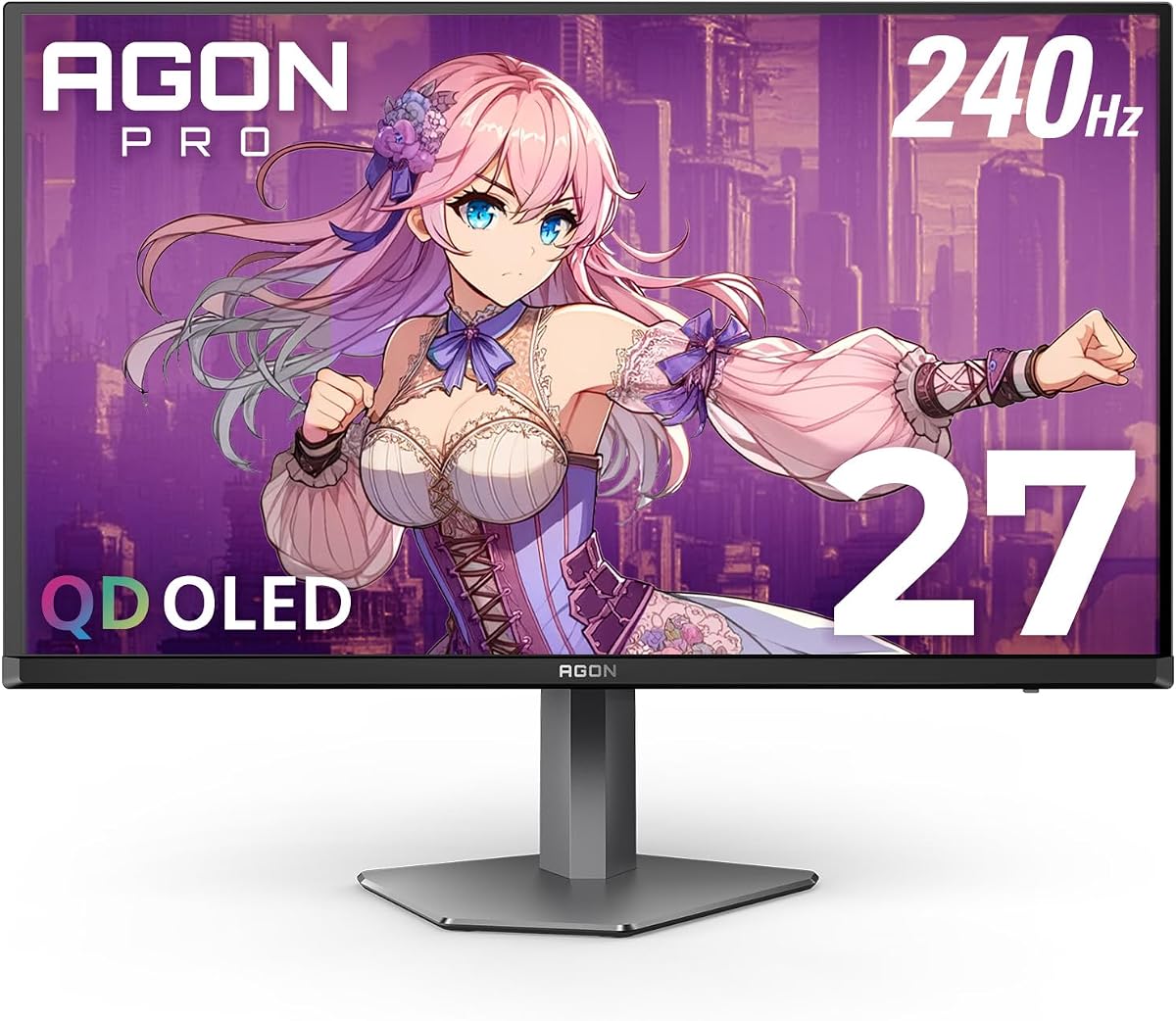
The Agon Pro delivers unprecedented fluidity with a 240Hz rate and 0.03ms response. It rates 4.4 for its state-of-the-art OLED panel that offers genuine blacks and over 1 billion colors.
We may earn a commission when you buy through this link, at no additional cost to you.
Its state-of-the-art OLED panel makes visuals come alive with extreme accuracy. HDR10 adds rich details and contrast. The special lighting at the back enhances the gaming ambiance significantly.
The higher price is a barrier for budget buyers. OLED panels carry a risk of burn-in if static images are displayed too long. These are acceptable trade-offs for enthusiasts seeking top-tier performance.
Professional gamers and enthusiasts wanting the best visual quality should buy this. It stands out as a top-tier option for those who want the fastest response and deepest contrast.
Self-luminous technology delivers infinite contrast for true blacks.
Integrated lighting syncs with games to enhance immersion.
We may earn a commission when you buy through this link, at no additional cost to you.
This 27 inch monitor features a 4K UHD IPS panel for rich details and wide viewing angles. It rates 4.2 for multimedia use with built-in speakers enhancing its convenience.
We may earn a commission when you buy through this link, at no additional cost to you.
The IPS panel produces over 1 billion colors for accurate representation. The frameless design supports seamless multi-monitor setups. Built-in speakers eliminate the need for external audio devices.
The lack of high refresh rate makes it unsuitable for competitive gaming. It is designed primarily for work and media consumption. This specialization makes it a great choice for office environments.
Professionals and multimedia users will appreciate the clarity and simplicity. It is a solid pick for those needing high resolution without gaming bells and whistles.
Optimized for text clarity and long hours of comfortable viewing.
Integrated speakers save desk space while delivering decent sound.
We may earn a commission when you buy through this link, at no additional cost to you.
This 27 inch monitor offers a 260Hz overclocked refresh rate for ultra-smooth motion at a budget-friendly price. It rates 4.6 for fast-paced gaming with crisp visuals.
We may earn a commission when you buy through this link, at no additional cost to you.
The Full HD IPS display provides vibrant colors and wide angles. Flicker-free technology reduces eye strain during long sessions. G-Menu software makes customization easy for users.
Full HD resolution is less sharp than QHD. Controls are basic compared to higher-end models. These trade-offs make it an excellent entry point for competitive gaming.
Budget gamers wanting high speed should buy this model. It balances performance and cost effectively for those on a tight budget.
Achieves high refresh rates without the high price tag of premium monitors.
Flicker-free and low blue light features protect eyes during extended use.
We may earn a commission when you buy through this link, at no additional cost to you.
This 32 inch curved monitor offers an immersive experience with 2K QHD resolution and 180Hz refresh rate. It rates 4.3 for vivid lifelike images.
We may earn a commission when you buy through this link, at no additional cost to you.
The VA panel delivers deep blacks and high contrast. The curve enhances immersion by wrapping around your view. HDR support adds extra dynamic range.
VA panels can show slight ghosting in very fast motion. The large size demands significant desk space. These factors are minor for most users seeking immersion.
Immersion seekers and console players will find this rewarding. It is perfect for those wanting a cinematic feel in gaming.
1500R curvature pulls your focus into the game world.
Deep blacks provide superior image depth compared to IPS.
We may earn a commission when you buy through this link, at no additional cost to you.
This 32 inch monitor combines size with speed at 240Hz refresh rate and low input lag. It rates 4.6 for responsive gameplay.
We may earn a commission when you buy through this link, at no additional cost to you.
The 1500R curve puts you at the center of action. FreeSync Premium ensures smooth visuals. It supports console gaming with 120Hz frame rate.
Full HD resolution on 32 inches lacks sharpness. Ports are basic but sufficient. These are acceptable for casual competitive gaming.
Gamers wanting a large screen should consider this. It is a great value for big setup enthusiasts.
Zero-bright-dot warranty ensures reliability for peace of mind.
Optimized for Xbox and PS5 with low latency features.
We may earn a commission when you buy through this link, at no additional cost to you.
This 27 inch OLED monitor delivers 240Hz refresh rate and extreme color accuracy. It rates 4.4 for unparalleled smoothness.
We may earn a commission when you buy through this link, at no additional cost to you.
OLED panel ensures deep blacks and 147% sRGB. HDR10 produces rich details. Console support includes low latency.
Premium price and burn-in risk are trade-offs. These are acceptable for visual enthusiasts.
Those seeking top OLED performance should buy this. It is ideal for demanding users.
OLED technology ensures best-in-class image quality.
HDR10 support brings scenes to life with contrast.
We may earn a commission when you buy through this link, at no additional cost to you.
This OLED monitor offers height adjustability and a USB Hub. It rates 4.4 for top quality.
We may earn a commission when you buy through this link, at no additional cost to you.
QD-OLED technology ensures superior sharpness. Stand allows 130mm adjustment. It is built for gaming with 240Hz.
Cost and setup complexity are trade-offs. These are acceptable for pros.
Pros and enthusiasts seeking OLED should buy this. It is a top-tier option.
Height adjustable stand provides perfect viewing comfort.
USB Hub simplifies peripheral connections.
We may earn a commission when you buy through this link, at no additional cost to you.
This renewed 21.5 inch monitor offers high contrast and Adaptive Sync. It rates 4.7 for budget value.
We may earn a commission when you buy through this link, at no additional cost to you.
VA panel provides deeper blacks. 100Hz refresh rate is faster than 60Hz. VESA mount allows flexible setups.
Smaller screen and lower refresh are trade-offs. These are acceptable for beginners.
Budget buyers and dorm users should buy this. It is an entry-level gem.
Delivers solid performance at an unbeatable price point.
VESA mount allows versatile mounting options.
We may earn a commission when you buy through this link, at no additional cost to you.
Choosing the best AOC monitor involves evaluating key factors like panel type, size, and refresh rate. This guide explains what to look for to ensure your purchase meets your specific needs.
AOC uses IPS, VA, and OLED panels. IPS offers wide viewing angles and good color. VA provides high contrast and deeper blacks. OLED delivers perfect blacks and fast response but costs more.
Choose IPS for accuracy, VA for contrast, and OLED for premium performance.
Monitor sizes range from 21.5 to 32 inches. Smaller sizes suit limited desks. Larger screens enhance immersion. Consider your desk space and viewing distance.
Match size to your available space and comfort preferences.
Resolution impacts image sharpness. Full HD is standard. QHD adds detail for productivity. 4K is best for media. Balance sharpness with graphics card power.
Select resolution based on content needs and hardware capability.
Refresh rate determines motion smoothness. 100Hz is good for general use. 240Hz or higher suits competitive gaming. Higher rates reduce motion blur.
Prioritize high refresh rates for fast-paced games.
Response time affects ghosting. Lower is better. 1ms is ideal for gaming. 5ms is acceptable for office work. OLED offers the fastest response.
Choose low response time for competitive gaming.
Ports like HDMI and DisplayPort are essential. HDMI works for consoles. DisplayPort suits PC. USB hubs add convenience. Check cable availability.
Ensure your chosen monitor has the ports you need.
Features like Adaptive Sync reduce tearing. HDR adds contrast. Flicker-free tech saves eyes. Built-in speakers save space. Prioritize features you actually use.
Look for features that enhance your daily experience.
Warranty terms vary. Some models offer zero-bright-dot. Check duration and replacement policies. Good warranty adds peace of mind.
Prioritize models with strong warranty coverage.
Unpack the monitor carefully and connect the power and video cables firmly. Ensure the stand is secure before placing it on your desk. Use the provided cables for optimal performance.
Adjust the tilt to reduce glare and set the resolution in your system settings for the best image. Use built-in menus to tweak colors and brightness to match your environment.
Clean the screen with a soft microfiber cloth. Avoid harsh chemicals. Use the stand features properly to prevent accidental tipping. Monitor care extends its lifespan.
The AOC 27 Gaming Monitor QHD 260Hz is top for competitive gaming. It offers 260Hz refresh rate and fast response time. Adaptive sync reduces tearing for smooth visuals.
Many AOC monitors support Adaptive Sync. This includes FreeSync and G-Sync Compatible models. Check the product specs to confirm compatibility with your GPU.
Yes, many AOC monitors are optimized for console gaming. They support up to 120Hz and have low input lag. This ensures smooth gameplay on Xbox and PlayStation.
The AOC 22B30HM2 is a great budget option. It offers 100Hz refresh rate and solid contrast. It is affordable and suitable for entry-level users.
OLED panels have a potential burn-in risk if static images stay too long. Use screensavers and move UI elements. Modern panels include protection features.
Use a dry microfiber cloth to wipe the screen gently. Avoid spraying liquid directly on the screen. Do not use harsh chemicals or abrasive materials.
Most AOC monitors have VESA mount compatibility. Check the specific model for VESA support. Use a compatible wall mount for easy installation.
IPS panels offer better color accuracy and wider viewing angles. VA panels provide higher contrast and deeper blacks. Choose based on your preference.
We have reviewed ten top AOC monitors for gaming and productivity. From budget-friendly options to premium OLEDs, there is a perfect fit for every user.
Prioritize features like refresh rate, resolution, and panel type based on your needs. Gamers should focus on speed while professionals prioritize accuracy.
Prices change frequently so always verify current listings before buying. Use the provided links to find the best deals for your chosen model.