
Canon PIXMA TS4320
4.0Editor score
Dual-band Wi-Fi connectivity
Compact and stylish design
Energy-efficient certification
Finding the right printer for your needs can be challenging with so many options available today. Airprint technology has revolutionized how we print from mobile devices, offering seamless connectivity without complex drivers or software installations. Whether you are a home office user, a student, or a creative professional, having a reliable Airprint capable printer ensures you can document tasks efficiently from your iPhone or iPad.
We have carefully selected and analyzed the leading models on the market to bring you a comprehensive comparison. Our evaluation focuses on key aspects such as print quality, connectivity options, ease of use, and overall value. Each product in this list has been chosen based on its ability to deliver consistent performance and support the wireless printing standards that modern users expect in their daily workflows.
Each pick in this guide highlights specific strengths and ideal use cases to help you narrow down your choices quickly. You will find detailed breakdowns of features, pros, and cons to ensure transparency in our recommendations. Please note that product availability and pricing can change over time, so we recommend checking the latest details before making your final purchase decision for your specific needs.
4.0Editor score

4.2Editor score

4.2Editor score
As an Amazon Associate we earn from qualifying purchases.
The following table provides a side-by-side overview of the top ten Airprint printers we have evaluated. It highlights key specifications and core capabilities to help you compare models at a glance and identify which device best matches your specific printing requirements.






The Canon PIXMA TS6520 stands out as a top choice for modern home offices seeking reliable wireless printing. With a strong rating and robust feature set, it delivers crisp documents and photos effortlessly. Its hybrid ink system and OLED display ensure you maintain control over your printing tasks.
We may earn a commission when you buy through this link, at no additional cost to you.
This printer excels in print quality thanks to its 2-cartridge hybrid ink system which produces sharp text and vivid colors. The dual-band Wi-Fi ensures stable connections for seamless Airprint functionality from any device. You can easily monitor ink levels via the intuitive OLED display for efficient management.
While it offers exceptional versatility, the cost of replacement cartridges can accumulate over time for high volume users. Additionally, the lack of an automatic document feeder might be a limitation for those scanning multi-page reports frequently. However, these are manageable trade-offs for the convenience and quality provided.
Ideal for home users and hybrid workers who prioritize space saving design and high quality output. The TS6520 is a great fit for anyone needing a compact yet powerful all-in-one printer for daily tasks. We recommend it for its balance of features and performance in a small package.
Effortless setup allows you to print directly from smartphones or tablets using the Canon PRINT App or Airprint for instant document handling without wires.
Its compact and stylish footprint fits seamlessly into any workspace without sacrificing functionality or print quality for professional results.
We may earn a commission when you buy through this link, at no additional cost to you.
The Canon PIXMA TS4320 is a budget-friendly all-in-one printer perfect for users seeking exceptional value without compromising on essential features. It offers crisp prints and easy mobile connectivity making it ideal for students or light home office use. Its energy-efficient design also makes it an environmentally conscious choice.
We may earn a commission when you buy through this link, at no additional cost to you.
This model delivers vibrant documents and photos through its reliable 2-cartridge hybrid ink system. The dual-band Wi-Fi connection ensures stable printing from anywhere in your home or office. Setup is quick and straightforward so you can start printing scan and copying without delay.
While it covers basic needs well it lacks some advanced features found in higher-end models such as an automatic document feeder. The ink yield is standard meaning frequent replacements might be necessary depending on your usage volume. These limitations are expected at this price point.
Perfect for those needing an affordable reliable solution for everyday printing tasks. The TS4320 is a solid pick for anyone looking to save money while still accessing wireless printing technology. We recommend it for its simplicity and eco-friendly certifications.
This printer is EPEAT Silver and ENERGY STAR certified helping you reduce your environmental footprint while maintaining excellent print quality.
Get started quickly with easy setup for your smartphone or computer so you can print scan and copy without delay.
We may earn a commission when you buy through this link, at no additional cost to you.
The HP DeskJet 2955 is designed for basic printing needs with a focus on efficiency and smart features. Its AI capabilities help optimize print formatting to reduce wasted pages making it a practical choice for students and home users. The included Instant Ink trial adds immediate value to the purchase.
We may earn a commission when you buy through this link, at no additional cost to you.
This printer uses dual-band Wi-Fi to stay connected reliably and automatically resolves connection issues for smooth operation. You can print web pages and emails with precision thanks to HP AI which removes unwanted content automatically. It is made with recycled plastics supporting sustainable design goals.
Print speeds are moderate which might slow you down if you have large documents to print frequently. The control panel is icon-based but lacks a large screen for detailed settings navigation. These factors may require some patience during heavy usage sessions.
Ideal for basic document printing with smart optimizations to save ink and paper. The 2955 is a great option for those prioritizing sustainability and ease of use over speed. We suggest it for light users who value AI assistance.
Print web pages and emails with precision and no wasted pages or awkward layouts with AI removing unwanted content automatically.
Subscribe to Instant Ink delivery service to get ink automatically delivered before you run out and save up to fifty percent on ink.
We may earn a commission when you buy through this link, at no additional cost to you.
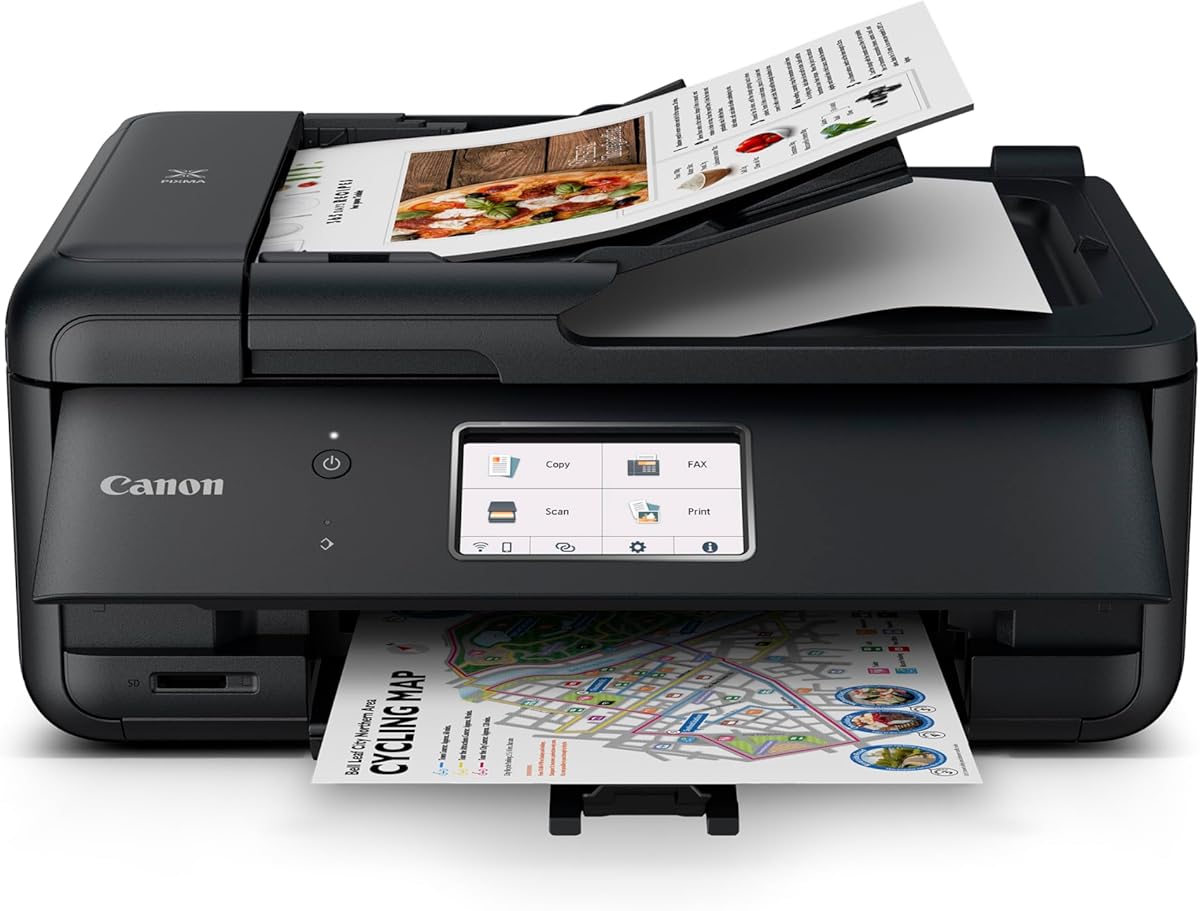
The Canon PIXMA TR8620a is a powerful all-in-one printer built for home offices requiring robust document handling capabilities. With features like an auto document feeder and fax capability it supports advanced workflows efficiently. Its Alexa integration ensures you never run out of ink supplies unexpectedly.
We may earn a commission when you buy through this link, at no additional cost to you.
This model offers wireless four-in-one functionality with print copy scan and fax capabilities to handle diverse tasks. The auto two-sided printing helps save time and paper while the large paper capacity reduces refills. Smart reorders with Alexa ensure you have supplies when needed without manual tracking.
The device is larger than compact models which may take up more desk space in smaller areas. It also comes at a higher price point compared to entry-level options. However these trade-offs provide significant value for productivity and convenience in office settings.
Perfect for home offices needing fax support and high volume document management. The TR8620a is a top choice for professionals requiring reliability and smart supply management. We recommend it for its comprehensive feature set and Alexa compatibility.
Connect your printer to Alexa and receive notifications when running low and Alexa can place smart reorders automatically if you enroll.
Wireless four-in-one functionality allows print copy scan and fax with support for Airprint and Android for versatile device compatibility.
We may earn a commission when you buy through this link, at no additional cost to you.
The Canon MegaTank G3270 is an excellent choice for users seeking high volume printing with minimal maintenance costs. With up to two years of ink included it offers significant savings on consumables over time. It is designed for wireless printing copying and scanning to cover daily needs.
We may earn a commission when you buy through this link, at no additional cost to you.
This printer can print thousands of pages using a single set of inks which drastically reduces long term expenses. You can see ink levels easily on the LCD display while printing from mobile devices via wireless connectivity. It is a practical solution for heavy document users.
The lack of automatic duplex printing means you must manually flip pages for two-sided jobs which adds time. The initial setup might take slightly longer than cartridge-based models due to the tank system. These factors are acceptable given the long-term savings offered.
Ideal for households or small offices with high printing volumes needing cost efficiency. The G3270 is a great investment for anyone wanting to reduce ink costs without sacrificing convenience. We suggest it for its high yield and included ink supply.
Print up to six thousand black and white pages using a single set of inks for massive long term savings on consumables.
Up to two years of ink included means you can print with confidence without worrying about running out of supplies quickly.
We may earn a commission when you buy through this link, at no additional cost to you.
The Brother Work Smart 1360 is a compact wireless printer designed for everyday home office printing and schoolwork. It offers a fast print speed of up to sixteen pages per minute for black documents making it efficient for busy users. The color display makes navigation intuitive for all tasks.
We may earn a commission when you buy through this link, at no additional cost to you.
You can print from and scan to popular cloud apps including Google Drive and Dropbox directly from the printer screen. This feature streamlines workflow by allowing direct access to stored documents without computer dependence. Mobile printing is also simplified with the Brother Mobile Connect app.
While it has strong capabilities some users report mixed experiences with reliability over extended periods. The ink options may not be as flexible as tank systems for very high volume needs. These points suggest weighing your usage frequency before purchase.
Suitable for home offices needing speed and cloud connectivity for daily tasks. The 1360 is a great choice for those who value quick print times and easy app access. We recommend it for its speed and cloud features.
Print from and scan to popular Cloud apps including Google Drive Dropbox Box and OneDrive directly from the color display.
Engineered to print at fast speeds of up to sixteen pages per minute in black and up to nine ppm in color.
We may earn a commission when you buy through this link, at no additional cost to you.
The HP Envy Photo 7975 is a premium multi-purpose home printer loaded with features for families to learn and create. It excels at producing high-quality borderless photos and homework documents seamlessly. AI-enabled features adapt to your workflow to ensure secure and efficient printing.
We may earn a commission when you buy through this link, at no additional cost to you.
This printer offers true-to-screen technology so your prints look vibrant and match what you see on your display. The large intuitive color touchscreen helps you navigate settings easily for all printing tasks. It includes an Instant Ink trial to help manage consumable costs immediately.
While it is optimized for photos it may not be the fastest for bulk text documents compared to dedicated office models. Consumable costs can add up if you do not subscribe to the Instant Ink service long term. These factors depend on your primary usage type.
Perfect for families needing to print high-quality photos and creative projects at home. The 7975 is a top pick for those valuing screen matching and smart features. We suggest it for photo enthusiasts and home users.
Print documents and photos that look as vibrant as they do on your screen with HP's P3 technology for accurate color.
AI-enabled to intuitively adapt to your workflow with wireless and security features that keep your multifunction printer secure.
We may earn a commission when you buy through this link, at no additional cost to you.
The HP Envy 6155 is perfect for homes printing everyday high-quality color documents and borderless photos with ease. Its large touchscreen and AI capabilities simplify printing and enhance output quality significantly. It is designed to be a trusted companion for daily home tasks.
We may earn a commission when you buy through this link, at no additional cost to you.
This model optimizes print formatting using HP AI to ensure no wasted pages and precise layout for emails and web pages. You can enjoy vibrant photos thanks to P3 technology that matches screen colors accurately. The durable Ink trial helps manage costs during initial use.
The printer is designed to work only with original HP chips which may restrict third-party cartridge usage. This can limit flexibility for users seeking alternative ink solutions over time. Despite this it remains a strong performer for standard cartridge users.
Ideal for home users needing vibrant color outputs and smart features. The 6155 is a great choice for those prioritizing ease of use and photo quality. We recommend it for its design and performance.
Smoothly navigate your printer with the easy-to-use 2.4-inch color touchscreen for effortless control of all settings.
Print web pages and emails with precision and no wasted pages or awkward layouts with AI removing unwanted content automatically.
We may earn a commission when you buy through this link, at no additional cost to you.
The HP Smart Tank 5003 is designed for low-cost high-volume printing with up to three years of ink included. Its cartridge-free refill system offers convenience and efficiency reducing waste and maintenance hassle. This model is a strong contender for families needing reliable printing.
We may earn a commission when you buy through this link, at no additional cost to you.
You can replenish ink easily using the mess-free refill system without spilling ink or needing to handle cartridges. The high yield capacity ensures you can print thousands of pages before needing to refill again. It supports borderless printing for creative projects and photos.
Some users may find the initial setup and refill process requires a bit of practice to master. The physical size might be larger than compact cartridge printers due to the tank system. These factors are minor given the savings provided.
Perfect for households needing frequent printing without constant cartridge purchases. The 5003 is a great option for those prioritizing value and convenience. We suggest it for its high ink capacity.
Replenish ink with HP's easy-access mess-free refill system and simply plug ink bottles into the cartridge-free tank.
Up to three years of HP Ink included means get up to six thousand color or black pages right out of the box.
We may earn a commission when you buy through this link, at no additional cost to you.
The Canon PIXMA TR7120 is a budget-friendly all-in-one printer perfect for home users and hybrid workers seeking value. It handles multi-page documents easily with its auto document feeder for scanning and copying tasks. The compact design fits neatly into any workspace.
We may earn a commission when you buy through this link, at no additional cost to you.
This printer delivers impressive quality for documents and photos using a 2-cartridge hybrid ink system. Dual-band Wi-Fi ensures reliable connectivity for smooth printing from anywhere. You can monitor ink levels and status on the intuitive OLED display.
The cartridge costs can add up over time if you print frequently compared to tank systems. Paper capacity is limited compared to larger office models so you may need to reload paper often. These limitations are acceptable for the compact form factor.
Ideal for home offices needing a small machine with essential scanning and printing features. The TR7120 is a great pick for those prioritizing space saving and ease of use. We recommend it for its balance of features.
Tackle multi-page documents with ease using the Auto Document Feeder for quick scanning and copying.
Designed to fit seamlessly into any workspace its small footprint complements your environment without sacrificing functionality.
We may earn a commission when you buy through this link, at no additional cost to you.
Selecting the right printer involves considering various factors to ensure it meets your specific workflow requirements efficiently.
Ensure the printer supports dual-band Wi-Fi for stable connections and seamless Airprint compatibility with your iOS devices. Look for models that offer cloud integration and mobile apps to enhance workflow flexibility.
Prioritize models with strong wireless protocols and multiple connection methods for reliable printing from anywhere.
Consider the ink system and resolution capabilities to ensure sharp text and vibrant photos for both documents and creative projects. Check reviews for consistency in color accuracy and detail rendering.
Choose a printer with high-resolution output and hybrid ink systems for balanced document and photo quality.
Evaluate the pages per minute rate and monthly duty cycle to confirm it can handle your expected print volume without overheating or jamming. Faster speeds help reduce wait times for large jobs.
Opt for models with sufficient speed and duty cycle ratings to match your daily printing demands.
Analyze the cost per page and availability of ink tanks versus cartridges to minimize long-term expenses and ensure sustainable use. Some models offer included ink trials to help you get started without immediate costs.
Select an ink system that fits your budget and volume needs to avoid unexpected expenses over time.
Look for an auto document feeder if you frequently scan or copy multi-page documents to save time and manual effort. This feature is crucial for efficient office workflows.
Choose a printer with an ADF if you need to handle multi-page documents frequently.
Decide if you prefer a color touchscreen or OLED display for better navigation and status monitoring during printing tasks. A clear interface makes setup and management much easier.
Pick a model with a display type that suits your preference for ease of use.
Measure your available workspace to find a compact design that fits without crowding your desk or office area. Consider footprint and dimensions before purchasing.
Ensure the printer size matches your workspace constraints for a clutter-free environment.
Check for Energy Star or EPEAT certifications to reduce your environmental footprint while maintaining energy efficiency during operation. Sustainable design often correlates with lower operating costs.
Look for eco-friendly certifications to support sustainable printing practices at home or office.
To get started ensure your printer is connected to your Wi-Fi network and install the manufacturer app on your device for seamless configuration. Follow the on-screen instructions to register your account and activate Airprint support.
Regularly clean the printhead and keep the device in a dust-free environment to maintain optimal print quality over time. Use the printer's built-in cleaning tools periodically to prevent clogs.
Monitor ink levels through the dashboard to avoid running out mid-job and replace cartridges or refill tanks promptly. Keep firmware updates installed to ensure security and feature compatibility with your devices.
Airprint is a technology by Apple that allows wireless printing from iOS and macOS devices without installing drivers. It works by discovering compatible printers on the same network and sending data directly to them for easy printing.
Most printers do not require a subscription for basic printing though some services like Instant Ink offer optional monthly plans. You can typically choose to subscribe or pay per cartridge based on your usage preferences and budget needs.
Yes many models support Android printing via Google Cloud Print or the manufacturer's mobile app alongside Airprint. Ensure you download the appropriate app and connect to the same Wi-Fi network to print successfully.
Cost per page varies widely from tank systems offering pennies per page to cartridge models charging more. Always check the ink yield and cartridge price before purchasing to estimate your long term expenses accurately.
Many models in our list feature automatic duplex printing to save paper and time but check specifications carefully. If duplex is not automatic you can often set manual duplex settings in your print driver.
Wireless printers often use encryption and secure protocols but should be kept updated with latest firmware to prevent vulnerabilities. Ensure your network is protected and change default passwords to maintain security.
We have explored the top ten Airprint printers that offer seamless wireless printing and diverse features for every user. From budget-friendly options to premium models each pick provides unique benefits for home and office needs.
When deciding prioritize your specific needs such as print volume and photo quality to find the model that fits best. Consider long-term ink costs and space requirements to ensure the printer works well in your setup.
Please remember that product availability and pricing change so verify details before making your final purchase. We hope this guide helps you find the perfect printer to support your creative and professional tasks.