
Thrustmaster T-Flight Hotas X
4.4Editor score
Detachable throttle control
Adjustable resistance dial
Fully programmable buttons
Discover the top 10 airplane controllers for PC flight simulators in October 2026, comparing precision, features, and realism for every pilot setup.
Flight simulation enthusiasts demand precise controls to replicate the cockpit experience authentically. Airplane controllers for PC bridge the gap between keyboard inputs and real-world aircraft handling, offering tactile feedback and dedicated switches.
We evaluated ten leading flight sticks, yokes, and throttle systems based on build quality, sensor accuracy, and software compatibility. Our analysis covers options ranging from budget-friendly joysticks to professional-grade HOTAS setups for immersive training.
Each selection highlights unique strengths for specific simulation genres, from combat aviation to commercial airliner operations. Note that pricing fluctuates regularly, so verify current offers before purchasing to ensure the best value for your flight deck.
4.4Editor score

4.0Editor score
4.6Editor score
This side-by-side comparison details the core specifications of each controller to help you match hardware capabilities with your simulation needs and desk space.



The Logitech G X56 H.O.T.A.S stands out as a top contender for serious flight simulation enthusiasts. It delivers military-grade precision with customizable options including all control surface settings needed for high-performance combat scenarios.
We may earn a commission when you buy through this link, at no additional cost to you.
Its twin throttles with friction adjusters and lock features provide authentic management of aircraft power systems. The Mini Analog Stick Control Surfaces allow independent control of pitch, roll, yaw, and weapon systems simultaneously. RGB Backlighting ensures you can navigate the control set easily, even in low-light environments. It is ideal for VR setups where subtle button distinctions aid navigation.
While it requires a significant investment and software configuration, the level of control offered is unmatched. The advanced 4-spring system allows stick force adjustment to match personal preferences. The 2 meter cable length provides ample reach for most desktop setups.
Pilot enthusiasts seeking a fully featured HOTAS system with high accuracy and customization should choose this controller. It supports Windows 11 through 7 and connects via two USB 2.0 ports.
Hall-effect sensors ensure accurate axis movement without physical contact, reducing wear and tear over time.
The adjustable stick force via the 4-spring system adapts the physical feel to your specific flight style preferences.
We may earn a commission when you buy through this link, at no additional cost to you.
The Logitech G PRO Flight Yoke System offers an ideal setup for new pilots and experienced aviators building muscle memory. It features realistic yoke controls that closely mimic actual aircraft inputs for civil aviation simulation.
We may earn a commission when you buy through this link, at no additional cost to you.
Its stainless steel yoke shaft ensures robust and smooth control of your virtual aircraft during flight simulators. The system includes a Flight Throttle Quadrant with 4.92 ft cable and 2 Desk Clamps for secure mounting. A POV Hat and 14 button controls offer at least 54 programmable controls under your fingertips.
Some users note the PS/2 connector for the throttle quadrant may require adapters on modern PCs. The 2-position desk clamp provides mounting flexibility but may not suit all desk thicknesses. The system requires optional software download for full compatibility with titles like Microsoft Flight Simulator and X-Plane.
Pilots focusing on commercial airliner simulation will appreciate the authentic feel and included throttle quadrant. It supports Windows 11 through 7 and connects via USB and PS/2 ports.
The stainless steel shaft provides a durable and smooth operation that mimics the resistance of real yokes.
Includes both yoke and throttle quadrant with desk clamps for a complete initial cockpit experience out of the box.
We may earn a commission when you buy through this link, at no additional cost to you.
The Thrustmaster T-Flight Hotas X provides comfortable ergonomic design allowing hours of flying without fatigue. Its wide hand rest and real size throttle control keep hands in a natural position for immersive simulation sessions.
We may earn a commission when you buy through this link, at no additional cost to you.
You can customize all 12 action buttons and 5 axes to match your preferred flight sim setup. The detachable throttle allows flexible setup either connected or separate for ideal mount configuration. The precision joystick features an adjustable resistance dial to fine tune stick tension. The trigger and multi-directional hat provide additional command options.
While it lacks force feedback, the weighted base ensures greater stability during intense maneuvers. The built-in memory saves custom programming even when disconnected. It is plug and play ready with preconfigured controls for immediate takeoff. The cable length and connectivity support standard USB ports.
Sim enthusiasts looking for an affordable entry into HOTAS controls should consider this model. It supports Windows PCs and offers versatility for various flight genres.
The detachable throttle gives you the freedom to arrange your cockpit space according to available desk real.
Preconfigured controls and plug-and-play functionality let you start flying immediately without complex software steps.
We may earn a commission when you buy through this link, at no additional cost to you.
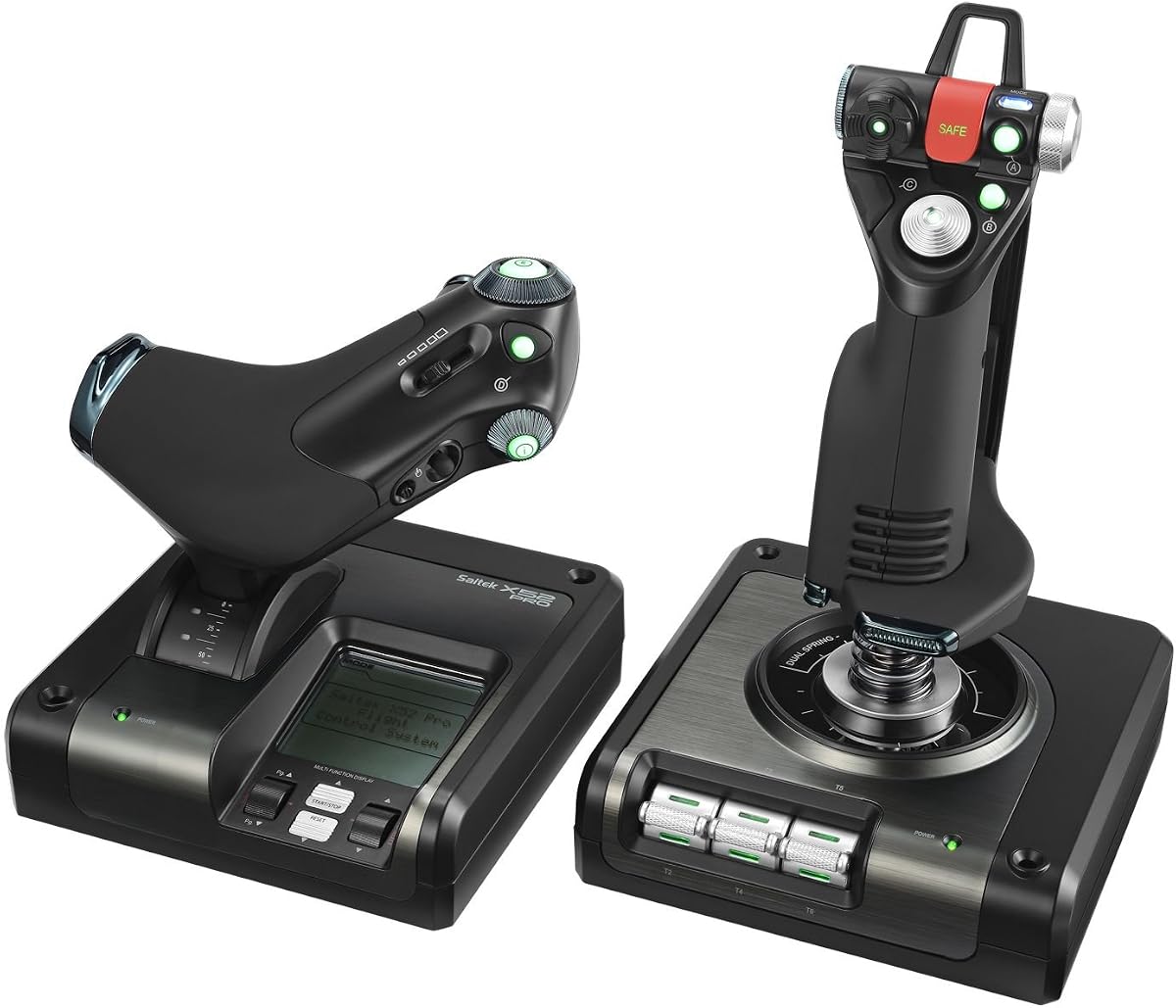
The Logitech G Saitek X52 Pro features illuminated buttons and an intuitive LCD multi-function display for enhanced gameplay. It offers a progressive throttle with resistance adjustment and detents for Afterburner and Idle settings.
We may earn a commission when you buy through this link, at no additional cost to you.
Its precision centering mechanism uses No Contact Technology on x and Y axes to improve control and reduce wear. The smart technology software allows you to program your controller for each game with specific profiles. The 5-position handle adjustment system suits all hand sizes with a soft-touch, contoured grip for maximum gaming comfort.
The LCD display helps verify commands quickly without alt tabbing to other windows. However, the system requirements include internet connection for optional software download which might be inconvenient. The 2-USB 2.0 port requirement is standard but may use up ports on older systems.
Pilots wanting visual feedback directly on the controller will value the LCD screen. It supports Windows 10, 8.1, and 7 and offers a professional feel for dedicated simmers.
The LCD multi-function display lets you check programmed commands instantly without looking away from your cockpit.
The 5-position handle system allows customization to fit various hand sizes comfortably during long sessions.
We may earn a commission when you buy through this link, at no additional cost to you.
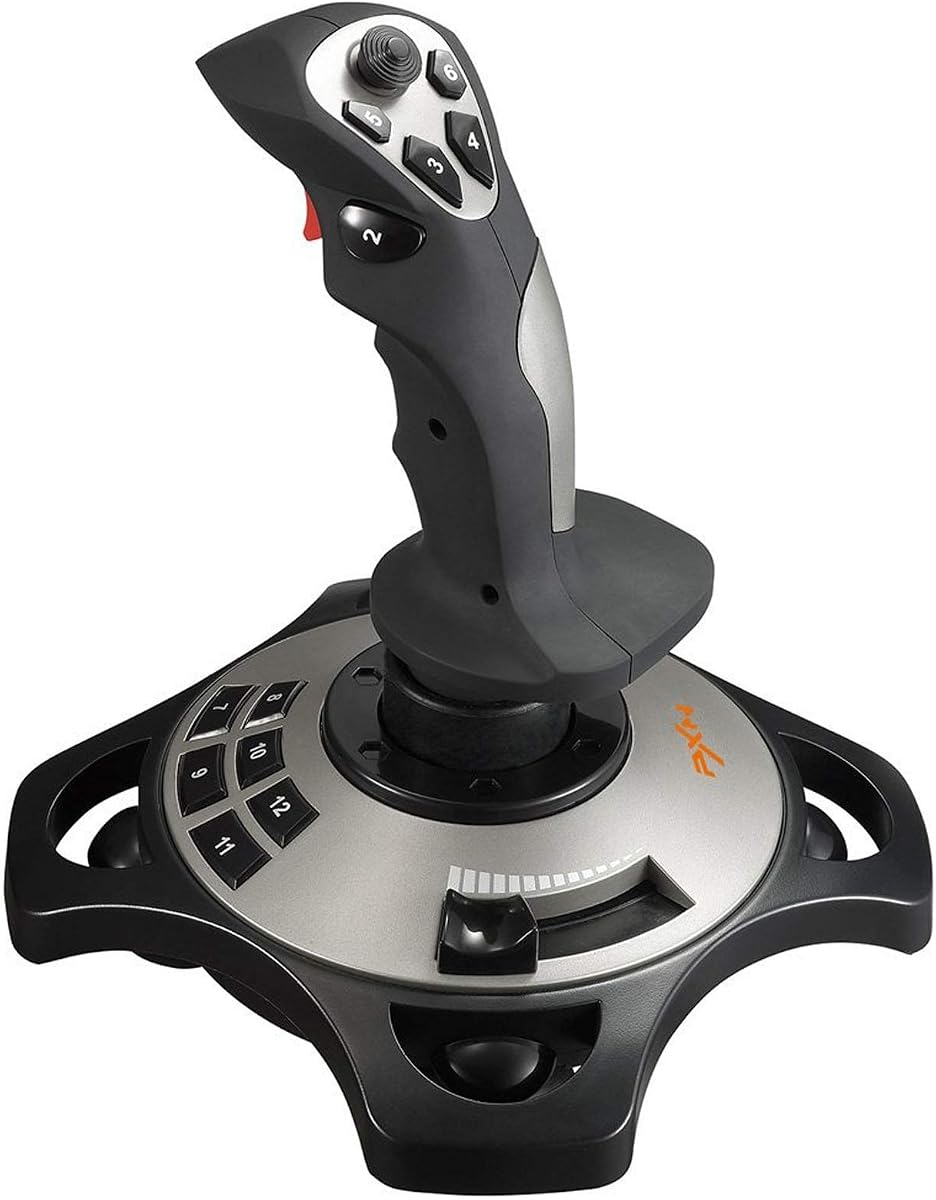
The PXN 2113PRO offers a solid and smooth feeling with comfortable ergonomic design for agile operation. It includes a vibration switch that you can activate for enhanced immersive flying experience during supported games.
We may earn a commission when you buy through this link, at no additional cost to you.
The rapid fire trigger, 4 axis controlling, and 8-Way hat switch provide essential inputs for flight simulations. Four power-grip suction cups at the bottom fix firmly on smooth tables to prevent slipping. You can make the right moves with 12 programmable buttons and keyboard mapping support via advanced software.
Vibration strength must be set in driver settings to be effective. It is ONLY for PC and Windows 7 through 11, not supporting Mac or consoles. The setup for Microsoft Flight Simulator requires mapping generic USB joystick mode within game settings.
Budget-conscious gamers seeking basic flight controls with vibration should consider this option. It supports World of Warplanes and X Plane 10 effectively.
The 12 buttons and 4 axes cover fundamental flight inputs for most simulation games.
Power-grip suction cups ensure the controller stays fixed during vigorous flying maneuvers.
We may earn a commission when you buy through this link, at no additional cost to you.
The Logitech G X52 Flight Control System utilizes magnetic non-contact X and Y axis sensors for enhanced longevity and accuracy. Its Multifunction LCD Display allows you to check all programmed commands before activating them.
We may earn a commission when you buy through this link, at no additional cost to you.
The 3D Twist with Rudder Lock is essential for simulation control if you have rudder pedals to prevent accidental activation. The 5-position Grip System maintains ergonomic comfort. It offers 282 Programmable Commands over 3 modes so you can keep commands under fingertips without switching back to keyboard.
The magnetic sensors eliminate contact wear ensuring inputs stay calibrated over years. The built-in clock on the LCD helps time flight plans. However, setting up all commands requires time and familiarity with the software. The design prioritizes efficiency for complex simulations.
Pilots needing high command density and precise sensors will appreciate this system. It supports Windows systems and offers a durable solution for dedicated aviation simulation.
Magnetic axis sensors ensure consistent performance without the friction that causes wear in traditional potentiometers.
With 282 commands available, you can assign virtually every function to the controller for seamless gameplay.
We may earn a commission when you buy through this link, at no additional cost to you.
The Thrustmaster TCA Yoke & Quadrant Boeing Edition brings the thrill of a real airplane simulator into your home. It features an officially-licensed Boeing 787 airliner replica at 1:1 scale transforming your PC into a true cockpit.
We may earn a commission when you buy through this link, at no additional cost to you.
The PENDULUM mechanism replicates the pendular movement of a Dreamliner delivering smooth responsive control with an 8.3-inch range. The yoke is crafted with a 100% metal internal structure ensuring durability and a premium professional feel. The throttle quadrant controls altitude airspeed and heading with autopilot functions. It includes 2 additional axes and 35 action buttons for total control.
The realistic motion adds immersion unmatched by standard sticks. You can pair it with rudder pedals sold separately for a full setup. Compatibility with Xbox and PC offers flexibility. The design is optimized for airliner enthusiasts seeking authentic handling.
Aviation fans focused on commercial flight simulation will find this bundle invaluable. It supports Microsoft Flight Simulator and offers official licensing for confidence.
The pendulum mechanism mimics the real physical feel of a Boeing aircraft during maneuvers and turbulence.
A 100% metal internal structure ensures the yoke withstands heavy use while maintaining precise control.
We may earn a commission when you buy through this link, at no additional cost to you.
The Thrustmaster TCA Sidestick Airbus Edition immerses you with an officially licensed 1:1 scale replica of the Airbus A320 sidestick. It features drift free magnetic precision eliminating potentiometer wear for unlimited lifespan.
We may earn a commission when you buy through this link, at no additional cost to you.
Command every function with 17 action buttons featuring braille style identification. It includes 4 swappable joystick head modules and 12 remappable buttons to tailor to any scenario. An integrated throttle axis with thrust reverser mechanism and rudder control via rotating handle makes it a complete flight throttle and joystick solution. Setup is seamless with plug and play connectivity.
The magnetic technology guarantees flawless accuracy on every maneuver. The compact design saves space while delivering realism. The throttle and rudder integration removes the need for extra peripherals for basic setups. It is designed for Airbus enthusiasts.
Pilots preferring Airbus cockpit layouts should choose this controller. It supports Microsoft Flight Simulator and offers professional-grade realism.
Magnetic sensor technology ensures inputs stay calibrated indefinitely by removing physical contact wear.
Integrated throttle and rudder controls provide a complete solution within a single compact unit.
We may earn a commission when you buy through this link, at no additional cost to you.
The Turtle Beach VelocityOne Flightstick offers high-precision non-contact main axes for accurate control. It is compatible with Xbox Series X|S, Xbox One, and PC for universal use. The customizable multi-function throttle includes flaps levers and rapid-fire trigger.
We may earn a commission when you buy through this link, at no additional cost to you.
It features 27 programmable buttons and 8 axes plus a POV hat. The integrated OLED flight management display shows flight data during missions. You can use the intuitive flight configuration wheel and touchpad navigation sensor for full cursor control. The ambidextrous design suits both fighter jets and airliners. Adjustable RGB lighting adds visual flair.
The touchpad allows for complex navigation without needing keyboard interaction. The non-contact axes ensure longevity and precision. However, the setup may require calibration to fit your specific game. The OLED display adds a modern cockpit feel to any setup.
Cross-platform gamers looking for a versatile controller will find this ideal. It supports major flight sim titles on both PC and Xbox.
Support for Xbox and PC expands your options for where you can fly without buying multiple controllers.
The OLED display provides real-time flight data directly on the controller for an immersive experience.
We may earn a commission when you buy through this link, at no additional cost to you.
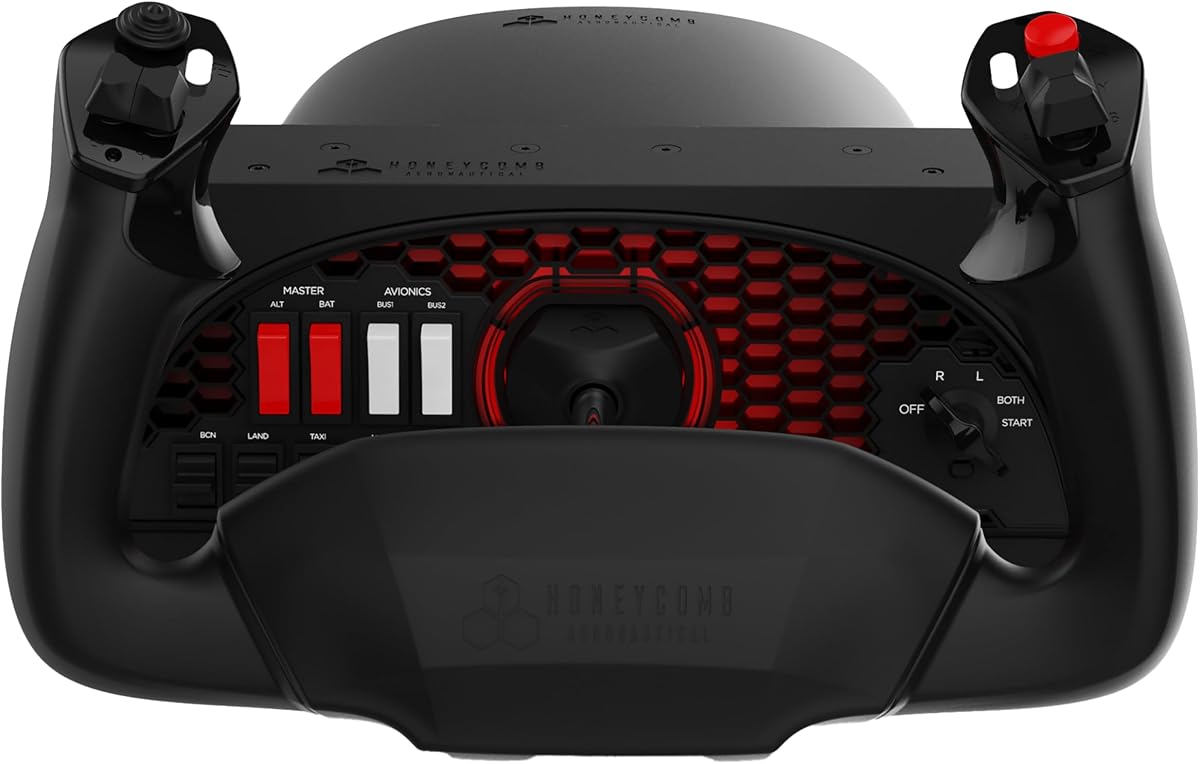
The Honeycomb Alpha Flight Controls Yoke & Switch Panel offers true-to-life flight control with 180 degree rotation. It features a solid steel shaft with two linear ball bearings for smooth control.
We may earn a commission when you buy through this link, at no additional cost to you.
The dampened self-centering mechanism has no center detent and minimal deadzone for accurate maneuvers. The switch panel features main alternator avionics light switches and a 5-position ignition switch with red LED backlighting for night flights. It has multi-function yoke handles with an 8-way round-view switch rocker switches and buttons. You can use two heavy-duty clamps or a micro-suction pad for mounting.
Designed by pilots and aerospace engineers it ensures operability during night flights. The durable high-quality build supports long-lasting performance. The dual mounting solutions provide flexibility for different desk setups. This system is trusted by aviation enthusiasts for reliability.
Serious simmers seeking the highest quality yoke experience should invest in this model. It supports Microsoft Flight Simulator and delivers precision for dedicated pilots.
The integrated switch panel with red LED backlighting enhances realism and usability in dark cockpits.
Solid steel shaft and linear ball bearings ensure frictionless movement for precise control inputs.
We may earn a commission when you buy through this link, at no additional cost to you.
Selecting the right controller involves assessing ergonomics, sensor type, and features specific to your preferred simulation genre.
Magnetic or hall-effect sensors provide higher precision and durability compared to traditional potentiometers by eliminating physical contact wear. This ensures your controls remain calibrated over years of flight training.
Metal internal structures and solid shafts offer greater stability and realism than plastic-only designs. Heavy-duty materials reduce wobbling and improve the tactile experience during complex maneuvers.
Look for adjustable handles and comfortable grips to prevent fatigue during extended sessions. A good controller should fit your hand size naturally without requiring excessive stretching.
More buttons and axes allow deeper customization for complex aircraft systems. Ensure the software supports mapping multiple modes to access functions without leaving the game.
Check if the controller integrates well with your primary simulation software like Microsoft Flight Simulator or X-Plane. Optional driver features can add valuable customization options.
Secure desk clamps or suction pads are essential for stability during intense flight events. Ensure the mounting solution fits your table thickness and surface type.
Standard USB ports ensure broad compatibility with modern PCs. Verify cable length to avoid tangles during setup and use.
Entry-level models offer basic functionality while premium sets provide professional realism. Choose based on how critical high-fidelity inputs are to your personal enjoyment.
Install drivers and mapping software before connecting the controller to your PC to ensure immediate device recognition. Configure button mappings to match your preferred aircraft layout using the included utility.
Place the controller on a stable surface and secure it firmly using provided clamps or suction pads. Proper mounting prevents unwanted movement during aggressive flight maneuvers.
Avoid exposing the controller to direct sunlight or moisture and keep cables tidy to prevent accidental tripping or damage. Regularly check for updates to firmware to maintain compatibility with new game patches.
Most controllers like the VelocityOne and Thrustmaster TCA Yoke support both PC and Xbox. Always check the product specifications for specific console compatibility before purchasing.
Many modern sticks come pre-calibrated but drivers often allow fine-tuning. Calibration ensures your axis inputs match physical movements accurately.
Throttle quadrants usually connect via USB or PS/2 ports separately. Ensure your PC has enough USB ports and install the necessary driver software.
Budget options like the Thrustmaster T-Flight Hotas X offer plug-and-play functionality and are easy to configure for new users starting flight simulation.
Yes, many controllers like the Logitech G X56 are designed for VR setups with ergonomic layouts to navigate controls easily without looking down.
Avoid touching magnetic or hall-effect sensors directly. Dust buildup can affect performance so keep the device clean and stored in a dry place.
This guide highlights top picks like the Logitech G X56 for precision, the Thrustmaster T-Flight Hotas X for value, and the Honeycomb Alpha Yoke for realism. Each option caters to different needs from casual flying to professional-grade simulation.
Prioritize sensor accuracy, ergonomics, and mounting stability to ensure a comfortable and immersive flight experience. Matching the controller to your specific aircraft genre helps maximize enjoyment and utility.
Prices and availability fluctuate so check current offers for the latest deals. Investing in the right controller elevates your flight simulator setup and brings virtual aviation to life.