
Ai Pen
5.0Editor score
Built-in GPT for answers
Offline translation for 150 plus languages
3.69 inch HD touchscreen display
AI scan pens with Chatgpt integration are transforming how students and professionals handle text. These devices combine optical character recognition with generative AI to deliver instant answers and translations.
We evaluated ten leading models based on scanning accuracy, AI capabilities, and user experience. Our comparison includes real-world performance data and expert insights to ensure you find the perfect tool.
Each pick highlights specific strengths like budget value or premium features. Prices and availability change frequently so verify details before purchasing to secure the best deal for your needs.
5.0Editor score

3.3Editor score

4.0Editor score
As an Amazon Associate we earn from qualifying purchases.
The following table provides a side by side comparison of all ten products reviewed in this guide to help you quickly identify the best fit for your specific workflow and requirements.




The Scanmarker AI Pen is a versatile device designed to streamline reading and note-taking for students and professionals. With its built-in screen and OCR capabilities, it offers instant access to scanned text and translations making it a top contender in this category.
We may earn a commission when you buy through this link, at no additional cost to you.
This pen excels at turning printed words into digital text efficiently. Users can slide the pen across documents to capture key lines and definitions instantly. The text to speech feature enhances understanding by reading content aloud which helps reduce reading fatigue significantly.
However some users note that the device relies heavily on internet connectivity for full functionality. The offline capabilities are limited compared to other models which might be a drawback for travelers without constant data access.
Overall this pen is ideal for those who need a straightforward tool for study and work. If you value quick text capture and audio feedback this device is a strong choice for your daily tasks.
Slide the pen to scan printed words and watch them appear on the screen in seconds for fast learning.
Store scans and notes in Favorites then export them for editing to keep everything organized in one place.
We may earn a commission when you buy through this link, at no additional cost to you.
The NEWYES AI Pen stands out for its specialized features aimed at learners with dyslexia and diverse linguistic needs. It combines a robust AI dictionary with a homework checker to provide comprehensive academic support in one portable device.
We may earn a commission when you buy through this link, at no additional cost to you.
Its dyslexia friendly design includes adjustable reading speeds and pause times which help users process text more comfortably. The built in 5MP camera allows for photo translation and expanding its utility beyond simple text scanning significantly.
Despite its strong features the initial setup can be complex for some users. Additionally the screen visibility may vary depending on lighting conditions which could impact readability in certain environments.
This pen is a valuable tool for students needing extra support with reading and comprehension. If you prioritize adaptive learning features this model offers significant benefits for daily study routines.
Adjust word reading speed and pause time to reduce stress and improve text processing efficiency.
Translate between 112 languages using printed text photo scans or voice input for any scene.
We may earn a commission when you buy through this link, at no additional cost to you.
The XNote Smart Pen offers a unique blend of traditional writing comfort and modern digital synchronization. It allows users to write on real paper while capturing every stroke and syncing it to the XNote app for seamless digital organization.
We may earn a commission when you buy through this link, at no additional cost to you.
Its AI powered features include lecture summaries and keyword search which enhance productivity for professionals and students. The pen supports up to 17 hours of continuous use making it reliable for long workdays or study sessions.
One limitation is that the pen itself does not include a microphone for audio recording. Users must rely on the companion app for transcribing conversations which might be less convenient than all-in-one hardware solutions.
For those who prefer handwriting but want digital benefits this pen is an excellent choice. Its complete starter set ensures you have everything needed to begin writing and syncing immediately.
Enjoy the comfort of real pen and paper while every stroke is captured instantly and synced to the app.
Go beyond digitization with features that summarize lectures and auto-tag notes to study faster.
We may earn a commission when you buy through this link, at no additional cost to you.
This Translator Pen combines OCR scanning with advanced translation capabilities to support dyslexia users and adult learners. It covers 142 online languages and 10 offline options ensuring reliable performance in various environments without constant internet.
We may earn a commission when you buy through this link, at no additional cost to you.
The 5MP HD camera allows for precise photo recognition of text even in complex layouts. This feature is particularly useful for translating menus signs or printed materials that are difficult to scan directly.
While powerful the device relies on its companion app for mobile sync which may require additional setup. Users might also face a learning curve to fully utilize the AI recording and translation features efficiently.
It is an ideal tool for international travelers and language learners who need versatile translation support. If you require both offline and online capabilities this pen offers a comprehensive solution.
Cover 142 online languages and 10 offline languages to realize barrier-free translation with or without internet.
Accurately identify various complex text scenarios using the 5MP HD camera for flexible conversion.
We may earn a commission when you buy through this link, at no additional cost to you.
The Ai Pen is a budget friendly option that still offers powerful AI capabilities including built-in GPT for instant answers. It features a 3.69-inch HD touchscreen and offline translation for over 150 languages making it accessible for diverse users.
We may earn a commission when you buy through this link, at no additional cost to you.
Its smart scanning technology helps users organize notes efficiently across 60 plus languages. The device also includes voice recording features which are useful for capturing lectures and meeting insights on the go.
Some users may find the storage capacity limited compared to premium models. The hardware is functional but not as robust as higher-end devices which might affect longevity under heavy use.
If you are looking for an affordable entry into AI scan pens this model delivers excellent value. It is well suited for students and professionals needing quick access to AI insights without a high cost.
Enhance your learning experience with built-in GPT integration offering intelligent suggestions and insights.
Combines translation scanning and file storage into a compact device for ultimate convenience.
We may earn a commission when you buy through this link, at no additional cost to you.
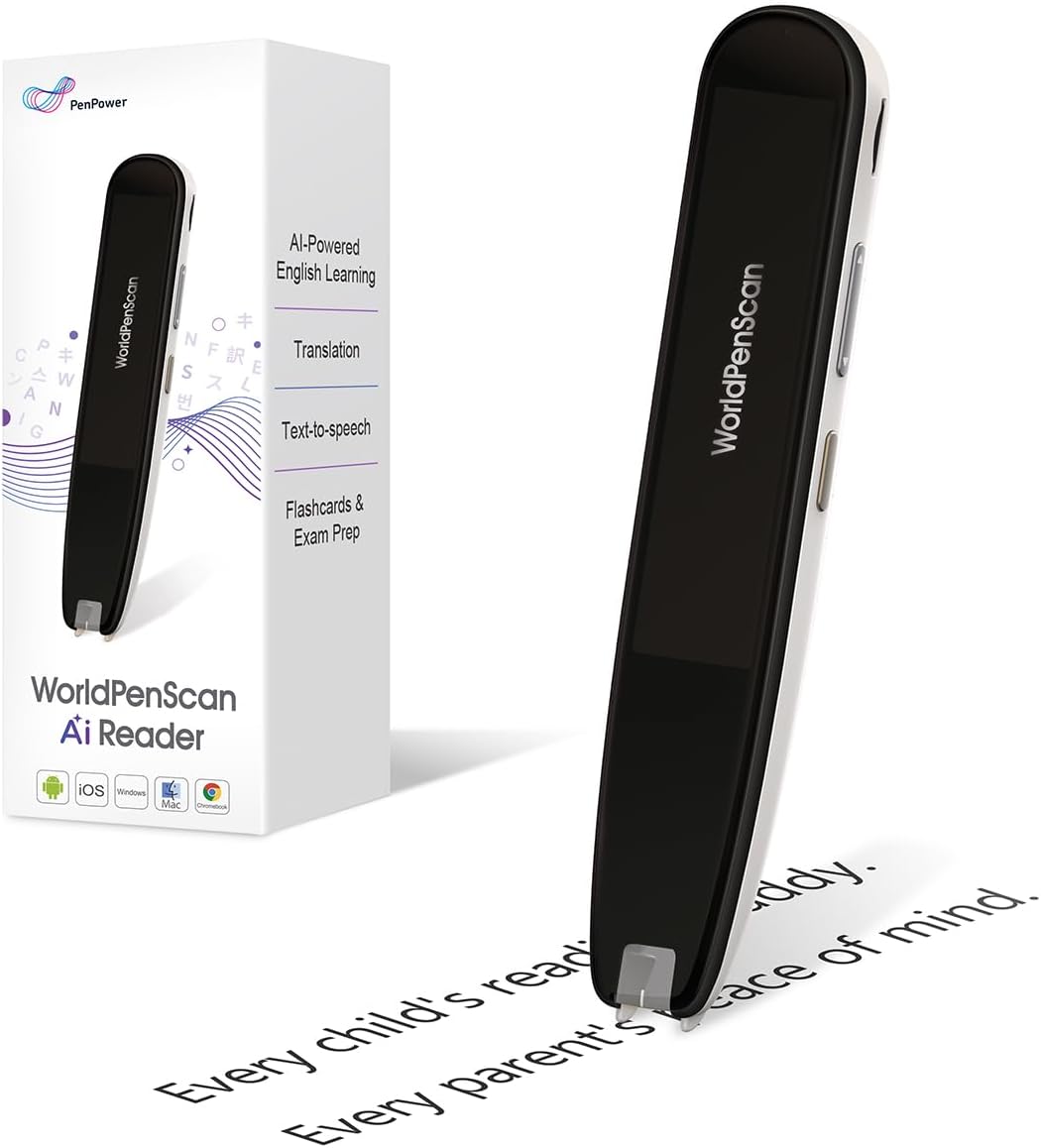
The WorldPenScan AI Reader is designed specifically to help children stay engaged with reading through interactive AI features. It allows kids to scan difficult words or sentences to receive clear age-appropriate explanations in seconds.
We may earn a commission when you buy through this link, at no additional cost to you.
Its Quick AI function helps build confidence by reducing frustration when encountering complex ideas. The device includes offline tools like text-to-speech and translation ensuring it works anywhere without constant internet access.
However full access to advanced AI features requires a subscription which might add to the overall cost. Additionally language support is currently focused on English Spanish and Chinese which could limit global usage.
This pen is an excellent tool for parents looking to support independent reading habits. If you want a device that encourages curiosity and comprehension this model is a strong fit.
Scan a word or sentence to receive clear age-appropriate explanations without leaving the page.
Designed to build independent readers by encouraging curiosity and strengthening comprehension.
We may earn a commission when you buy through this link, at no additional cost to you.
The Pen Gpt positions itself as a versatile tool for digitizing text and accessing instant AI answers across various subjects. Its integration with ChatGPT allows users to ask questions and refine essays directly through an intuitive interface.
We may earn a commission when you buy through this link, at no additional cost to you.
It supports offline translation for over 50 languages and features a 3.5-inch HD touchscreen for clear display. The device also includes voice recording and WiFi sync for streamlined file management and study workflows.
As a newer product there are limited verified reviews to assess long term reliability. Some users might find the performance varies depending on network connectivity which could impact consistent usage.
This pen is suitable for those who prioritize direct AI interaction and file organization. If you need a tool for brainstorming and instant insights this model offers interesting capabilities.
Ask questions brainstorm ideas or refine essays through the built-in ChatGPT for maximum efficiency.
Record lectures and sync files wirelessly to pair scanned notes with complete review.
We may earn a commission when you buy through this link, at no additional cost to you.
The Smart Pen Notebook Set transforms verbal expressions into reality with AI voice transcription and handwriting recognition capabilities. It supports multiple language translations making it easier to record inspirations and meeting content effortlessly.
We may earn a commission when you buy through this link, at no additional cost to you.
Users can draw sketches and have the phone generate compliant artwork in seconds offering a unique blend of digital and analog creativity. The device features wireless charging and reusable refills for convenient long-term use.
However the heavy reliance on the companion app for visual generation and transcription may limit standalone functionality. Some users might find the setup process complex before enjoying all the smart features.
This set is ideal for creatives and professionals who value voice to text workflows. If you need a tool that turns ideas into tangible images quickly this is a compelling option.
Transform your ideas into reality with simple verbal expressions generating visuals in about 40 seconds.
Write meeting notes while simultaneously activating voice transcription to generate editable Word documents.
We may earn a commission when you buy through this link, at no additional cost to you.
The Scanmarker Pal is a versatile translator and reading pen designed for language learners and those with dyslexia. It scans and translates text in over 100 languages with offline support for major European languages.
We may earn a commission when you buy through this link, at no additional cost to you.
Its listen and learn feature reads text aloud with highlighted words on the screen improving comprehension significantly. The compact portable design makes it easy to carry anywhere for instant language support.
While strong the offline support is limited to five languages which might be restrictive for travelers visiting other regions. Battery life is average requiring regular charging for extended trips.
This pen is perfect for travelers and students needing quick accurate translations. If you value portability and audio feedback this model delivers a seamless experience for daily use.
Scans and translates text in over 100 languages including offline support for key languages.
Reads text aloud instantly with highlighted words on the screen for improved comprehension.
We may earn a commission when you buy through this link, at no additional cost to you.
This Translation Pen supports 142 languages with both online and offline options for versatile use across various scenarios. It also offers photo translation capabilities allowing users to translate text from images effortlessly.
We may earn a commission when you buy through this link, at no additional cost to you.
The device includes text extraction features which sync scanned documents with your phone for easy editing. It functions as a recorder and music player adding utility beyond just translation for travelers and professionals.
However user reviews indicate some setup issues and average performance compared to higher rated competitors. Some users report challenges with scanning accuracy on certain text formats or lighting conditions.
For those needing a multi-functional tool at a budget friendly price this pen offers value. If you prioritize language variety and simple features this model is worth considering.
Support online and scanning translation for 142 languages and offline translation for 10 languages.
Aim the camera at any text to automatically translate foreign menus magazines and labels.
We may earn a commission when you buy through this link, at no additional cost to you.
Choosing the right AI scan pen requires evaluating several key factors to ensure it meets your specific academic or professional needs.
OCR accuracy determines how well the pen recognizes text from various fonts and print qualities. Look for models that advertise high recognition rates to minimize errors during scanning sessions.
A device with fast scanning speeds will enhance your workflow efficiency by reducing wait times between captures.
Modern scan pens often include AI features like grammar checking summarization and contextual explanations. These capabilities transform simple text capture into a powerful learning and productivity tool.
Prioritize models that offer seamless AI integration without requiring complex external apps for core functions.
If you work across languages ensure the pen supports the specific languages you need for both online and offline use. Robust translation features are essential for travelers and international business professionals.
Check if the device includes offline dictionaries to ensure functionality in areas with limited connectivity.
Battery life affects how long you can use the pen without interruption. Look for devices offering at least 10 to 15 hours of active use for all-day reliability.
Fast charging options add convenience allowing you to quickly power up the device during short breaks.
Storage capacity determines how many documents and notes you can keep directly on the pen. Higher capacity allows for offline access to your library without constant syncing to a computer.
Consider models that support exporting files to common formats like PDF or DOC for easy sharing.
Ergonomic design ensures comfort during extended scanning sessions. A lightweight pen with a comfortable grip reduces hand fatigue and improves accuracy.
Durability is also key as these devices are often carried in bags or pockets daily.
Text-to-speech features provide auditory reinforcement which is vital for language learners and those with dyslexia. Clear audio output helps users confirm content accuracy without reading visually.
Ensure the device offers adjustable voice speeds and multiple accent options to suit your preferences.
Bluetooth and WiFi connectivity enable seamless syncing with your mobile devices or computers. Reliable connection ensures your notes are backed up safely and accessible across platforms.
Check compatibility with your existing ecosystem like iOS or Android to avoid pairing issues.
To begin use gently slide the pen across the text you want to capture at a consistent speed to ensure accurate OCR recognition. Most devices provide a beep or visual cue when a successful scan is completed.
Regularly clean the sensor window with a soft microfiber cloth to prevent dust buildup that might affect scanning performance. Avoid using harsh chemicals that could damage the lens or casing.
Keep your device charged and store it in a protective case when not in use to prevent accidental drops or scratches. Periodically update the firmware through the companion app to access new features and improvements.
Many AI scan pens offer offline capabilities for basic scanning and translation but advanced Chatgpt features typically require an internet connection. Always check the product specifications to confirm offline support for your specific needs.
Most scan pens are optimized for printed text and may struggle with handwritten notes unless specified otherwise. Look for models with handwriting recognition features if you need to digitize your own notes.
Yes many pens in this guide include text-to-speech and dyslexia-friendly features like adjustable reading speeds. These tools help reduce reading fatigue and improve comprehension for users with learning challenges.
You can typically transfer files via Bluetooth WiFi or a USB connection depending on the model. The companion app often facilitates this process allowing you to export notes in various formats like PDF or DOC.
Some devices require a subscription to access advanced AI features like summarization or unlimited translations. Basic functions like scanning and offline translation usually do not require ongoing fees.
Battery life varies by model but most range from 10 to 17 hours of continuous use. For optimal longevity avoid using the device in extreme temperatures and keep the software updated.
In this guide we explored ten top AI scan pens with Chatgpt integration offering features from budget-friendly tools to premium devices. Each model brings unique strengths to help you manage text and information efficiently.
When making your decision prioritize factors like OCR accuracy and battery life that align with your daily workflow. Consider whether you need offline capabilities or advanced AI features to get the most value.
Remember that prices and availability change frequently so check current deals before purchasing to ensure you secure the best offer for the device you select.