
OBSBOT Meet SE
4.4Editor score
1080P at 100 FPS
Intelligent AI framing
Low-light performance
AI powered webcams have transformed how we connect online by bringing intelligent tracking and superior image quality to every call. These devices use advanced algorithms to keep you framed perfectly without manual adjustments, making them ideal for professionals and creators alike.
We compared ten leading models based on sensor size, AI tracking accuracy, audio performance, and software features. Each product was evaluated for its ability to deliver crisp video and clear sound in diverse lighting conditions and usage scenarios.
This guide shows detailed reviews and specs for every pick so you can find the right fit. Prices and availability change frequently, so check the current listings before making your final purchase decision online.
4.4Editor score

4.4Editor score

4.6Editor score
As an Amazon Associate we earn from qualifying purchases.
The following table compares all ten selected AI powered webcams side by side. Review the key specifications and features to understand the strengths of each model quickly.




The OBSBOT Tiny 3 stands out as the top choice in this roundup with its robust feature set and high ratings. It delivers professional-quality video and audio suitable for serious creators and remote workers.
We may earn a commission when you buy through this link, at no additional cost to you.
Its upgraded 1/1.28 CMOS sensor captures stunning clarity even in dim environments. The AI Tracking 2.0 allows you to track over 200 types of objects ensuring you stay framed perfectly during dynamic sessions.
While it is a premium option, the trade-off is justified by the superior image quality and audio capabilities. The spatial audio ensures your voice sounds natural and clear to everyone on the call.
This model is ideal for users who demand the best performance and versatility. It balances portability with powerful features making it the recommended pick for most advanced needs.
The large sensor and DCG HDR provide detailed balanced visuals that rival dedicated cameras.
A tri-mic array with five specialized modes adapts to your environment for crystal-clear sound.
We may earn a commission when you buy through this link, at no additional cost to you.
The YOLOLIV YoloCam S3 offers unmatched image quality thanks to its massive 1/1.3 sensor. This hardware allows for uncompressed 4K video that looks incredibly sharp and detailed.
We may earn a commission when you buy through this link, at no additional cost to you.
It includes professional software features like Picasso Resolve for precise color grading. The fast PDAF autofocus ensures you are always crisp even when moving around or adjusting your position.
The all-aluminum body prevents overheating during long streaming sessions. However, some advanced software features are currently Windows-only which limits flexibility for Mac users.
This camera is perfect for content creators who want DSLR-like control without the bulk. It is the best choice for those prioritizing raw visual fidelity above all else.
Fine-tune contrast and saturation directly from the camera using the intuitive Resolve engine.
The metal body dissipates heat efficiently ensuring stable performance for 24/7 streaming.
We may earn a commission when you buy through this link, at no additional cost to you.
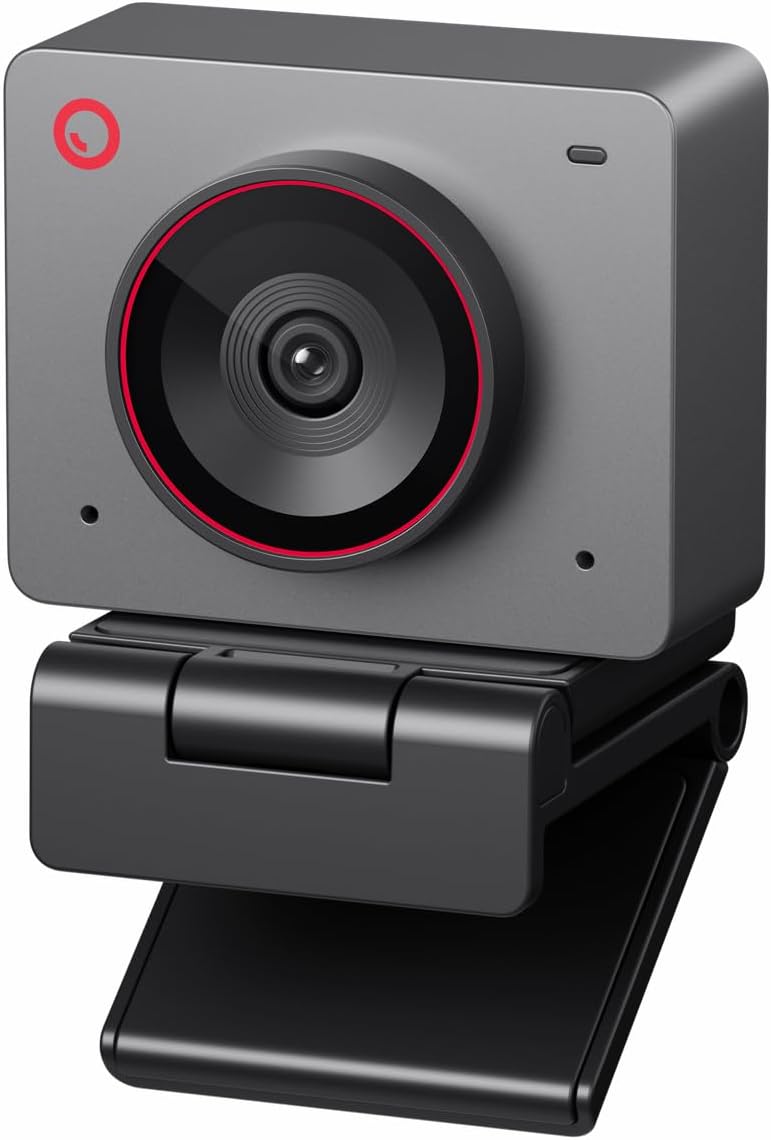
The OBSBOT Meet SE delivers incredible value with its ability to capture smooth 1080P video at 100 FPS. This high frame rate makes motion look fluid and professional during streams.
We may earn a commission when you buy through this link, at no additional cost to you.
It features staggered HDR and dual native ISO for excellent performance in low light. The intelligent AI framing adapts to single or group shots seamlessly without manual input.
While it does not reach 4K resolution the smoothness of the video compensates well for many use cases. You will need to enable extra settings in the software to unlock the full 100 FPS.
This is the ideal pick for streamers on a budget who need smooth motion. It proves that you do not need to spend a fortune to get high-quality streaming performance.
100 FPS recording ensures your movements are smooth and free from motion blur.
Advanced HDR and ISO settings ensure your image stays clear in dim lighting.
We may earn a commission when you buy through this link, at no additional cost to you.
The EMEET PIXY introduces a unique dual-camera design that enhances autofocus and exposure tracking. One camera captures the image while the other analyzes face position for optimal results.
We may earn a commission when you buy through this link, at no additional cost to you.
Its 3-chip AI system provides smoother tracking than standard single-chip models. The triple-mic array offers multiple recording modes to suit podcasts or live streams effectively.
The system relies on EMEET STUDIO software which adds power but also steps. Privacy mode can be activated via tilt or app giving you control over when you are on camera.
This webcam is great for users who want advanced tracking without a high price tag. The combination of hardware and software features makes it a strong contender for streaming.
PDAF and AI work together to lock focus in just 0.2 seconds for sharp visuals.
Multiple audio modes filter noise or capture ambient sound depending on your needs.
We may earn a commission when you buy through this link, at no additional cost to you.
The Insta360 Link 2C brings gimbal stability to webcams for smoother video. Its natural bokeh effect mimics a DSLR look which enhances the professional feel of your meetings.
We may earn a commission when you buy through this link, at no additional cost to you.
Advanced AI noise-canceling filters out background noise ensuring your voice is the focus. The physical privacy switch gives you immediate control over the lens without software.
It is compatible with most major conferencing tools making it easy to integrate. However, it does not support ARM-based Windows systems which limits it for some laptop users.
This model is highly recommended for business professionals seeking a polished look. The gimbal tracking ensures you stay centered even if you move around your desk.
Replicates a professional camera look with natural blur in the background.
A physical switch blocks the lens instantly for secure and private moments.
We may earn a commission when you buy through this link, at no additional cost to you.
The OBSBOT Tiny 3 Lite is a smaller and lighter version of the flagship model. It retains high performance with a 1/2 CMOS sensor and spatial audio capabilities.
We may earn a commission when you buy through this link, at no additional cost to you.
Its triple-mic array ensures clear voice capture with five specialized modes. Voice commands allow you to control tracking and zoom without touching the device.
You can capture smooth motion with 1080P at 120 FPS which is great for dynamic content. While smaller it still delivers professional results in low-light scenarios.
This is a great choice for users with limited desk space. It balances portability with powerful features for those who need a reliable travel camera.
48% smaller than the predecessor yet maintains strong imaging power.
Command your camera with voice or gestures for a hands-free workflow.
We may earn a commission when you buy through this link, at no additional cost to you.
The OBSBOT Meet Flip offers a clever foldable design that acts as a stand. It weighs only 37.7 grams making it easy to carry in your laptop bag.
We may earn a commission when you buy through this link, at no additional cost to you.
Meeting companions like transcription and smart highlights help capture every detail. The teleprompter support ensures smooth delivery during presentations without looking away.
Privacy is ensured when you fold the device which triggers sleep mode and covers the lens. It is a reliable companion for meetings on the go wherever work takes you.
This model is ideal for mobile professionals who travel often. The all-in-one design reduces the need for extra accessories in your setup.
Real-time transcription and AI summaries help you focus on the conversation.
Ultra-lightweight design with a flip stand fits easily into any bag.
We may earn a commission when you buy through this link, at no additional cost to you.
The OBSBOT Tiny 2 Lite is designed to streamline features for teaching and meetings. It maintains 4K resolution while optimizing for business shooting scenarios.
We may earn a commission when you buy through this link, at no additional cost to you.
You can set multiple preset positions with custom parameters for each scene. Gesture control allows you to lock tracking or zoom easily during presentations.
It supports SDK and OSC functions for developers who want to integrate it. While it removes some advanced features the price and quality remain competitive.
This is a solid pick for offices or classrooms needing reliable video. The preset modes save time ensuring consistent framing across different setups.
Save and switch between custom settings to reduce setup time instantly.
SDK and OSC support allow for deep customization with third-party tools.
We may earn a commission when you buy through this link, at no additional cost to you.
This conference camera is built for small rooms where everyone needs to be seen. The 120 degree wide angle captures the entire space without repositioning.
We may earn a commission when you buy through this link, at no additional cost to you.
It includes microphones and speakers so you do not need extra peripherals. Presenter tracking follows the active speaker making it ideal for training sessions.
It is plug and play with USB requiring no IT setup for quick meetings. Privacy is supported with a physical lens cover for secure shared environments.
This is the best choice for team spaces needing an all-in-one solution. The speaker and mic combo simplifies your setup for hybrid collaborations.
Capture the full meeting space without needing to position the camera perfectly.
Built-in speakers and mics reduce the need for extra devices on the table.
We may earn a commission when you buy through this link, at no additional cost to you.
The OBSBOT Meet 2 offers stunning 4K clarity in a compact and lightweight body. It combines AI features with a sleek design that fits any modern setup.
We may earn a commission when you buy through this link, at no additional cost to you.
Dynamic gesture control lets you lock framing or zoom without touching the camera. The larger sensor boosts light capture for clearer and brighter images.
It may get warm during use due to its powerful performance which is normal. The simple USB-C connection ensures it is ready for use immediately.
This webcam is great for mobile workers who need quality on the go. It balances high-end features with a convenient form factor for daily calls.
A bigger sensor area captures more light for brighter images in any room.
Open or close AI framing with simple hand signals for hands-free control.
We may earn a commission when you buy through this link, at no additional cost to you.
Selecting the right AI powered webcam involves evaluating sensor size, tracking accuracy, audio quality, and software features. This section helps you understand what matters most for your needs.
Larger sensors like 1/1.28 or 1/2 produce better image quality with improved light capture. Look for 4K resolution if you need detailed clarity or 1080P for high frame rates.
Prioritize models with larger sensors for low-light performance to ensure your image remains sharp in any room.
AI tracking keeps you centered during movement which is essential for dynamic streams. Check for features like gesture control and customizable zones for flexible framing.
Choose a webcam with advanced tracking modes to handle different scenarios without manual adjustments.
Clear audio is as important as video. Look for multiple microphones and noise-canceling modes to filter out background sounds.
Ensure the webcam supports spatial audio or has dedicated modes for your specific environment.
For travelers, consider weight and size. Foldable or lightweight models are easier to carry and set up in new locations.
A compact design helps you maintain a professional setup wherever you work.
Good software adds value with features like color grading and background blur. Check for compatibility with your operating system and conferencing tools.
Dedicated apps allow you to customize settings and unlock advanced features.
Privacy is critical for security. Models with physical lens covers or easy privacy switches give you control over when the camera is active.
Always look for built-in privacy options to protect your personal space.
USB-C or USB 3.0 connections ensure fast data transfer and power. Ensure your computer has the right ports for plug and play use.
Verify compatibility with your devices to avoid driver issues.
Assess the balance between price and features. A higher price may offer better hardware but budget options often provide sufficient AI tracking.
Choose the model that offers the best features within your budget.
Begin by connecting the webcam to your computer via USB. Ensure you have downloaded any necessary software to access AI features and customization options.
Position the webcam at eye level for natural framing. Use the provided stand or tripod to stabilize the device and avoid shaky video.
Keep the lens clean with a microfiber cloth to maintain image quality. Regular updates to the software ensure you have access to the latest features and security patches.
An AI powered webcam uses algorithms to track movement, adjust framing, and optimize lighting automatically. This ensures you stay in focus without manual adjustments.
Most models work with both Windows 10+ and macOS. Always check specific compatibility notes before purchasing to ensure full feature support.
Basic plug and play works for most video calls. Advanced AI features and controls are accessed through dedicated manufacturer software.
Position your webcam near a light source and enable HDR settings in the software. Higher sensor quality models naturally perform better in dim conditions.
4K is ideal for high detail but 1080P offers smoother frame rates. Choose based on your internet speed and platform requirements.
Use the companion software to restore defaults or unplug and replug the device. Check the manual for specific reset instructions.
The OBSBOT Tiny 3, YOLOLIV YoloCam S3, and OBSBOT Meet SE top our list for performance and value. They offer strong AI tracking and quality video for diverse needs.
Prioritize features like sensor size and tracking accuracy based on your specific workflow. A model that fits your environment ensures a better user experience.
Always verify current availability and pricing before you buy. Technology and market conditions change so stay updated for the best deals.