
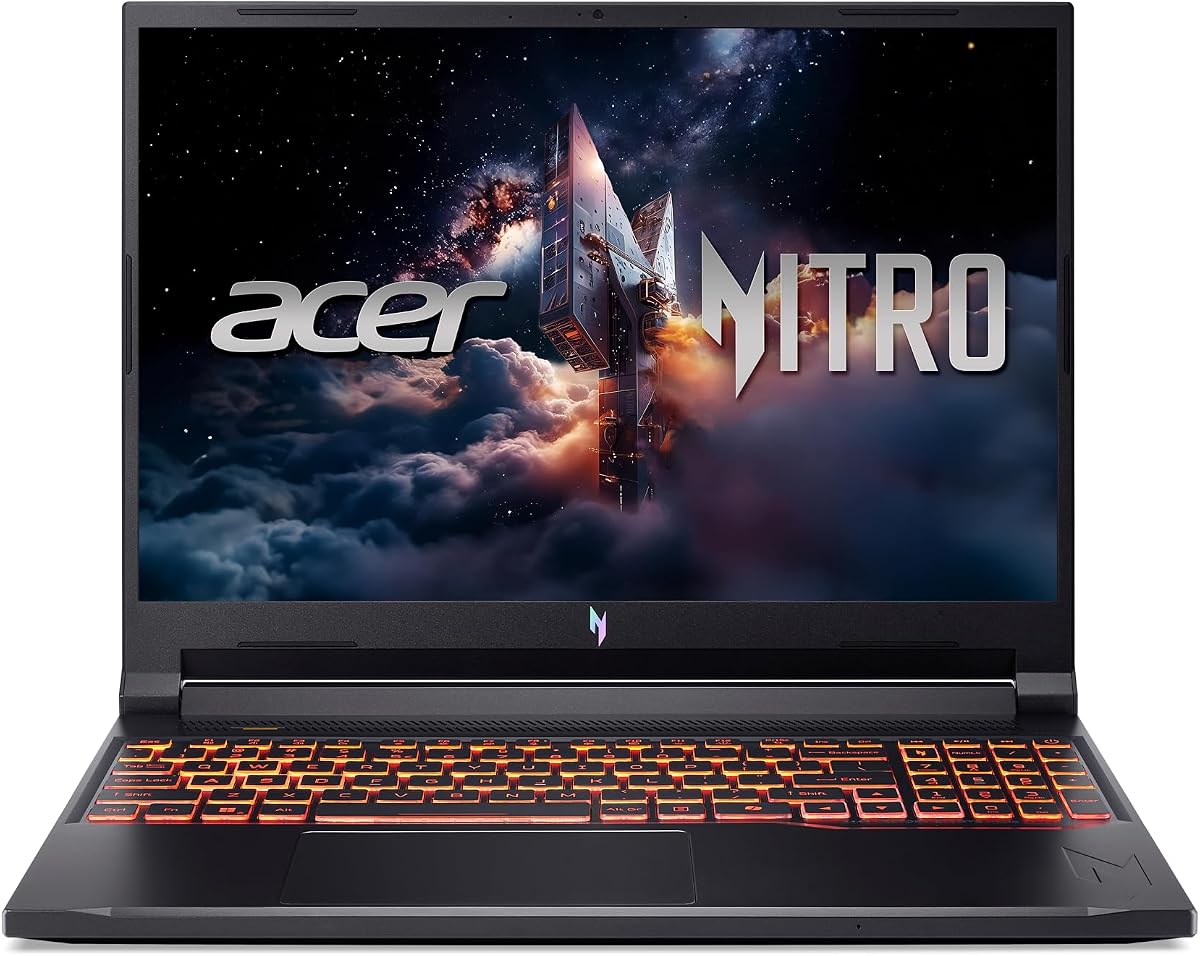
Acer Nitro V 16S AI Gaming Laptop
4.4Editor score
AMD Ryzen 7 260 Processor
NVIDIA GeForce RTX 5060 GPU
16 inch WUXGA 180Hz Display
The gaming laptop market continues to evolve rapidly with new hardware pushing performance boundaries. Acer offers a strong lineup including the Predator and Nitro series that cater to diverse needs and budgets.
We have carefully selected and reviewed ten distinct models based on their specifications, performance capabilities, display quality, and overall value proposition for users seeking portable gaming power.
Each pick highlights specific strengths such as screen quality, processing speed, or portability. Keep in mind that availability and pricing can fluctuate frequently based on market demand and seasonal promotions.
4.4Editor score

3.7Editor score

4.0Editor score
As an Amazon Associate we earn from qualifying purchases.
The following table provides a side-by-side comparison of all ten selected models highlighting their key specifications including processors, graphics cards, display sizes, refresh rates, and memory configurations.



The Acer Predator Helios Neo 18 stands out as a powerhouse in the gaming laptop category. It achieves a solid rating of 3.7 stars based on user feedback and technical analysis. Its standout qualities include a massive 18 inch display and top-tier hardware configurations.
We may earn a commission when you buy through this link, at no additional cost to you.
This model features the Intel Core Ultra 9 275HX processor which delivers desktop level performance. The NVIDIA GeForce RTX 5070 Ti provides exceptional graphics capabilities for ray tracing. The 18 inch WQXGA screen offers vibrant colors with 100 percent DCI-P3 coverage.
While the performance is impressive there are trade-offs to consider. The device weighs 7.28 pounds making it less suitable for daily travel. The price is also high compared to smaller 14 or 16 inch options.
It is ideal for gamers who prioritize screen real estate and raw power over portability. If you want a desktop replacement that can handle heavy workloads this is the top choice.
The 18 inch WQXGA panel with 240Hz refresh rate ensures smooth gameplay without screen tearing.
Up to 13 NPU TOPS allow for efficient background tasks and AI acceleration during gaming.
We may earn a commission when you buy through this link, at no additional cost to you.
The Acer Nitro V 16S is an excellent option for budget conscious gamers. It holds a high rating of 4.4 stars from customers. It delivers strong performance using AMD Ryzen 7 processing and RTX 5060 graphics.
We may earn a commission when you buy through this link, at no additional cost to you.
Its AMD Ryzen 7 260 CPU supports up to 38 AI Overall TOPS. The NVIDIA GeForce RTX 5060 enables ray tracing and DLSS features. The 16 inch WUXGA display has 180Hz refresh rate for fluid motion.
One limitation is the RTX 5060 GPU which may struggle with ultra settings in demanding titles. The cooling is decent but not as advanced as the higher end Predator models.
This laptop is best for students or casual gamers needing reliability. It offers great value with high RAM and storage for the price.
Delivers modern gaming features like ray tracing at a fraction of premium model costs.
32GB DDR5 memory ensures seamless switching between games and productivity apps.
We may earn a commission when you buy through this link, at no additional cost to you.
The Acer Predator Helios Neo 14 offers a premium portable gaming experience. It has a rating of 4.0 stars. It combines high end specs with a sleek design suitable for mobile professionals.
We may earn a commission when you buy through this link, at no additional cost to you.
It uses the Intel Core Ultra 9 285H for powerful processing. The RTX 5070 provides excellent graphics fidelity. The 14.5 inch WQXGA matte display ensures clarity in bright environments.
The main drawback is the limited screen real estate compared to larger models. The onboard LPDDR5X memory cannot be upgraded later which limits long term flexibility.
It is perfect for travelers who need desktop power on the go. If you value portability and build quality this model is the top pick.
Weighing only 4.19 pounds makes it easy to carry in a standard backpack.
Vortex Flow technology and liquid metal grease keep temperatures stable under load.
We may earn a commission when you buy through this link, at no additional cost to you.
The Acer Nitro V 16 balances performance and practicality for students. It holds a 4.4 star rating from verified buyers. It features an Intel Core 7 processor and RTX 5050 graphics card.
We may earn a commission when you buy through this link, at no additional cost to you.
The Intel Core 7 240H handles multitasking well. The RTX 5050 provides entry level ray tracing capabilities. The 16 inch display has 180Hz refresh for smooth motion.
The RTX 5050 GPU is less powerful than newer models. The 16GB RAM is standard but lower than the 32GB found in premium Nitro models.
This laptop suits casual gamers and students on a budget. It is a reliable machine for everyday computing and moderate gaming.
Quad intake and exhaust design ensures efficient heat removal during long sessions.
NitroSense app lets users monitor temperatures and adjust fan speeds easily.
We may earn a commission when you buy through this link, at no additional cost to you.
The Acer Predator Helios Neo 16 AI targets competitive gamers specifically. It has a rating of 4.1 stars. It features high speed components optimized for minimal lag and high frame rates.
We may earn a commission when you buy through this link, at no additional cost to you.
The Intel Core Ultra 9 275HX is a top tier CPU. The RTX 5070 Ti delivers robust graphics performance. The 16 inch WQXGA screen with 240Hz refresh ensures crisp motion.
The 16GB RAM is sufficient for gaming but may bottleneck video editing. The single 1TB SSD slot limits internal storage capacity.
It is ideal for esports titles requiring high refresh rates. If you need raw speed and low latency this laptop is a strong contender.
240Hz refresh rate provides a clear edge in fast paced shooter games.
Killer Wi-Fi 6E ensures reliable connectivity for online matches.
We may earn a commission when you buy through this link, at no additional cost to you.
The Acer Predator Helios Neo 16 Plus supports creative professionals well. It achieves a rating of 4.4 stars. It offers high fidelity visuals and robust processing for rendering tasks.
We may earn a commission when you buy through this link, at no additional cost to you.
The Intel Ultra 9 275HX handles multitasking efficiently. The RTX 5070 Ti accelerates rendering software. The display offers 100 percent DCI-P3 coverage for accurate color.
The price is higher than standard models which may deter budget users. Port selection is decent but could be more comprehensive.
It is a great choice for designers and video editors. The balance of GPU power and screen quality supports demanding creative workflows.
DCI-P3 coverage ensures media looks correct across different devices and screens.
32GB RAM allows smooth operation of video editing software.
We may earn a commission when you buy through this link, at no additional cost to you.
The Acer Predator Helios Neo 14 Slim is a customer favorite. It holds a perfect 5.0 star rating. It delivers portable performance with a refined design.
We may earn a commission when you buy through this link, at no additional cost to you.
The Intel Core Ultra 7 255H is efficient. The RTX 5060 GPU handles modern titles well. The matte display offers better visibility than glossy panels.
The soldered RAM limits future upgrades. The GPU is entry level for heavy 4K gaming tasks.
It is suitable for students needing a versatile laptop. It offers a great balance of portability and gaming performance.
Perfect rating indicates high quality control and reliable user experience.
Reduces reflections in bright rooms for better visibility.
We may earn a commission when you buy through this link, at no additional cost to you.
The Acer Predator Helios Neo 16S Renewed offers high value. It has a rating of 4.8 stars from buyers. It provides premium features like an OLED panel at a lower cost.
We may earn a commission when you buy through this link, at no additional cost to you.
The Intel Core Ultra 9 275HX ensures high CPU performance. The OLED display provides deep blacks and rich colors. The chassis remains slim for easier portability.
Renewed units may have shorter warranty terms. Battery life might not be consistent across units.
It is an affordable entry for OLED gaming. If you want premium visuals without the high price this is a good option.
Deep blacks and high contrast ratios create cinematic visuals.
Lower price allows budget for accessories or software.
We may earn a commission when you buy through this link, at no additional cost to you.
The Acer Nitro V 15 is the most affordable option on this list. It holds a strong 4.6 star rating. It serves well for casual gaming and general tasks.
We may earn a commission when you buy through this link, at no additional cost to you.
The Intel Core i7-13620H provides capable processing. The RTX 4050 handles popular titles effectively. The 15.6 inch FHD display has 165Hz refresh for smooth visuals.
The GPU is older compared to RTX 50 series models. The screen resolution is lower than WQXGA options.
It is perfect for students on a strict budget. If you need reliable performance without high cost this is a smart choice.
Best option for first time buyers or casual gamers.
Consistent frame rates for popular multiplayer games.
We may earn a commission when you buy through this link, at no additional cost to you.
The Acer Predator Helios Neo 16 Pro offers a balanced configuration. It has a rating of 4.0 stars. It provides a strong mix of CPU GPU and RAM.
We may earn a commission when you buy through this link, at no additional cost to you.
The Intel Core Ultra 9 275HX is powerful. The RTX 5060 GPU is capable for most games. The 16 inch WQXGA screen provides high visual fidelity.
The RTX 5060 is not as powerful as higher tier GPUs. The price is middle range which may not appeal to budget users.
It is best for users needing versatility. If you want strong performance in all areas this model fits well.
Strong CPU and high RAM ensures no bottlenecks.
WQXGA resolution provides sharp images and text.
We may earn a commission when you buy through this link, at no additional cost to you.
Selecting the right gaming laptop requires understanding how different components work together. This guide outlines the key factors to consider before making your purchase.
The CPU is the brain of your laptop. Look for Intel Core Ultra or AMD Ryzen 7 processors to ensure smooth multitasking and gaming performance. These newer chips include AI capabilities that optimize tasks.
Prioritize a multi core processor for better overall system responsiveness.
Your GPU determines visual quality and frame rates. NVIDIA RTX 50 series cards support DLSS and ray tracing which enhance visuals. Higher tier models like 5070 Ti deliver superior performance.
Choose a GPU that matches your resolution and settings targets.
A high refresh rate screen makes gameplay smoother. Look for 165Hz or higher to reduce motion blur. Color accuracy like DCI-P3 coverage matters for content creators.
Refresh rates above 144Hz are recommended for competitive gaming.
RAM impacts how many apps you can run at once. 16GB is standard but 32GB is better for heavy workloads. SSDs provide fast loading times and system boot.
Opt for at least 1TB of storage for modern game sizes.
Efficient cooling keeps performance stable during long sessions. Look for dual fan systems and liquid metal thermal compounds. Good airflow prevents thermal throttling.
Effective cooling ensures consistent frame rates over time.
Gaming laptops often have shorter battery life. Consider your travel needs before choosing a heavy model. Lighter chassis improve mobility but may have fewer ports.
Balance weight and specs based on your daily routine.
Check for Thunderbolt 4 USB 3.2 and HDMI ports. Wi-Fi 6E ensures stable online connections. Extra ports allow for external monitors and peripherals.
Verify ports match your specific peripheral needs.
Determine your spending limit upfront. Premium models offer more power but at higher costs. Budget models are good for casual play.
Select a model that meets essential needs within your budget.
Ensure your laptop is placed on a flat hard surface to allow proper airflow. Avoid using it on soft fabrics like beds which can block vents and cause overheating.
Use the provided software tools like NitroSense or PredatorSense to manage fan speeds. Customizing these settings helps maintain optimal temperatures during intense sessions.
Keep your system updated with the latest drivers from Acer. Regular software updates improve compatibility and fix potential performance issues.
Predator models generally offer higher performance with better cooling and more premium features. Nitro models are designed for budget conscious users with solid mid range specs. Choose Predator for maximum power and Nitro for value.
Yes many models feature high resolution displays and ample RAM suitable for video editing. The RTX GPUs also accelerate rendering tasks. For serious editing consider the 32GB RAM variants.
Some models have open slots but others have soldered RAM. Always check the specs of your specific unit before assuming upgrades are possible. Higher end models often allow for more flexibility.
Yes most models include HDMI 2.1 and USB-C ports capable of video output. You can connect external displays for a multi monitor setup. Check specific ports for bandwidth limits.
Gaming laptops typically offer 4 to 6 hours of light use. Gaming drains battery much faster. For mobility choose lighter models like the Helios Neo 14 for better endurance.
Yes both series feature backlit keyboards with good travel distance. Predator models often offer more customization options via software. They are well suited for both tasks.
Our top picks highlight the Acer Predator Helios Neo 18 for raw power and the Nitro V 16S for budget value. Each model serves different needs from casual play to professional workloads.
Prioritize your specific needs such as screen size or portability. The right choice depends on whether you value mobility or maximum graphics performance.
Always check current prices and stock availability as they change frequently. This guide provides a solid foundation to make an informed purchase decision for your gaming needs.