
ARCTIC P8 (5 Pack)
4.6Editor score
Static pressure optimised
High quality bearing
Redesigned fan blades
Discover the top 80mm case fans for quiet cooling and high performance. This guide compares ten leading models for compact builds, NAS, and servers.
Choosing the right cooling solution for your compact build is essential for maintaining system stability and longevity. Eighty millimeter fans are often required for small form factor cases, NAS devices, and specific chassis ventilation needs where space is limited but thermal demands remain high.
We have evaluated ten leading models based on acoustic performance, airflow efficiency, bearing technology, and overall build quality. Each product was analyzed against its technical specifications and user feedback to determine which options deliver the best balance of quiet operation and effective heat dissipation for diverse computing environments.
Every selection below highlights key strengths and potential trade-offs to help you make an informed decision for your specific setup. Please note that availability and pricing may vary over time, so verifying current stock and costs on the retailer site is recommended before finalizing your purchase.
4.6Editor score

4.9Editor score

4.8Editor score
The following table provides a side-by-side overview of all ten models evaluated in this guide. It highlights key specifications such as speed, airflow, noise levels, and connector types to help you quickly identify which fan aligns with your specific cooling requirements.


The Noctua NF-A8 PWM stands out as a top-tier option for users seeking silent cooling in compact spaces. With a rating of 4.9 stars, it is praised for its ability to move air efficiently while maintaining whisper-quiet operation even at high speeds.
We may earn a commission when you buy through this link, at no additional cost to you.
Its design features Flow Acceleration Channels and an Advanced Acoustic Optimisation frame which significantly reduces turbulence and noise. The fan operates at a maximum of 2200 RPM but remains incredibly quiet at 17.7 dB(A) under full load. It includes anti-vibration mounts, screws, and a Low-Noise Adaptor for even greater control over speed and acoustics.
While the cost is higher than generic alternatives, the build quality and longevity justify the investment. The 150,000-hour mean time to failure indicates a reliable lifespan. However, the distinctive brown and beige color scheme might not appeal to builders seeking a sleek all-black aesthetic without aftermarket modifications.
This fan is ideal for enthusiasts who prioritize silence and reliability in HTPCs, small form factor builds, or NAS devices. If you value premium engineering and quiet operation above all else, the Noctua NF-A8 PWM is the definitive choice for your 80mm cooling needs.
The A-series frame design actively minimizes noise by optimizing airflow dynamics and reducing resonance points across the fan structure.
Included extras like vibration mounts and adaptors ensure easy installation and allow for fine-tuning performance without needing extra purchases.
We may earn a commission when you buy through this link, at no additional cost to you.
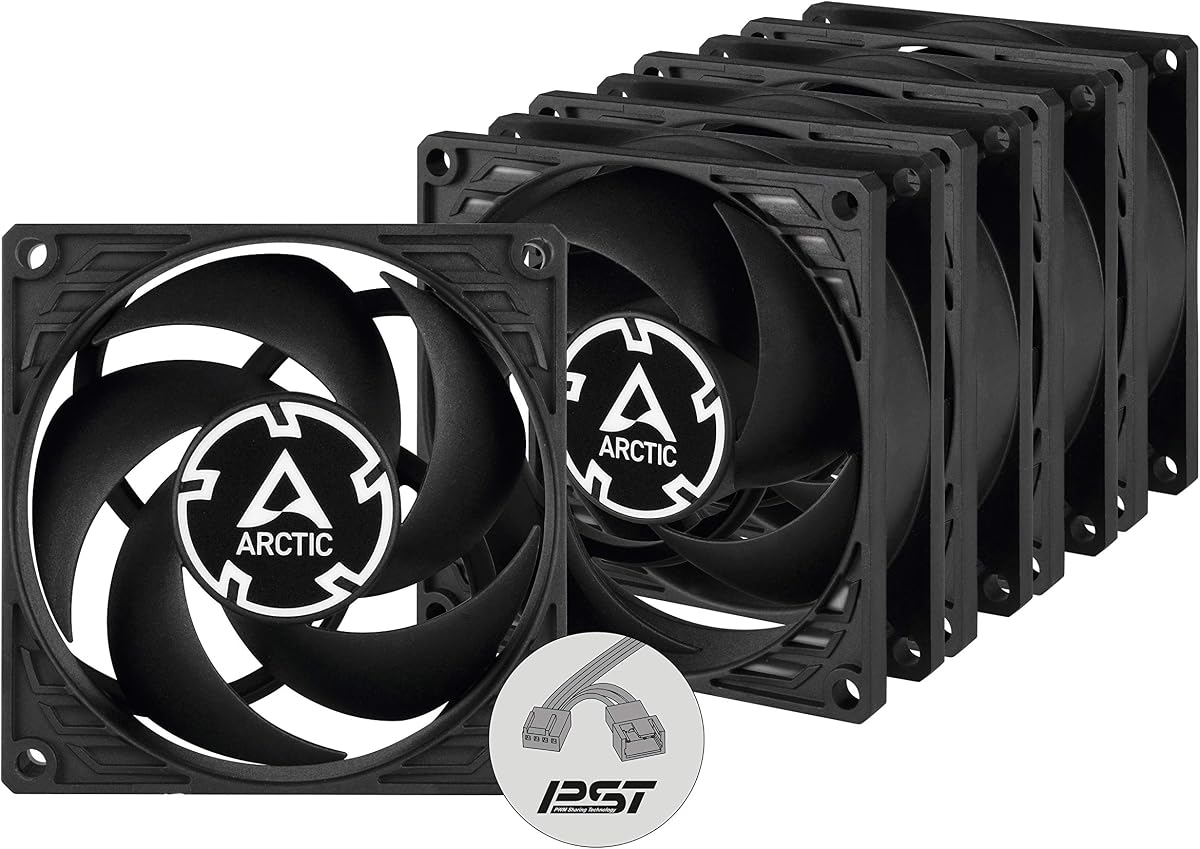
The ARCTIC P8 five-pack offers exceptional value for those needing multiple cooling points without breaking the bank. With a rating of 4.6 stars, these fans are recognized for their robust performance and efficient cooling capabilities in constrained environments.
We may earn a commission when you buy through this link, at no additional cost to you.
These fans are optimized for static pressure, making them suitable for heatsinks and radiators where air resistance is high. They feature a fluid dynamic bearing developed in Germany to reduce friction and ensure longevity. While they lack PWM control, their high 3000 RPM speed ensures strong airflow when needed, even if it comes with higher noise at full tilt.
The primary trade-off is the lack of automatic speed control via motherboard headers. This limits quiet operation options during idle times. However, for budget-conscious builders or server replacements where consistent high-speed cooling is more important than silence, these fans deliver solid performance for the price.
If you need to fill multiple slots in a chassis or build a budget server rack, this pack provides the necessary components efficiently. It is a practical solution for users who need reliable cooling units in bulk without worrying about individual unit costs or complex wiring.
The redesigned fan blades specifically target resistance-heavy environments to ensure airflow reaches components deep within a chassis.
Purchasing five units together reduces the per-fan cost significantly compared to buying single fans individually from other brands.
We may earn a commission when you buy through this link, at no additional cost to you.
The Noctua NF-A8 PWM chromax.Black.swap brings top-tier performance to a modern black aesthetic. It shares the same core performance metrics as the standard A8 but offers a sleek design that fits seamlessly into contemporary PC builds without clashing with other black components.
We may earn a commission when you buy through this link, at no additional cost to you.
Like its sibling, it features Flow Acceleration Channels and an Advanced Acoustic Optimisation frame. The 4-pin PWM connection allows for automatic speed control via motherboard headers. It stops at 0% PWM for semi-passive systems ensuring silence during light loads. The unique selling point is the included set of swappable anti-vibration pads in red, black, white, blue, yellow, and green.
The main drawback is the higher price point associated with the chromax.black.swap branding. Additionally, you must manually install the color pads if you want anything other than black, which takes a few minutes. However, for builders who refuse to compromise on looks or sound quality, this fan is worth the investment.
Choose this model for custom builds where the visual theme matters as much as thermal performance. It is particularly well suited for enthusiasts who want the best noise-to-airflow ratio while maintaining a cohesive black aesthetic throughout their system hardware.
The inclusion of multiple anti-vibration pad colors allows users to tailor the fan to their specific RGB or accent color theme.
It retains the same A-series technology that has made Noctua fans legendary in the industry for years of reliable use.
We may earn a commission when you buy through this link, at no additional cost to you.
The Noctua NF-R8 redux-1800 offers a compelling balance of performance and price within the Noctua lineup. Rated 4.8 stars, it is a proven high-end fan that delivers consistent cooling with a focus on low noise operation suitable for everyday computing tasks.
We may earn a commission when you buy through this link, at no additional cost to you.
It features a 4-pin PWM connection for automatic speed control and operates at a max of 1800 RPM. The design is optimized for high static pressure and airflow while maintaining a noise level of just 17.1 dB(A). This makes it quieter than the standard A8 model at full speed. The redux edition simplifies the accessory bundle but still includes anti-vibration mounts and fan screws.
The trade-off is a slightly lower maximum speed compared to the NF-A8 PWM. However, for most applications where silent operation is preferred over maximum cooling potential, this difference is negligible. It remains a robust choice for NAS units and HTPCs where continuous operation is critical.
Ideal for users seeking trusted Noctua quality without the premium price of the chromax version, this fan is a reliable workhorse. It provides excellent value for those who prioritize steady cooling and quiet operation in standard PC cases or server chassis.
The NF-R8 design specifically targets noise reduction without sacrificing the static pressure needed for effective heat dissipation.
The redux branding allows Noctua to offer proven technology at a more accessible price point for the average consumer.
We may earn a commission when you buy through this link, at no additional cost to you.
The Kingwin 80mm Silent Fan is a budget-friendly option designed for silent operation and high airflow. With a rating of 4.5 stars, it is often selected for mining rigs and standard desktop builds where cost efficiency and functional reliability are key priorities.
We may earn a commission when you buy through this link, at no additional cost to you.
Its optimized blade design delivers excellent ventilation to reduce system heat buildup effectively. It features a long life bearing and a rugged black frame to ensure consistent cooling over time. The fan is marketed as a versatile replacement for PC cases, CPU coolers, and even custom water cooling radiators.
While it lacks the detailed specs of premium brands, its performance in high-density environments like GPU farms is highly regarded. The low noise feature ensures that even in multi-fan setups, the system remains relatively quiet. However, you may not find extensive technical documentation or advanced PWM features.
For builders needing a simple and reliable cooling solution for mining or basic maintenance, this fan offers good utility. It is a practical choice for those who need functional airflow without paying for premium features they do not need for their specific workload.
The fan is engineered to maintain airflow in environments with significant heat buildup typical of crypto mining hardware.
Standard sizing and mounting holes make it an easy replacement for aging fans in older chassis without needing adapters.
We may earn a commission when you buy through this link, at no additional cost to you.
The ARCTIC P8 Silent is specifically tuned for users who prioritize silence over raw speed. It carries a 4.6-star rating and is engineered to minimize unwanted noise at low speeds while maintaining enough pressure to push air through heatsinks effectively.
We may earn a commission when you buy through this link, at no additional cost to you.
This fan operates at a maximum of 1600 RPM which is lower than its non-silent counterparts. The result is a noise level of just 0.08 Sone making it nearly imperceptible during normal use. The bearing technology developed in Germany reduces friction and extends the service life of the motor significantly.
Because it lacks PWM control, you cannot adjust the speed via motherboard headers. It runs at a fixed speed which might not be ideal for variable thermal loads. However, for applications where steady cooling is sufficient and silence is paramount, this fixed speed is a benefit rather than a drawback.
Ideal for HTPCs or office desktops, this fan ensures your system does not distract with noise. It is a solid choice for those who need reliable static pressure without the mechanical noise often associated with high-performance cooling fans.
The alloy lubricant combination developed locally reduces friction to enhance efficiency and minimize operating noise effectively.
Designed specifically to address motor noise at low speeds this fan ensures a quiet environment for sensitive setups.
We may earn a commission when you buy through this link, at no additional cost to you.
This fan represents the pinnacle of quiet cooling performance in the 80mm form factor. It is highly rated by users for its ability to deliver high airflow while keeping noise levels exceptionally low. The chromax.black.swap edition provides the visual flexibility that modern PC builders demand.
We may earn a commission when you buy through this link, at no additional cost to you.
Its A-series design ensures superior cooling performance through advanced acoustic optimization. The PWM version allows for automatic speed control via motherboard headers making it adaptable to varying thermal loads. It includes anti-vibration mounts and a low-noise adaptor to further customize the performance profile.
The main trade-off is the cost. You are paying a premium for the Noctua brand reputation and the specific chromax features. While the build quality justifies this, budget builds might find better value elsewhere. The pads require manual swapping which can be tedious if you need many units.
For enthusiasts who value both silence and style, this is a top recommendation. It fits perfectly in compact ITX cases or high-end workstations where thermal management and aesthetics are equally critical for the final build presentation.
The 4-pin PWM interface allows the fan to stop completely at idle ensuring silent operation when system load is light.
Swappable pads allow you to match your system color scheme without needing to replace the entire fan housing.
We may earn a commission when you buy through this link, at no additional cost to you.
This five-pack of silent fans offers a cost-effective way to equip a server rack or large case with quiet cooling. The fans are designed for static pressure ensuring they can push air through restrictive areas without creating excessive noise during operation.
We may earn a commission when you buy through this link, at no additional cost to you.
Each fan operates at 1600 RPM and features a virtually silent motor. The design ensures efficient cooling even with increased air resistance. This makes them particularly suitable for use on heatsinks and radiators where noise is often a secondary concern to effective heat transfer.
The lack of PWM control means you cannot adjust the fan speed dynamically. This limits flexibility but ensures stable operation. The bulk pricing makes this a compelling option for those needing multiple units simultaneously without paying premium prices per unit.
For network closets or home servers, this pack provides the right balance of performance and acoustic comfort. It is an efficient solution for maintaining low noise levels across multiple intake or exhaust points in a single purchase.
Designed to handle high air resistance this fan ensures effective cooling in tightly packed chassis environments.
Buying five units together ensures consistency across your build and saves time on individual purchases and installation.
We may earn a commission when you buy through this link, at no additional cost to you.
The ARCTIC P8 Max is a powerhouse in the 80mm category offering a wide speed range from 500 to 5000 RPM. It is highly rated for its ability to deliver powerful performance at maximum speed while remaining controllable via PWM signals.
We may earn a commission when you buy through this link, at no additional cost to you.
Its fluid dynamic bearing ensures long service life and silent operation at low speeds. The fan is optimized for high static pressure making it suitable for use on heat sinks and radiators. It provides high airflow and high static pressure to effectively dissipate heat in server cases such as 2U racks.
The main trade-off is noise and vibration at high speeds. While the motor is efficient, pushing air at 5000 RPM will produce significant acoustic output. This limits its use to scenarios where cooling performance is critical and noise is not a primary concern.
For 2U server racks or high-density compute environments this fan is an excellent choice. It handles the heat loads of compact hardware effectively without requiring larger chassis space. It is ideal for professional setups where performance dictates the fan choice.
Infinitely variable speed allows precise control over cooling performance to match varying thermal loads.
Optimized design ensures efficient cooling even when fans must push air through dense components or radiators.
We may earn a commission when you buy through this link, at no additional cost to you.
The Thermalright TL-8015 CPU Fan is designed for cases where depth is limited. With a slim 15mm profile it is ideal for tight spaces where standard 25mm fans will not fit. It maintains a solid performance level despite its thin form factor.
We may earn a commission when you buy through this link, at no additional cost to you.
It features S-FDB V2 bearings that keep noise to a minimum while providing maximum cooling performance. The fan operates at a max of 2200 RPM and is controlled via a 4pin PWM cable interface. This allows automatic speed control based on motherboard temperature readings.
The main limitation is the thin profile which reduces the surface area for the blades and can slightly limit airflow compared to standard 25mm fans. However, for specific clearance issues this fan offers a reliable solution. It provides good airflow for its size and ensures minimal noise.
Ideal for ultra-thin PCs or custom water cooling setups with limited clearance this fan is a practical choice. It ensures your system stays cool without the need for larger components that might interfere with other hardware.
The 15mm thickness allows installation in tight chassis where standard fans would not fit properly.
Automatic speed control via PWM ensures you get cooling only when needed for efficient and quiet operation.
We may earn a commission when you buy through this link, at no additional cost to you.
Selecting the right 80mm case fan involves balancing several factors including noise levels, airflow, and mounting constraints. This guide outlines the key technical considerations you should evaluate before making your final choice.
Noise is often the most critical factor for users building home theater PCs or office workstations. Look for fans with low dBA ratings and Sone ratings for a more accurate measurement of perceived noise. Fans with advanced acoustic optimization frames and fluid dynamic bearings typically offer quieter operation at similar speeds.
Prioritize models with a low noise rating if you plan to mount the fan in a location close to your workspace or living area.
Airflow (CFM) determines how much air the fan moves while static pressure measures its ability to push air through resistance. Use high airflow fans for standard case ventilation where air moves freely. Choose high static pressure fans for radiators, CPU heatsinks, or cases with dense front filters.
For 80mm fans used in tight spaces high static pressure is often necessary to ensure air actually reaches the components instead of just circulating around them.
PWM fans utilize a 4-pin connector to allow the motherboard to adjust fan speed dynamically based on temperature. This ensures the fan spins slowly when the system is idle and speeds up only when necessary. Non-PWM fans run at a fixed speed which can be either too loud or insufficient depending on load.
Always opt for PWM control if your motherboard supports it to maximize both cooling efficiency and silent operation capabilities.
The bearing type significantly impacts the lifespan and noise of the fan. Sleeve bearings are affordable but may degrade faster and become noisier over time. Fluid Dynamic Bearings (FDB) or Dual Ball Bearings offer superior longevity and quieter operation making them ideal for continuous 24/7 use in servers or NAS devices.
Check the Mean Time To Failure (MTTF) rating to estimate how long the fan will operate before replacement is needed.
Most 80mm fans are 25mm thick but slim versions like 15mm exist for tight spaces. Verify the depth required by your chassis or heatsink before purchasing. An oversized fan might not fit in small form factor cases leading to installation issues.
Ensure the thickness matches the clearance available especially when mounting near CPU coolers or side panel fans.
Standard 3-pin fans run at full speed unless connected to a voltage controller. 4-pin PWM fans allow for precise speed control via the motherboard. While 3-pin fans are cheaper, 4-pin fans offer better integration and silence for modern systems.
Confirm your motherboard has the correct header type to utilize the full features of the fan you choose.
Quality fans include rubber anti-vibration mounts and screws to reduce noise from the chassis. Vibration isolation prevents sound waves from transferring to the case which can amplify noise significantly. Cheap fans often omit these leading to a rattling effect.
Look for packages that include anti-vibration mounts to ensure a clean installation without extra cost or hassle.
Established brands like Noctua and Arctic have proven track records for reliability and quality control. A strong warranty indicates the manufacturer stands behind the product. Read user reviews for real-world longevity data beyond the manufacturer's claims.
Investing in a reputable brand often saves money in the long run by reducing the need for replacements.
Install the fan with the arrow on the frame pointing in the desired direction of airflow. Usually, intake fans push air in while exhaust fans pull air out. Use the included screws or anti-vibration mounts to secure the fan tightly to the chassis frame to prevent rattling.
Connect the fan to the motherboard headers carefully. Match the plastic connector keys to ensure the correct pins align. If using a 3-pin fan on a 4-pin header it will run at full speed unless you use a voltage controller. Always power down your system before making connections.
Regularly clean the fan blades with compressed air to remove dust buildup. Dust accumulation increases noise and reduces airflow efficiency. Ensure the fan rotates freely after cleaning to avoid mechanical issues. Check for unusual noises or vibrations that might indicate a failing bearing.
80mm fans often spin faster to move the same amount of air which can make them slightly louder than larger fans. However, high-quality 80mm fans with advanced bearings and acoustic designs can remain very quiet even at high RPM. Choose models optimized for low noise to minimize any audible difference.
Yes, a 3-pin fan works on a 4-pin PWM header. It will run at full speed continuously because it lacks the PWM signal pin. To adjust the speed of a 3-pin fan you would need a specific 3-pin controller or motherboard voltage control option rather than PWM.
Airflow measures the volume of air moved while static pressure measures the force to push air through resistance. High airflow is good for open case vents. High static pressure is essential for radiators or heatsinks where air resistance is high.
Yes, many 80mm fans are designed specifically for server racks and NAS devices. Look for models with high static pressure and long bearing lifespans to handle 24/7 operation. Fans like the ARCTIC P8 Max are specifically marketed for 2U rack use.
Use compressed air to blow dust out of the blades and motor housing. Ensure the fan is disconnected from power before cleaning. Check if the fan rotates freely. If noise persists after cleaning, the bearing may be worn out requiring replacement.
Fluid Dynamic Bearings (FDB) offer the best balance of silence and lifespan. They use an oil capsule to reduce friction and prevent leakage. Sleeve bearings are cheaper but may fail sooner. Double ball bearings are durable but often noisier.
The Noctua NF-A8 PWM, ARCTIC P8 (5 Pack), and Noctua NF-A8 PWM chromax.Black.swap stand out as the top choices in this review. Each delivers exceptional value depending on whether you prioritize silence, bulk pricing, or aesthetics.
When selecting your fan, prioritize low noise ratings and proper connector types to ensure quiet and compatible operation. A high-quality bearing will also save you from having to replace the fan after a short period of use.
Always check the current availability and pricing on the retailer site before purchasing. Inventory levels change frequently so verifying stock ensures you get the model you need without delay.