
G32P 32 Inch UHD
4.6Editor score
High-Speed 100W Power
223 PPI Clarity
Ergonomic Stand Design
Finding the right 6K Monitor can transform your workflow by offering exceptional clarity and screen real estate for creative tasks. These displays provide sharper text and more detailed images than standard 4K options, making them ideal for design and editing work.
We have carefully selected ten standout models based on their resolution, color gamut coverage, and connectivity features. Each product was analyzed for its suitability in professional environments, ensuring you find a screen that matches your specific needs and budget constraints.
Every pick highlights unique strengths like touch functionality, curved immersion, or high refresh rates. Please note that prices and availability change frequently, so verify current offers before making your final purchase decision to ensure you get the best value.
4.6Editor score

3.9Editor score

4.5Editor score
As an Amazon Associate we earn from qualifying purchases.
This side-by-side comparison highlights the key specifications of all ten models to help you quickly identify the best fit for your workspace and creative requirements.




The ASUS ProArt PA32QCV stands out as a top choice for Mac users seeking high-resolution clarity. With a 6K resolution and strong color accuracy, it delivers sharp visuals for professional work. Its factory calibration ensures reliable performance right out of the box.
We may earn a commission when you buy through this link, at no additional cost to you.
Key strengths include the inclusion of dual Thunderbolt 4 ports and a unique MacBook color preset mode. The display supports up to 96W power delivery and allows daisy-chaining for efficient setups. The Auto KVM switch simplifies workflows by letting you control two devices with one keyboard and mouse.
While the HDR capabilities are not the brightest in the category, the color consistency remains strong across different tasks. The 5-year warranty provides peace of mind for long-term use, and the ergonomic stand supports various viewing angles comfortably.
This monitor is ideal for creatives who need precise color and seamless Mac integration. If you prioritize accuracy and connectivity over raw gaming features, this model offers excellent value for professional environments requiring high detail.
Factory calibration with Calman verification ensures Delta E < 2 accuracy for reliable color reproduction across workflows.
MacBook color matching preset and Thunderbolt 4 connectivity make switching between devices and managing screens effortless.
We may earn a commission when you buy through this link, at no additional cost to you.
The Dell 52-Inch model offers a cinematic viewing experience with its massive curved screen. It is designed for users who need extensive screen real estate for multitasking or content creation. The high refresh rate ensures smooth motion for various applications.
We may earn a commission when you buy through this link, at no additional cost to you.
Its IPS Black panel delivers a 2000:1 contrast ratio and deep blacks, enhancing visual depth. The monitor includes hardware low blue light technology and an ambient light sensor to reduce eye strain during long sessions. Connectivity is robust with Thunderbolt 4 supporting up to 140W power.
However, the physical size demands a spacious desk, and the power requirements are higher than smaller units. The price reflects its premium build and large dimensions, which may not suit smaller workspaces. Despite this, the productivity gains are significant.
This monitor is best for professionals who work with multiple windows or large timelines. If you want an immersive setup that minimizes the need for multiple screens, this Dell model provides a compelling all-in-one solution.
The 52-inch curved design wraps around your field of view for a comfortable and expansive workspace.
Multi-PC productivity tools like PbP and KVM allow seamless switching between connected devices without extra hardware.
We may earn a commission when you buy through this link, at no additional cost to you.
The G32P delivers impressive specs for its price point, making it accessible for budget-conscious buyers. It features a glossy finish that enhances contrast and color vibrancy. With high PPI, text and images appear crisp and detailed for professional work.
We may earn a commission when you buy through this link, at no additional cost to you.
Key strengths include the 100W high-speed port that charges laptops while displaying video. The honeycomb cooling design keeps the unit stable and cool during extended use. The stand offers full ergonomic adjustments and universal mount compatibility for flexible setups.
While HDR performance is modest compared to premium units, the color accuracy remains strong at 99% DCI-P3. Some users may prefer matte screens, but the glossy finish can benefit creative color work. The price-to-performance ratio is difficult to beat.
Choose this if you want a capable 6K panel without overspending. It is suitable for general creative work and productivity where high resolution matters more than advanced gaming or HDR features.
With 223 PPI, the screen delivers stunning clarity that rivals high-end professional monitors for text and graphics.
Single-cable power delivery up to 100W simplifies desk setups by combining video and charging into one connection.
We may earn a commission when you buy through this link, at no additional cost to you.
Samsung introduces a gaming-focused 6K option that supports high refresh rates in specific modes. It balances resolution with speed, allowing users to switch between detail and responsiveness. This dual approach suits mixed-use environments well.
We may earn a commission when you buy through this link, at no additional cost to you.
The Fast IPS panel ensures vivid colors and wide viewing angles. G-SYNC compatibility helps reduce tearing during fast action. HDR10+ gaming optimizes brightness and contrast for immersive scenes. Connectivity includes DP 2.1 and HDMI 2.1 for modern consoles and PCs.
While performance is strong, user feedback on reliability varies. The high resolution can be demanding on hardware, requiring powerful GPUs to drive it effectively. Ensure your system can handle the load before purchasing.
This is a great pick for gamers who also need professional-grade visuals. If you want one monitor that handles both work and high-speed gaming without compromise, this Samsung model offers unique flexibility.
Switch between 6K at 165Hz for visuals or 3K at 330Hz for speed depending on your current activity.
Built-in G-SYNC and FreeSync Premium ensure smooth, tear-free gameplay across different hardware setups.
We may earn a commission when you buy through this link, at no additional cost to you.
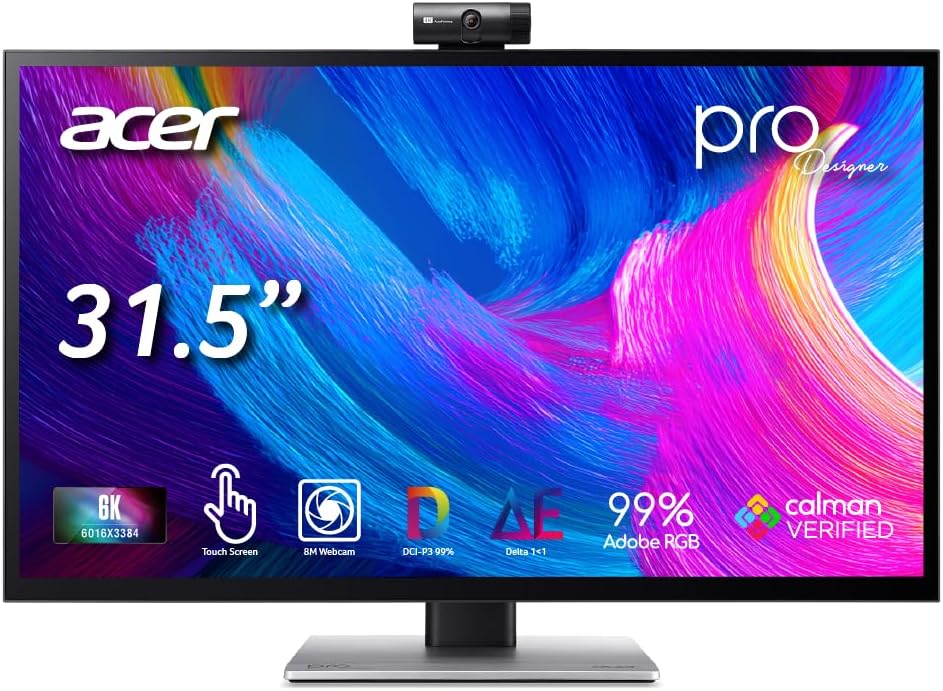
This monitor allows direct interaction on the screen, merging editing and reviewing into one surface. It supports an MPP 2.0 stylus for natural sketching. The 10-point touch helps with navigation and annotation without extra peripherals.
We may earn a commission when you buy through this link, at no additional cost to you.
Factory calibration ensures Delta E < 1 accuracy for print and digital work. The built-in 8MP webcam and microphone array remove the need for external gear during calls. DisplayHDR 600 offers bright highlights and true shadow details.
The touch layer can attract fingerprints or reflections in bright rooms, which might distract some users. It is an investment in productivity rather than a budget option. However, the convenience of not needing a second tablet is a major benefit.
Designers who need to annotate or draw directly on files will appreciate this device. It is best for workflows that require frequent input changes and high fidelity color accuracy for final output.
Direct touch and stylus support allow for precise retouching and annotation directly on the display surface.
Built-in 8MP webcam and 4-mic array with noise reduction simplify video calls without extra hardware.
We may earn a commission when you buy through this link, at no additional cost to you.
The G32X focuses on core performance with a clean, minimalist design that fits modern desks. It offers high-resolution visuals for daily work with an anti-glare coating that reduces reflections. The build quality is durable with CNC-machined aluminum.
We may earn a commission when you buy through this link, at no additional cost to you.
Features include 100W power delivery and multiple video interfaces for flexible connections. It supports ergonomic adjustments and VESA mounting for custom setups. Eye care modes help reduce fatigue during long hours of productivity.
The monitor lacks advanced software features or built-in speakers, which keeps costs down. It is a solid choice for users who prefer hardware simplicity over extra bloat. The rating suggests strong satisfaction with the display quality.
Ideal for professionals who want a reliable, high-density screen without unnecessary extras. If your priority is image clarity and clean aesthetics, this model delivers consistent value for office and creative tasks.
A sleek, minimalist aluminum body complements modern workspaces while maintaining structural durability.
With 218 PPI and accurate colors, text and graphics remain sharp and vibrant for extended viewing sessions.
We may earn a commission when you buy through this link, at no additional cost to you.
This enterprise-grade monitor offers a large screen with powerful connectivity for professional stations. It supports high resolutions and refresh rates to keep workflows smooth. The Thunderbolt 4 hub manages data and power efficiently.
We may earn a commission when you buy through this link, at no additional cost to you.
Software tools like Dell Color Management and Display Manager help standardize color across teams. Remote control and KVM functionality add layers of management useful for shared environments. The power delivery reaches up to 140W for demanding laptops.
The price is steep compared to other options, and the target audience is specialized. It requires careful consideration of workspace size. The lower rating might reflect mixed experiences with calibration or shipping.
Best for organizations needing standardized, large displays. If budget is secondary to having a unified visual tool for complex work, this Dell unit provides enterprise-level utility.
Integrated Dell Color Management and Display Manager help standardize color and layout across multiple systems.
Dual Thunderbolt 4 ports allow for high-speed data transfer and daisy-chaining of peripherals efficiently.
We may earn a commission when you buy through this link, at no additional cost to you.
LG brings Thunderbolt 5 to this professional monitor, offering faster data speeds than previous generations. The Nano IPS Black panel improves contrast while maintaining wide color coverage. It is built for demanding creative workflows.
We may earn a commission when you buy through this link, at no additional cost to you.
Features include support for 99.5% Adobe RGB and 98% DCI-P3, ensuring accurate color for print and cinema. KVM functionality allows control of two PCs with one set of peripherals. The bundle includes useful accessories like cleaning kits.
This is a top-tier device for those who need the fastest connections and best visuals. The price is high, reflecting the premium components and advanced specs. Setup requires powerful hardware to handle the throughput.
If you want the latest tech and excellent color, this is a strong candidate. It is best for professionals who need to move large files quickly and demand the highest fidelity visuals.
Up to 80 Gbps data transfer speeds reduce wait times when moving large media files between drives.
With 10-bit color and wide gamut coverage, you get accurate rendering that matches client standards.
We may earn a commission when you buy through this link, at no additional cost to you.
This bundle includes a monitor with a two-year protection pack for added security. It delivers clear visuals with decent brightness and response times for general work. The inclusion of cables reduces the hassle of finding compatible ones.
We may earn a commission when you buy through this link, at no additional cost to you.
Features include USB Type-C for data and power transmission. The 5ms response time makes it suitable for light multimedia tasks. Brightness reaches 450 nits for well-lit rooms. The 6K mode provides sharp text for reading and coding.
While the protection is a benefit, the color specs are not as advanced as competitors. It may not suit high-end color grading but is fine for general productivity. The rating reflects mixed user expectations.
Ideal for buyers who want a protected purchase with solid clarity. If you value convenience and warranty security over advanced color science, this bundle offers practical value.
Includes a two-year premium service plan to safeguard against accidental damage and malfunctions.
Comes with necessary cables including Thunderbolt 4/USB-C and DisplayPort to get started quickly.
We may earn a commission when you buy through this link, at no additional cost to you.
This renewed option provides a large screen at a potentially lower cost than new units. It includes the main display unit without a stand, suitable for custom mounts. The 120Hz refresh rate ensures smooth performance.
We may earn a commission when you buy through this link, at no additional cost to you.
It supports 6K UHD resolution with a 21:9 aspect ratio for wide workflows. Thunderbolt 4 hub functionality connects to high-speed data and power delivery. Renewed products can save money but may have cosmetic imperfections.
The lack of a stand means you must use a VESA mount. While the rating data is unavailable for this listing, standard specs remain reliable for the base model. Check return policies carefully when buying renewed.
Best for those who have existing mounts and want a large display for less. If you are comfortable with refurbished electronics, this provides a budget-friendly way to access the same screen tech.
Buying renewed can offer cost savings for users who prioritize display tech over new cosmetic condition.
VESA mounting compatibility allows flexible setup options when a standard stand is not needed.
We may earn a commission when you buy through this link, at no additional cost to you.
Choosing a 6K Monitor involves weighing resolution, color performance, and connectivity against your specific workflow needs and budget constraints.
6K resolution offers significantly more pixels than 4K, making text appear sharper and graphics more detailed. Higher pixel density like 220 PPI ensures smooth edges without aliasing which is critical for typography and design work.
Look for models with PPI above 200 to maximize the clarity benefits of 6K resolution on standard desk distances.
Professional work requires wide color coverage to ensure content looks consistent across different devices. Monitors with 98% DCI-P3 or 99% sRGB coverage are ideal for video editing and print design workflows.
Check for Delta E values below 2 to guarantee factory calibration accuracy for true-to-life color reproduction.
High bandwidth ports like Thunderbolt 4 or USB-C are essential for carrying 6K video signals alongside power delivery. Ensure the monitor has the necessary inputs for your laptop or desktop setup to simplify your desk cabling.
Prioritize models with high wattage power delivery if you want to charge your laptop through a single cable connection.
For gaming or animation work, a higher refresh rate reduces motion blur and ensures smooth playback. While many 6K monitors run at 60Hz, some models offer dual modes to boost rates for lower resolution options.
Select a fast response time below 5ms to minimize ghosting during fast-paced visual interactions.
A good stand allows tilt, swivel, pivot and height adjustments to maintain a healthy posture during long sessions. Some monitors also include VESA mounting holes for use with third-party arms if space is limited.
Adjustable stands help reduce neck strain and allow you to position the screen at the optimal viewing angle.
DisplayHDR certification indicates how well a monitor handles high dynamic range content with bright highlights and deep shadows. Higher brightness levels improve visibility in well-lit rooms and enhance contrast in darker environments.
Look for HDR600 or higher brightness to ensure accurate HDR previewing for video and graphic content.
Built-in webcams, touch screens, or KVM switches can replace extra hardware on your desk. Touch capabilities are especially useful for artists who want to sketch directly on the screen without a separate tablet.
Consider your workflow to decide if these extra tools add value or just increase cost and complexity.
Professional monitors often come with extended warranties that protect against dead pixels and hardware failure over time. A longer warranty period can save money on potential repairs and ensures long-term reliability.
Verify the warranty terms and registration requirements to maintain coverage for the full duration.
Begin by connecting the monitor via a high-speed cable that supports 6K video. Use DisplayPort or Thunderbolt 4 for best performance. Ensure your graphics card supports the resolution before turning on the display.
Clean the screen regularly using a microfiber cloth and distilled water. Avoid chemical cleaners that might strip anti-glare coatings or damage the panel. Dust can accumulate on sensors and ports so gently wipe them down.
Calibrate your display settings to match your work environment for accurate colors. Use built-in software tools or external calibrators if you do color work. Adjust brightness based on ambient light to reduce eye strain over time.
A 6K Monitor provides roughly 32 million pixels compared to 4K's 8 million. This higher density results in sharper text and images. It also offers more screen real estate for multitasking and detailed creative tasks.
Yes, driving 6K resolution requires a strong graphics card to handle the pixel load effectively. Older systems may struggle with lag or limited output options. Ensure your computer has the correct ports like Thunderbolt or DisplayPort.
Many 6K Monitors are designed to work well with Mac systems via Thunderbolt connections. Models with macOS color presets simplify the setup process. Always check connectivity requirements to avoid needing adapters.
Use monitors with built-in blue light filters and adjust brightness to match your room. Take regular breaks using the 20-20-20 rule. Proper stand height and ambient lighting also help reduce discomfort during long work.
Yes, several 6K Monitors offer high refresh rates and response times for gaming. Look for G-SYNC or FreeSync support to minimize screen tearing. Dual mode options allow switching resolution for faster frame rates.
IPS panels offer wide viewing angles and color consistency for general use. OLED panels provide deeper blacks and higher contrast but may risk burn-in. For long editing sessions, IPS is often more reliable and durable.
The ASUS ProArt PA32QCV leads our list with excellent color accuracy and Mac integration. The G32P offers a budget-friendly option without sacrificing essential specs. For premium needs the LG UltraFine evo delivers the latest tech and fast data transfer.
Prioritize what matters most for your specific work such as touch input or large screen real estate. Consider how your current computer handles high resolutions before making a final decision.
Remember that prices and models change regularly. Check current offers and reviews to ensure you are getting the best value for your investment in a 6K Monitor.