
TP-Link Nano AC600
4.5Editor score
Nano size design
Dual band support
2 year warranty
This guide compares the top 5GHz WiFi Dongle options for desktops and laptops, reviewing speed, range, and compatibility to help you choose the right adapter.
Finding a reliable 5GHz WiFi Dongle can transform your desktop or laptop experience by offering faster speeds and reduced congestion. These adapters plug into USB ports to provide dual-band connectivity, ensuring your device stays online even in crowded wireless environments.
We evaluated ten top-rated models based on performance, build quality, and user feedback. Our comparison covers AC and WiFi 6 standards, antenna designs, and operating system compatibility to help you find the best fit for your setup.
Each pick highlights specific strengths like budget friendliness or premium features. Remember that prices fluctuate frequently, so check current listings before purchasing. This guide ensures you understand what matters most when upgrading your wireless connection today.
4.5Editor score

4.4Editor score

4.1Editor score
The following table provides a side-by-side comparison of all ten selected adapters, highlighting key specifications and features to assist in your decision-making process for a stable wireless connection.


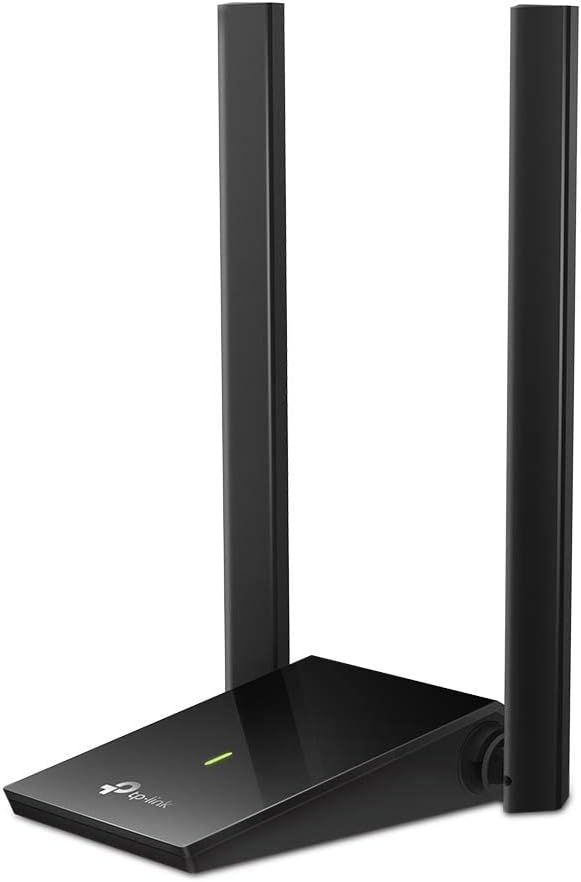


The TP-Link AC600 USB WiFi Adapter stands out as a solid choice for users needing reliable dual band connectivity on desktop PCs. With a rating of 4.4 stars, it offers speeds up to 433 Mbps on the 5 GHz band and 200 Mbps on the 2.4 GHz band. This adapter ensures lag-free connections for web surfing, gaming, and streaming across your home network.
We may earn a commission when you buy through this link, at no additional cost to you.
Key strengths include its long-range performance driven by a high gain 3dBi antenna that enhances signal transmission. The adjustable multi-directional design allows you to rotate the antenna for optimal reception. Dual-band support provides flexibility to connect to the latest routers for faster speeds and extended range. Wireless security features protect your data using WPA and WPA2 standards.
Trade-offs involve Windows-only compatibility which limits Mac users and USB 2.0 speeds compared to USB 3.0 models. However these limitations are acceptable for basic connectivity needs. The easy setup process ensures smooth installation with a friendly user interface. Drivers are available on the TP-Link site for older Windows versions.
This adapter is ideal for budget-conscious users wanting an upgrade from older wireless N speeds. It delivers stable connections for everyday tasks without breaking the bank. If you need a simple reliable dongle for desktop PCs the TP-Link AC600 is a recommended choice for consistent performance.
The high gain antenna significantly boosts WiFi signal strength ensuring better performance across rooms and floors.
Connect to 5 GHz for speed or 2.4 GHz for range providing adaptability for different network environments.
We may earn a commission when you buy through this link, at no additional cost to you.
The TP-Link Nano AC600 offers a sleek miniature design perfect for users prioritizing portability and space efficiency. Rated 4.5 stars it provides AC600 dual band wireless speeds for fast connections. Its tiny form factor allows you to plug it in and leave it permanently without obstructing other ports or cluttering the workspace.
We may earn a commission when you buy through this link, at no additional cost to you.
Strengths include strong 2.4G/5G connections that ensure a lag-free experience for internet browsing. The industry-leading support provides two years of free technical assistance available twenty-four seven. Compatibility extends to Windows and Mac OS X systems making it versatile across platforms. The design prioritizes convenience for desktop and laptop users alike.
Trade-offs involve potential driver installation requirements depending on your operating system version which adds minor setup steps. Additionally it uses USB 2.0 which may limit maximum throughput compared to newer standards. These factors are minor considering the price and convenience. The adapter remains reliable for general usage.
Choose this adapter if you need an affordable compact solution for dual band WiFi. It fits well in laptops or small desktops where space is limited. The reliable performance and support make it a top pick for budget-friendly upgrades to modern AC standards.
The nano size ensures the adapter stays plugged in without sticking out or getting damaged during transport.
Leverages AC600 speeds on both bands for balanced performance and reduced interference.
We may earn a commission when you buy through this link, at no additional cost to you.
The TP-Link AC1300 USB WiFi Adapter delivers high-speed connectivity with AC1300 dual band performance. Rated 4.4 stars it supports MU-MIMO and beamforming for lag-free experiences. The USB 3.0 port ensures data transfers ten times faster than USB 2.0 enabling robust performance for streaming and gaming.
We may earn a commission when you buy through this link, at no additional cost to you.
Strengths include the MU-MIMO feature which improves connection efficiency with multiple devices. The mini portable size allows easy transport between computers. TP-Link is recognized as a top consumer WiFi provider ensuring quality. Dual-band support provides strong high-speed connections throughout your house for reliable internet access.
Trade-offs involve dependency on USB 3.0 ports for full speed benefits and lack of Linux support. However for most Windows and Mac users these are not significant issues. The compact design and speed make it a practical upgrade. Installation is straightforward for supported operating systems.
Ideal for users needing faster speeds than AC600 without breaking the bank. It supports modern WiFi standards ensuring longevity. The AC1300 adapter balances price and performance making it a reliable choice for daily computing needs.
Delivers beamforming connections for better throughput when multiple devices are connected to the network.
Utilizes SuperSpeed USB 3.0 to reduce bottlenecks in data transfer rates.
We may earn a commission when you buy through this link, at no additional cost to you.
The Nineplus Wireless USB WiFi Adapter provides AC1300Mbps speeds for long-range stable connections. With 4.3 stars it features dual 5dBi high gain antennas to enhance signal transmission. Ideal for upgrading desktops or laptops it supports Windows 11/10/7 systems effectively.
We may earn a commission when you buy through this link, at no additional cost to you.
Strengths include dual-band speeds with 867Mbps on 5.8GHz and 400Mbps on 2.4GHz for smooth streaming. The dual antennas ensure accurate signal capture even at distances overcoming poor signal issues. USB 3.0 delivers faster data transfer and compatibility. The online setup support adds value for installation.
Trade-offs include Windows-only compatibility requiring manual driver installation for older versions like Win 7. This may inconvenience Mac users. However the speed and stability offer excellent value. The adapter extends device life cost-effectively.
Choose this adapter for high speeds and strong signal penetration in larger spaces. It offers a budget-friendly path to modern AC1300 speeds. The dual antennas make it a reliable option for desktop gaming or streaming.
Equipped with two high-gain antennas for stronger signal capture and wider coverage area.
Supports faster data transfer rates compared to USB 2.0 for better performance.
We may earn a commission when you buy through this link, at no additional cost to you.
The UGREEN WiFi Adapter introduces AX900 USB WiFi 6 technology for high-speed transmission. Rated 4.2 stars it supports 600 Mbps on 5 GHz and 287 Mbps on 2.4 GHz. It is compatible with Windows 10/11 on X86/X64 architectures.
We may earn a commission when you buy through this link, at no additional cost to you.
Strengths include built-in drivers allowing CD-free installation saving time and worry. The adapter enables lightning-fast transmission of video at ultra-high speed and low latency. It acts as both receiver and transmitter. Security is maintained via WPA/WPA2 modes.
Trade-offs include lack of Linux support and shorter recommended distance of 30ft. These limits apply to advanced users. The convenience of pre-loaded drivers outweighs minor drawbacks for most users.
Ideal for users wanting modern WiFi 6 speeds without complex setup. It provides a reliable connection for video streaming. Choose this adapter for seamless integration with modern Windows systems.
Supports AX standard rates for faster connectivity than older AC adapters.
Built-in drivers eliminate need for external CDs or manual downloads.
We may earn a commission when you buy through this link, at no additional cost to you.
The Tenda AX900 WiFi Adapter offers dual-band performance with 6dBi high gain antenna. Rated 4.3 stars it delivers speeds up to 600Mbps on 5GHz. The external antenna ensures improved reception compared to built-in models.
We may earn a commission when you buy through this link, at no additional cost to you.
Strengths include faster connection speeds than AC600 adapters for 4K streaming. The antenna provides multi-dimensional rotation for optimal signal. Preloaded drivers enable instant setup without technical skills. AP Mode allows hotspot creation.
Trade-offs include lack of Linux support and AP Mode limited to 5GHz. These do not hinder basic use. The smart algorithm improves signal range and stability.
Choose this adapter for superior signal reception and speed. It is ideal for competitive gaming. The high gain antenna makes it a strong contender for better coverage.
High gain antenna improves weak signal reception in interference-heavy environments.
Turn your PC into a Wi-Fi hotspot for other devices easily.
We may earn a commission when you buy through this link, at no additional cost to you.
The BrosTrend AX1800 Adapter delivers latest speeds with AX1800 dual-band performance. Rated 4.1 stars it supports 1201Mbps on 5GHz. The desktop design includes a 3.3-foot USB 3.0 extension cable.
We may earn a commission when you buy through this link, at no additional cost to you.
Strengths include 38% faster speeds than AC1300 models. Dual 5dBi high gain antennas ensure strong signal reception. Beamforming technology delivers targeted signals. It supports Windows 11/10 and Linux but not Mac.
Trade-offs include lack of Mac support and Linux-only OS compatibility. These limit Mac users. The high speed and range make up for this for PC users.
Ideal for users needing maximum throughput and range. It is perfect for HD streaming. The premium features justify the price.
Delivers highest data rates for efficient multi-device connectivity.
Includes extension cable for optimal placement away from computer chassis.
We may earn a commission when you buy through this link, at no additional cost to you.
The TP-Link AC1300 High Gain Adapter offers super-fast speeds for gaming. Rated 4.4 stars it has dual high-gain antennas. The USB 3.0 port enables 10x faster transfer speeds.
We may earn a commission when you buy through this link, at no additional cost to you.
Strengths include 400Mbps on 2.4GHz and 867Mbps on 5GHz. Dual antennas improve range and signal quality. Flexible desktop design aids deployment. Compatible with Windows and macOS X.
Trade-offs include size making it less portable and Mac compatibility limited to X 10.9-10.14. These are acceptable for desktop use. The adapter ensures flexible connectivity.
Choose for superior range and performance. It supports modern gaming needs. The dual antennas provide robust signal quality.
Dual high-gain antennas boost range and transmission performance.
Multi-directional antennas allow precise placement for best reception.
We may earn a commission when you buy through this link, at no additional cost to you.
The UGREEN AX1800 Adapter provides blazing-fast dual-band performance. Rated 4.1 stars it supports 1201 Mbps on 5GHz. WPA3-SAE encryption enhances security. Cooling holes maintain reliability.
We may earn a commission when you buy through this link, at no additional cost to you.
Strengths include MU-MIMO and OFDMA for multi-device connectivity. Built-in drivers ensure quick installation. AP mode allows sharing internet as hotspot. Windows 10/11 compatibility.
Trade-offs include lack of Mac support. This limits Mac users. Security features and speed are strong benefits.
Ideal for secure high-speed browsing. The dual mode is a plus. Reliable for gaming and streaming.
Advanced encryption ensures secure browsing sessions.
Back ventilation holes help maintain performance during long sessions.
We may earn a commission when you buy through this link, at no additional cost to you.
The BrosTrend AX900 Mini Adapter delivers high-speed WiFi 6 performance. Rated 4.2 stars it is compact at 1.4 inches. It offers 600Mbps on 5GHz and 286Mbps on 2.4GHz.
We may earn a commission when you buy through this link, at no additional cost to you.
Strengths include 38% faster 5GHz speeds than AC600. Tiny design integrates seamlessly. Pre-loaded driver simplifies setup. Advanced technologies ensure reliable performance.
Trade-offs include lack of Mac and Linux support. It uses USB 2.0 which is slower. For Windows users this is minor.
Choose for portability and speed. Ideal for clutter-free workspaces. A reliable compact upgrade for PC users.
Measures 1.4 inches ensuring clutter-free workspace integration.
Uses OFDMA and MU-MIMO for efficient connectivity.
We may earn a commission when you buy through this link, at no additional cost to you.
Selecting the right adapter involves understanding key technical specifications and features that impact your wireless experience.
Wireless standards like AC or AX determine your maximum potential speeds. AC600 adapters offer basic speeds while AC1300 or AX1800 provide faster throughput for streaming and gaming. Higher ratings ensure better performance in congested networks.
Dual-band adapters connect to both 2.4GHz and 5GHz frequencies. 5GHz offers faster speeds and less interference while 2.4GHz provides better range. Choosing a dual-band dongle ensures flexibility based on your needs.
External high-gain antennas improve signal strength and range significantly. Internal antennas save space but may struggle with distance. For desktops, adjustable or high-gain external antennas are recommended to overcome obstacles.
USB 3.0 ports provide faster data transfer than USB 2.0 ensuring the adapter can handle high speeds. If your computer only has USB 2.0, speeds may be throttled regardless of the dongle's capabilities.
Not all adapters support Mac or Linux. Most Windows models work seamlessly but checking specs is vital if you use other systems. Some newer WiFi 6 models require specific Windows versions.
Some adapters include built-in drivers while others require downloading from manufacturer sites. Pre-loaded drivers save time and ensure smoother installation especially on systems without internet access.
Prices range from budget-friendly options under fifteen dollars to premium models near forty dollars. Prioritize features like MU-MIMO or WPA3 if you need advanced performance but basic tasks may work with cheaper units.
Modern adapters support WPA3 encryption for better security. Ensuring your adapter supports current standards protects your data from threats especially when connecting public or home networks.
Update drivers periodically for performance improvements. Avoid exposing the adapter to moisture or extreme heat to prolong its lifespan.
Yes, it reduces lag and jitter due to less interference. This results in smoother gameplay especially in crowded areas.
Many support Mac but checking compatibility is key. Some models are Windows-only so verify before purchasing.
AX is newer technology offering faster speeds and better efficiency. AC is older but still reliable for basic needs.
Yes, dual-band dongles work with older routers but you must use the 2.4GHz band if needed.
Slow speeds may result from USB 2.0 ports or distance from the router. Ensure proper setup to maximize performance.
Some do but support varies widely. Check product specs carefully if you plan to run Linux.
Prices change frequently so check current listings before buying. These adapters provide essential upgrades for stable home connectivity.