
M-AUDIO Keystation 49 MK3
4.5Editor score
Plug and play USB
Full size velocity keys
Includes software bundle
This guide compares the top 49 key MIDI keyboards for producers and performers, evaluating features, integration, and value to help you choose the right
Choosing the right 49 key MIDI keyboard is essential for producers, composers, and performers who need a balanced workspace for melody, chords, and transport control without overwhelming desk real estate.
We evaluated ten leading models based on key feel, software integration, control surfaces, and overall value, ensuring each pick delivers reliable performance for home studios and mobile setups alike.
Each review highlights standout strengths and trade-offs so you can match a controller to your DAW and genre, and remember that pricing and bundles often shift with seasonal promotions.
4.5Editor score

4.7Editor score

4.4Editor score
This side-by-side comparison covers all ten selected models so you can quickly weigh key features, connectivity options, and included software against your specific production needs.




The Novation Launchkey 49 MK4 stands out as a top performer for producers who want a controller that feels like an extension of their digital audio workstation.
We may earn a commission when you buy through this link, at no additional cost to you.
Its seamless integration with major DAWs, including Ableton Live and Logic, means you spend less time configuring mappings and more time composing.
The FSR drum pads are highly responsive and support polyphonic aftertouch, making them suitable for both drumming and melodic sequencing tasks.
If you value workflow efficiency and creative tools like Scale and Chord modes, this controller offers a premium experience that justifies its cost.
Launchkey includes custom scripts for most major DAWs so transport, track, and mixer controls map automatically for faster session work.
Features like Scale Mode and Step Sequencer help you craft tight patterns and avoid wrong notes during live jams or recording.
We may earn a commission when you buy through this link, at no additional cost to you.
The M-AUDIO Keystation 49 MK3 is a classic choice for beginners who want a reliable keyboard without breaking the bank or dealing with drivers.
We may earn a commission when you buy through this link, at no additional cost to you.
Its velocity-sensitive keys offer a natural feel that captures nuance in performance, while the compact design fits well on smaller desks.
Although it lacks pads and extensive knobs, the included software like Ableton Live Lite and MPC Beats gives you a full production start.
For those focused on learning to compose and play, this keyboard provides a straightforward and cost-effective path into MIDI production.
You can connect to Mac, PC, or iOS immediately without installing drivers or external power supplies for instant creative sessions.
The included package features DAW software and instruments plus free lessons from Skoove and Melodics to help you learn quickly.
We may earn a commission when you buy through this link, at no additional cost to you.
The Nektar SE49 delivers essential MIDI control in a compact chassis that is ideal for mobile setups or limited workspace environments.
We may earn a commission when you buy through this link, at no additional cost to you.
It offers comprehensive MIDI functionality and DAW integration for popular software, making it easy to control your computer from the hardware.
While it does not include a pitch wheel, it covers most basic needs for playing virtual instruments and managing transport in sessions.
For producers who prioritize simplicity and portability, this keyboard is a practical and affordable option that gets the job done.
Nektar provides custom scripts for major DAWs so you can manage tracks and transport directly from the keyboard.
Its lightweight and small form factor make it easy to pack for gigs or use on cramped desktops.
We may earn a commission when you buy through this link, at no additional cost to you.
The M-AUDIO Oxygen 49 MKV sits in the sweet spot for producers who want tactile control over their virtual instruments without full premium pricing.
We may earn a commission when you buy through this link, at no additional cost to you.
Its eight knobs and nine faders allow you to tweak synth parameters and mix levels on the fly, bringing physical engagement to your workflow.
The NKS integration lets you browse Native Instruments sounds directly from the keyboard, which is a huge plus for users invested in that ecosystem.
If you need a balanced controller that covers both performance and mixing tasks, this model delivers versatile tools that grow with your skills.
Dedicated faders and knobs map automatically to your DAW and plugin parameters for quick adjustments while recording.
Smart Chord and Smart Scale modes help you generate harmonies and avoid mistakes when writing complex arrangements.
We may earn a commission when you buy through this link, at no additional cost to you.
Arturia has long been known for strong software integration, and the KeyLab Essential mk3 continues that legacy with the included Analog Lab V package.
We may earn a commission when you buy through this link, at no additional cost to you.
Its bright LCD screen provides real-time feedback for parameters, making it easy to navigate presets without staring at your computer screen.
The custom DAW scripts support major platforms like Ableton and Logic, ensuring that your controller behaves intuitively within your existing environment.
For sound designers and producers who rely on high-quality synths, this keyboard offers a robust toolset that enhances both sound selection and performance.
The bundled software includes thousands of presets covering vintage and modern sounds, giving you immediate access to a wide palette.
The 2.5 inch LCD shows parameters and values clearly so you can adjust settings with precision during live performance.
We may earn a commission when you buy through this link, at no additional cost to you.
This generic 49-key controller offers a functional entry point for those who need basic MIDI input without spending on advanced features.
We may earn a commission when you buy through this link, at no additional cost to you.
Its ABS construction keeps it lightweight and durable enough for regular use, while the compact dimensions allow it to fit easily on small desks.
While it lacks the advanced features found in higher-end models, it fulfills the essential role of translating key presses into MIDI data reliably.
For casual users or those testing a new setup, this keyboard provides a no-frills option that gets you started without a large investment.
The simple design keeps costs low, making it accessible for students or hobbyists who need basic note input.
Its small footprint ensures it can sit comfortably on crowded workspaces without obstructing monitors or other gear.
We may earn a commission when you buy through this link, at no additional cost to you.
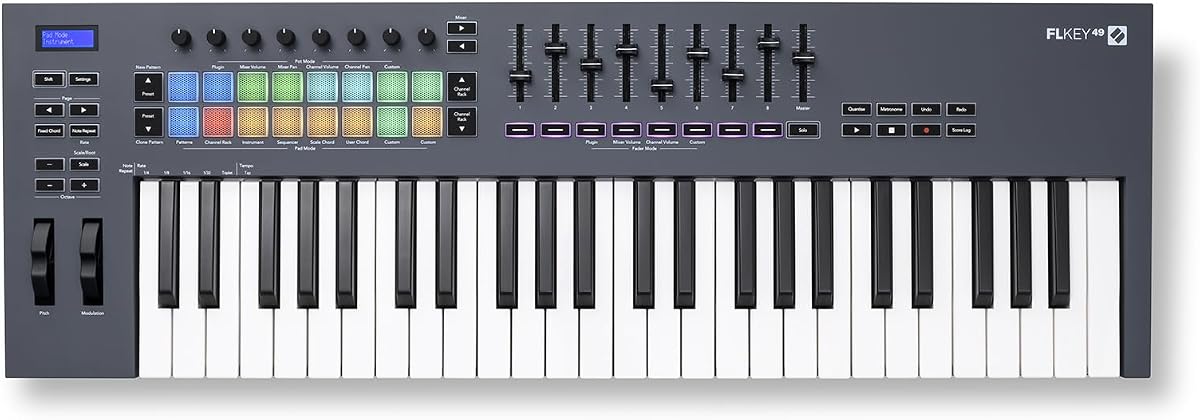
The Novation FLkey 49 is purpose-built for FL Studio users, bringing channel rack and mixer controls directly to your hands to speed up beat-making.
We may earn a commission when you buy through this link, at no additional cost to you.
Its sequencer mode maps the pads to FL Studio's step sequencer, allowing you to program rhythms and patterns without touching the mouse.
Transport and score log buttons keep you in the flow, while scale modes help you maintain harmony when crafting melodies.
If you live in FL Studio, this controller removes friction from the production process and turns your keyboard into a dedicated beat machine.
Controls map directly to FL Studio's mixer and channel rack, so you can adjust pans and volumes instantly.
The step sequencer mode allows you to create and change patterns rapidly using the pads for fast idea capture.
We may earn a commission when you buy through this link, at no additional cost to you.
The M-AUDIO Oxygen Pro 49 adds professional touches like aftertouch and more pads, making it suitable for expressive performances and complex productions.
We may earn a commission when you buy through this link, at no additional cost to you.
Its semi-weighted keys provide more resistance than standard synth action, offering a feel that bridges the gap between piano and synthesizer.
With 16 RGB pads and extensive knob and fader control, you can manage a wide array of instruments and effects without reaching for the mouse.
For producers who need tactile feedback and expressive capabilities, this model delivers a comprehensive control surface that supports advanced workflows.
Aftertouch allows you to modulate sound after pressing a key, adding dynamics and expression to sustained notes.
16 pads give you more room for drum patterns and sample triggering compared to smaller controllers.
We may earn a commission when you buy through this link, at no additional cost to you.
The midiplus AK490 is a straightforward controller that provides essential functions without extra features that might complicate simple setups.
We may earn a commission when you buy through this link, at no additional cost to you.
Its velocity-sensitive keys and standard pitch and modulation wheels cover the basics needed for playing virtual instruments and recording MIDI.
With both USB and DIN MIDI outputs, you can connect to computers or legacy hardware without needing additional adapters.
This is a good option for those who just need to send note data and don't require extensive control over their DAW.
USB and DIN MIDI outputs allow flexible connections to modern computers or older gear that uses 5-pin cables.
Essential features like sustain and octave controls are present without unnecessary complexity for quick operation.
We may earn a commission when you buy through this link, at no additional cost to you.
The Arturia KeyLab mk3 brings high-end build quality and features like aftertouch to producers who demand a professional-grade interface.
We may earn a commission when you buy through this link, at no additional cost to you.
Its 12 performance pads and nine encoders give you precise control over your instruments, while the white finish offers a distinct look.
This controller is designed to integrate deeply with Arturia software and other major DAWs for a seamless creative experience.
If you value aesthetics and tactile precision, this keyboard is a premium investment that delivers long-term value in the studio.
High-quality encoders and pads respond accurately to your touch, ensuring that your performances are translated faithfully.
USB-C power options offer flexibility and align with modern device standards for easier cable management.
We may earn a commission when you buy through this link, at no additional cost to you.
Choosing a 49 key MIDI keyboard involves balancing physical features, software needs, and budget constraints.
The feel of the keys impacts how you play and your ability to perform nuanced dynamics. Look for velocity-sensitive keys at minimum, and consider aftertouch if you plan to use expressive controls during performance.
If you play piano-style parts often, semi-weighted keys offer more resistance and a more realistic experience than lightweight synth-action keys.
Controllers with custom scripts for your specific digital audio workstation let you control transport, tracks, and mixing without manual mapping.
Strong integration saves time and keeps your hands on the hardware rather than the mouse during creative sessions.
Faders, knobs, and pads give you hands-on control over instruments and effects. More controls mean you can manage complex arrangements without opening plugin windows.
Match the layout to your workflow; for example, FL Studio users might prioritize step sequencer mapping while others may prefer knob depth.
Many controllers include DAWs and instrument plugins that can save you hundreds of dollars when starting out.
Check which software is included and whether it aligns with your production needs before purchasing.
Ensure the controller offers the right ports for your setup, such as USB, MIDI DIN, or pedal inputs.
Modern controllers often include USB-C power for easier connection to laptops and mobile devices.
A sturdy chassis ensures durability over years of regular use, while finishes like white or black can influence your studio's look.
Consider whether the physical design fits your desk and if materials feel premium enough for long sessions.
Prices vary widely based on features and build. Determine what you need versus what you want to avoid overspending.
Entry models may lack pads, while mid-range options balance features and cost effectively.
If you travel for gigs or use multiple locations, weight and dimensions matter significantly for ease of transport.
Compact designs can fit in backpacks but may compromise on keybed quality or control depth.
Begin by connecting your keyboard to your computer via USB and ensuring any necessary drivers are installed if required.
Configure your DAW to recognize the device and use any included mapping tools to customize controls for your favorite plugins.
Keep your controller clean with a soft cloth and avoid exposing it to dust, moisture, or direct sunlight for long periods.
Many modern controllers are class-compliant and require no drivers, though some models may offer optional drivers for advanced features.
Aftertouch allows you to modulate sound pressure after a key is pressed, adding dynamics to sustained notes.
Yes, 49 keys offer a balance between melody and space savings, ideal for compact studios and mobile setups.
Most USB controllers include the USB cable, but MIDI DIN or pedal cables may need separate purchase.
Many USB-MIDI keyboards work with iPad via a camera adapter if they are class-compliant and do not require drivers.
Bundles often include DAW versions and instrument plugins such as MPC Beats and Ableton Live Lite.
Our top picks highlight models ranging from budget-friendly essentials to premium controllers with advanced features.
Prioritize DAW integration and control surfaces that match your production style for a seamless workflow.
Check current pricing and bundle offers before buying as promotions frequently update product value.