
ARCTIC Liquid Freezer III Pro 420
4.4Editor score
Powerful P14 PRO fans
Integrated cable management system
Reliable heat dissipation
Choosing the right cooling solution is critical for high performance computing. A 420mm AIO liquid cooler offers exceptional thermal performance for demanding workloads and gaming sessions.
We evaluated ten top rated models based on cooling efficiency, noise levels, build quality, and feature sets. Each product was analyzed for compatibility and real world performance claims.
This guide details the strengths and weaknesses of each option to help you decide. Remember that availability and pricing may change so verify details before purchasing your next cooling system.
4.4Editor score

4.6Editor score

4.4Editor score
As an Amazon Associate we earn from qualifying purchases.
The following table provides a side by side overview of the leading 420mm AIO liquid coolers available in November 2026. Use this reference to compare key specifications at a glance.


The ARCTIC Liquid Freezer III Pro 420 A-RGB stands out as a top contender for extreme cooling needs. It holds an impressive 4.6 rating from verified users who value performance and reliability.
We may earn a commission when you buy through this link, at no additional cost to you.
Its standout feature is the native offset mounting which shifts the cold plate center toward the CPU hotspot. This design significantly improves heat transfer efficiency compared to standard AIO coolers.
While the performance is exceptional the large radiator may challenge smaller cases. Additionally the integrated VRM fan adds complexity for some users but ensures stable power delivery under load.
If you need the best thermal performance and have the case space this model is highly recommended. It balances raw cooling power with thoughtful design features for modern CPUs.
Shifting the cold plate center ensures the coolant absorbs heat directly from the CPU hotspot for faster dissipation.
The PWM controlled VRM fan lowers voltage converter temperatures ensuring system reliability during intense workloads.
We may earn a commission when you buy through this link, at no additional cost to you.
The ARCTIC Liquid Freezer III Pro 420 offers excellent value for builders prioritizing raw cooling power over aesthetics. It delivers consistent performance with a 4.4 user rating.
We may earn a commission when you buy through this link, at no additional cost to you.
Its P14 PRO fans provide more power at any speed than the standard P14 making it quieter at low loads and faster under high stress.
The lack of RGB lighting might disappoint gamers but the clean cable management and VRM fan support make it ideal for professional workstations.
For those seeking high performance without extra cost this cooler is a smart investment. It ensures CPU longevity and stable thermal performance.
These fans deliver higher maximum speeds and quieter operation at low speeds for optimized cooling across all workloads.
Integrated PWM cables in hose sheathing ensure only a single visible cable connects to the motherboard.
We may earn a commission when you buy through this link, at no additional cost to you.
The NZXT Kraken Elite 420 RGB redefines what a premium AIO cooler can be. Its large 2.72 inch IPS LCD offers crisp visuals and real time system monitoring.
We may earn a commission when you buy through this link, at no additional cost to you.
Built around a custom NZXT Turbine pump it maintains high flow rates and head pressure for efficient cooling even on the heat prone CPUs.
While the price is higher than standard models the customization options including Spotify and Google Photos integration add significant user value.
If you want a cooler that looks as good as it performs this is the top choice. It merges aesthetics with advanced thermal engineering.
The 640 x 640 resolution screen supports GIFs system photos and real time performance monitoring.
Sync with Google Photos and Spotify to display custom content or control RGB effects across your system.
We may earn a commission when you buy through this link, at no additional cost to you.
The ARCTIC Liquid Freezer III Pro 420 A-RGB variant continues to impress with its robust cooling capabilities and user friendly features. It holds a strong 4.4 user rating.
We may earn a commission when you buy through this link, at no additional cost to you.
Its native offset mounting ensures the cold plate targets the CPU hotspot efficiently reducing thermal resistance for faster heat transfer.
The integrated VRM fan helps keep voltage converters cool ensuring system stability during high performance tasks which is rare in this price range.
This cooler is perfect for users who need reliable performance and clean cable management. It supports the latest Intel and AMD sockets effectively.
Shifting the cold plate center ensures more efficient heat transfer by targeting the CPU hotspot directly.
This PWM controlled fan lowers voltage converter temperatures ensuring reliable performance under load.
We may earn a commission when you buy through this link, at no additional cost to you.
The be quiet! Silent Loop 3 420mm is designed for users who prioritize silence above all else. It boasts an impressive 4.7 user rating for its noiseless operation.
We may earn a commission when you buy through this link, at no additional cost to you.
Its 3 chamber pump design significantly reduces turbulences and noise while delivering incredibly high cooling performance thanks to the engineered cooling block.
The included Silent Wings 4 140mm PWM fans are adjustable and dampened making the system virtually inaudible even during high load operations.
Ideal for home studios or quiet workspaces this cooler offers Threadripper support and wide CPU plate coverage. It ensures efficient heat dissipation without noise.
This pump design reduces turbulences and noise while maintaining high cooling performance for demanding CPUs.
High speed PWM fans with radiator corners ensure virtually inaudible operation during intense computing sessions.
We may earn a commission when you buy through this link, at no additional cost to you.
The Geometric Future Eskimo Pro brings modern aesthetics and solid cooling performance to the 420mm AIO market. It holds a 4.6 user rating for its reliability and visual appeal.
We may earn a commission when you buy through this link, at no additional cost to you.
Its K6 liquid pump delivers a 1.5 L/min flow rate ensuring efficient coolant circulation through the large 55.8 x 55.8mm copper base.
The Squama 2503 ARGB fans are pre installed high static pressure fans designed to push air through the radiator effectively even in tight spaces.
For those seeking vibrant ARGB lighting and compatibility with Intel and AMD sockets this model is a strong contender. It offers a great balance of style and cooling.
Advanced pump design offers a 1.5 L/min flow rate for efficient coolant circulation and heat dissipation.
Pre installed fans with high static pressure ensure effective airflow through the 420mm radiator for consistent cooling.
We may earn a commission when you buy through this link, at no additional cost to you.
The ASUS ProArt LC 420mm is designed for professionals needing reliable cooling without distracting aesthetics. It carries a 4.4 user rating for its robust build quality.
We may earn a commission when you buy through this link, at no additional cost to you.
Its Noctua NF-A14 industrialPPC-2000 PWM fans deliver high airflow with minimal noise making it perfect for work environments where focus is key.
The illuminated meter on the pump provides live system load temperature and fan speed data which is a rare and useful feature for monitoring.
This cooler complements ProArt components with its minimalist design. It ensures long term reliability with thicker radiator and durable tubing.
An illuminated meter indicates live system load temperatures and fan speeds for real time performance monitoring.
This motor technology offers excellent cooling capability and quieter operation for professional workloads.
We may earn a commission when you buy through this link, at no additional cost to you.
The Thermaltake TH420 V2 Ultra ARGB combines LCD customization with broad compatibility for a wide range of systems. It holds a 4.0 user rating among enthusiasts.
We may earn a commission when you buy through this link, at no additional cost to you.
Its new industrial look features a 2.1 inch LCD with 480 x 480 resolution allowing users to show off 16.8M color videos or photos.
The high performance copper base plate accelerates heat conductivity while the reliable pump enables maximum water circulation to keep the copper plate cool.
This model is suitable for users who want customization without paying premium prices. It syncs with major motherboard RGB software for cohesive lighting.
High resolution screen allows users to display custom videos and photos for a unique PC aesthetic.
High performance copper accelerates heat conductivity ensuring the copper plate stays cool during operation.
We may earn a commission when you buy through this link, at no additional cost to you.
The MAGFloe 420 Ultra stands out for its massive 3.95 inch square LCD display and magnetic fan connection technology. It holds a 3.3 user rating indicating room for improvement.
We may earn a commission when you buy through this link, at no additional cost to you.
MAGForce 2.0 improves on the original design by increasing the surface area of pin to pad contacts for better connections and preventing signal drop out.
Included reverse blades let users easily change airflow direction so the LED side of the fan remains visible for aesthetic control.
This cooler is for users who want massive customization and magnetic fan tech. It supports both Intel and AMD sockets effectively.
Magnetic fan connectors ensure easy linking and prevent signal drop out from misalignment of fans.
Reverse blades allow users to change airflow direction so the LED side of the fan remains visible.
We may earn a commission when you buy through this link, at no additional cost to you.
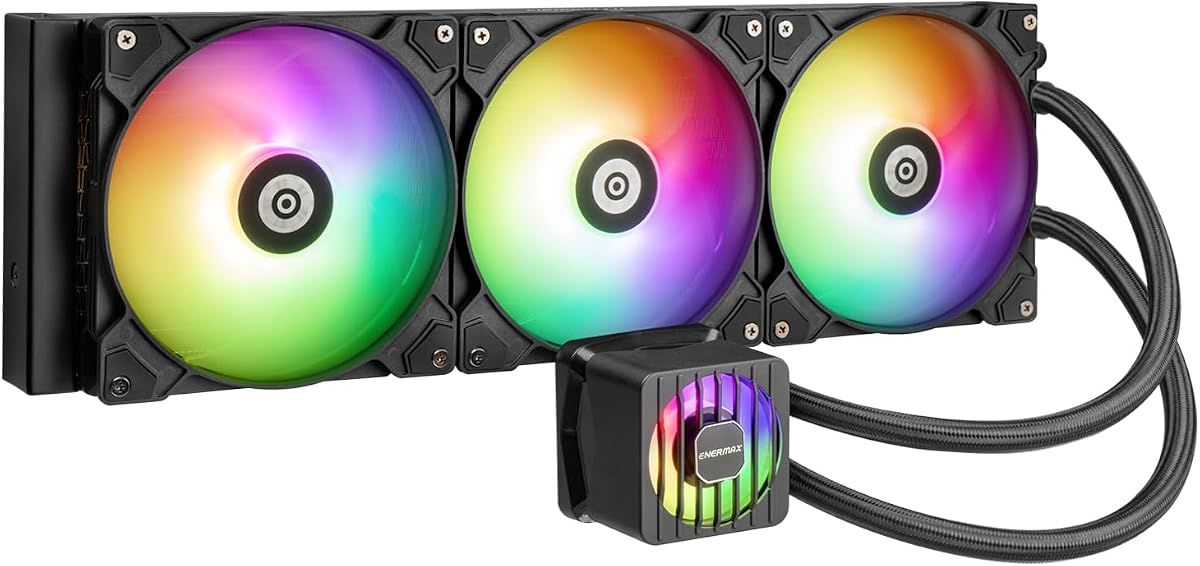
The ENERMAX LIQMAXFLO 420mm offers high performance pumping up to 3000RPM with silent operation for balanced cooling. It holds a 4.1 user rating.
We may earn a commission when you buy through this link, at no additional cost to you.
Its 38mm thick radiator provides enhanced cooling performance while the pressure optimized silent 140mm FDB PWM fans ensure quiet airflow.
The magnetic detachable pump cover can be rotated 90 degrees for easy customisation and neat cable management thanks to daisy chained design.
This cooler is suitable for users needing silent and reliable performance. It supports Intel and AMD sockets with included thermal paste.
Pump speeds up to 3000RPM ensure efficient heat dissipation and reliable performance under load.
Silent FDB bearing fans optimized for pressure ensure quiet airflow and effective radiator cooling.
We may earn a commission when you buy through this link, at no additional cost to you.
Selecting the right 420mm AIO liquid cooler requires understanding several technical factors that impact performance and longevity.
A 420mm radiator is larger than standard 280mm or 360mm units so ensure your case supports 420mm top or front mounting. Measure available space and clearance for fans and radiator thickness before purchasing.
Always check case specifications for maximum radiator dimensions to avoid fitment issues.
The pump drives coolant flow which determines how fast heat is moved away from the CPU. Look for high flow rates like 1.5 L/min or higher for consistent cooling under load.
Higher flow rates generally correlate with better thermal performance and reduced risk of hot spots.
Fans play a critical role in dissipating heat from the radiator. Prioritize models with PWM controlled FDB or fluid dynamic bearing fans which offer quiet and reliable operation.
Select fans with high static pressure if the radiator has tight fins or restrictive case designs.
Ensure the cooler supports your specific CPU socket such as Intel LGA1851 or AMD AM5. Check for native offset mounting features that optimize contact pressure distribution.
Verify that mounting brackets are included for your CPU generation to simplify installation.
Clean cable management makes installation easier and improves airflow inside your case. Look for integrated cable sheathing or daisy chained designs that reduce clutter.
Tool free mounting brackets save time and reduce the risk of damage during installation.
Integrated VRM fans help cool motherboard voltage regulators which can overheat under load. This feature is crucial for high end builds requiring stable power delivery.
Coolers with VRM fans often include PWM control for automatic fan adjustment.
RGB lighting adds visual appeal but consider if it aligns with your build aesthetic. LCD displays allow for custom images or system monitoring which can be useful for troubleshooting.
Check if the RGB software integrates with your motherboard's ecosystem for seamless control.
AIO coolers are subject to wear over time so check warranty length and leak coverage. High quality materials like thick tubing and robust pumps contribute to longer lifespan.
Select brands with a reputation for reliability and customer support to ensure peace of mind.
Install the cooler according to manufacturer instructions ensuring the pump head sits flat on the CPU surface. Apply thermal paste properly if pre applied paste is not included to maximize heat transfer efficiency.
Route cables carefully to avoid interference with fans or other components. Use integrated cable management features to keep wires hidden and organized for optimal airflow.
Monitor pump and fan operation regularly to ensure there are no unusual noises or leaks. Keep the case intake vents clean to maintain consistent airflow and thermal performance.
Check your case manual or manufacturer website for maximum radiator size. Most full tower cases support 420mm at the top or front but measure space and clearance carefully before purchasing.
Offset mounting shifts the cold plate towards the CPU hotspot improving heat transfer efficiency. This design ensures coolant contacts the hottest part of the CPU directly for faster cooling.
Minimal maintenance is required but you should check for dust buildup on fans and radiator regularly. Ensure pump and fans operate quietly and watch for leaks during periodic inspections.
P14 PRO fans deliver more power at any speed than standard P14 fans. They are quieter at low speeds and have higher maximum RPMs for better cooling under high loads.
Most modern coolers support both AM5 and AM4 but verify specific bracket compatibility. Newer mounts often require specific kits for AM5 so check product details before purchasing.
A VRM fan cools motherboard voltage regulators preventing overheating and unstable performance under load. This ensures consistent power delivery for high performance CPUs during intensive workloads.
LCD displays offer custom visuals or system monitoring which adds functionality but increases cost. Consider if you value this feature over other performance features when buying.
Most high quality AIOs last five to seven years depending on usage and quality. Leaks and pump failures are rare but monitor performance and listen for unusual noise regularly.
The ten models reviewed represent the best cooling performance and features available in November 2026. From silent operation to high flow pumps these units cover diverse user needs.
Prioritize thermal performance if you run demanding workloads or choose quiet operation for home studios. Compatibility with your case and CPU socket should also guide your decision process.
Verify current availability and pricing before purchase as details may vary by retailer. Ensure your case supports a 420mm radiator to avoid fitment issues.