
Koolertron 40% Gaming
4.1Editor score
Affordable Price
Full Macro Support
RGB Backlighting
Compare the top 40 percent keyboard models for efficiency and comfort. We analyze build quality, layout, and customization to find the ideal compact solution.
A 40 percent keyboard represents the pinnacle of minimalist typing efficiency. These ultra-compact layouts strip away unnecessary keys to focus on core functionality. They demand a steep learning curve but offer unparalleled speed and desk space savings for dedicated users.
We evaluated ten distinct models based on build quality, switch options, and programmability. Our analysis covers everything from ortholinear splits to standard staggered layouts. We prioritized devices that balance portability with the robust feature sets needed for daily productivity.
Each product highlight demonstrates real-world performance and unique design choices. Prices fluctuate based on availability and promotions so always check current listings. Use this guide to find the perfect match for your specific workflow and ergonomic needs today.
4.1Editor score

4.5Editor score

3.1Editor score
This comparison table summarizes the key specifications of all ten models reviewed. We highlight critical differences in connectivity, switch types, and programmability features. Use this quick reference to identify the model that best fits your specific requirements.




The EPOMAKER Luma40 stands out as a top tier option for compact typing enthusiasts. It features a stunning CNC aluminum chassis that provides exceptional durability and a premium feel. The ortholinear layout reduces finger travel significantly compared to traditional staggered designs.
We may earn a commission when you buy through this link, at no additional cost to you.
Customization is where this keyboard truly shines with full QMK and VIA support. You can remap every single key create macros and define custom layers effortlessly. The hot-swappable sockets allow you to change switches without any soldering making it easy to tweak the sound and feel.
The low profile switches reduce hand strain making long typing sessions more comfortable. While the wireless connectivity is stable the transition between modes occasionally requires a brief pause. The frosted keycaps diffuse RGB lighting beautifully for a clean aesthetic.
This device is perfect for power users who value ergonomics and customization. If you are willing to invest time in learning the layout the rewards are significant. The Luma40 offers a refined typing experience that few other compact keyboards match today.
The ortholinear grid aligns keys with your fingers reducing wrist strain over long sessions.
QMK and VIA support allow deep customization of every key and layer to suit your workflow.
We may earn a commission when you buy through this link, at no additional cost to you.
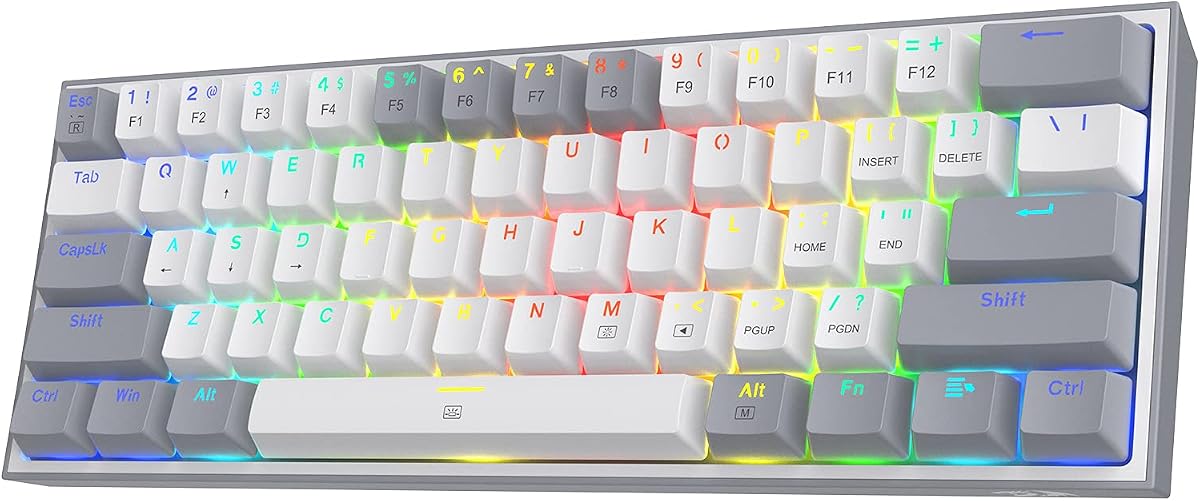
Koolertron delivers a highly accessible 40 percent keyboard for those on a tight budget. It is designed specifically for gamers and power users who need fast access to macros and shortcuts. The layout is extremely compact which helps save valuable desk space for mouse movement.
We may earn a commission when you buy through this link, at no additional cost to you.
Macro capabilities are robust with up to 16 advanced macro buttons and layer support. You can record complex key sequences to automate repetitive tasks in games or software. The RGB lighting is vibrant and adjustable adding a nice visual flair to the setup.
While it lacks wireless options the wired connection ensures zero latency and consistent performance. The build quality feels sturdy despite the lower price point. Switch options are limited compared to enthusiast boards but they work reliably for daily use.
This keyboard is ideal for users who prioritize function over form. It offers significant value for anyone needing a dedicated macro pad or compact typing tool. The simple plug and play setup makes it easy to start using immediately.
16 advanced macro buttons allow you to automate complex workflows without needing extra software.
At a lower price point this model offers essential features for compact typing and gaming.
We may earn a commission when you buy through this link, at no additional cost to you.
The Keychron Q9 brings premium enthusiast features to the 40 percent form factor. Its full CNC aluminum body and double gasket structure provide a satisfying and resonant typing sound. The Gateron G Pro Brown switches offer a tactile feel that is popular among programmers.
We may earn a commission when you buy through this link, at no additional cost to you.
QMK and Launcher support allow for deep customization of layers and macros. The Keychron Launcher web app simplifies the configuration process for users who are not technical. Hot swap sockets let you change switches easily to experiment with different sounds.
Build quality is exceptional but the high price point might be a barrier for some. The lack of wireless connectivity limits portability compared to other modern options. RGB lighting is bright and well diffused by the south facing LEDs.
This model is best for enthusiasts who want a high end wired experience. It is a robust tool for daily typing and programming tasks. The solid construction ensures it will last for years of heavy use.
CNC machined aluminum and gasket mounting deliver a superior typing feel and sound.
QMK and Launcher support enable extensive layer programming and key remapping.
We may earn a commission when you buy through this link, at no additional cost to you.
The VORTEXKEYBOARD Core V2 offers a balanced mix of wireless freedom and compact design. It connects via Bluetooth 5.0 and a 2.4GHz dongle to provide stable performance across multiple devices. This versatility makes it ideal for users who switch between a laptop and desktop often.
We may earn a commission when you buy through this link, at no additional cost to you.
Low profile mechanical switches reduce hand strain and provide a smooth typing experience. The Gateron switches included are reliable and offer a standard linear feel. The layout is compact but retains essential keys for productivity workflows.
Customization options are limited compared to QMK boards but basic remapping is available via VIA. RGB lighting only works in wired mode which is a notable limitation for wireless users. The battery life is decent for typical daily usage patterns.
This keyboard is a solid choice for travelers and remote workers. It balances portability with comfort effectively. If you need reliable wireless connectivity without sacrificing ergonomics this is a strong contender.
Bluetooth and 2.4GHz dongle support allow you to switch between up to three devices easily.
Low profile switches reduce wrist strain making it suitable for extended typing sessions.
We may earn a commission when you buy through this link, at no additional cost to you.
The YIVU Corne LP focuses on health and ergonomics with its split ortholinear design. By separating the halves you can position them to match your shoulder width and wrist angle. This layout is crucial for preventing repetitive strain injuries during long work days.
We may earn a commission when you buy through this link, at no additional cost to you.
Low profile switches are included to further reduce finger travel distance. Vial support allows for intuitive visual remapping of keys layers and macros. The RGB backlight is bright and customizable to help you see keys in low light.
The learning curve is steep because of the split and ortholinear layout. It requires a dedicated period of adjustment to reach typing speeds. The device is wired only which limits mobility for users who prefer wireless setups.
This keyboard is best for those with existing wrist issues or health goals. It offers a unique solution that few other compact keyboards provide. If you prioritize health over convenience the Corne LP is worth considering.
Split ergonomic design reduces wrist strain by allowing natural shoulder and hand positioning.
Vial support makes configuring custom layers and macros visual and straightforward.
We may earn a commission when you buy through this link, at no additional cost to you.
The YIVU Unibody Split is an ultra compact solution for minimalists. With only 36 keys it pushes the limits of functional minimalism. The unibody construction provides stability for a split keyboard which often lacks rigidity.
We may earn a commission when you buy through this link, at no additional cost to you.
QMK and VIAL support allow for deep customization of layers and macros. Hot swap sockets make it easy to change switches without any soldering. The ortholinear layout ensures straight lines of keys which aligns better with your fingers.
The extremely small footprint saves massive desk space but requires significant reliance on layers. It is not suitable for users who need frequent access to number pads or arrows. Wired only connectivity limits its use for mobile setups.
This keyboard is ideal for advanced users who value extreme portability. It is a great choice for coders who work with custom macros. The build quality is robust despite the minimalist design.
With only 36 keys this layout saves space but requires a high degree of layer mastery.
Unibody construction ensures the split halves remain rigid during heavy typing sessions.
We may earn a commission when you buy through this link, at no additional cost to you.
This is a straightforward entry level option for those exploring 40 percent keyboards. It offers the core features needed for compact typing without extra bells and whistles. The build quality is functional and sufficient for basic daily use.
We may earn a commission when you buy through this link, at no additional cost to you.
Macros are a key feature allowing you to save repetitive key combinations easily. The RGB lighting adds a visual touch that can be customized with preset modes. It is plug and play requiring no complex configuration software.
The lack of advanced software limits deep customization compared to QMK boards. Build materials feel more basic compared to aluminum options. However it serves well as a secondary device for travel or light gaming.
Ideal for users who want a simple and cheap compact keyboard. It works well for specific tasks like game control or macro use. Do not expect premium features or high-end build quality.
Plug and play functionality makes setup instant without needing driver installations.
Macros and RGB lighting provide essential features without unnecessary complexity.
We may earn a commission when you buy through this link, at no additional cost to you.
The Redragon K617 is technically a 60% model but offers similar benefits for compact users. It provides a slightly larger layout that includes arrow keys which aids navigation. The hot swap sockets allow you to customize switches to your preference.
We may earn a commission when you buy through this link, at no additional cost to you.
RGB lighting is vibrant and supports multiple modes suitable for gaming setups. The build is sturdy and the switches are rated for long term durability. It is a great option if you need arrows without going full 75% or TKL.
This keyboard is not a true 40% but serves as a good middle ground. It offers significant space savings compared to full sized boards. The price point is very competitive for the features provided.
Best for gamers or users who want arrows in a compact form. It is a high value option that does not compromise on build quality. If you find 40% too limiting this is a viable alternative.
While 60% this layout includes arrow keys which are often missing in smaller 40% models.
Hot swap sockets and RGB lighting cater to gamers who customize their setup.
We may earn a commission when you buy through this link, at no additional cost to you.
This model combines the benefits of wireless connectivity with ergonomic split design. It uses 2.4GHz wireless for stable latency which is crucial for typing and gaming. QMK and VIAL support offer deep customization for power users.
We may earn a commission when you buy through this link, at no additional cost to you.
PBT keycaps provide a textured feel that resists shine over time. Hot swap sockets let you experiment with different switches easily. The columnar staggered layout aligns keys with fingers for natural movement.
The price is high due to the advanced features included. Setup requires learning Vial software which can be complex for beginners. However the wireless stability makes it a strong choice for desktop users.
Ideal for users who want a wireless ergonomic split without compromise. It is a great option for professionals who work with custom macros. The build quality justifies the cost for serious enthusiasts.
2.4GHz wireless dongle ensures low latency and stable connection for productivity.
Columnar staggered keys align with fingers reducing wrist strain and improving comfort.
We may earn a commission when you buy through this link, at no additional cost to you.
The Keychron Q9 with Knob adds a rotary encoder to the 40 percent layout. This knob provides quick access to volume or scrolling which is useful for creators. The rest of the keyboard matches the standard Q9 in build and features.
We may earn a commission when you buy through this link, at no additional cost to you.
CNC aluminum body ensures a stable and premium typing experience. QMK and Launcher support allow for extensive layer configuration. Hot swap sockets let you change switches without any soldering required.
This model is excellent for Mac users needing quick media control. The knob is a practical addition for workflows involving audio or media. However it remains wired which limits mobility compared to wireless options.
Ideal for creators and power users who value quick access to controls. The knob makes this model stand out from other 40 percent options. If you work with multimedia this is a strong choice.
A built-in rotary knob provides quick access to volume or scrolling without using keys.
CNC aluminum body and double gasket mounting ensure durability and a premium feel.
We may earn a commission when you buy through this link, at no additional cost to you.
Choosing a 40 percent keyboard requires understanding your workflow and needs. This guide breaks down the critical factors you should evaluate before making a purchase.
The layout is the most critical factor in a 40 percent keyboard. Ortholinear or columnar staggered layouts align keys with your fingers reducing strain. Traditional staggered layouts are easier to learn but may cause more fatigue. Decide if you need a split design for better wrist positioning.
Choose a layout that supports your health and productivity goals long term.
Switch type defines the tactile feel and sound of your typing experience. Linear switches are smooth and quiet while tactile switches provide feedback. Low profile switches reduce finger travel and are great for speed. Consider the actuation force that suits your typing style best.
Select switches that match your preference for feedback and noise levels.
Connectivity determines how you interact with your devices. Wireless options like Bluetooth or 2.4GHz dongles offer portability but can have latency. Wired connections ensure zero latency and consistent power but limit movement. Multi-device support allows switching between a laptop and desktop easily.
Prioritize wired for gaming or wireless for mobility and desk flexibility.
Customization is key to making a 40 percent keyboard functional. QMK and VIA support allow deep remapping of keys and macros. Basic models may only offer simple layer switching via function keys. Consider the learning curve of software tools before purchasing.
Invest in boards with strong software support for maximum productivity.
Build quality impacts durability and typing feel. Aluminum cases provide a solid premium feel while plastic is lighter. Hot swap sockets let you change switches without soldering extending keyboard life. Weight affects stability during typing but portability for travel.
Opt for metal cases and hot swap sockets for longevity and customization.
RGB lighting can help visibility in low light environments. Some keyboards have bright RGB while others are minimal. Aesthetics like frosted keycaps add to the visual appeal. Consider if lighting is essential for your workflow or just a bonus.
Choose lighting options that match your desk setup and personal taste.
Prices for 40 percent keyboards vary widely based on features. Basic models are affordable but lack advanced customization. Premium models cost more but offer better materials and software. Determine how much you are willing to spend for quality.
Balance cost with the features you need most for daily use.
Ensure the keyboard works with your operating system. Many models support Mac and Windows with system toggle keys. Some keyboards are designed for Mac with extra keycaps. Check software compatibility for your specific OS requirements.
Verify OS compatibility to avoid configuration issues after purchase.
Start by mapping essential functions to your home row for efficient typing. Learn layers by using key combinations to access numbers and arrows. Use the function key to toggle between layers as needed for different tasks. Practice daily to build muscle memory for the compact layout.
Clean the keyboard regularly to prevent dust buildup in switches. Use a can of compressed air to blow out debris between keycaps. If using hot swap switches remove them carefully to avoid damaging the PCB. Keep the surface dry and avoid spills to protect electronics.
Update firmware or software periodically to fix bugs and add features. For wireless keyboards keep battery charged to avoid sudden disconnections. Store the keyboard in a protective case during travel to prevent scratches. Adjust keycaps as needed to reduce friction and wear.
A 40 percent keyboard can be excellent for gaming due to compact design. It leaves more space for mouse movement which is crucial for shooters. Custom macros can help with complex in-game actions. However you may miss standard arrow keys unless you learn layers.
Learning a 40 percent layout typically takes two to four weeks of consistent use. You must master layers to access numbers and arrows efficiently. Muscle memory develops over time so practice daily for best results. Patience is key to enjoying the efficiency gains.
Yes most 40 percent keyboards support Mac with system toggle keys. Models like Keychron offer extra keycaps for Mac layouts. Check for QMK or software support to remap keys for Apple devices. Ensure the vendor explicitly lists Mac compatibility before buying.
Yes they are suitable for coding if you master layers and macros. Remapping brackets and function keys speeds up development workflows. The compact design reduces hand strain during long coding sessions. Most developers find the efficiency gain worth the learning curve.
Ortholinear keyboards align keys in straight columns matching finger lengths. Staggered layouts align keys like typewriters which is easier to learn. Ortholinear reduces wrist strain but takes time to adapt to. Staggered is more familiar to most standard keyboard users.
Some 40 percent keyboards support Bluetooth while others are wired only. Models like VORTEXKEYBOARD offer Bluetooth and 2.4GHz options. Wireless adds portability but may have slight latency issues. Wired models offer zero latency for precise gaming or typing.
Yes if the keyboard has hot swap sockets you can change switches. Some models require soldering to change switches which is permanent. Check product specs for hot swap compatibility before purchasing. Hot swap adds flexibility to customize sound and feel later.
Most 40 percent keyboards are built with durable materials like aluminum. High-end models often use metal cases for stability and longevity. Switches are rated for tens of millions of keystrokes. With proper care these keyboards can last many years.
We reviewed ten diverse models to help you find the right 40 percent keyboard. The EPOMAKER Luma40 leads as the overall best with premium build and customization. Budget-friendly options like Koolertron offer essential features without high costs.
Prioritize ergonomics and customization based on your specific workflow needs. Consider connectivity options carefully to match your desk setup and travel habits. Invest in software support to unlock the full potential of the compact layout.
Remember to check current prices and availability before finalizing your choice. Promotions and sales may affect value across different models. Use this guide to make an informed decision that supports your productivity long term.