
Anycubic Kobra 3 Camera
4.5Editor score
DIY frame replacement
Ultra clear resolution
Easy assembly process
This guide compares the top 3D printer cameras for remote monitoring to help you choose the right model for seamless tracking and control.
Monitoring your 3D prints from anywhere is essential for modern makers. A reliable camera helps you catch failures early and share time-lapse videos with friends easily.
We evaluated ten top-rated cameras based on resolution, connectivity, and compatibility. Each option offers unique features like night vision or AI detection for better results.
Each pick shows specific strengths for different printers and budgets. Note that prices and availability change frequently so check the links for the latest deals.
4.5Editor score

4.3Editor score

4.5Editor score
Below you will find a side-by-side comparison of all ten cameras including their key specs and links to detailed reviews.




The Creality Official Nebula Camera stands out as a top choice for makers who want seamless monitoring. With a high rating of 4.3 it delivers reliable performance for tracking prints from anywhere via WiFi.
We may earn a commission when you buy through this link, at no additional cost to you.
This camera excels at remote monitoring allowing you to check progress through the Creality Cloud app. The auto time-lapse feature captures each layer so you can share your prints without manual editing. Night vision ensures clarity even in low light.
While it offers great features it mainly works with Creality printers and pads. Users should ensure their setup is compatible before purchase. The WiFi connection can be tricky if your network is complex but guides help.
Buy this if you value ease of setup and automatic features. It is ideal for Creality owners who want a plug-and-play solution. The convenience of auto time-lapses makes sharing results effortless for all users.
Connecting via USB and WiFi takes minutes with the app guiding you through each step.
The built-in code system captures images per layer to generate videos without your input.
We may earn a commission when you buy through this link, at no additional cost to you.
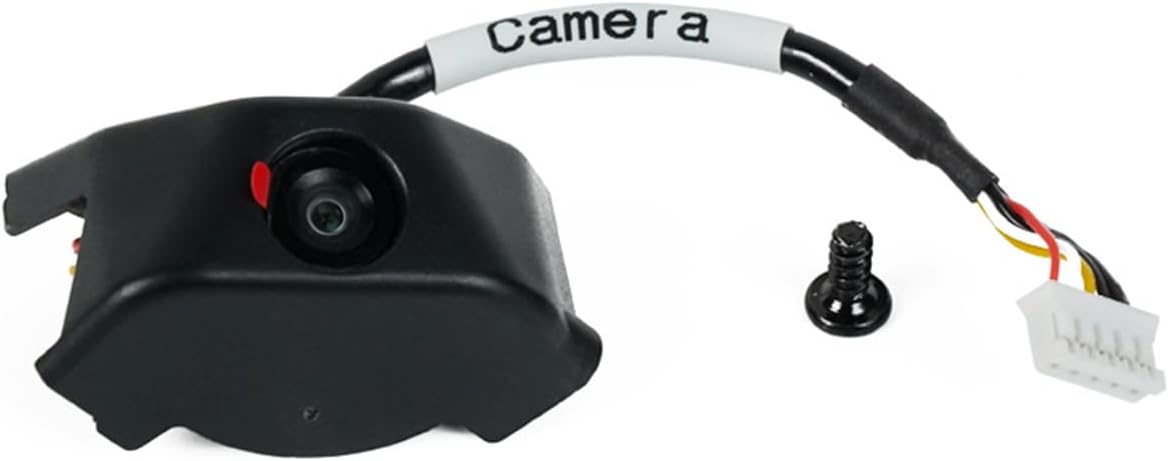
The Anycubic Kobra 3 Camera offers excellent value for money making it a favorite for budget conscious makers. It supports real-time monitoring through the Anycubic app helping you spot issues like filament jams quickly.
We may earn a commission when you buy through this link, at no additional cost to you.
Its DIY frame design allows you to create unique looks for your printer. The ultra clear resolution ensures detailed images which helps in diagnosing print problems accurately. Assembly is straightforward and takes only minutes.
While affordable it lacks advanced AI features found in pricier models. The frame assembly might take extra time if you want a custom look. But for basic monitoring it performs reliably without breaking the bank.
Choose this if you want a cost-effective camera for your Kobra or similar printer. It is perfect for those who enjoy tweaking their setup. The clear images and app control make it a smart low-cost pick.
You can replace the frame to add personal style to your 3D printing journey easily.
High quality visuals ensure detailed and accurate images of your printing process.
We may earn a commission when you buy through this link, at no additional cost to you.
The Creality K1 AI Camera is a premium choice designed specifically for K1 series printers. It delivers 1080P HD quality and includes AI detection to spot errors early saving your time and filament.
We may earn a commission when you buy through this link, at no additional cost to you.
Its integration with Creality Cloud allows you to monitor from your phone effortlessly. The time-lapse feature auto-generates videos for sharing. Installation is easy since the camera interface is reserved on the printer.
While powerful it is limited to K1 models which may not fit all users. The price is higher than basic cameras but the added intelligence justifies it for serious makers. It reduces waste significantly.
Buy this if you own a K1 printer and want top-tier monitoring. The AI features help prevent failed prints. It is the best premium option for efficiency and clarity in your printing workflow.
Captures images in 1080P ensuring clear visuals without missing any details of your print.
The system reminds you in time and pauses printing to avoid waste of filaments.
We may earn a commission when you buy through this link, at no additional cost to you.
The Official Original FLASHFORGE AD5M Camera Smart Kit is designed for seamless integration with Flashforge printers. It offers HD quality and allows control via the Flash Maker app or PC browser.
We may earn a commission when you buy through this link, at no additional cost to you.
Users can record the printing process to review later. The kit comes with installation videos making setup accessible for beginners. It ensures the best possible outcome by letting you track progress anytime.
While it works well for AD5M and AD5X models it does not support other brands. The remote features are standard but effective. Installation is easy but you must follow the provided guides closely.
Choose this if you have a compatible Flashforge printer and want an official accessory. It provides reliable monitoring and process recording. The included guides help you install it without complex steps.
Easily achieving high-definition image quality ensures the best possible outcome for your prints.
Allow users review and sharing of print process videos using the camera kit to capture moments.
We may earn a commission when you buy through this link, at no additional cost to you.
The Creality Nebula Pro camera enhances monitoring with its advanced night vision function. It supports 24-hour tracking and auto switches when light levels drop. You can adjust focus manually to get sharp images.
We may earn a commission when you buy through this link, at no additional cost to you.
Resolution is 1920×1080 which provides detailed visuals for checking layers. USB connection makes it easy to hook up to your printer. Time-lapse filming is also supported to capture the exciting moments.
Manual focus requires a bit of effort to perfect but ensures HD quality. It is compatible with specific Creality printers so check your model. The night vision helps identify issues like misalignments effectively.
Buy this if you need clear night monitoring and high resolution. The manual focus adds control for precise viewing. It is a strong option for users who want detailed images in all lighting.
Support auto switch allows you to monitor printing status anytime with clear night pictures.
Manually adjust the camera angle and focus to easily achieve high-definition image quality.
We may earn a commission when you buy through this link, at no additional cost to you.
This Flashforge Camera Kit offers seamless integration for Adventurer 5M and AD5X users. It allows you to view and control your printer via the Flash Maker app for flexible monitoring from anywhere.
We may earn a commission when you buy through this link, at no additional cost to you.
Installation is designed for simplicity with all necessary components included. You can check printing status anytime. The app support adds convenience for managing prints without needing to be near the machine.
While it does not have extra AI features it covers essential needs well. Compatibility is limited to specific models so verify before buying. The kit is practical for improving workflow efficiency easily.
Choose this if you need basic remote control and monitoring. It is ideal for users who want simple integration. The ease of use makes it a reliable choice for daily tracking of your prints.
Users could view and control the 3D printer from anywhere offering convenience and flexibility.
Designed for simplicity and ease of use including all necessary components for a quick setup.
We may earn a commission when you buy through this link, at no additional cost to you.
The Anycubic Kobra 3 V2 camera provides real-time monitoring and remote viewing via the Anycubic app. It features a replaceable frame allowing you to customize the look of your camera setup easily.
We may earn a commission when you buy through this link, at no additional cost to you.
Assembly is simple and takes minutes to complete. The resolution is ultra clear so your images are detailed. Support includes life-time technical assistance and 24/7 customer service to help you.
The DIY aspect might require a bit of patience but it adds creativity. It does not include advanced AI detection but covers basic needs well. It is a good option for budget and custom look.
Buy this if you want to customize your camera frame. It suits makers who enjoy tweaking their hardware. The clear images and support make it a dependable choice for monitoring your prints daily.
The frame of camera can be replaced to create unique frames for your printing journey.
No complicated steps just need to connect the camera to the USB interface and insert it.
We may earn a commission when you buy through this link, at no additional cost to you.
The Creality Nebula Basic offers real-time monitoring with built-in 940nm infrared night vision. It connects via USB and WiFi and supports time-lapse photography to capture your prints automatically without extra settings.
We may earn a commission when you buy through this link, at no additional cost to you.
Manual focus helps you adjust angles for HD quality. It works with specific Creality printers like Ender 3 V3 and CR 10 SE. The app connection is straightforward with the Creality Cloud app.
It keeps an eye on anomalies and can pause printing to prevent waste. The features are functional without being overwhelming. Night vision ensures clarity even if you print at night or in dark rooms.
Choose this if you want a reliable basic camera for Creality printers. It covers essential monitoring needs well. The manual focus and night vision are great additions for consistent image quality.
Built-in 940nm infrared fill light ensures clear night pictures for effective monitoring.
The system will remind in time and pause the printing to avoid the waste of filaments.
We may earn a commission when you buy through this link, at no additional cost to you.
This Creality Nebula WiFi Camera brings spaghetti detection to help eliminate waste from failed prints. It supports 24-hour real-time monitoring and auto captures time-lapse videos for easy review and sharing.
We may earn a commission when you buy through this link, at no additional cost to you.
Manual focus ensures high-definition quality for close inspection. You can connect via WiFi and use the Creality Cloud app. It fits various models like Sonic Pad and Ender 3 V3 series easily.
Spaghetti detection is a key feature that alerts you to errors early. It requires a bit of setup but pays off in reliability. The HD quality allows you to examine prints in detail.
Buy this if you want smart failure detection in a standard camera. It suits users who want to save material. The WiFi connection and app access make tracking simple from anywhere.
Advanced spaghetti detection helps to eliminate waste by identifying printing errors promptly.
The manual focus feature ensures high-definition quality allowing you to closely examine your prints.
We may earn a commission when you buy through this link, at no additional cost to you.
The Flashforge Kit AD5X Camera delivers high definition process recording with video files generated after printing. It includes a longer cable to fit the enclosure and works with the Flash Maker app for control.
We may earn a commission when you buy through this link, at no additional cost to you.
You can export videos to a USB drive for viewing. It is an official accessory for AD5M series ensuring compatibility. The upgraded camera provides clear detail for tracking your prints from anywhere.
The focus on recording makes it useful for reviewing performance later. It does not offer smart alerts but covers basic monitoring well. The longer cable is practical for installation inside enclosures.
Choose this if you need USB video export for your Flashforge printer. It suits makers who value recorded logs. The official support and clear imaging make it a solid choice for tracking.
Turn on the video switch and video files will be generated after the model is printed.
It is the same one on Adventurer 5M and compatible with Flash Maker APP for seamless use.
We may earn a commission when you buy through this link, at no additional cost to you.
Choosing the right camera requires attention to key factors that affect performance and compatibility.
Always check if the camera supports your specific printer model. Many cameras are made for one brand like Creality or Flashforge and may not work with others.
Match the camera to your printer to ensure easy connection and full feature use.
Higher resolution like 1080P gives clearer images to spot issues like filament jams. Look for cameras with clear specs for image quality.
Better resolution helps you see details during prints for accurate monitoring.
If you print in dark rooms or at night choose a camera with infrared night vision. This ensures you can view prints even when lights are off.
Night vision is key for 24-hour monitoring without missing details.
WiFi cameras allow remote access from anywhere but USB cameras are simpler to set up. Consider how far you will be from your printer when choosing.
WiFi adds flexibility but USB may be more stable for local monitoring.
Auto time-lapse features save you time capturing each layer without manual work. Look for cameras that generate videos automatically after prints finish.
Auto time-lapse makes sharing your progress effortless for all users.
Some cameras include AI or spaghetti detection to alert you of errors early. This can save material and prevent failed prints.
AI features add smart protection but may cost more than basic models.
Check that the camera app is easy to use on your phone or PC. Good apps let you view status and adjust settings quickly.
A reliable app ensures you can monitor prints smoothly without trouble.
Look for cameras that come with guides or videos for installation. Simple setups save you time and frustration during first use.
Easy installation helps you start monitoring right away without complex steps.
Connect the camera to your printer using the USB port or reserved interface. Download the associated app on your phone or computer to begin.
Configure the WiFi settings and link the camera to your network. Test the view from the app to ensure clarity.
Keep the lens clean and check the camera position periodically for best images. Update the app software to maintain performance.
Start by connecting the camera to your printer via USB. Install the brand app and follow the on screen steps to link WiFi. Test the feed on your device.
Yes if your camera supports remote monitoring over WiFi. As long as both you and the printer have internet you can access the feed from anywhere.
Aim for at least 720P or 1080P. Higher resolution helps you see details like filament movement which is critical for spotting failures early.
No only some models include infrared night vision. Check the specs before buying if you plan to print in low light or overnight conditions.
Ensure the time-lapse feature is enabled in the app. Some cameras require manual settings adjustment to capture images per layer for the video.
Yes these cameras are designed for long term use. They consume minimal power and are built to handle heat inside printer enclosures safely.
We explored ten top cameras offering features from night vision to AI detection. Pick based on your printer model and what matters most to you.
Prioritize compatibility and ease of use for smooth daily tracking. Remote access saves time and helps you catch failures before they ruin prints.
Prices change so check the links for current deals. Choose the camera that fits your needs best today.