
UGREEN Headphone Splitter
4.6Editor score
Aluminum alloy casing
Short compact length
Wide device support
Finding the right audio splitter helps you share music or games with friends easily. A good splitter ensures clear sound without losing quality or causing noise issues.
We compared ten top models based on build quality, sound performance, and compatibility. Our list includes options for gaming, travel, and daily use cases.
Each pick shows key specs and real-world performance notes. Remember that availability and terms may vary, so check current listings before you decide.
4.6Editor score

4.6Editor score

4.5Editor score
As an Amazon Associate we earn from qualifying purchases.
This side-by-side view compares all ten models by key traits like build, ports, and design. See which fits your needs for sharing audio or linking headsets.



The SYNCWIRE model stands out with a 4.6 rating for reliable audio sharing. It uses gold-plated connectors to keep signal loss low while you listen.
We may earn a commission when you buy through this link, at no additional cost to you.
Its nylon braided jacket survives frequent bends, and the slim plug fits many cases. Dual female outputs give you clean stereo sound on both ends.
One trade-off is the compact length, which limits distance from the source. Still, the build quality and interference protection make it a safe pick.
Choose this if you want a durable splitter for travel or daily use. It works with phones, laptops, and consoles for simple two-device listening.
The soft nylon jacket resists wear and bends without cracking over time.
24K gold connectors help maintain accurate transmission and reduce static.
We may earn a commission when you buy through this link, at no additional cost to you.
This UGREEN adapter links modern headsets to older PCs with separate mic and audio jacks. It carries a 4.5 rating for consistent performance.
We may earn a commission when you buy through this link, at no additional cost to you.
Oxygen-free copper and gold plating ensure clean audio for calls or games. The aluminum case protects internal parts from daily wear and tear.
Note that it only works with CTIA standard headsets, which rules out some Apple or Beats models. Also, the 20cm length keeps it close to your port.
Pick it if you need a reliable headset adapter for Skype or online classes. It bridges legacy PC ports with TRRS gear effectively.
Connects dual jacks on older laptops to a single TRRS headset plug.
Nylon braiding withstands twist and tug while staying neat in a bag.
We may earn a commission when you buy through this link, at no additional cost to you.
This UGREEN splitter delivers clear sound for sharing music at a low cost. It holds a 4.6 rating for solid performance and durability.
We may earn a commission when you buy through this link, at no additional cost to you.
Gold plating and oxygen-free copper keep audio loss minimal on both outputs. The TPE jacket passes bend tests to resist daily tangles and twists.
It lacks mic support and inline volume control, so it is for listening only. The 20cm length is perfect for pocket or bag carry.
Choose this budget option for simple music or movie sharing with friends. It works with most smartphones and laptops without extra setup.
Offers high-quality materials and sound at an accessible price point.
Short length fits easily in pockets or travel kits for quick access.
We may earn a commission when you buy through this link, at no additional cost to you.
This splitter allows three devices to share one audio source with a 4.7 rating. It uses a 1-to-3 design for group listening sessions.
We may earn a commission when you buy through this link, at no additional cost to you.
Gold-plated connectors reduce corrosion and keep signal paths stable. The cable ensures smooth audio with clarity across all three outputs.
It is a passive distributor, so volume may drop when adding more devices. It does not support microphones, only stereo headphone or speaker output.
Pick it for parties or small group listening from a single phone or PC. The 3-way design adds flexibility over standard 2-way splitters.
Splits one input into three outputs for multiple listeners at once.
Corrosion-resistant connectors help maintain steady transmission over time.
We may earn a commission when you buy through this link, at no additional cost to you.
This D & K adapter connects a headset to a PC with separate audio and mic jacks. It has a 4.3 rating for basic functionality.
We may earn a commission when you buy through this link, at no additional cost to you.
Oxygen-free copper wires help maintain conductivity during calls or chat. The compact design fits easily in a laptop bag for office use.
It may lack the premium shielding of higher-end models, so noise could appear. Still, it solves the dual-jack issue for standard headsets.
Use it for Skype, online classes, or simple VOIP tasks on older computers. It is a straightforward fix for dual-port systems.
Designed for apps like Skype, Google Voice, and chat programs.
Small footprint keeps your workspace tidy while adding needed ports.
We may earn a commission when you buy through this link, at no additional cost to you.
Belkin offers a classic splitter backed by a lifetime warranty for peace of mind. It holds a 4.3 rating for dependable everyday use.
We may earn a commission when you buy through this link, at no additional cost to you.
The male-to-dual-female design allows sharing with friends or speakers. It works across laptops, phones, and portable audio players.
While it lacks braided protection, the plastic shell handles normal wear. The trade-off is simplicity, not advanced shielding or metal housings.
Choose this if brand trust and warranty coverage matter most. It serves well for home or travel sharing without extra features.
Belkin backs this splitter with long-term protection against defects.
Compatible with most standard 3.5mm audio jacks and devices.
We may earn a commission when you buy through this link, at no additional cost to you.
This adapter is tuned for TRRS gaming headsets on PCs with split jacks. It has a 4.4 rating for clean mic and audio routing.
We may earn a commission when you buy through this link, at no additional cost to you.
It works with common brands like HyperX, Razer, and Turtle Beach. The 20cm length keeps connections neat without extra slack.
It may not handle non-standard standards, so verify your headset type first. It is ideal for gaming chat or VOIP tasks.
Pick this if you game on PC and need a quick headset link. It bridges modern headsets to legacy PC ports reliably.
Also works with PS4, Xbox One, and Switch headsets.
Separate mic and audio outputs help avoid static or noise.
We may earn a commission when you buy through this link, at no additional cost to you.
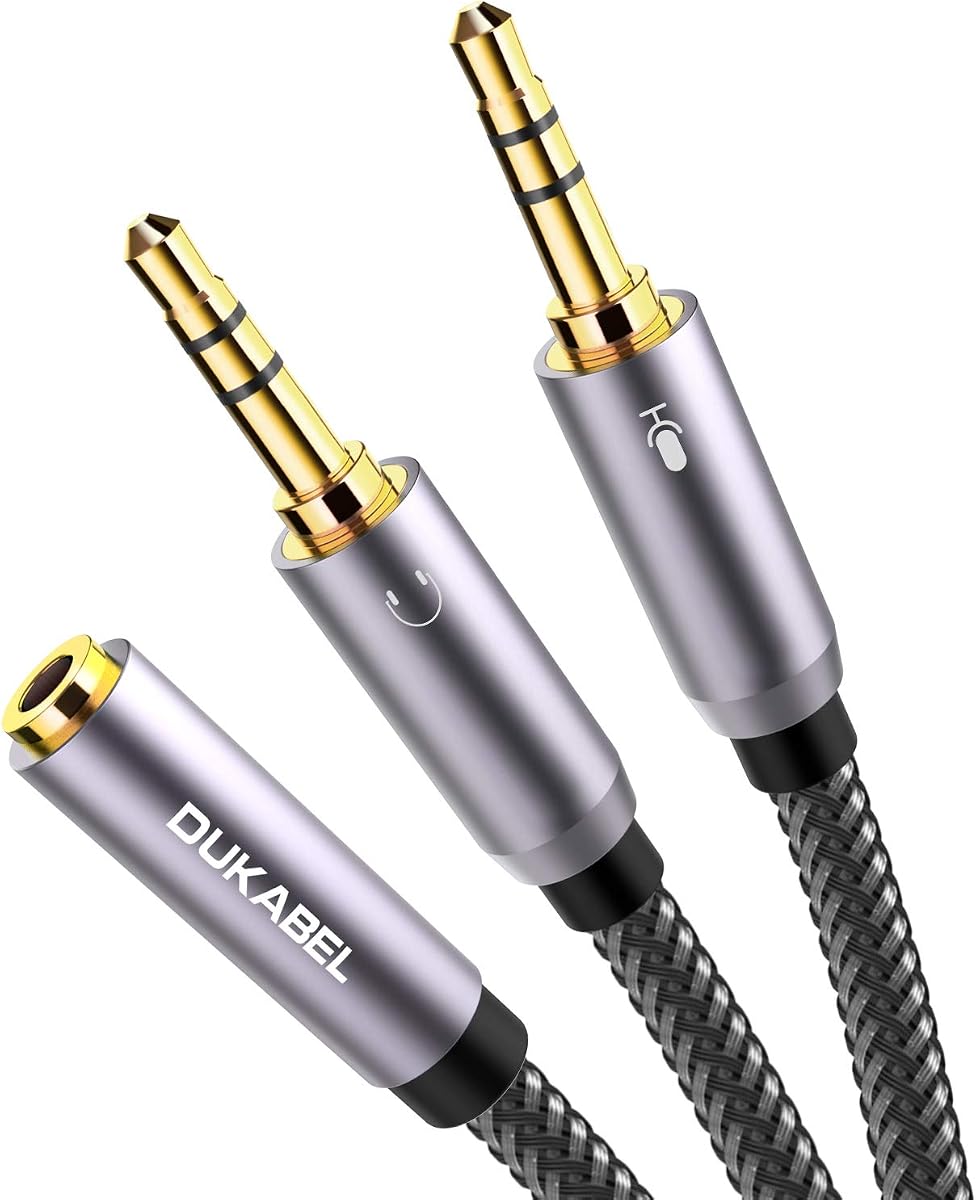
This DuKabel adapter offers a longer 30cm cable for flexible PC use. It holds a 4.6 rating for build and sound quality.
We may earn a commission when you buy through this link, at no additional cost to you.
Triple shielding and a nylon-braided exterior guard against interference. The metal housing adds durability and a sleek look.
It excludes iOS Earphones or Beats headsets, so check standards before buying. The length helps route cables cleanly in tight spaces.
Choose this for gaming or office setups needing extra reach. It balances durability and length for reliable mic and audio links.
The 30cm length gives more room to position your headset.
Unique braiding adds strength and a smooth touch feel.
We may earn a commission when you buy through this link, at no additional cost to you.
This hub splits audio to five devices with a solid aluminum case for isolation. It has a 4.5 rating for clean signal distribution.
We may earn a commission when you buy through this link, at no additional cost to you.
Full aluminum housing reduces static and ground noise. The passive design needs no power, making it ready for any source.
Adding devices lowers volume, so you may need to boost levels. It does not support mics or signal mixing between ports.
Pick this for group sessions or classroom sharing. The 5-port layout and compact size make it a versatile tool.
Supports up to five headphones or speakers from one source.
Aluminum case shields signals from electrical noise and static.
We may earn a commission when you buy through this link, at no additional cost to you.
The MOSWAG splitter handles audio sharing across phones, tablets, and laptops with a 4.5 rating. It keeps signals clear on both outputs.
We may earn a commission when you buy through this link, at no additional cost to you.
Robust materials help the cable survive daily bends. The design is simple and portable for use on the go.
It lacks mic support and may have less rugged jacketing than others. Still, it offers solid performance for everyday listening.
Choose this for general sharing needs. It works reliably with most devices and includes responsive after-sales service.
Compatible with iPhones, Android phones, and laptops.
Strong build helps the splitter last through regular use.
We may earn a commission when you buy through this link, at no additional cost to you.
Selecting the right splitter involves matching ports, build quality, and your use case. Below are key factors to consider.
Check whether your device uses TRS (audio only) or TRRS (audio plus mic). Some splitters link a TRRS headset to dual PC ports, while others split one audio source into two speakers.
Match the male and female ends to your gear. Using the wrong standard can silence your mic or cause static.
Standard models offer two outputs for sharing. If you need three or five listeners, choose a 3-way or 5-way distributor designed for group use.
More ports mean passive signal division, which can lower volume. You may need to raise the source volume to compensate.
Look for gold-plated connectors to reduce corrosion and signal loss. Cables with nylon braiding or fishing-wire styles resist tangles and daily wear.
Aluminum or metal housings add durability and can reduce electromagnetic interference compared to plastic shells.
Shorter lengths between like 20cm suit pockets and tight setups. Longer 30cm+ cables give more reach when your source is on a desk.
Measure your typical distance before choosing. Too short can strain ports, while too long creates slack.
Cables with double or triple shielding minimize noise from lights, chargers, or motors. This is vital for calls, games, or quiet music.
Plain wires may introduce hum or static. If you hear hiss, check if the splitter has shielded wiring or a braided jacket.
Verify standards like CTIA versus OMTP for headsets. Some adapters work only with CTIA-compliant TRRS plugs found on most modern devices.
If you use Apple earphones or Beats, confirm the splitter supports those. Otherwise, microphones may fail to work.
Choose gaming or VOIP adapters for PC mic and audio splitting. For music sharing, focus on stereo output splitters with clear sound.
Travel buyers should pick compact, lightweight designs with strong jackets to survive frequent packing.
Brands like Belkin offer lifetime protection for peace of mind. Others provide short-term support, so check return policies before buying.
A solid warranty reflects confidence in build quality. It can save you if the cable or connector fails early.
Plug the male end firmly into your source device. Then connect your headphones or speakers to the female ports. Ensure the splitter is seated fully to avoid loose connections.
Keep cables away from heat and liquids. Coil them gently without tight bends to protect internal wires. Store them in a small pouch to prevent tangles.
If audio sounds weak, raise your source volume slightly when adding more devices. Clean the connectors with a dry cloth to remove dust and keep signal paths clear.
A well-made splitter with gold connectors and shielding keeps quality high. Cheaper or unshielded cables may introduce static or signal loss, especially over longer runs.
Only if you choose a TRRS-to-dual-male adapter designed for PC. Standard audio splitters split output only and will not pass mic signals to a source.
TRS has three contacts for stereo audio. TRRS has four contacts to include a microphone. Use the right type to ensure both audio and mic work.
Two-device sharing is standard. Three or five devices are possible with dedicated 3-way or 5-way splitters, though volume may decrease.
Most work with iPhones that have a 3.5mm jack or via a Lightning adapter. Ensure the splitter matches the CTIA standard used by Apple.
No. Passive splitters draw power from the source device. You do not need extra batteries or adapters to make them work.
We found strong options for sharing, gaming, and travel. The SYNCWIRE model leads for durability, while the 5-way hub helps larger groups.
Prioritize connector type, shielding, and length. Match the splitter to your source and headset to avoid mic issues or weak sound.
Check current listings before you decide. Availability and support can change, so verify details on the product page.