
ASUS Z170 PRO Gaming
4.1Editor score
SupremeFX Audio Technology
Intel Gigabit Ethernet
USB 3.1 and M.2
This guide compares the top 1151 Z170 Skylake gaming motherboards for performance, features, and value to help you choose the right board.
Finding the right foundation for your gaming PC is crucial. The 1151 Z170 Skylake motherboards offer a balance of legacy support and high-speed features like DDR4 and M.2 for modern builds.
We evaluated ten top-rated boards based on connectivity, audio quality, overclocking potential, and build durability. Our analysis covers models from major brands like Asus, Gigabyte, and MSI.
Each pick highlights specific strengths for different needs. Remember that prices and availability change frequently, so check current listings before making your final decision for your system.
4.1Editor score

4.2Editor score

4.2Editor score
The following table provides a side-by-side comparison of the top 1151 Z170 motherboards to help you quickly identify key specifications and features for your build.


The Asus ROG Maximus VIII Hero stands out as a top-tier choice for enthusiasts seeking robust features on the LGA1151 platform. With a strong rating and premium components like SupremeFX audio, it delivers exceptional performance for gaming and content creation tasks.
We may earn a commission when you buy through this link, at no additional cost to you.
Its Extreme Engine DIGI+ power design ensures stable voltage delivery to your CPU during intense workloads. The inclusion of USB 3.1 Type A and C ports provides future-proof connectivity for high-speed storage and peripherals right from the start.
While the board offers extensive customization options via its lighting control features, the sheer number of settings might overwhelm casual users. The cost is also a consideration compared to standard gaming motherboards in this chipset category.
This board is ideal for gamers who prioritize audio quality and overclocking headroom. If you value detailed control over your system aesthetics and performance, this Asus model is a compelling recommendation for your next build.
The SupremeFX 2015 codec offers immersive sound quality that enhances gaming sessions without needing an external sound card.
Multiple USB 3.1 ports allow for faster data transfers and support for the latest peripheral devices.
We may earn a commission when you buy through this link, at no additional cost to you.
This Gigabyte board offers a unique proposition with its industrial packaging but genuine original components. It is rated highly by users who appreciate the raw performance and connectivity features available in this Z170 chipset board.
We may earn a commission when you buy through this link, at no additional cost to you.
The motherboard supports up to 64GB of DDR4 memory with significant overclocking potential ranging from 2133MHz up to 3466MHz. This flexibility ensures you can maximize your system's performance for demanding applications and multitasking.
One trade-off is the lack of retail packaging which may affect unboxing experience and warranty handling. Additionally updating the BIOS is necessary for 7th Gen Intel Core processors which adds a step to your initial setup.
If you are comfortable with basic installation and prefer value over retail packaging this board delivers excellent specs. It is a great choice for those needing specific M.2 and SATA connectivity options for their storage array.
With support for high-speed DDR4 modules this board allows you to tailor memory performance to your specific workload needs.
Multiple M.2 slots combined with SATA Express connectors provide diverse options for expanding your storage capacity.
We may earn a commission when you buy through this link, at no additional cost to you.
The ASUS Z170 PRO Gaming brings essential gaming features to a more accessible price point. With a solid rating and core technologies like SupremeFX audio and M.2 support it meets the needs of many casual gamers.
We may earn a commission when you buy through this link, at no additional cost to you.
Its Intel Gigabit Ethernet ensures stable and fast network connections for online gaming without introducing latency. The inclusion of USB 3.1 Type A and C ports allows for rapid file transfers and modern peripheral compatibility.
While it lacks some of the extensive expansion slots found on higher-end models it covers the fundamentals well. Users should note that the VRM cooling is basic so extreme overclocking may be limited compared to flagship boards.
This motherboard is an excellent starting point for those building a budget system with room to grow. It balances performance and cost effectively making it a strong contender in the mid-range market.
You get critical gaming features like high speed audio and networking without paying for premium extras you might not need.
USB 3.1 ensures your drives and peripherals run at top speeds for a responsive experience.
We may earn a commission when you buy through this link, at no additional cost to you.
This listing represents the ASUS Z170-PRO-GAMING known for its durable construction and optimized power delivery. While specific technical ratings vary the product description highlights enhanced cooling and connectivity for serious gaming.
We may earn a commission when you buy through this link, at no additional cost to you.
The board is designed to handle marathon gaming sessions with stability. The upgraded power design aims to deliver consistent performance to your CPU reducing the risk of throttling during long playtimes.
Without verified user ratings in this specific context buyers should rely on the known reputation of the model. The rugged design suggests it is built to withstand heat and stress better than standard office boards.
Consider this if you prioritize longevity and consistent performance over flashy features. It serves well as a stable foundation for a home office or gaming PC that needs to run reliably.
The design emphasizes stability to ensure your system remains online during critical matches or rendering tasks.
Advanced cooling features help dissipate heat keeping internal components running cooler under load.
We may earn a commission when you buy through this link, at no additional cost to you.
The Gigabyte GA-Z170X-Gaming 7 targets enthusiasts who need advanced graphics capabilities like SLI. With a strong rating and extensive connectivity it stands out for users building high-performance systems.
We may earn a commission when you buy through this link, at no additional cost to you.
It supports 2-Way NVIDIA SLI and 3-Way AMD Crossfire allowing for expanded graphical performance in compatible games. The board also includes a USB 3.1 port along with numerous USB 3.0 ports for versatile connectivity.
The premium price reflects its feature set including gaming grade audio and robust expansion slots. However the ATX form factor requires a larger case which might not fit smaller compact builds.
If you need multi-GPU support or maximum connectivity options this board is a solid investment. It is well-suited for power users who need every possible port and lane for their peripherals.
Support for SLI technology enables you to combine graphics cards for better performance in supported titles.
A wide range of USB ports ensures you can connect all your controllers and drives simultaneously.
We may earn a commission when you buy through this link, at no additional cost to you.
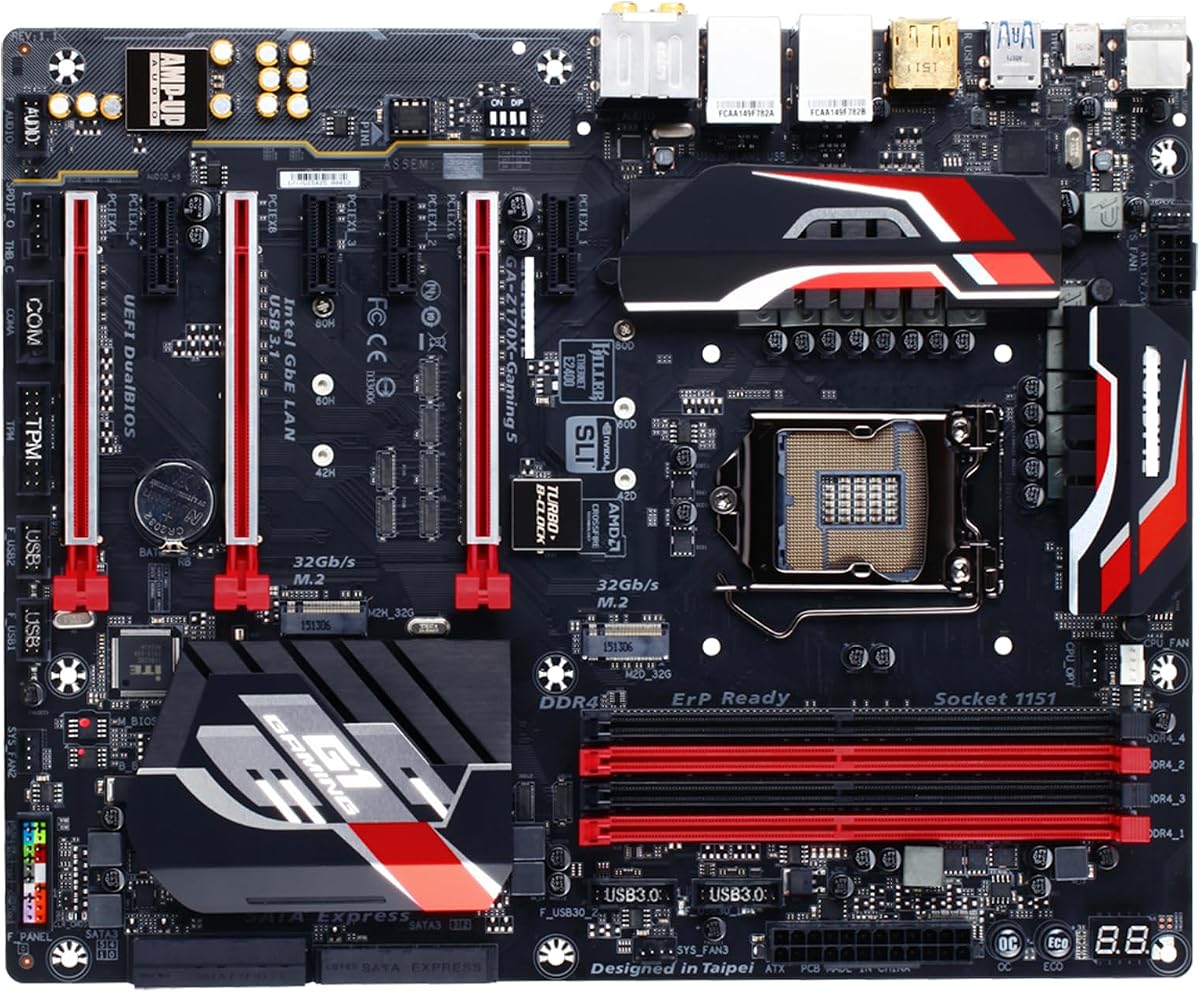
The GIGABYTE GA-Z170X-GAMING 5 offers a balanced selection of features for standard gaming builds. It supports 2-Way SLI and includes multiple PCIe slots for expansion cards.
We may earn a commission when you buy through this link, at no additional cost to you.
With 4 DDR4 DIMM sockets it handles memory needs well and supports fast overclocking speeds. The presence of 3 SATA Express connectors provides flexibility for storage configurations using older standards.
While it shares similarities with the Gaming 7 model it may lack some premium touches. The lower user rating suggests some inconsistencies in build quality or support experiences reported by buyers.
Choose this board if you want solid expansion capabilities without paying for the highest tier model. It is a functional choice for mid-range systems requiring multiple add-on cards.
Multiple PCIe slots allow you to add sound cards network adapters or capture cards easily.
SATA Express support bridges the gap between traditional SATA and faster NVMe storage options.
We may earn a commission when you buy through this link, at no additional cost to you.
The ASRock Z170 EXTREME4 delivers a high spec count at an attractive price point. It is well rated for providing solid performance features like flexible PCIe lanes and robust audio.
We may earn a commission when you buy through this link, at no additional cost to you.
With support for up to 3200MHz memory and multiple PCI Express slots it is adaptable for various build configurations. The Realtek ALC1150 codec ensures good sound quality for multimedia and gaming.
While it may not have the flashiest aesthetic features it focuses on functionality. Users should note that PCIe lane distribution can affect performance if multiple devices are installed simultaneously.
This board is an excellent pick for value seekers who need specific connectivity options. It provides the core Z170 capabilities without unnecessary costs making it a practical choice.
The high definition audio codec supports premium Blu-ray audio and 7.1 channel sound for immersive gaming.
PCI Express slots can be configured to support multiple GPUs or expansion cards effectively.
We may earn a commission when you buy through this link, at no additional cost to you.
The MSI Z170 Krait Gaming offers durable Steel Armor slots and a high count of USB ports. It is designed to provide reliable connectivity and protection for your components during gaming.
We may earn a commission when you buy through this link, at no additional cost to you.
Features like DDR4 Boost and Audio Boost aim to optimize system performance and sound quality without extra software. The board supports CrossFire and SLI setups for expanded graphical capabilities.
The rating is average which suggests it is a good board but not the top tier. It is a solid option if you find it at a competitive price point for your build needs.
Consider this if you want durable slot protection and plenty of ports for peripherals. It is a reliable workhorse for a gaming PC that needs to handle various connections.
Steel Armor slots help secure your graphics card against stress and sag over time.
Built-in boosts for memory and audio help you get more out of your hardware easily.
We may earn a commission when you buy through this link, at no additional cost to you.
The Asus Z170-A is known for its balanced feature set and high user rating. It provides 5-Way Optimization to tune your system automatically for better performance in gaming.
We may earn a commission when you buy through this link, at no additional cost to you.
It includes M.2 and SATA Express support for faster storage speeds. The 5X Protection II ensures your system is safeguarded against potential electrical or thermal issues.
While it is a versatile board it may not have the advanced tweaking tools found on ROG models. However the sound quality via DTS Studio Sound remains a highlight for users.
This board is a great all-rounder for general gamers and home office users. Its focus on protection and ease of use makes it a dependable choice for most builds.
The 5-Way Optimization tool simplifies system tuning by adjusting CPU and cooling settings automatically.
5X Protection II provides robust safeguards against power surges and overheating conditions.
We may earn a commission when you buy through this link, at no additional cost to you.
The Asus ROG Maximus VIII GENE brings premium features to a smaller mATX form factor. Certified refurbished units offer a cost effective way to get high end features with a warranty.
We may earn a commission when you buy through this link, at no additional cost to you.
It maintains the same audio and connectivity standards as its ATX siblings including USB 3.1 and SupremeFX audio. The Extreme Engine DIGI+ ensures stable power for CPU overclocking despite the compact layout.
The main trade-off is fewer slots for expansion cards which may limit future upgrades. Also the smaller case size requires careful planning for cable management and cooling airflow.
Choose this board if you need a compact build without compromising on core performance. It is a great option for small form factor gaming PCs that still demand high power.
The mATX layout allows you to fit high performance hardware into smaller cases.
Certified refurbished models come with a warranty ensuring functionality at a reduced cost.
We may earn a commission when you buy through this link, at no additional cost to you.
Selecting the right motherboard requires balancing your budget with specific performance needs. We have broken down the key factors to consider before you make a purchase.
Ensure the motherboard supports your specific Intel Core processor generation. Z170 boards generally support 6th and 7th Gen Intel CPUs but BIOS updates are often required for 7th Gen support.
Always check the manufacturer's CPU support list to confirm compatibility before installing your processor to avoid boot issues.
Z170 motherboards use DDR4 memory which is faster and more efficient than older standards. Look for boards that support high speeds if you want to optimize your gaming performance.
Check how many DIMM slots are available and the maximum capacity supported to ensure your system can handle large applications.
The number of PCIe slots determines how many graphics cards or expansion cards you can install. SLI or Crossfire support is key if you plan to run multiple GPUs.
Also consider the size of the slots; x16 slots are needed for graphics cards while x1 slots are useful for sound or network cards.
Modern motherboards include M.2 slots for ultra-fast NVMe SSDs. Ensure the board has at least one M.2 slot if you want fast system boot times.
SATA Express and standard SATA ports are also important for connecting traditional hard drives and SATA SSDs.
Integrated audio codecs vary widely between models. Premium boards feature dedicated sound chips and shielding to reduce noise and improve sound fidelity.
Look for audio branding like SupremeFX or Audio Boost which indicate better quality components and better out-of-the-box performance.
The number and speed of USB ports matter for peripherals and external drives. USB 3.1 ports are faster and future-proof compared to older USB 2.0 ports.
Check if the board includes Type-C ports as they are becoming standard for new devices and high-speed charging.
ATX boards offer the most features and expansion options but require a large case. mATX boards are smaller and fit more compact builds with slightly fewer slots.
Choose a form factor that fits your case size to ensure proper airflow and physical installation of components.
Z170 chipsets are unlocked for overclocking allowing you to increase CPU speeds beyond base clocks. A motherboard with robust power phases helps maintain stability during these higher loads.
Look for features like extreme power designs or advanced cooling solutions if you plan to overclock your processor for extra speed.
To maximize performance update the BIOS to the latest version immediately after installation. This ensures compatibility with newer CPUs and provides the most stable features for your system.
Keep your motherboard clean from dust using compressed air regularly. Dust accumulation can block airflow and lead to overheating which affects overall system stability and component life.
Use a high quality power supply to protect your motherboard from voltage fluctuations. A stable power source prevents sudden shutdowns and reduces the risk of electrical damage to sensitive parts.
Yes Z170 motherboards generally support 7th Gen Intel Core processors but you must update the BIOS first. Some boards require a 6th Gen CPU to perform the update before installing a 7th Gen CPU.
The main difference is that Z170 supports overclocking and multiple GPU setups while B150 does not. Z170 also typically offers more PCIe lanes and M.2 slots for faster storage connectivity.
Most Z170 motherboards support DDR4 memory but you should verify the specific model specs. Look for 'DDR4' in the product title or memory section to ensure compatibility.
Not necessarily as many Z170 boards include high quality integrated audio codecs like SupremeFX. A separate sound card is only needed if you require professional audio recording features or ultra high end sound.
Not always because larger boards are more expensive and require bigger cases. mATX boards offer good performance in a smaller package which is better for compact gaming PCs.
Yes most Z170 boards feature M.2 slots for fast SSDs. Check the specific slot to see if it supports PCIe or SATA modes to ensure your drive works correctly.
Ensure the refurbished product comes with a warranty and is from a certified seller. Check the physical condition for scratches or missing parts before installation.
We have highlighted ten excellent options that range from budget friendly to high end performance. Each board offers a unique combination of features to suit different needs and requirements.
Prioritize connectivity and expansion slots based on your specific build goals. If you need multiple GPUs or fast storage a Z170 board with multiple M.2 slots is essential.
Remember to verify compatibility and pricing before buying as market conditions change. A careful choice here ensures a stable and powerful foundation for your gaming setup.