
10Gtek 10Gb PCI-E NIC Network Card
4.4Editor score
Intel 82599EN Controller
Single SFP+ Port
Low-Profile Bracket Included
This guide compares the top 10GbE network cards for speed, compatibility, and value to help you choose the best adapter for your setup.
Choosing the right 10GbE network card is essential for modern high-speed networking needs. Whether you need faster file transfers or better server performance, the right adapter makes a huge difference in your daily workflow and connectivity.
We compared ten top-rated PCIe adapters based on controller quality, port types, and system compatibility. Our analysis covers copper and fiber options to ensure you find a solution that fits your specific hardware and networking environment requirements.
Each pick shows key specifications and real-world performance traits to guide your decision. Prices and availability change frequently, so verify details before purchasing. These models represent the current market leaders in reliable 10 Gigabit Ethernet connectivity.
4.4Editor score

4.2Editor score

4.6Editor score
This side-by-side comparison highlights the key specifications and capabilities of the ten top 10GbE network cards available today. Review these details to find the adapter that best matches your server, workstation, or home lab needs.




This TP-Link adapter delivers reliable 10 Gigabit performance for most desktop and workstation setups. It ranks high for ease of use and includes a compatible cable for immediate deployment without extra costs.
We may earn a commission when you buy through this link, at no additional cost to you.
The card supports full 10GBase-T speeds and negotiates down seamlessly to lower rates. Its QoS features help prioritize gaming traffic, making it suitable for mixed-use environments where latency matters.
While it is a single-port solution, the included low-profile bracket ensures fit in smaller cases. The warranty and support options provide peace of mind for home and small business users.
Buy this if you need a straightforward 10GbE upgrade without dealing with complex optics or cabling. It balances performance and simplicity well for general connectivity needs.
The included CAT6A cable ensures you can reach full 10G speeds without buying additional accessories immediately.
Built-in QoS helps manage network traffic efficiently, ensuring smooth gaming or video calls even during file transfers.
We may earn a commission when you buy through this link, at no additional cost to you.
Synology users seeking maximum network throughput will find this dual-port adapter ideal. It integrates seamlessly with DiskStation Manager for optimized performance and simplified management within the NAS ecosystem.
We may earn a commission when you buy through this link, at no additional cost to you.
The two ports allow for link aggregation or failover, improving both speed and reliability. The five-year warranty underscores Synology's confidence in the hardware quality and durability for storage applications.
While expensive compared to third-party cards, the purpose-built design minimizes compatibility issues. It is a premium choice for those prioritizing stability and long-term support over raw cost savings.
Choose this if you run a Synology NAS and need reliable high-speed networking without troubleshooting driver conflicts. The investment pays off in consistent performance and support.
This adapter is validated specifically for Synology systems, ensuring seamless driver integration and feature support out of the box.
Two 10GbE ports allow you to create aggregated links for faster transfers or failover setups for uninterrupted access.
We may earn a commission when you buy through this link, at no additional cost to you.
This 10Gtek card offers exceptional value for users who already have fiber infrastructure or DAC cables. The Intel 82599EN controller is a proven workhorse in server environments, ensuring stable throughput.
We may earn a commission when you buy through this link, at no additional cost to you.
The single SFP+ port supports high-speed connections over fiber or twinax cables. You can choose your own modules, which often costs less than buying a copper card for data center applications.
Compatibility across Windows Server, Linux, and VMware makes it versatile for homelabs and small businesses. The included low-profile bracket helps fit it into compact chassis without hassle.
Opt for this if you want a reliable fiber connection on a budget and have the cables to support it. It provides enterprise-grade performance at a consumer-friendly price.
The SFP+ cage lets you connect various modules, giving you freedom to choose distance and cable types without vendor lock.
Equipped with an original Intel controller, this card delivers stable 10Gbps speeds and virtualization support for demanding tasks.
We may earn a commission when you buy through this link, at no additional cost to you.
VunLink's card is perfect for smaller builds where slot space is precious. Its PCIe 4.0 x1 interface offers full 10G speed while occupying minimal motherboard real estate, fitting well in ITX systems.
We may earn a commission when you buy through this link, at no additional cost to you.
It supports multi-gigabit auto-negotiation, allowing it to work with a wide range of switches and routers. This flexibility makes it easy to upgrade existing networks without replacing other hardware.
Low power consumption helps keep system temps down, which is vital for compact enclosures. Windows and Linux support covers most desktop and server use cases effectively.
Select this if you have a Mini PC or limited slot space but still need fast network speeds. It balances performance and form factor very well for modern builds.
Designed with a PCIe 4.0 x1 interface, this card maximizes slot efficiency without sacrificing 10GbE performance for smaller systems.
Supporting 10G, 5G, 2.5G, and 1G speeds ensures compatibility with various network devices for flexible connectivity options.
We may earn a commission when you buy through this link, at no additional cost to you.
This Vogzone adapter brings dual-port 10GBASE-T capability to workstations and servers. The Intel X550AT2 controller offers advanced features like QoS and SR-IOV for virtualized environments.
We may earn a commission when you buy through this link, at no additional cost to you.
You can use both ports for link aggregation to double throughput or ensure uptime during cable failure. On-chip management tools help maintain performance under heavy network loads smoothly.
Firmware updates are supported via utility, extending hardware lifespan and security. Compatibility spans Windows, Linux, and VMware ESXi for enterprise versatility.
Choose this for servers requiring dual copper connections and advanced features. It is a robust solution for environments needing reliable redundancy and throughput.
Dual RJ45 ports support link aggregation or failover, ensuring high availability and faster transfer speeds for your network.
On-chip QoS and traffic management prioritize critical data, improving performance for demanding applications and virtual machines.
We may earn a commission when you buy through this link, at no additional cost to you.
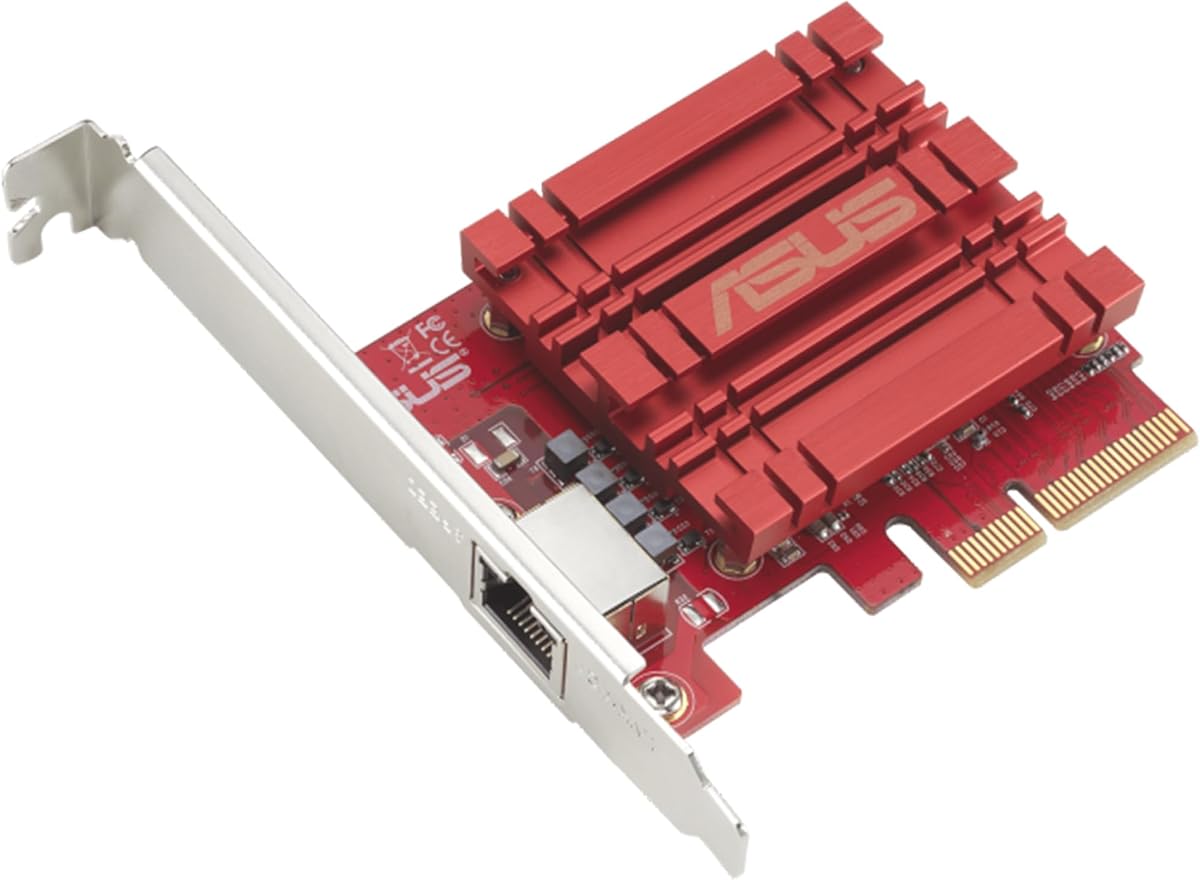
The Asus network card provides a straightforward upgrade path for desktop users needing faster connectivity. It supports up to 10Gbps speeds while maintaining full compatibility with older Gigabit standards.
We may earn a commission when you buy through this link, at no additional cost to you.
Its QoS feature helps prioritize data packets, which is useful for streaming or gaming sessions. This ensures a smooth online experience even when other devices use bandwidth.
Linux kernel support makes it flexible for developers and server admins. While it lacks the advanced features of server-grade cards, it covers essential needs for general use.
Buy this for simple desktop upgrades where simplicity and cost are key. It gets the job done efficiently for most home and office networking scenarios.
Hyper-fast 10Gbps networking delivers up to 10X-faster data-transfer speeds for bandwidth-demanding tasks and file transfers.
Built-in Quality-of-Service technology allows you to prioritize bandwidth and data packets for a smooth online experience.
We may earn a commission when you buy through this link, at no additional cost to you.
This Synology adapter is built for single-slot NAS systems needing a 10GbE upgrade. It ensures high performance for storage applications and integrates flawlessly with DSM software for management.
We may earn a commission when you buy through this link, at no additional cost to you.
Auto-negotiation handles speed adjustments automatically, simplifying setup. The five-year warranty offers long-term security for your investment, reflecting Synology's commitment to quality.
While more expensive than third-party options, the reliability and compatibility benefits outweigh costs for Synology owners. It reduces troubleshooting and ensures consistent performance.
Choose this for Synology NAS if you want guaranteed compatibility and strong warranty support. It is the safest choice for reliable single-port upgrades.
Validated for full compatibility and performance with Synology systems, ensuring seamless integration and reliable operation.
Covered by Synology's 5-year limited warranty, providing long-term peace of mind for your network investment.
We may earn a commission when you buy through this link, at no additional cost to you.
This card offers the reliability of Intel's 82599EN without vendor lock-in. The SFP+ cage accepts any module, allowing flexibility in choosing cost-effective optics or DAC cables.
We may earn a commission when you buy through this link, at no additional cost to you.
It works out-of-the-box with Proxmox, TrueNAS, and ESXi. Windows users may need drivers, but installation is straightforward with the Intel complete pack.
Airflow is important since it runs warm by design. With proper case cooling or a small fan, it maintains performance in silent builds.
Opt for this if you want flexible fiber optics and broad OS support. It is a robust choice for data centers and homelabs needing reliable throughput.
No vendor lock on the SFP+ cage allows third-party DAC twinax, AOC, and optics to link up without restrictions.
Plug and play on Proxmox, TrueNAS, Unraid, and ESXi, also detected by QNAP, Synology, Ubuntu, Debian, and CentOS with no driver steps.
We may earn a commission when you buy through this link, at no additional cost to you.
TRENDnet's adapter meets NDAA and TAA compliance requirements for government and enterprise use. It is designed for reliability and offers strong technical support for smooth deployment.
We may earn a commission when you buy through this link, at no additional cost to you.
2.5G BASE-T support ensures it works well with standard cabling for intermediate speeds. The PCIe Gen 2 3.0 interface ensures compatibility with a range of systems.
English-speaking tech support is available during business hours for assistance. This reduces downtime when integrating the card into complex networks.
Choose this if compliance and support are priorities. It is a solid option for regulated environments needing reliable 10G networking.
With our NDAA and TAA compliant Network Adapters, you can plan and install networking solutions that Government customers demand today.
Our team of advisors, support and tech experts are English speaking, and available for all your needs during normal business hours.
We may earn a commission when you buy through this link, at no additional cost to you.
This 10Gtek card brings Intel X550 stability to cost-effective server deployments. It supports multiple speeds and integrates well with various server OS for stable connectivity.
We may earn a commission when you buy through this link, at no additional cost to you.
Single RJ45 port is ideal for servers needing just one fast connection. Multi-speed negotiation ensures smooth transitions across different network environments.
Lifetime tech support and warranty provide added value for long-term use. The included bracket simplifies installation in compact server cases.
Select this for stable, straightforward server upgrades. It balances cost and reliability for small and mid-sized businesses.
Equipped with original Intel X550-AT2 controller chip which makes the servers more stable and reliable.
Backed by 10Gtek 30 Days Free-returned, 3 Year Free Warranty and Lifetime Technology Support for peace of mind.
We may earn a commission when you buy through this link, at no additional cost to you.
Selecting the right network card depends on your infrastructure and needs. Review these factors to ensure compatibility and performance.
Cards offer RJ45 copper or SFP+ fiber. RJ45 uses standard cables for short distances. SFP+ requires optics but suits longer runs.
Choose based on existing cabling and distance requirements for optimal cost.
Intel controllers provide stability but cost more. Realtek and others offer affordability. Check OS driver support before buying.
Prioritize chipsets with strong community support for hassle-free setup.
Ensure your motherboard has the required PCIe lane. x1 slots work for basic 10G. x4 lanes suit high-load servers.
Match the card to available slots to avoid bottlenecks.
Single port cards suffice for basic upgrades. Dual ports allow redundancy and link aggregation for servers.
Select dual ports if uptime or doubled throughput is critical.
Verify drivers for Windows or Linux. Server OS compatibility is vital for enterprise. Some cards need manual installs.
Choose cards with official drivers for your specific OS version.
10GBASE-T needs Cat6A for full speed. Shorter Cat6 can work but may limit distance. DACs are ideal for SFP+.
Invest in proper cabling to avoid throttling your network.
Longer warranties indicate confidence in quality. Look for at least three years of coverage for protection against defects.
Prioritize brands offering strong warranty and support terms.
SR-IOV features help VMs access network hardware directly. Check if your hypervisor needs specific NIC features.
Choose SR-IOV capable cards for virtualized server environments.
Install the card into an available PCIe slot on your motherboard. Secure the bracket to the chassis and connect the network cable firmly.
Boot your system and install the latest drivers from the manufacturer or operating system repository for best performance.
Ensure airflow in your case to keep the card cool, especially for high-performance models that may generate more heat.
Use Cat6A for full 10Gbps over distances up to 100 meters. Cat6 may work for shorter runs but lacks guaranteed performance. Always verify cable ratings.
Yes, your switch must support 10GbE. If using copper, ensure it has 10G copper ports. Fiber switches need SFP+ ports.
Most modern 10GbE cards work with Linux. Check for kernel support and driver availability. Intel cards have strong open-source support.
Old Cat5e might support 2.5G but not full 10G. For best performance, upgrade to Cat6A or use fiber DAC cables with SFP+.
For large file transfers, media editing, or virtualized servers, yes. For simple browsing, Gigabit is sufficient. Match speed to your needs.
Use OS tools like ipconfig, Network Settings, or switch UI. The interface shows negotiated speed. Ensure cable supports the link rate.
This roundup highlights top cards like TP-Link and Synology for home and NAS users. Budget and premium options ensure you find the best fit.
Prioritize your infrastructure needs such as copper versus fiber and port count. Ensure compatibility with your OS and motherboard slots.
Check current prices and availability before buying. Networks evolve quickly, so select a card that grows with your setup.