
Flashforge AD5M
4.3Editor score
Fast 600mm/s printing speed
Fully auto leveling system
Quick swap nozzle design
This guide compares the top 3D printers for beginners in October 2026 based on ease of use, print quality, speed, and reliability.
Choosing the right 3D printer for beginners can be overwhelming due to the vast array of options available today. You need a machine that balances ease of use with reliable performance to ensure your first prints are successful and enjoyable.
We have carefully evaluated the latest models on the market focusing on features like auto-leveling, calibration speed, and user-friendly interfaces. This list covers machines that minimize setup time and maximize creative potential for new users.
Each pick highlights specific strengths such as multi-color capabilities or compact designs suitable for different spaces. Please note that availability and specific bundle details may change over time as manufacturers update their product lines.
4.3Editor score

4.7Editor score

4.2Editor score
The following table provides a side-by-side look at the key specifications and features of each recommended 3D printer for beginners to help you make an informed decision.





The Bambu Lab A1 stands out as the top choice for beginners seeking a high-performance machine that requires minimal technical knowledge. With a stellar rating of 4.7 stars it offers an exceptional balance of speed precision and user-friendly features that simplify the learning curve significantly.
We may earn a commission when you buy through this link, at no additional cost to you.
Its full-auto calibration system eliminates the frustration of manual bed leveling ensuring that your first print starts off perfectly every time. The active flow rate compensation algorithm further enhances consistency by adjusting extrusion on the fly for flawless details and smooth surfaces across various geometries.
While the A1 offers incredible value the need to purchase the AMS lite separately for multi color printing can be a minor hurdle for some users. Additionally the lack of an included enclosure means it may not be ideal for printing advanced materials that require temperature control.
This printer is perfect for hobbyists parents or students who want reliable results without spending hours troubleshooting. If you prioritize ease of use and print quality the A1 is the strongest recommendation for entering the world of 3D printing today.
The automated calibration process handles Z-offset and bed leveling without user intervention ensuring consistent adhesion from the very first layer.
Active motor noise canceling technology ensures the printer runs quietly making it suitable for living rooms or classrooms without disruption.
We may earn a commission when you buy through this link, at no additional cost to you.
The Flashforge AD5M delivers impressive performance at a competitive price point making it an ideal budget option for beginners. With a rating of 4.3 stars this printer combines a robust CoreXY all-metal structure with rapid printing speeds that reduce wait times significantly.
We may earn a commission when you buy through this link, at no additional cost to you.
Its one-click auto leveling system ensures the bed is perfectly calibrated for every job removing the guesswork often associated with new printers. The quick-release nozzle design allows for maintenance in just three seconds enabling you to switch between different nozzle sizes for various project requirements easily.
While the build volume is smaller than some competitors it remains sufficient for most hobbyist projects and prototyping needs. Users may find the initial firmware setup slightly complex compared to plug-and-play options but the long-term reliability justifies the effort.
For those looking to maximize output without breaking the bank this machine offers a compelling mix of speed and durability. It is particularly well-suited for users who want to print multiple small items efficiently while maintaining high precision and quality.
The CoreXY structure enables high-speed movement with precise control reducing vibration to maintain print quality even at top speeds.
Optional nozzle sizes from 0.25mm to 0.8mm give you creative control over detail level and print speed for any project.
We may earn a commission when you buy through this link, at no additional cost to you.
The Bambu Lab P1S Combo represents the pinnacle of ready-to-use 3D printing for beginners who want professional results. With a solid rating of 4.2 stars this bundle includes the printer and the AMS multi-color system providing a complete solution for creative projects.
We may earn a commission when you buy through this link, at no additional cost to you.
The fully enclosed design protects sensitive materials like ABS and ASA from warping while keeping the print area clean. Combined with auto bed leveling and a 15-minute setup time you can start creating almost immediately without technical hurdles.
While the cost is higher than entry-level models the inclusion of the AMS and advanced capabilities offers long-term value. Some users may prefer a smaller footprint but the performance and versatility make it a top choice for serious hobbyists.
This bundle is perfect for those who want to explore multi-color designs without compromising on speed or ease of use. If you are willing to invest in a machine that grows with your skills the P1S Combo is an outstanding choice.
The enclosed chamber enables reliable printing of engineering-grade filaments expanding your creative possibilities beyond basic PLA.
With up to 16 colors available you can create vibrant functional parts without needing multiple separate print runs.
We may earn a commission when you buy through this link, at no additional cost to you.
The Flashforge Adventurer 5M is designed for those who prioritize speed without sacrificing build quality. With a rating of 3.9 stars it offers a high-speed CoreXY structure that maximizes efficiency for rapid prototyping and production cycles.
We may earn a commission when you buy through this link, at no additional cost to you.
Its direct drive extruder supports high flow rates and allows for quick nozzle swaps in just three seconds. The dual-sided PEI platform ensures easy model removal while the app monitoring gives you remote control over your printing jobs anytime.
Some users report a steeper learning curve compared to simpler models which may affect the overall experience for absolute beginners. While it is powerful the need for occasional calibration adjustments can be a downside for those seeking true plug-and-play convenience.
This printer is best suited for users who value throughput and are comfortable with minor technical tweaks. If you need to print large batches quickly and understand the basics of machine tuning the Adventurer 5M is a strong contender.
The Flash Studio app lets you monitor progress and adjust settings from your smartphone for a seamless workflow.
With 600mm/s travel speed and 20000mm/s² acceleration it drastically cuts down production time for standard models.
We may earn a commission when you buy through this link, at no additional cost to you.
This fully assembled mini 3D printer kit is tailored for kids and absolute beginners who need a complete and simple solution. With a rating of 4.4 stars it provides everything needed to start printing immediately including a roll of filament and essential accessories.
We may earn a commission when you buy through this link, at no additional cost to you.
The machine features one-button auto leveling and one-touch filament loading simplifying the process for new users significantly. A built-in automatic nozzle cleaning system ensures consistent print quality by preventing clogs before they happen.
The primary limitation is the small build volume which restricts the size of objects you can create in a single print. However for educational purposes and small toys this constraint is often acceptable given the ease of use and compact footprint.
Ideal for classrooms or home desks this kit removes the complexity of assembly and setup for younger users. If your goal is to introduce 3D printing in a fun and accessible way without technical barriers this option is highly recommended.
The kit includes all necessary tools and a test filament so users can start printing without extra purchases.
Automatic cleaning routines help maintain print quality by keeping the nozzle clear during operation and standby.
We may earn a commission when you buy through this link, at no additional cost to you.
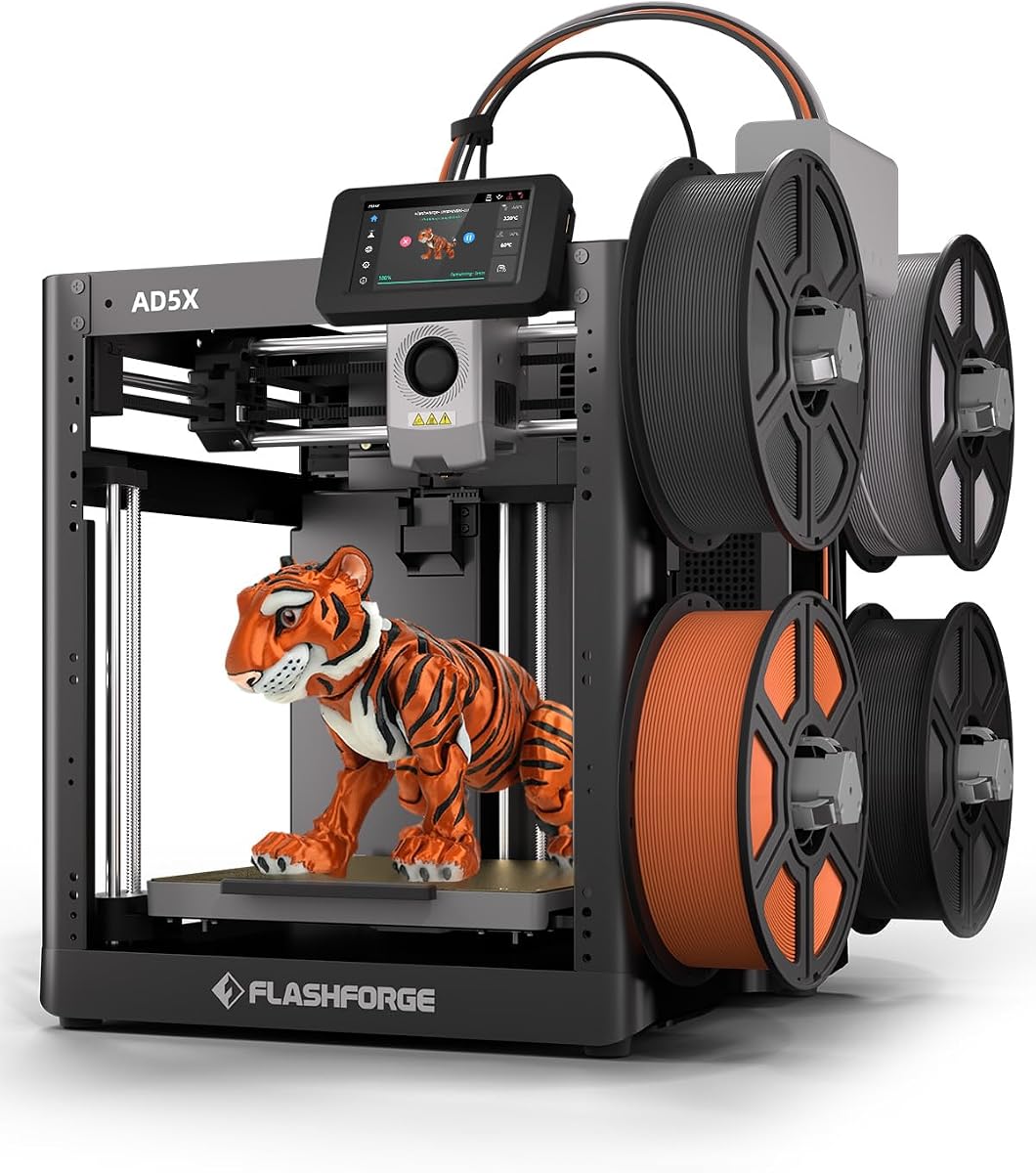
The Flashforge AD5X brings multi-color capabilities to beginners with a high-performance CoreXY system. With a rating of 3.9 stars it supports up to four colors simultaneously allowing for vibrant projects that would be impossible with single extrusion printers.
We may earn a commission when you buy through this link, at no additional cost to you.
Its 300C direct drive extruder can handle a wide range of materials including those that require higher temperatures. The vibration compensation system helps maintain precision even at high speeds ensuring that complex multi-color prints remain sharp and aligned.
Setting up multi-color prints can be more involved than single color jobs requiring some planning and slicing adjustments. Beginners might find the additional complexity challenging but the results are worth the effort for those interested in creative design.
This printer is perfect for users who want to explore color mixing without investing in a full high-end system. If you are looking to add visual variety to your prints the AD5X offers a unique balance of speed and versatility.
Support for four colors enables detailed models with shading and accents directly on the printer.
The 300C extruder allows for greater material variety including some engineering filaments for strong parts.
We may earn a commission when you buy through this link, at no additional cost to you.
The AOSEED AI 3D Printer is a creative powerhouse designed to make design accessible for children and beginners. With a rating of 4.5 stars it includes an AI assistant that helps transform voice text or images into 3D models easily.
We may earn a commission when you buy through this link, at no additional cost to you.
Its enclosed safe design ensures that young users can print without risk of burns while the built-in camera allows parents to monitor progress remotely. Access to over 8000 human-reviewed models means there is always inspiration ready to print right out of the box.
The printer supports only single-color printing which limits some advanced projects but simplifies the process for kids. Despite this the AI tools and safety features make it an excellent educational tool for fostering creativity and STEM learning.
Ideal for families looking to engage kids in technology this printer reduces the barrier to entry significantly. If you want a device that inspires imagination without technical frustration this AI-enabled model is a standout choice.
Convert simple drawings into 3D models using voice or text prompts for effortless custom design creation.
The built-in camera sends time-lapse videos to your phone so you can watch the process from anywhere.
We may earn a commission when you buy through this link, at no additional cost to you.
The Bambu Lab A1 Mini is a compact version of the popular A1 offering the same quality in a smaller package. With a rating of 4.4 stars it comes with a creative LED Lamp Kit that allows for immediate functional DIY projects.
We may earn a commission when you buy through this link, at no additional cost to you.
Its compact design makes it perfect for small desks or limited spaces while maintaining the reliability and speed expected from the Bambu ecosystem. The auto calibration and simple setup ensure that beginners can start printing within minutes of unboxing.
While the small build volume restricts large objects it is ideal for small parts jewelry and educational models. For users with space constraints this machine offers a powerful yet contained solution for daily creative work.
This model is perfect for those who want the full Bambu experience in a space-efficient form factor. If you need a printer that fits easily into a small studio and delivers consistent results the A1 Mini is a top pick.
The included LED lamp set allows for making functional light projects immediately without extra accessories.
Its compact footprint allows for placement on smaller desks while still delivering high quality performance.
We may earn a commission when you buy through this link, at no additional cost to you.
The Creality Ender 3 V3 SE is a trusted choice for beginners with a remarkably high rating of 4.9 stars. This bundle includes four packs of PLA filament giving you plenty of material to start experimenting immediately after setup.
We may earn a commission when you buy through this link, at no additional cost to you.
Its Sprite direct extruder provides strong and smooth feeding ensuring that TPU and other flexible materials print reliably. The CR touch auto leveling and dual Z-axis shafts contribute to consistent high-quality prints over long durations.
As an open-frame machine it may require more attention to environmental factors like drafts which can affect print quality. However the reliability and included accessories make it a solid starting point for those willing to learn the basics of assembly.
This printer is ideal for users who want a cost-effective reliable machine with strong community support. If you prefer a model with proven reliability and plenty of resources online the Ender 3 V3 SE is an excellent recommendation.
Four packs of PLA filament are included to ensure you can print various colors right from the start.
The Sprite extruder pushes filament smoothly with less slip improving performance on complex or flexible prints.
We may earn a commission when you buy through this link, at no additional cost to you.
The Flashforge AD5M is designed to handle rigorous usage with its durable all-metal CoreXY structure. With a rating of 4.3 stars it ensures that high-speed printing remains stable and precise even after extended periods of operation.
We may earn a commission when you buy through this link, at no additional cost to you.
Its quick-swap nozzle and one-click auto leveling simplify maintenance and setup saving valuable time for busy creators. The resume function ensures that if a power outage occurs the print will continue from the saved layer instead of starting over.
Some users may find the firmware interface slightly complex initially and updates may be required to unlock all features. Despite this the machine robust build quality and speed make it a reliable workhorse for both beginners and experienced users.
This printer is perfect for environments where durability and speed are key considerations. If you need a machine that can withstand frequent use while maintaining consistency the AD5M offers a solid and efficient solution.
The resume feature saves your progress automatically during outages saving time and material on long prints.
The all-metal structure reduces vibration and maintains alignment over time ensuring consistent print quality.
We may earn a commission when you buy through this link, at no additional cost to you.
Selecting the right 3D printer involves evaluating several key factors to ensure it matches your needs and skill level.
Look for models with auto-bed leveling and pre-assembled frames to minimize technical barriers. A good beginner printer should allow you to start printing within an hour of receiving it.
Prioritize units with one-click calibration and clear assembly instructions to ensure a smooth first experience.
While speed is attractive it should not come at the cost of print accuracy. High acceleration rates paired with vibration compensation help maintain precision even during fast jobs.
Focus on machines that balance fast speeds with reliable extruders to avoid layer shifting or clogs.
The build volume determines the maximum size of objects you can print in a single job. Beginners often start with small models so a standard 220mm cube is usually sufficient.
Choose a size that fits your desk space while allowing room for future projects that may require larger dimensions.
Most beginners start with PLA due to its ease of use but consider whether you want to experiment with PETG or ABS later. Ensure the extruder can reach the necessary temperatures for your desired materials.
Check the supported filament types to ensure the printer can handle the materials you plan to use for your projects.
Remote monitoring via apps or built-in cameras adds convenience by allowing you to check progress without physical access. This feature is particularly useful for longer prints or shared spaces.
Select a printer with robust software support and mobile control options for added flexibility and peace of mind.
Safety is paramount especially if children will be using the printer. Look for enclosed designs or pinch-free mechanisms to prevent accidental burns or injuries.
Ensure the machine has sensors that detect filament runouts or other issues to stop safely before damage occurs.
A strong warranty and responsive support team can save you time and frustration if issues arise. Look for brands that offer comprehensive guides and quick response times to inquiries.
Choose a manufacturer with a proven track record of helping new users through community forums and official support channels.
Consider the total cost including any necessary accessories like filaments or tools that are not included. A slightly higher upfront cost may offer better long-term value through improved reliability and features.
Evaluate bundles that include essential items to maximize the value of your initial purchase and reduce extra costs.
Always start by calibrating the bed using the automatic leveling feature provided by your printer. This ensures the first layer adheres correctly and prevents warping throughout the print process.
Regularly clean the nozzle and build plate to remove dust and residue that can cause clogs or uneven adhesion. Use recommended cleaning solutions and tools to maintain optimal performance over time.
Monitor your first few prints closely to catch any issues early before they affect larger jobs. Keeping a log of settings and results helps you understand the machine better and improves future projects.
The Bambu Lab A1 is often cited as the easiest due to its full-auto calibration and minimal setup requirements. It removes most technical hurdles allowing users to focus on design rather than machine tuning.
No an enclosure is not strictly necessary for PLA as it does not warp easily. However an enclosure can help maintain consistent temperatures and reduce drafts that might affect print quality.
Print times vary based on size and quality settings but most standard models take between two to five hours. High-speed printers can reduce this time significantly without sacrificing essential details.
PLA is the best starting filament because it is odorless easy to print and does not require high temperatures. It is widely available in many colors and makes learning the basics straightforward.
Yes some models like the Bambu Lab P1S support multi-color printing with an additional AMS system. Alternatively you can manually pause and swap filaments for basic multi-color effects.
Yes with proper supervision and enclosed models like the AOSEED AI Printer safety is maintained. Features like pinch-free beds and thermal protection minimize risks during operation.
Many modern printers have a resume function that saves progress if power is lost. This ensures you can restart the print from where it stopped without wasting materials.
Regular maintenance should include monthly nozzle cleaning and checking belt tension. Keeping the build plate clean and replacing worn parts as needed ensures consistent print quality.
The top picks like the Bambu Lab A1 and Flashforge AD5M offer distinct advantages depending on your budget and specific needs. Each of these models provides a reliable foundation for learning and creating with 3D printing.
Prioritize ease of use and support features like auto-leveling and remote monitoring to ensure a smooth entry into this hobby. The right machine will grow with your skills and keep the process enjoyable.
Remember that prices and bundles can change so check current listings before making a decision to get the best value available. Investing time in research now will lead to a rewarding experience with your new printer.