
Bambu Lab A1
4.7Editor score
Fast acceleration up to 10000 mm/s²
Full-auto calibration for easy setup
Quiet operation with active noise canceling
This guide compares the top 3D printer for small business options featuring speed, reliability, and multi-color capabilities to help you choose the right tool.
Running a small business requires tools that boost efficiency and creativity. A reliable 3D printer can transform your workflow by enabling rapid prototyping and custom production without external dependencies.
We evaluated ten leading models based on speed, material versatility, ease of use, and build quality. Our analysis focuses on features that matter most to entrepreneurs seeking consistent output and low operational costs.
Each pick highlights specific strengths like multi-color printing or high-speed CoreXY motion. Keep in mind that availability and pricing fluctuate, so verify current details before making your final investment decision.
4.7Editor score

4.2Editor score

4.0Editor score
This table provides a side-by-side overview of the ten selected models. It highlights core specifications like build volume, speed, and key features to help you compare options quickly.





The Bambu Lab P1S Combo stands out as a top contender for small businesses needing speed and versatility. It delivers an impressive 500mm/s print speed which significantly reduces production times. Its enclosed design ensures reliable prints even with challenging materials like ABS or ASA.
We may earn a commission when you buy through this link, at no additional cost to you.
One of its strongest features is the support for up to 16 colors when connected to the AMS system. This allows for vibrant multi-color parts without post-processing painting. The automatic bed leveling also simplifies the workflow making it accessible even for new users.
While the P1S excels in speed and ease of use there are trade-offs. It does not recommend carbon or glass fiber reinforced polymers which limits some industrial applications. Additionally the multi-color feature requires the separate AMS unit for full functionality.
For entrepreneurs seeking a balance of performance and usability the P1S Combo is a smart choice. It minimizes downtime and maximizes output which is essential for growing businesses. We recommend it for those prioritizing speed and multi-color capabilities.
The 500mm/s speed and high acceleration mean parts are ready faster reducing bottlenecks in your workflow.
With multi-color support you can produce finished products directly from the printer saving labor costs.
We may earn a commission when you buy through this link, at no additional cost to you.
The FLASHFORGE Creator 5 Pro is designed for serious industrial engineering needs. Its four independent toolheads allow for seamless multi-material and multi-color printing without constant waste. The near-zero waste system drastically slashes operational overhead which is vital for business budgets.
We may earn a commission when you buy through this link, at no additional cost to you.
It features an active heated chamber reaching up to 65°C which prevents warping in advanced filaments like ABS PC and PA. This versatility enables you to produce robust industrial parts with confidence. The CoreXY structure ensures stability at high speeds up to 600mm/s.
Safety is also a priority with a dual HEPA and activated carbon system trapping particles and fumes. This maintains a safe workspace environment. However the complexity of managing multiple toolheads might be overwhelming for those new to 3D printing.
This printer is best suited for businesses focusing on high-volume industrial parts. The reduction in material waste and increased speed justify the investment. If you need professional-grade output with material versatility this model is a strong candidate.
The 7-second tool changer avoids filament flushing saving significant material costs over time.
Heated chamber allows reliable printing of engineering materials like PC and PA for durable parts.
We may earn a commission when you buy through this link, at no additional cost to you.
The Snapmaker U1 redefines multi-color printing with its 5s tool changer system. This allows for rapid switching between materials minimizing downtime and waste. It supports true mixed-material printing combining rigid and flexible materials in a single part.
We may earn a commission when you buy through this link, at no additional cost to you.
Its robust locking mechanism has been validated for over a million swaps with zero failures ensuring reliability. The automatic toolhead offset calibration and vibration compensation help deliver smooth dimensionally accurate prints. This precision is crucial for small businesses producing detailed prototypes.
The build volume of 270x270x270 mm is standard but might be limiting for larger single-piece items. Additionally the reliance on Snapmaker Orca software means you are tied to their ecosystem. However the ease of use for beginners is a plus.
If your business needs functional multi-color parts quickly the Snapmaker U1 is ideal. It reduces material costs through waste reduction and increases productivity. We recommend it for creators focusing on complex prototypes and finished models.
Switching toolheads instead of purging reduces filament waste by up to 5 times saving money.
Supports PLA PETG TPU and more allowing for diverse functional and aesthetic parts.
We may earn a commission when you buy through this link, at no additional cost to you.
The Bambu Lab P1S offers the core benefits of the P1S Combo at a lower cost point. It features a fully enclosed body which improves performance for advanced filaments. The automatic bed leveling makes achieving high-quality prints straightforward for any user level.
We may earn a commission when you buy through this link, at no additional cost to you.
With a speed of 500mm/s and acceleration up to 20000 mm/s² it delivers lightning-fast production. You can set it up in just 15 minutes reducing initial downtime. This makes it perfect for businesses needing immediate deployment without technical hurdles.
The main limitation is the lack of the AMS unit which means it is single-color unless purchased separately. Also it does not support carbon fiber filaments which limits some structural applications. However for general purpose use it is highly effective.
For startups looking for a reliable enclosed printer the P1S is an excellent choice. It balances speed and ease of use well. We suggest it for those who prioritize quick setup and high-speed printing over multi-color capabilities.
The user-friendly design allows assembly in 15 minutes letting you start printing immediately.
Enclosed design enables printing of ASA and PETG with higher success rates.
We may earn a commission when you buy through this link, at no additional cost to you.
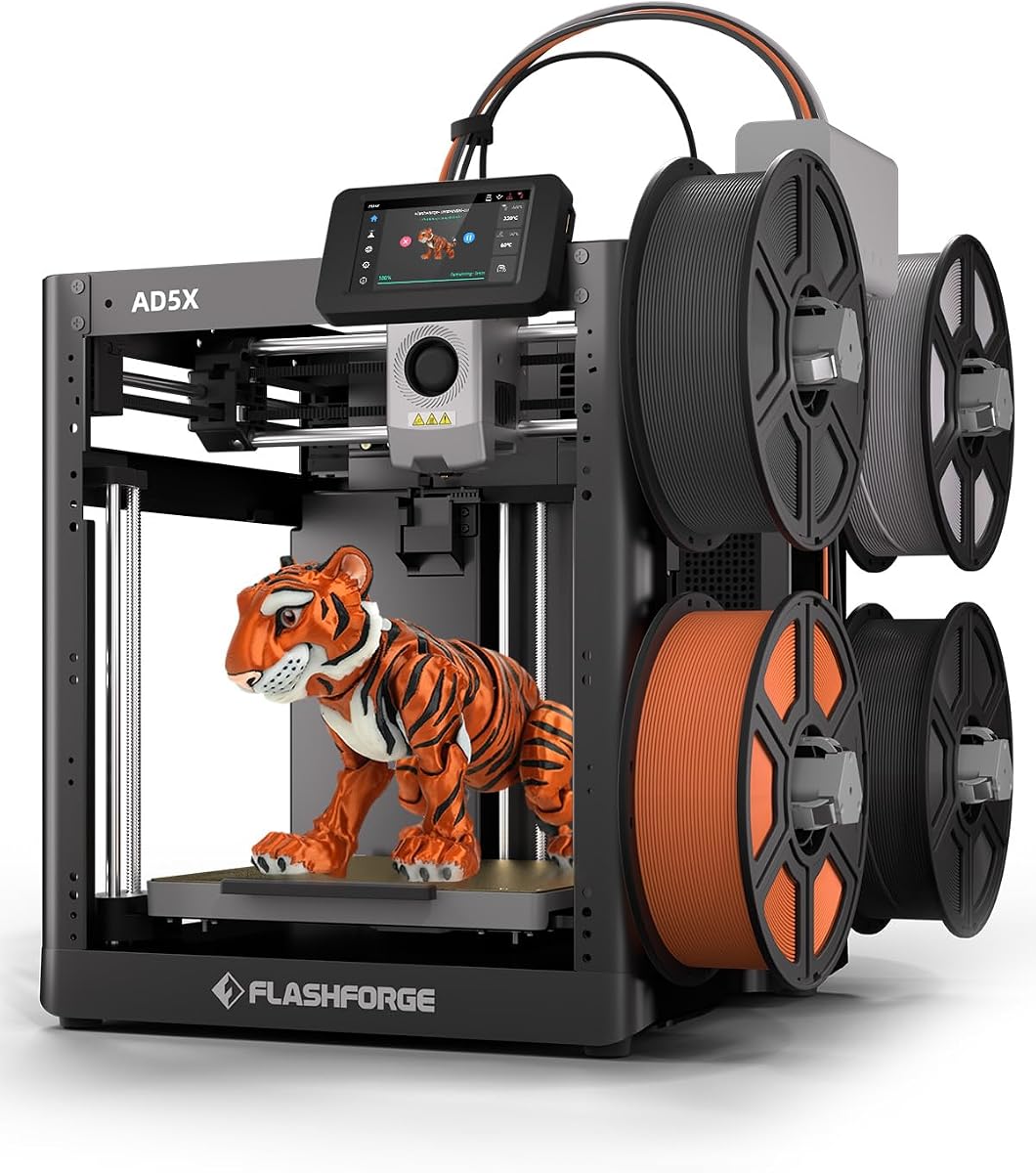
The FLASHFORGE AD5X focuses on precision and efficiency for small scale production. It supports up to 4 colors simultaneously giving creative possibilities. The CoreXY structure enables speeds up to 600mm/s with acceleration up to 20000mm/s² for rapid prototyping.
We may earn a commission when you buy through this link, at no additional cost to you.
Its 300°C direct drive extruder handles a wide range of materials ensuring exceptional print quality. The 1-Click auto leveling feature calibrates the bed automatically saving time on setup. You can also choose from four nozzle sizes to fit different creative needs.
The build volume of 220x220x220mm is compact which might limit large parts. While it has smart features like resume printing the overall reliability rating is lower than competitors. This suggests potential minor issues in long term use.
For small businesses needing high speed and versatility on a budget this model is worth considering. The auto leveling and multi-color support add significant value. We recommend it for hobbyists or small production runs where speed is critical.
CoreXY design ensures fast printing with stability for batch production tasks.
Upgrades from 0.25mm to 0.8mm allow customization for detail or speed.
We may earn a commission when you buy through this link, at no additional cost to you.
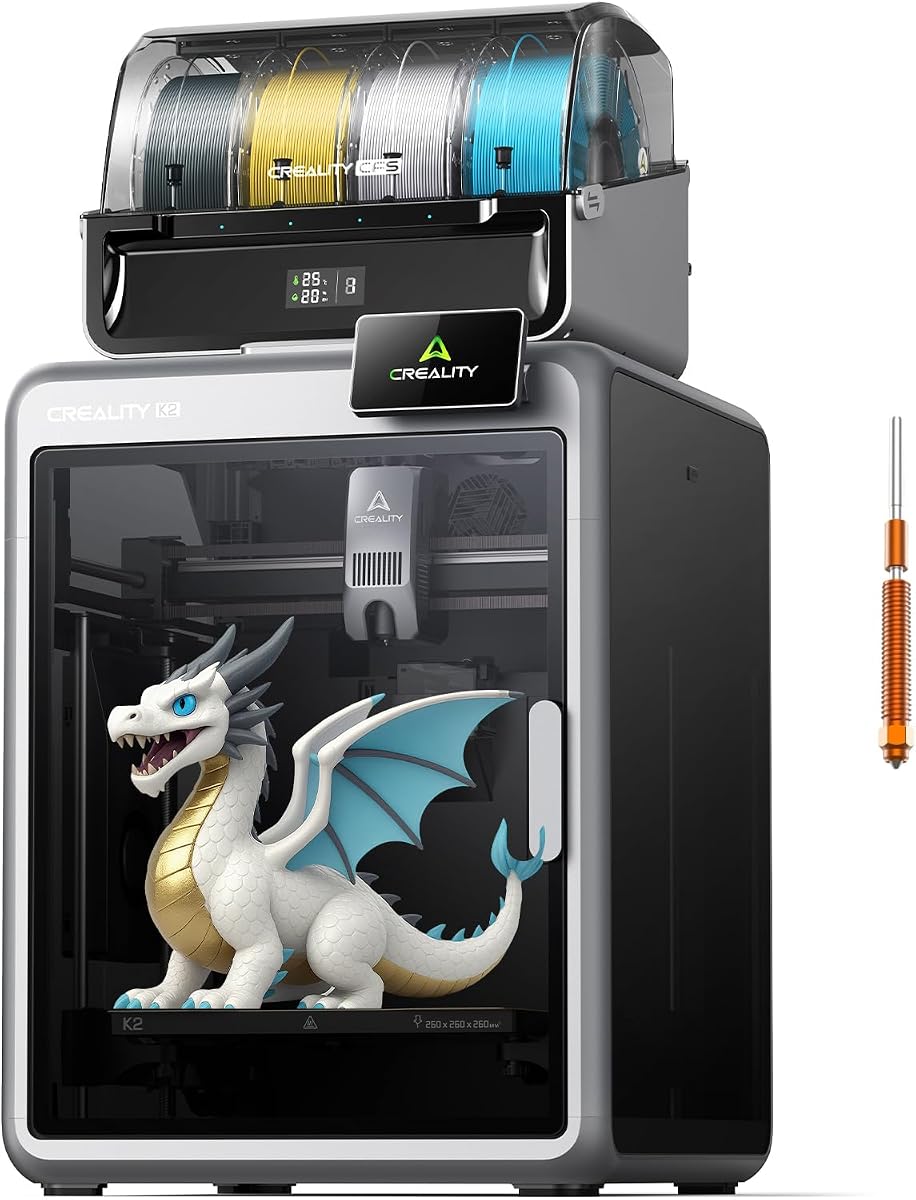
The Creality K2 Combo offers a hassle-free experience with 95% pre-assembly. You can use it right after unpacking reducing initial setup time. It supports multicolor printing with the CFS system allowing up to 16 colors when expanded.
We may earn a commission when you buy through this link, at no additional cost to you.
The silent mode makes it quieter than typical printers using step-servo motors and balanced fans. Smart auto leveling probes only the target area for faster and more precise calibration. An AI camera helps watch over spaghetti failures and idling in real-time.
While powerful the build volume of 260x260x260mm is adequate but not large. The CFS units are sold separately for full multi-color capability which can add cost. However the pre-assembly feature is a major plus for immediate use.
For businesses wanting a plug-and-play solution the K2 Combo is a strong choice. It balances speed and ease of use effectively. We recommend it for teams needing reliable multi-color output without complex assembly.
Silent mode reduces noise making it suitable for office environments.
AI camera helps prevent failures saving material and time on critical prints.
We may earn a commission when you buy through this link, at no additional cost to you.
The Creality K2 Plus Combo is a flagship model designed for large objects or batches. Its 350x350x350mm build volume allows printing large parts without partitions. This is ideal for businesses needing scale without compromising on speed.
We may earn a commission when you buy through this link, at no additional cost to you.
It delivers up to 600mm/s printing speed even at this size. The active chamber up to 60°C handles high-end filaments like ASA and PPA reliably. Dual AI cameras monitor both the chamber and the flow rate ensuring high accuracy and low failure rates.
The Matrix frame structure with aerospace-grade aluminum improves rigidity and eliminates resonance. This precision is crucial for consistent quality. However the larger size requires significant workspace and a higher investment.
For enterprises needing large format production the K2 Plus is a premium choice. It combines size speed and material versatility. We recommend it for businesses focused on scaling up prototyping and manufacturing.
The 350mm volume allows single print parts that usually require assembly.
60°C chamber ensures warp-resistant prints of high-temperature engineering filaments.
We may earn a commission when you buy through this link, at no additional cost to you.
The FLASHFORGE Adventurer 5M is built for rapid prototyping and efficiency. It features a CoreXY structure with speeds up to 600mm/s and acceleration up to 20000mm/s². This maximizes output for small businesses needing fast turnaround times.
We may earn a commission when you buy through this link, at no additional cost to you.
The 280°C direct drive extruder ensures superior quality. A 3-second nozzle change makes maintenance quick and simple. The dual-sided PEI platform allows easy removal of prints. App monitoring keeps you informed remotely.
While fast the build volume is standard at 220x220x220mm. It is not designed for extreme engineering materials but handles standard ones well. The user-friendly design simplifies operations for beginners.
For teams focused on rapid iterations and speed this printer is excellent. The quick nozzle changes and auto leveling save time. We recommend it for startups needing efficient prototyping capabilities.
3-second nozzle swaps mean less downtime for cleaning or changing nozzles.
Remote monitoring via Flash Studio app keeps you updated without being present.
We may earn a commission when you buy through this link, at no additional cost to you.
The Bambu Lab A1 is a top pick for beginners and budget-conscious businesses. It delivers high-speed precision with 10000 mm/s² acceleration. Full-auto calibration removes manual hassles ensuring smooth prints every time.
We may earn a commission when you buy through this link, at no additional cost to you.
Active flow rate compensation maintains consistent quality. The interface is user-friendly with a simplified touchscreen. Quiet operation with active noise canceling makes it suitable for shared office spaces.
It lacks an enclosed chamber limiting high-temp filaments. Multi-color requires the AMS lite which is an add-on. However its ease of use and reliability are outstanding for entry-level needs.
For startups needing a reliable easy printer the A1 is highly recommended. It simplifies the printing process significantly. We suggest it for teams prioritizing simplicity and low maintenance.
Full-auto calibration handles Z-offset and leveling automatically for beginners.
Active motor noise canceling reduces sound making it office-friendly.
We may earn a commission when you buy through this link, at no additional cost to you.
The Creality K2 Combo excels with smart filament handling. Its CFS system allows automatic wire switching and smooth transitions. With up to 16 colors it supports complex prototypes without painting.
We may earn a commission when you buy through this link, at no additional cost to you.
The smart filament system reads info automatically and keeps materials dry. It also relays running out filaments with similar ones. Silent mode makes it quieter. AI camera failure detection adds safety.
The direct drive hotend handles engineering filaments well. However setup may be complex for those new to multi-color systems. The build volume is standard for this class.
For businesses needing advanced filament management the K2 Combo is solid. It reduces manual intervention. We recommend it for professional creators seeking reliable multi-color output.
RFID system reads filament type automatically reducing setup errors.
Built-in air purifier filters VOCs making printing safer indoors.
We may earn a commission when you buy through this link, at no additional cost to you.
Selecting the right 3D printer requires evaluating several factors that affect your daily operations. Below we outline key considerations to help you make an informed decision.
Speed impacts how quickly you can produce prototypes or parts. Look for models with high travel speeds and acceleration like 600mm/s. Faster speeds reduce idle time and allow you to complete more jobs in a day.
Prioritize printers with acceleration capabilities that maintain quality at high speeds.
Multi-color printing can save on post-processing labor. Systems like AMS or CFS allow seamless color switching without manual swaps. This is vital for creating marketing models or custom parts.
Ensure the system supports your needed color count without excessive waste.
A larger build volume allows for bigger parts or multiple items at once. Consider if you need to print single large objects or batch small parts. The dimensions of your workspace also limit the machine size you can choose.
Choose a build volume that matches your common part sizes.
Different businesses require different materials like ABS PLA or engineering-grade filaments. Check if the printer supports advanced materials like PC or ASA. Some models offer enclosed chambers for better thermal management.
Verify the extruder temperature and chamber support for your intended materials.
Setup time affects how fast you can start producing. Pre-assembled models or those with auto-leveling simplify the process. User-friendly interfaces and apps also improve daily workflow.
Look for auto-leveling and simple interfaces for minimal downtime.
Automations like filament relaying and failure detection reduce manual checks. A machine that can run unattended overnight increases productivity. High reliability means fewer failed prints and wasted materials.
Prioritize features like auto-calibration and smart monitoring.
Beyond the initial price consider waste reduction and maintenance. Systems that minimize purge waste or offer tool changers save money. Reliable parts mean fewer replacements over time.
Choose models with low waste systems to save on filament costs.
If your printer is in an office space noise and fume management are key. HEPA filters and air purifiers improve safety. Silent modes help keep the environment professional.
Ensure the machine fits safely in your workspace with noise control.
Start by calibrating the printer using built-in auto-leveling tools. This ensures the bed is flat and prevents adhesion issues. Verify the nozzle and bed temperatures match your filament requirements before printing.
Store filaments in dry environments to avoid moisture absorption. Most high-performance materials like PLA and TPU absorb water easily. Use airtight containers or dryers to maintain print quality.
Clean the nozzle and bed regularly to prevent clogs and scratches. Inspect the extruder gears for debris. Regular maintenance extends the life of your printer and ensures consistent quality.
A suitable printer offers high speed reliability and ease of use. It should support diverse materials to expand product options. Automation features like auto-leveling help reduce downtime and manual effort.
Advanced multi-color systems with tool changers can reduce filament waste by up to 5 times. By swapping nozzles without flushing waste is minimized. This saves significant costs over time for business users.
No only those with enclosed chambers and high nozzle temperatures. ABS needs a heated chamber to prevent warping. Check if the model supports 60°C+ chambers before purchasing for engineering materials.
Most models support speeds up to 500mm/s or 600mm/s. This allows for rapid prototyping and efficient batch production. Acceleration up to 20000mm/s² ensures quality is maintained at these speeds.
Many modern printers offer mobile apps for remote monitoring. You can view progress via cameras and adjust settings. This keeps you connected without needing to be near the printer constantly.
Many models are pre-assembled and ready in under 20 minutes. Auto-leveling and calibration tools further simplify setup. Even beginners can start printing quickly with these user-friendly designs.
Clean the nozzle regularly with a soft brush and solvent. Inspect for wear and replace if necessary. A well-maintained nozzle ensures consistent flow and prevents clogs during production.
Look for HEPA filters or air purifiers to trap fumes. Silent modes reduce noise which is good for office spaces. Automatic power loss recovery protects your prints during outages.
We reviewed ten top models ranging from budget-friendly options to premium industrial machines. Each offers unique strengths like multi-color support or high-speed production to fit different business needs.
Prioritize speed and automation if you need rapid output. For versatility consider models with advanced material support and large build volumes. Ensure the printer integrates well with your current workflow.
Remember that prices and availability may change over time. Always check current details on the product pages before purchasing. A well-chosen printer will boost your business efficiency significantly.