
GWEIKE G2 Max 50W Fiber Laser Engraver
4.4Editor score
15000 mm/s engraving speed
Over 90 color engraving options
Electric lift column focus
This guide compares the top 10 50W fiber laser engravers for precision metal marking, deep engraving, and versatility across diverse industrial and creative
Fiber laser engravers have transformed how professionals and hobbyists mark metal surfaces with speed and precision. A quality 50W model delivers the power needed for deep engraving and vibrant color marking on various alloys.
We evaluated ten top models based on laser source reliability, working area size, software compatibility, and user feedback. Each entry offers unique strengths for jewelry making, industrial tagging, or custom design work.
Every selection includes detailed specifications, pros, cons, and expert insights to help you choose confidently. Prices and availability fluctuate, so verify current listings before purchasing your ideal engraving solution.
4.4Editor score

5.0Editor score

5.0Editor score
This side-by-side comparison highlights key specifications across all ten models. Compare working areas, laser sources, software options, and included accessories to find the best fit for your needs.


This OMTech 50W model stands out as the Editor's Choice due to its exceptional balance of power and precision. With a perfect 5.0 rating, it offers a large 7.9×7.9 inch workspace ideal for detailed jewelry or industrial projects.
We may earn a commission when you buy through this link, at no additional cost to you.
The machine supports both LightBurn and EZCAD2 software, giving users flexibility in design workflows. Its dual red dot locators ensure accurate positioning, while the rotary axis attachment simplifies engraving on cylindrical objects.
While the price reflects its premium build quality, the accuracy of 0.1mm and engraving speeds up to 7000 mm/s justify the investment. The only minor drawback is its dependency on Windows-based operating systems for full software functionality.
Ideal for professional jewelers and small businesses, this engraver delivers consistent results. We recommend it for anyone seeking a reliable, versatile 50W fiber laser system for high-value custom work.
The 0.1mm accuracy ensures fine details and small text remain crisp. This precision is vital for intricate designs on jewelry and small metal parts.
Compatibility with LightBurn allows users to leverage familiar design tools. EZCAD2 support provides advanced features for professional industrial marking.
We may earn a commission when you buy through this link, at no additional cost to you.
The GWEIKE G2 Max offers incredible value with its 4.4 rating and industrial-grade performance. It excels in speed with up to 15000 mm/s engraving capabilities and supports over 90 vibrant color options on metals like stainless steel.
We may earn a commission when you buy through this link, at no additional cost to you.
Its electric lift column allows for quick focus adjustments, saving time on repetitive setups. The 150x150mm working area is sufficient for most small to medium projects, and it includes safety features like emergency stop buttons.
While it has a smaller working area compared to some premium models, the trade-off is a more affordable entry point. Users might notice a shorter warranty compared to top-tier brands, but performance remains solid for the price.
This machine is perfect for budget-conscious creators and small workshops needing speed and versatility. Choose this if you prioritize high-speed marking and color options over maximum workspace dimensions.
The ability to mark over 90 colors on metals adds creative freedom. This feature sets it apart for custom design and artistic applications.
Electric focus and fast speeds reduce setup time significantly. This efficiency boosts productivity for high-volume small businesses.
We may earn a commission when you buy through this link, at no additional cost to you.
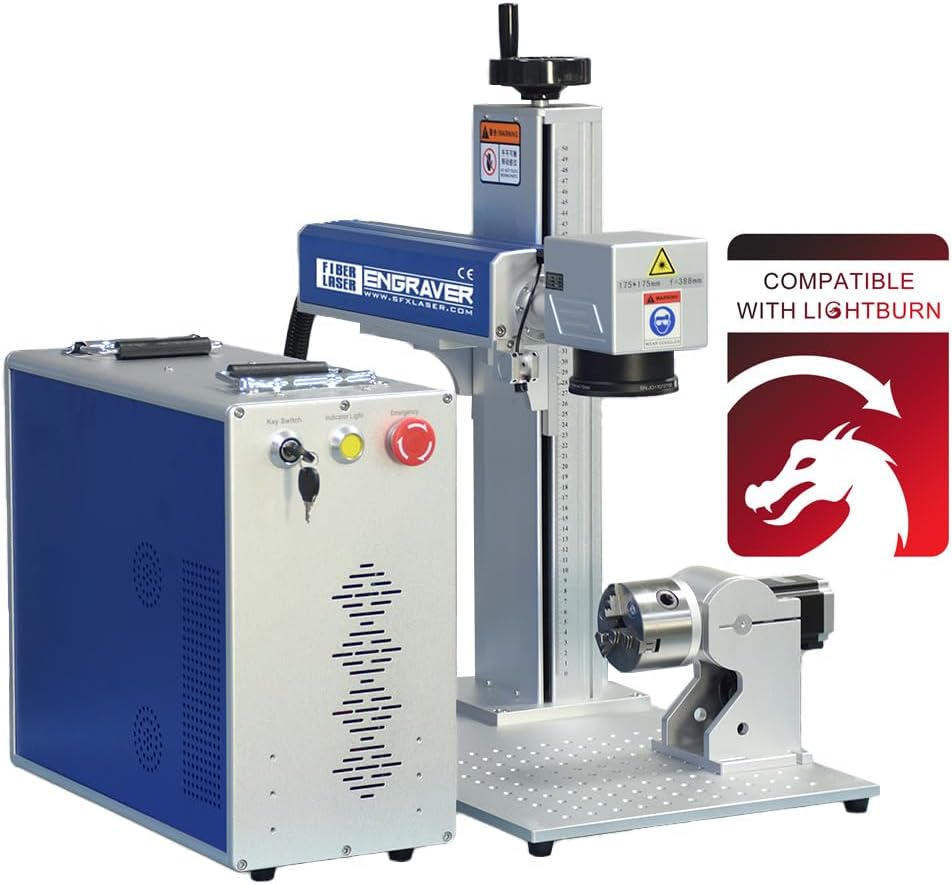
This model earns the Best Premium badge thanks to its JPT LP+ Series laser source and perfect 5.0 user rating. It delivers a reliable 175x175mm working area and includes a rotary axis for versatile engraving on round objects.
We may earn a commission when you buy through this link, at no additional cost to you.
The imported laser scanning system ensures marking speeds up to 7m/s with re-position precision of 0.002mm. SFX provides lifetime one-on-one technical support, which is a rare and valuable feature for industrial users needing long-term reliability.
While the price is higher, the build quality and support justify the cost. The unit is relatively heavy, which can make transportation difficult, but its stability during operation ensures consistent results.
Ideal for industrial settings and high-end custom shops, this machine offers unmatched support and precision. If budget allows, this is the most reliable 50W fiber laser available today.
JPT laser sources are renowned for longevity and stable output. This ensures consistent marking quality over thousands of hours of use.
Lifetime one-on-one technical support addresses complex issues quickly. This benefit reduces downtime for professional operations significantly.
We may earn a commission when you buy through this link, at no additional cost to you.
The Cloudray machine is perfect for portable needs with its compact design and perfect 5.0 rating. It comes with a standard 4.3×4.3 inch area but can be adjusted to 6.9×6.9 inch for larger projects using the adjustable height block.
We may earn a commission when you buy through this link, at no additional cost to you.
It supports both EzCad2 and Lightburn software across Windows and macOS. The included 360-degree rotary axis makes it excellent for rings and bracelets, and the max marking speed of 10000 mm/s ensures quick results.
The manual lift column is a minor limitation compared to electric versions, but the price point is reasonable. Its portability allows for engraving on-site, which is valuable for jewelry repair shops or trade shows.
Recommended for hobbyists and small jewelers needing mobility, this unit offers great versatility. Choose this if you need a reliable 50W system that can fit in smaller workspaces or travel easily.
Lightweight and compact design makes on-site engraving feasible. This is rare for 50W systems and adds significant value.
Support for both EzCad2 and Lightburn ensures workflow flexibility. Users can switch software based on project requirements.
We may earn a commission when you buy through this link, at no additional cost to you.
The ComMarker B4 is unique as a 2-in-1 desktop and handheld fiber laser. It features a marking speed up to 15000 mm/s and includes two lenses (110x110mm and 200x200mm) for varied project sizes.
We may earn a commission when you buy through this link, at no additional cost to you.
Support for both Lightburn and EzCad2 makes it versatile for different user preferences. The package is comprehensive, including foot switch, positioner, and safety goggles, making it ready to use out of the box.
However, the 3.7 rating indicates mixed user experiences regarding consistency and support. While the handheld feature adds flexibility, some users report challenges with calibration or long-term durability.
This model suits those needing a handheld option for irregular objects. If you prefer flexibility over guaranteed high-end stability, it is worth considering despite the mixed feedback.
The detachable handheld feature allows engraving on large fixed objects. This expands possibilities beyond traditional bench setups.
Includes all necessary lenses and accessories. This reduces extra costs and simplifies initial setup.
We may earn a commission when you buy through this link, at no additional cost to you.
This OMTech model features an automatic focusing button that simplifies setup significantly. With a perfect 5.0 rating, it delivers crisp precision with ±1mm accuracy and a 5.9×5.9 inch engraving area.
We may earn a commission when you buy through this link, at no additional cost to you.
It is designed for small spaces with a compact footprint and silent operation, reducing noise in shared workspaces. The engraving speed reaches 10000 mm/s, ensuring quick turnover for detailed jobs.
While the working area is smaller than premium models, the autofocus feature reduces errors for beginners. The absence of a rotary axis in the package means purchasing it separately for cylindrical work.
Ideal for small offices or quiet studios, this machine prioritizes ease of use. Choose this if you want a reliable, silent system that requires minimal manual adjustment for daily tasks.
One-touch autofocus removes manual focus wheel guesswork. This saves time and reduces setup errors.
Silent operation makes it suitable for offices or shared spaces. Compact dimensions fit easily into limited environments.
We may earn a commission when you buy through this link, at no additional cost to you.
The Monport 50W Pro integrates a JPT laser source for reliable performance with one-touch autofocus. It supports 3D relief engraving, allowing for detailed sculptural work on metal surfaces.
We may earn a commission when you buy through this link, at no additional cost to you.
Custom-engineered with high-quality silicon material reflectors, it ensures accuracy down to 0.01mm. The 5.9×5.9 inch working area is optimized to avoid distortion at edges, maintaining consistent power throughout.
While it lacks user reviews currently, the specifications suggest high-end performance. The autofocus and 3D relief capabilities are advanced features that may be complex for absolute beginners.
Best for professionals needing 3D capabilities, this machine offers precision tuning. If advanced detailing is your priority, this model provides the necessary hardware and software support.
Supports deep engraving for sculptural effects. Ideal for creating textured and artistic metal pieces.
Edge engraving maintains consistent power without weak spots. This ensures uniformity across large designs.
We may earn a commission when you buy through this link, at no additional cost to you.
Dereklaser offers a Raycus 50W fiber source with a generous 7.8×7.8 inch workbed. Local US inventory ensures no long shipping delays, and the machine arrives ready to use with software on a USB drive.
We may earn a commission when you buy through this link, at no additional cost to you.
It supports LightBurn and EzCad2 software for versatile design options. Protective eyewear is included, and the open design allows easy access to materials. Manual focus adjustment is straightforward via a focus-height wheel.
While there are no reviews yet, the specs suggest competitive value. The large workbed is ideal for bigger projects, though the manual focus may require a learning curve for beginners.
Great for those seeking a large workspace at a competitive price. Choose this if you prefer US-based logistics and a durable Raycus laser for consistent marking.
No local inventory in the US means faster shipping. This reduces wait times significantly for domestic buyers.
7.8×7.8 inch workbed accommodates larger items. This flexibility benefits diverse project types and sizes.
We may earn a commission when you buy through this link, at no additional cost to you.
This OMTech model focuses on precision with ±0.01mm accuracy. It includes a rotary axis and dual red dot locators, making it reliable for detailed work on jewelry or small metal parts.
We may earn a commission when you buy through this link, at no additional cost to you.
The fiber source promises over 100,000 hours of lifespan, ensuring long-term durability. LightBurn compatibility allows for flexible design workflows, and the 5.9×5.9 area is sufficient for most small to medium projects.
With a 4.2 rating, some users noted learning curves with setup. However, the all-metal body provides stability and a cooler appearance, contributing to a user-friendly experience over time.
Perfect for those prioritizing precision over massive workspace. If accuracy and lifespan are your top priorities, this model delivers reliable performance for consistent engraving.
±0.01mm accuracy ensures fine details. Ideal for small text and intricate patterns on metal.
100000+ hours of operational life. This durability makes it a reliable long-term investment for businesses.
We may earn a commission when you buy through this link, at no additional cost to you.
This model stands out with a Class 1 laser output, ensuring safer operation without needing constant protective eyewear. It features a JPT laser source and a large 175x175mm lens area for detailed work.
We may earn a commission when you buy through this link, at no additional cost to you.
Included with a D80 rotary axis, it handles cylindrical objects easily. The 3.9 rating suggests varied user experiences, possibly due to complexity or support, but the specs promise high performance.
The Class 1 designation is a major safety advantage. While the price is higher, the reduced safety requirements and large working area make it attractive for specific applications.
Recommended for safety-focused environments needing large workspace. If operational safety and size are critical, this machine offers significant advantages over standard models.
Safer operation reduces need for protective eyewear. This improves comfort and ease of use significantly.
175x175mm lens area handles larger items. This increases versatility for industrial and detailed tasks.
We may earn a commission when you buy through this link, at no additional cost to you.
Selecting the right 50W fiber laser engraver involves evaluating laser source, software, workspace size, and support. Use these factors to align features with your project needs.
The laser source determines reliability and longevity. Brands like JPT and Raycus offer proven durability with over 100,000 hours of operation. Look for sources with stable output to ensure consistent engraving depth and precision.
Choose a reputable source for long-term performance.
Software drives your design workflow. Most 50W models support EZCAD2 and LightBurn. EZCAD2 is powerful for industrial use, while LightBurn is intuitive for creatives. Ensure the machine supports your preferred platform.
Verify compatibility with LightBurn or EZCAD2.
Workspace size defines project capacity. Areas range from 4.3×4.3 inches to 7.9×7.9 inches. A larger area accommodates bigger pieces but may sacrifice power density. Match size to your typical item dimensions.
Select area size based on your project needs.
Precision ensures fine detail. Look for accuracy specs like 0.01mm or 0.1mm. High precision is essential for jewelry or text. Field lens quality also affects clarity and edge sharpness.
Prioritize high-accuracy models for detailed work.
Rotary axes enable engraving on cylindrical objects like rings. Some models include this accessory; others require separate purchase. If you mark round items often, ensure compatibility and included hardware.
Confirm rotary axis inclusion for 3D projects.
Focus systems vary from manual wheels to one-touch auto. Auto-focus saves time and reduces setup errors. Manual systems are cost-effective but require skill. Consider ease of use for your daily routine.
Choose auto-focus for efficiency and ease.
Safety standards like Class 1 or 4 matter. Class 1 offers safer operation without constant eyewear. Class 4 requires strict protocols. Check FDA accession numbers and IEC reports for legal compliance.
Verify safety certifications for safe operation.
Warranty length and support availability are crucial. Some brands offer lifetime technical support; others provide limited years. US-based support ensures faster troubleshooting. A good warranty protects your investment.
Prioritize brands with strong support and warranties.
Before operating, wear provided protective goggles and ensure ventilation is adequate. Place the material securely on the bed and use red dot locators to align the design position accurately.
Set parameters based on material thickness and type. Use software like LightBurn to adjust speed and power settings. Perform a test engraving on scrap material to verify focus and depth.
Maintain the machine by cleaning lenses regularly with a dry cloth. Avoid touching optical surfaces with fingers. Store protective covers and check alignment periodically to ensure consistent results over time.
A 50W fiber laser excels at marking metals including stainless steel, aluminum, gold, silver, and brass. It also works on some plastics, leather, and ceramics. Always test first to confirm compatibility for each material type.
Most modern 50W models support LightBurn alongside EZCAD2. Check the product specs to confirm compatibility. Some units may require specific drivers or updates to function fully with LightBurn.
Typical engraving depth ranges from 0.3mm to 1mm depending on speed and material. For deep engraving, multiple passes are required. Always adjust power and frequency to prevent overheating.
High-quality sources like JPT or Raycus last over 100,000 hours. This ensures long-term operation without frequent replacements. Proper ventilation and maintenance extend this life further.
Yes, a rotary axis is essential for cylindrical objects like cups or rings. Some models include this; others require separate purchase. Verify rotary compatibility before buying for round items.
Class 1 models are safest as they emit low-power output. Class 4 models require safety protocols and goggles. Always follow manufacturer guidelines and maintain safe distance during operation.
Clean lenses gently with a dry, soft cloth. Never use liquids or touch the surface with fingers. Regular cleaning prevents dust buildup and maintains engraving quality consistently.
Fiber lasers use 1064nm wavelength ideal for metals, while CO2 lasers use 10.6μm for organic materials. Fiber lasers offer better precision and speed on metal but are less effective on wood.
We reviewed ten top 50W fiber laser engravers including OMTech, GWEIKE, and Monport models. Each offers unique strengths from color engraving to automatic focusing and precision.
Prioritize features matching your needs like workspace size and laser source reliability. Consider support and warranty options to ensure long-term satisfaction.
Prices fluctuate regularly. Always verify current listings and confirm specifications before purchasing to secure the best value for your project.