
Xiaomi TV Stick 4K
4.5Editor score
Dolby Vision and Atmos
Dual-band Wi-Fi 6
Google TV interface
This guide compares the top Android stick PC for Smart TV options to help you find the best streaming device for your home entertainment setup in October 2026.
Finding the right Android stick PC for Smart TV can transform your viewing experience by turning any HDMI-enabled display into a powerful smart entertainment hub. These compact devices offer access to thousands of apps and seamless streaming capabilities.
We compared ten leading models based on performance, connectivity, operating system features, and user feedback to determine which options deliver the most value and reliability for different needs and budgets.
Each pick highlights key strengths and ideal use cases to help you decide which device fits your setup. Note that availability and pricing may change over time, so check current listings before purchasing.
4.5Editor score

4.6Editor score
4.2Editor score
The following table provides a side-by-side overview of key specifications and features across all ten models to help you quickly identify the most suitable option for your specific streaming needs and preferences.


The Amazon Fire TV Stick 4K Plus stands out as the most polished streaming stick in this comparison, offering a modern design and powerful performance that justifies its position as our top pick for most users.
We may earn a commission when you buy through this link, at no additional cost to you.
Its AI-powered Fire TV Search and Alexa+ integration make finding content across apps effortless, while Wi-Fi 6 support ensures smooth streaming even when multiple devices are active on the network.
The trade-off is a slightly higher cost compared to budget options and some promotional content on the home screen, but the performance and ecosystem integration outweigh these minor drawbacks for most households.
Anyone seeking a reliable, future-proof streaming device with strong smart home capabilities should consider this model as it delivers consistent quality and broad content support.
The new Alexa+ system understands natural language queries to find shows across apps quickly, reducing scrolling time significantly.
With Xbox Game Pass via cloud gaming, you can stream demanding titles without needing a separate console or high-end PC.
We may earn a commission when you buy through this link, at no additional cost to you.
The Xiaomi TV Stick 4K delivers a premium cinematic experience with Dolby Vision and Atmos support alongside a high-performance 6nm platform that ensures smooth playback of high-bitrate content.
We may earn a commission when you buy through this link, at no additional cost to you.
Its Google TV interface organizes content effectively, and the dual-band Wi-Fi 6 ensures stable connections for 4K streams without buffering interruptions during critical viewing moments.
While the price is the highest in this list and availability can vary, the combination of top-tier visual and audio codecs makes it ideal for home theater enthusiasts.
Buyers who prioritize picture fidelity and immersive sound over cost savings will find this device offers a noticeable upgrade in viewing quality.
Support for Dolby Vision HDR10+ and Atmos creates dynamic lighting and panoramic sound that rivals dedicated home theater systems.
The 2.5GHz quad-core A55 CPU handles multitasking and app switching seamlessly without lag or overheating issues.
We may earn a commission when you buy through this link, at no additional cost to you.
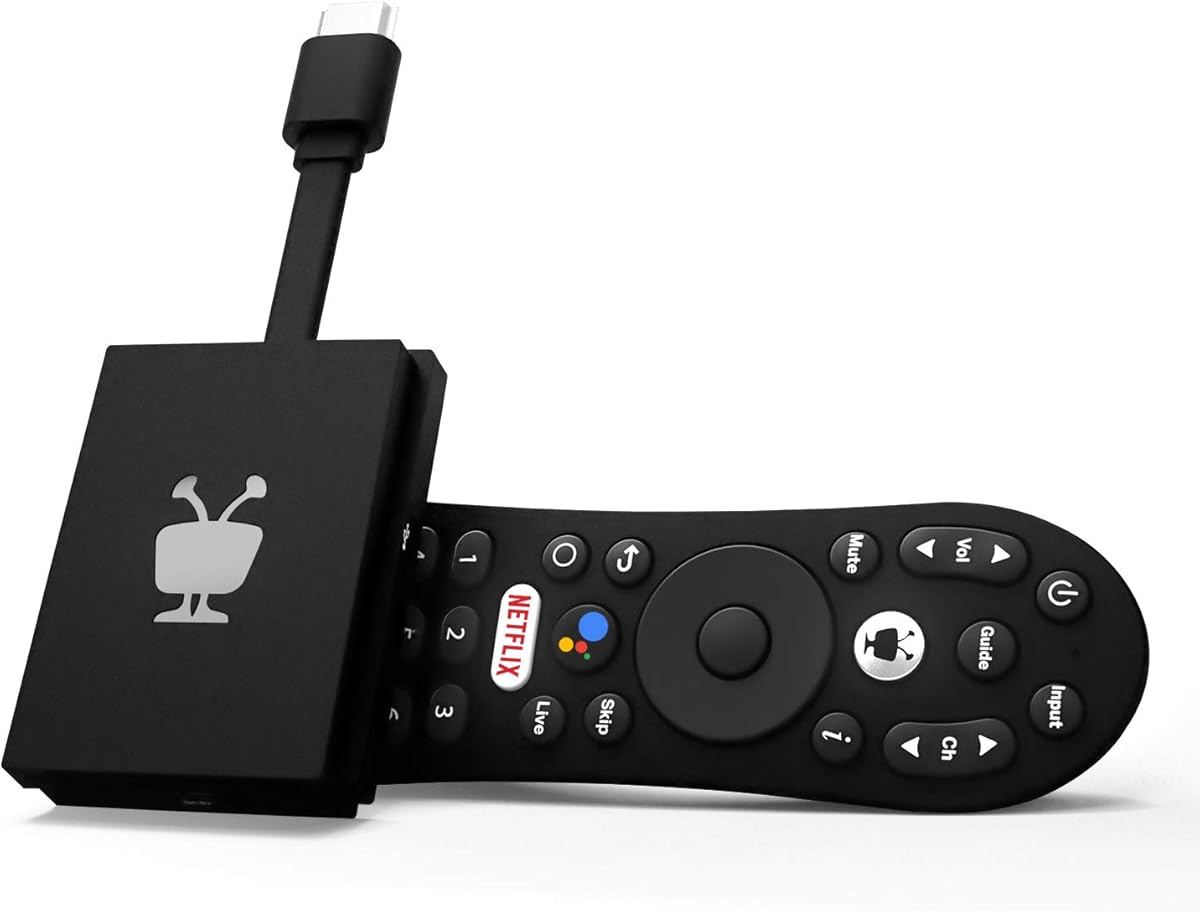
The TiVo Stream 4K offers exceptional value by combining 4K streaming with a unified interface that aggregates content from multiple apps into a single searchable dashboard.
We may earn a commission when you buy through this link, at no additional cost to you.
Powered by Android TV with Google Assistant integration, it allows for voice control and personalized recommendations that adapt to your viewing habits over time effectively.
While it may not support gaming as well as higher-end models and receives fewer updates than major brand devices, its core streaming functionality remains robust and responsive for daily use.
This device is perfect for budget-conscious buyers who want a polished smart TV experience without paying for premium features they do not need regularly.
No need to switch between apps manually as the search function finds content across Netflix, Prime Video, and others in one place.
Built-in Google Assistant lets you launch apps, dim lights, and search for shows using simple voice commands through the remote.
We may earn a commission when you buy through this link, at no additional cost to you.
The ONN Android TV 2K stick provides a straightforward and cost-effective way to add smart capabilities to a television without compromising on essential streaming functionality or app access.
We may earn a commission when you buy through this link, at no additional cost to you.
With Chromecast built-in and a virtual assistant button on the remote, it offers convenience for casting content from mobile devices and searching with voice commands when needed effectively.
While the resolution caps at 2K and the remote lacks advanced features, it delivers stable performance for standard streaming apps and remains one of the most accessible options available.
Casual viewers who do not require 4K or advanced gaming capabilities will find this device meets their daily entertainment needs without unnecessary complexity.
Chromecast built-in lets you cast videos and photos from your phone or tablet directly to the TV with just one tap.
Press the mic button on the remote to activate the virtual assistant for hands-free control and quick app launches.
We may earn a commission when you buy through this link, at no additional cost to you.
The Android TV Stick 4K 2026 brings modern connectivity standards with WiFi 6 and Bluetooth 5.4 alongside Android 14 to ensure stable performance and future-proofing for various streaming needs.
We may earn a commission when you buy through this link, at no additional cost to you.
Its RK3518 quad-core processor handles app navigation smoothly, and the inclusion of a USB 3.0 port adds flexibility for connecting external storage or accessories directly to the stick.
While internal storage is limited compared to higher-end models and the remote is functional but basic, the connectivity options make it a versatile choice for multi-device households.
Tech-savvy users who value the latest wireless standards and want a compact device for travel will appreciate its balance of performance and portability.
WiFi 6 and Bluetooth 5.4 provide faster speeds and stronger anti-interference for consistent streaming across crowded home networks.
The USB 3.0 port allows direct connection of flash drives or peripherals without needing a separate hub or adapter.
We may earn a commission when you buy through this link, at no additional cost to you.
The H96MAX TV Stick 4K focuses heavily on media playback capabilities with a USB 3.0 port that supports direct connection of drives containing personal video collections for easy local access.
We may earn a commission when you buy through this link, at no additional cost to you.
It runs Android 14.0 with dual-band WiFi 6 which provides stable internet connectivity for streaming services and supports 4K 60Hz output for smooth visual playback on compatible TVs.
While performance with third-party apps can be inconsistent and there is no major brand warranty, the hardware specs make it suitable for users who primarily stream local media files.
Buyers looking for an inexpensive way to play local 4K content and do not need premium streaming app optimization may find this device sufficient for their needs.
Connect USB drives directly to play personal videos and photos without needing to transfer files to a phone or PC first.
Support for both 2.4G and 5G WiFi ensures stable connections even when many devices are sharing the same network.
We may earn a commission when you buy through this link, at no additional cost to you.
The 2026 Android 14.0 TV Stick uses an RK3539 chipset to provide efficient app switching and multitasking capabilities that keep the interface responsive during daily streaming sessions.
We may earn a commission when you buy through this link, at no additional cost to you.
With dual-band WiFi 6 and Bluetooth 5.4, it maintains stable connections for streaming and supports peripherals like headphones and speakers seamlessly without requiring extra dongles or hubs.
Although the build quality is average and gaming performance is limited, the combination of connectivity options and software responsiveness makes it a solid mid-range option for general entertainment.
Users who frequently switch between apps or devices and want reliable wireless performance will find this stick meets their core requirements effectively.
The efficient processor allows quick transitions between video players and social apps without noticeable lag or freezing.
Bluetooth 5.4 easily pairs with headphones or speakers for private listening or enhanced audio setups.
We may earn a commission when you buy through this link, at no additional cost to you.
The HS89 T19 stands out by offering 4GB RAM and 32GB ROM which provides ample space for apps and media while enabling smooth multitasking across multiple entertainment functions.
We may earn a commission when you buy through this link, at no additional cost to you.
Powered by the RK3539 quad-core processor it supports 4K Ultra HD decoding ensuring that high-resolution content plays smoothly without stuttering even during intense streaming sessions.
While the software interface may lack the polish of major brand devices and can have occasional bugs the hardware specifications deliver strong value for users who need extra memory.
Tech users who install many apps or store local media files on the device will appreciate the generous storage and RAM capacity.
With 32GB ROM and 4GB RAM you can install more apps and store larger files without needing external storage often.
Support for 4K Ultra HD decoding ensures crisp picture quality and vibrant colors on compatible television screens.
We may earn a commission when you buy through this link, at no additional cost to you.
The Android TV Stick 14.0 optimizes the latest operating system for responsive navigation and smooth boot times making it well suited for daily browsing and streaming tasks without delays.
We may earn a commission when you buy through this link, at no additional cost to you.
Its RK3518 quad-core chipset provides reliable performance for standard video playback and supports USB 3.0 for connecting peripherals like keyboards or controllers when needed.
While it lacks some premium video codecs and the remote is basic, the overall system optimization ensures a steady experience for everyday use and regular viewing sessions.
Households looking for a dependable device that handles routine streaming smoothly without unnecessary complexity or high costs will find this model practical and effective.
Android 14 brings refined color rendering and smoother booting which enhances the overall daily usability of the interface.
USB 3.0 allows direct connection of mice or game controllers for more flexible control options during use.
We may earn a commission when you buy through this link, at no additional cost to you.
The Android TV Stick 4K Ultra HD Media Player offers a compact and simple entry point into smart streaming with essential 4K capabilities and easy plug-and-play setup.
We may earn a commission when you buy through this link, at no additional cost to you.
It includes dual-band WiFi 6 and a USB 3.0 port which provide stable network connectivity and optional storage expansion without requiring extra hardware or hubs.
While performance is average and the user interface is basic, the small form factor and low cost make it a good starter option for basic TV upgrades.
Users who prioritize size and simplicity over advanced features will find this device adequate for watching standard content on modern displays.
Its small size allows it to hide behind the TV for a cleaner look while still providing full streaming functionality.
Support for both frequency bands helps maintain stable streaming speeds even when other devices are active on the network.
We may earn a commission when you buy through this link, at no additional cost to you.
Selecting the right Android stick PC requires understanding key factors like resolution, operating system, and connectivity to match your specific viewing habits and device setup.
Ensure the device supports at least 4K resolution and modern codecs like HDR10+ or Dolby Vision if your TV and content library require high fidelity visuals and audio immersion.
Look for sticks that advertise clear codec support to avoid buffering or quality issues when streaming high-bitrate content from premium services.
Choose devices running the latest Android TV or Google TV versions to benefit from improved app compatibility, security updates, and streamlined navigation interfaces.
Newer OS versions provide better integration with voice assistants and updated app stores which enhances the long-term usability of the device.
Prioritize models with WiFi 6 and Bluetooth 5.4 for stable wireless performance and seamless pairing with external speakers or headphones for a versatile viewing setup.
Strong connectivity ensures minimal lag when streaming and allows for flexible use of peripherals without cluttering your entertainment center with cables.
For smooth multitasking and app installation look for at least 2GB RAM and 16GB internal storage to ensure the interface remains responsive during use.
Higher RAM and storage capacity prevent slowdowns when switching between apps or storing downloaded content locally on the device.
Check if the remote includes dedicated voice buttons and supports popular assistants like Google Assistant or Alexa for convenient hands-free search and smart home control.
Voice control simplifies finding content and managing connected devices reducing the effort needed to navigate menus or change settings frequently.
If you plan to use the stick across multiple locations choose a compact lightweight model that easily plugs into HDMI ports without obstructing other connections or space.
A small design allows the device to blend in visually and makes it simple to carry between home and travel destinations.
Verify that the device supports the streaming apps you use most regularly whether that is mainstream services or niche platforms for your viewing habits.
Compatibility with major providers ensures you have access to your subscriptions without needing additional hardware or workarounds.
Balance the cost against the features you need by comparing models that offer essential performance versus those with premium extras you may not use regularly.
A mid-range device often provides the best value by including necessary modern standards without the high price of flagship branded models.
Plug the stick into an HDMI port on your TV and connect the included power adapter to a reliable outlet to ensure stable operation and avoid power shortages during use.
Follow the on-screen setup wizard to connect to your WiFi network and sign in with your Google or streaming service accounts to access your apps and personalized content immediately.
Keep the device clean by avoiding excessive heat and dust and periodically restart it to clear cache and maintain smooth performance over extended periods of daily usage.
Yes as long as your TV has a functional HDMI port you can transform it into a smart TV with these sticks to access apps and streaming services. The device handles all smart processing so the TV itself just displays the video output.
Most modern models in this guide support dual-band WiFi allowing you to connect to either 2.4GHz or 5GHz networks depending on your router settings and signal strength. Dual-band support provides better flexibility and stability for streaming high-resolution content.
Many devices offer USB ports that let you connect external drives for expanded storage. This is useful for storing local media files or installing many apps. Check the specific product specs to confirm USB connectivity and storage limits.
Yes most models include a remote with voice control capabilities. However the quality and features of these remotes vary by brand and price point. Always check if the included remote supports the voice assistant you prefer before purchasing.
Some models support casual gaming apps and cloud gaming services but they are not designed for heavy console-level gaming. Performance depends on the processor and RAM so check gaming support specifically if this is a priority for you.
Update the device whenever notifications prompt you to keep security patches and feature improvements current. Regular updates ensure compatibility with new apps and maintain system stability over time. Enable automatic updates if the option is available in settings.
The Amazon Fire TV Stick 4K Plus leads the group with AI search and robust performance while the Xiaomi TV Stick 4K offers premium visuals and the TiVo Stream 4K provides excellent value for budget-conscious buyers.
Prioritize resolution codec support and connectivity standards to match your home network and display capabilities when selecting the device that fits your specific viewing requirements best.
Always check current listings and availability as features and compatibility can change over time to ensure you get the most accurate information before finalizing your purchase decision.