
Qanba N3 Drone 2
4.5Editor score
Sony Licensed
Budget Friendly
Mic Input
Discover the top Arcade Stick for PS5 options ranked by performance and build quality to help you choose the best fightstick for your console.
Finding the right Arcade Stick for PS5 is essential for serious fighting game enthusiasts who demand precision and reliability during intense matches.
We compared ten top-rated models based on build quality, component reliability, compatibility, and user feedback to create this comprehensive ranking list.
Each pick highlights key features and potential drawbacks so you can make an informed decision while keeping in mind that prices may change frequently.
4.5Editor score

4.6Editor score

4.2Editor score
This side-by-side comparison highlights the unique strengths and limitations of each model to help you find the perfect match for your gaming style.




The HORI PlayStation 5 Fighting Stick Alpha stands out as the top choice for players seeking a reliable and high-performance fighting game controller designed specifically for the PS5 ecosystem.
We may earn a commission when you buy through this link, at no additional cost to you.
Its official licensing by Sony ensures seamless compatibility while the proprietary Hayabusa joystick and buttons deliver a tactile response that competitive players prefer during intense matches.
While the cost is higher than generic alternatives, the ability to easily open the unit for maintenance and part replacement justifies the investment for long-term use.
If you are serious about fighting games and want a controller that balances tournament-grade performance with official platform support, this model is the clear recommendation.
Being officially licensed by Sony means you avoid potential compatibility issues that often plague unofficial third-party controllers on the PlayStation 5 console.
The design allows you to open the panel quickly to replace worn parts or customize the look without voiding your warranty or requiring specialized tools.
We may earn a commission when you buy through this link, at no additional cost to you.
The Nacon Daija Arcade Fight Stick is engineered for players who demand top-tier customization options and professional-grade components to suit their specific play style preferences.
We may earn a commission when you buy through this link, at no additional cost to you.
It features authentic Sanwa joystick and action buttons which are industry standards for durability and responsiveness while the software allows for detailed button mapping configurations.
The textured palm rest ensures comfort during long sessions and the included faceplate options let you tailor the aesthetic look to match your gaming setup perfectly.
Choose this stick if you want a premium experience with extensive control over how your controller behaves and looks during high stakes competitive gameplay sessions.
Using Sanwa components guarantees that you are getting the same quality found in professional tournament booths which is crucial for consistent performance.
The dedicated software on PC and Mac enables you to create complex game profiles that can save specific layouts for different fighting game titles easily.
We may earn a commission when you buy through this link, at no additional cost to you.
The MAYFLASH Arcade Stick F700 offers an impressive balance of features and affordability making it an ideal entry point for players wanting wireless freedom on their PS5.
We may earn a commission when you buy through this link, at no additional cost to you.
It supports multiple connection methods including Bluetooth and a 2.4g receiver which ensures flexibility whether you are playing on console or PC for different gaming sessions.
The compatibility extends to various systems beyond just PS5 allowing you to use the same hardware across your entire gaming setup without needing multiple controllers.
This is the perfect choice if you are looking for a wireless stick that works reliably across many platforms without breaking the bank on expensive tournament gear.
Being able to play without cables means less clutter on your desk and more freedom to move comfortably during intense gaming moments.
The special compartment for the 2.4g receiver ensures you never lose the small accessory and keeps your setup tidy when not in use.
We may earn a commission when you buy through this link, at no additional cost to you.
The Qanba N3 Drone 2 provides a straightforward and reliable wired connection option for PS5 players who prefer simplicity and official compatibility in their fighting setup.
We may earn a commission when you buy through this link, at no additional cost to you.
Its official licensing ensures you get a controller that works out of the box while the Qanba buttons and lever deliver a satisfying tactile feel for daily practice.
The inclusion of a microphone input is a nice touch for players who want to chat with teammates without swapping controllers during online matches on the console.
Pick this model if you want a no fuss stick that delivers core fighting functionality at a price point that leaves room in your budget for games.
Having the official Sony badge means you avoid potential firmware issues and ensure your controller is recognized correctly by the system settings.
The mic input allows you to connect a headset directly to the stick so you can communicate with friends while playing on the PS5.
We may earn a commission when you buy through this link, at no additional cost to you.
The MAYFLASH Arcade Stick F700 Elite upgrades the standard F700 with premium Sanwa components giving you a more professional feel while keeping the versatile wireless connectivity.
We may earn a commission when you buy through this link, at no additional cost to you.
Its anti-slip rubber mat ensures the stick stays firmly in place on any surface which is critical for maintaining precision during rapid movements in complex combos.
With three connection methods including Bluetooth you can seamlessly switch between your PS5 PC or other supported devices without needing to plug in cables every time.
This model is the ideal upgrade if you are willing to pay a bit more for high quality parts and the convenience of a wireless connection experience.
Using Sanwa buttons and joystick ensures you get the same responsive feel that pros use in tournaments for consistent performance in every match.
The rubber mat prevents sliding during intense gameplay so your focus remains on the screen instead of adjusting your controller position constantly.
We may earn a commission when you buy through this link, at no additional cost to you.
The MAYFLASH F500 Bundle is a robust choice for gamers who own multiple consoles and need a single stick that can work across PS5 Xbox and PC systems easily.
We may earn a commission when you buy through this link, at no additional cost to you.
The included Magic Boots simplify the setup process for PlayStation systems allowing you to connect without needing to plug in a controller first for immediate use.
Its compatibility with Xbox Series X S and older models means you do not need to buy a separate fightstick if you play games on those systems as well.
Select this bundle if you prioritize versatility and want to maximize the utility of your fighting game setup across different gaming platforms simultaneously.
The Magic Boots act as an adapter so the fightstick is recognized directly by the system without extra hardware or controller passthrough issues.
Using one stick for PS5 Xbox and PC simplifies your collection and lets you carry your setup easily to different gaming stations.
We may earn a commission when you buy through this link, at no additional cost to you.
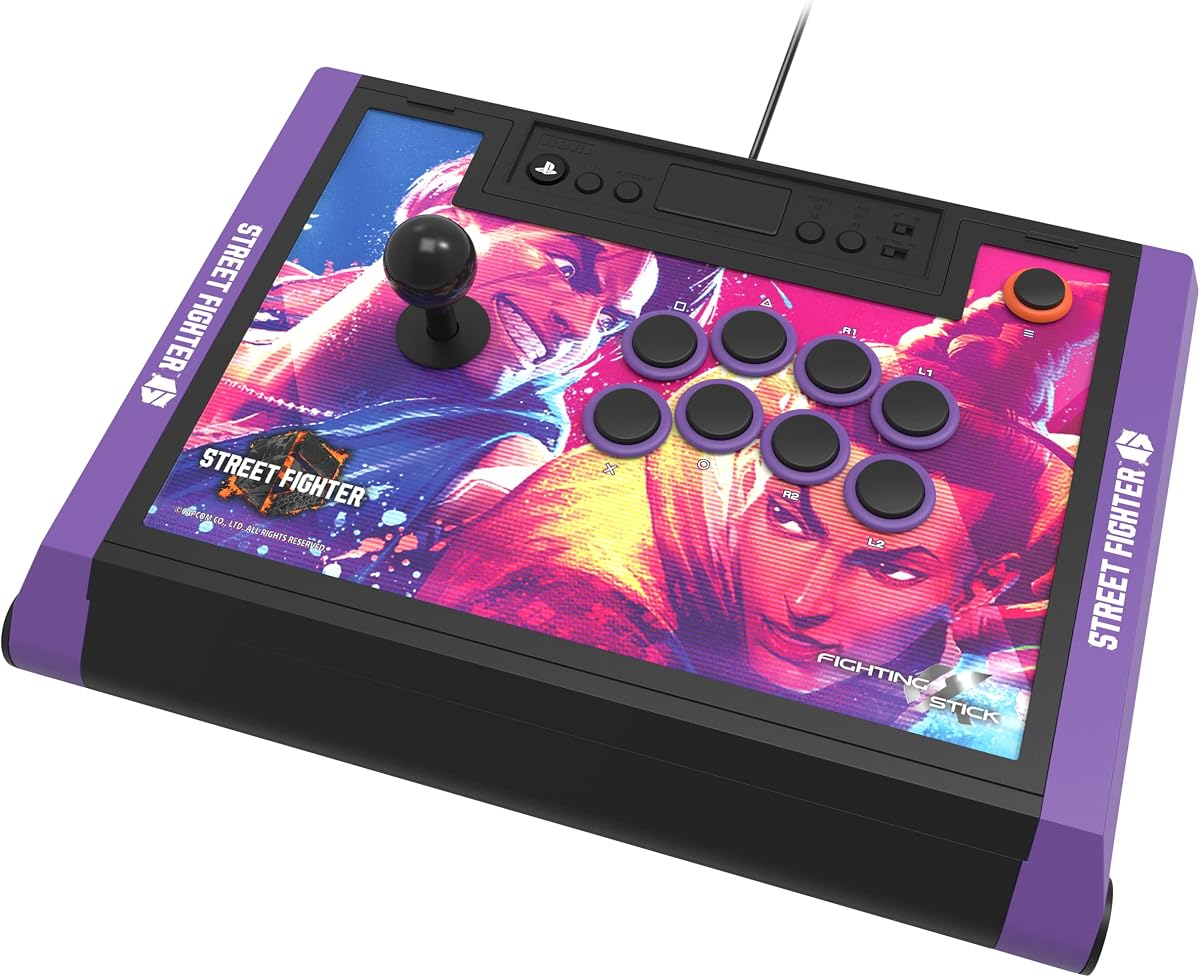
The HORI PlayStation 5 Fighting Stick Alpha in the Street Fighter 6 Edition combines tournament grade performance with exclusive artwork that appeals directly to fans of the franchise.
We may earn a commission when you buy through this link, at no additional cost to you.
It features the same high quality Hayabusa joystick and buttons as the standard version ensuring that your gameplay experience remains top notch regardless of the visual theme.
The inclusion of downloadable high resolution images for the top panel lets you personalize the look further while keeping the official licensed structure intact for reliability.
This edition is perfect for fans who want a controller that reflects their love for Street Fighter 6 while still delivering the reliability expected from a licensed product.
The Street Fighter 6 branding and included art sets this model apart as a collector worthy item for those invested in the franchise history.
Despite the unique look, it maintains the same professional internals as the standard Alpha model for consistent results in competitive matches.
We may earn a commission when you buy through this link, at no additional cost to you.
The Qanba Q7 Obsidian 2 distinguishes itself with a dedicated mode switch that lets you toggle between PS5 PS4 and PC modes without needing software changes or drivers.
We may earn a commission when you buy through this link, at no additional cost to you.
It is officially licensed by Sony ensuring compatibility while the swappable Sanwa joystick tops allow you to adjust the feel to match your specific hand preferences.
The built-in microphone input is a practical feature for players who need voice chat functionality during matches without connecting a headset to the console directly.
If you value quick mode switching and a wired connection with robust compatibility features this model offers a solid balance of functionality and platform support.
The physical toggle switch removes the guesswork from connecting to different systems making it easy to jump between console and PC play.
Swapping the joystick tops lets you adjust the resistance and height of the stick to suit your ergonomic needs without tools.
We may earn a commission when you buy through this link, at no additional cost to you.
The HORI PlayStation 5 Fighting Stick Alpha in the TEKKEN 8 Edition brings the iconic style of the latest Tekken game directly to your fighting setup with premium internals.
We may earn a commission when you buy through this link, at no additional cost to you.
It uses the same proprietary Hayabusa components that ensure a responsive and durable experience for players looking to master the complex mechanics of the series.
The design includes downloadable alternate artwork so you can print custom panels that fit perfectly on the stick while maintaining its official Sony licensed structure.
This model is highly recommended for Tekken fans who want to show their dedication through their controller while ensuring they have a reliable tool for serious play.
The included alternate artwork options let you personalize the look of your stick to match your favorite Tekken characters or aesthetic preferences.
Under the hood it remains a top tier fightstick with the same durability and response found in the standard Alpha model for consistent results.
We may earn a commission when you buy through this link, at no additional cost to you.
The GuileKeys GK-18 Leverless Arcade Stick offers a revolutionary all button layout that eliminates the traditional joystick to reduce input errors for competitive players seeking an edge.
We may earn a commission when you buy through this link, at no additional cost to you.
It features Kailh Choc low-profile switches that deliver a fast response time and smooth typing feel while the integrated OLED screen keeps you informed of your current mode settings.
Customization is key with hot-swappable switches and RGB lighting allowing you to tailor both the mechanical feel and the visual style of your controller to your exact preference.
Consider this controller if you are ready to experiment with a different input method that could improve your reaction speed and precision in high level gameplay.
Removing the lever means fewer mechanical points of failure and direct access to inputs which can reduce input errors during critical combos.
The web configurator and hot swap support let you adjust everything from button layout to startup screens to match your personal workflow.
We may earn a commission when you buy through this link, at no additional cost to you.
Selecting the right fighting controller involves considering several key factors to ensure the device meets your specific needs for comfort and performance.
Ensure the stick is officially licensed or explicitly states support for the PlayStation 5 console to avoid any potential connection or software issues.
Check if it supports other platforms you might own if you plan to use the same stick for PC or Nintendo Switch in the future.
Look for sticks that use well-known components like Sanwa or Hayabusa as these are industry standards for durability and consistent button response.
High quality buttons and joystick parts will last longer and provide a more satisfying tactile feel during extended gaming sessions.
Wired connections generally offer zero latency which is critical for competitive play while wireless options provide convenience and a cleaner setup.
Consider your priority between absolute performance and setup freedom when deciding between a cable or a Bluetooth connected stick.
Some models allow you to open the panel easily to swap parts or change the top artwork giving you the freedom to tailor the look and feel.
Customization can extend the life of the stick by letting you replace worn parts instead of buying a brand new controller when issues arise.
A comfortable grip and well placed buttons are essential for preventing hand fatigue during long practice sessions or tournament matches.
Look for features like palm rests or textured surfaces that help keep your hands steady and relaxed while you play.
Having a microphone input on the stick allows you to chat with teammates directly without needing to connect your headset to the console.
This feature is particularly useful for online multiplayer matches where communication is key to coordinating strategies with your party.
Prices vary significantly based on build quality and brand so determine your budget early to narrow down the options that offer the best value.
Remember that investing a bit more in a durable model often saves money in the long run compared to replacing cheaper alternatives frequently.
Some sticks come with software for button mapping and profile saving which can enhance your experience by allowing quick swaps between game layouts.
Advanced users will appreciate the ability to set macros or adjust response curves to fit their specific fighting style preferences.
Connect the stick to your PS5 using the provided USB cable or pair it via Bluetooth if your model supports wireless connectivity to begin using it immediately.
Familiarize yourself with the button layout and practice basic movements to get used to the tactile response of the joystick and buttons.
Keep the unit clean by occasionally wiping down the buttons and surface with a dry cloth to prevent dust buildup that could affect performance.
Most modern fightsticks are recognized as direct controllers by the PS5 so you do not need a standard DualSense controller to use them. However older adapters may require a controller to act as a bridge so always check the product specifications before purchasing.
Arcade sticks are primarily designed for fighting games. While they work on the PS5 console they may not function correctly in games that require dual analog sticks or specific motion controls which limits their use to compatible genres.
Regularly check for wear on the joystick cap and base and use compressed air to remove dust from the mechanism. If your stick has a modular design you can easily swap out worn parts to keep it feeling responsive.
Yes most of the top rated sticks include PC compatibility via USB or drivers. Check the product details to ensure it supports XInput or DInput for seamless integration with your PC fighting game collection.
Wired sticks provide a direct connection with no latency which is ideal for competitive play. Wireless sticks offer more flexibility and a cleaner setup but rely on batteries and may have slight latency depending on the connection type.
Not necessarily as casual players might find the standard controller sufficient for enjoyment. However an arcade stick provides a more authentic experience and can improve precision if you are deeply invested in fighting games.
With proper care and high quality components like Sanwa or Hayabusa a stick can last for many years. Regular cleaning and avoiding excessive force on the joystick will help extend its lifespan significantly.
Many models allow for customization of the top panel artwork and some offer replaceable buttons or joystick caps. This lets you personalize the look to match your setup or favorite games without needing to buy a new unit.
The HORI PlayStation 5 Fighting Stick Alpha remains the top recommendation for most players due to its balance of performance and official platform support.
Prioritize component quality and connection stability to ensure your controller enhances your gameplay rather than becoming a source of frustration.
Always check current availability and pricing before purchasing since models may go on sale or update in version over time.