
VIMIN 10G PCI-E Network Card
4.5Editor score
Dual RJ45 Ports
Intel X540 Chipset
Wide OS Compatibility
Discover the top 10GB Ethernet Card options for fast networking. We compare speed, compatibility, and features to help you choose the right adapter today.
Finding the right 10GB Ethernet Card can transform your network performance significantly. These adapters offer speeds far beyond standard Gigabit connections, ensuring smooth data transfers for demanding tasks like video editing or large file backups.
We evaluated ten top-rated network cards based on chipset reliability, interface compatibility, and real-world performance metrics. Our analysis covers copper and fiber options, ensuring you find a solution that fits your specific server or workstation needs.
Each pick highlights key strengths and potential trade-offs to guide your decision. Prices fluctuate frequently, so check current listings before purchasing. This guide ensures you invest in hardware that delivers lasting value and consistent network throughput.
4.5Editor score

4.2Editor score

4.6Editor score
This side-by-side comparison highlights key specifications across all ten models. Review each adapter to interface type, speed support, and physical design to determine which fits your specific hardware requirements best.



The TP-Link TX401 stands out as a top contender for upgrading your home or office network. With a solid 4.2 rating, it delivers consistent 10Gbps speeds essential for bandwidth-heavy tasks. Its straightforward setup and included accessories make it an excellent choice for users seeking immediate performance gains without technical hurdles.
We may earn a commission when you buy through this link, at no additional cost to you.
This adapter utilizes advanced 10GBase-T technology to ensure smooth data transmissions across both local and internet connections. It supports auto-negotiation for various speeds, ensuring compatibility with existing Gigabit infrastructure. Quality of Service features help prioritize traffic, which is particularly beneficial for gaming or video conferencing scenarios where latency matters.
While it lacks active cooling, the design ensures stable operation under typical loads. The inclusion of a CAT6A cable is a thoughtful touch that ensures you can test maximum speeds immediately. However, users needing dual ports for redundancy or link aggregation may need to look elsewhere for a more comprehensive solution.
Ideal for enthusiasts and professionals upgrading workstations, this card offers a balance of speed and cost-effectiveness. The comprehensive system support across Windows and Linux ensures it fits diverse environments. If you need a reliable single port upgrade with minimal fuss, this model is highly recommended.
Negotiates automatically with 100Mbps to 10Gbps devices ensuring you integrate smoothly into existing networks without replacing all switches or routers immediately.
Includes both standard and low-profile brackets along with a rated Ethernet cable ensuring you have everything needed for physical installation right out of the box.
We may earn a commission when you buy through this link, at no additional cost to you.
The VIMIN 10G PCI-E Network Card offers exceptional value with its dual RJ45 port configuration. Rated 4.5 stars, it leverages the robust Intel X540-T2 chipset for high-speed data transmission. This card is ideal for users needing redundancy or link aggregation without breaking the bank, delivering reliable performance for high-end devices.
We may earn a commission when you buy through this link, at no additional cost to you.
Featuring a dedicated heat sink, this adapter maintains optimal temperatures during heavy usage. Its flexible PCIe compatibility allows adaptation to various slot types. The gold finger interface minimizes interruptions, ensuring consistent network performance. It supports Windows, Linux, and VMware making it versatile for different server environments.
However, it does not support intermediate 2.5G or 5G speeds which might limit flexibility in some setups. Ensure your network infrastructure matches the supported speeds to avoid potential bottlenecks. The installation requires careful attention to slot availability but rewards users with high throughput capabilities.
This card is a strong candidate for budget-conscious professionals needing dual ports for server applications. The Intel chipset ensures stability and performance comparable to more expensive alternatives. If maximizing connectivity within a limited budget is your goal, this adapter is a compelling option to consider.
Powered by Intel X540-T2 for reliable high-speed transmission ideal for server and high-end device requirements demanding consistent network performance.
Features a built-in heat sink and well-designed gold finger interface to maintain stable performance and prevent overheating during intensive data transfers.
We may earn a commission when you buy through this link, at no additional cost to you.
Designed specifically for Synology systems, this 2-port adapter delivers high-performance storage applications with ease. With a 4.6 rating, it ensures reliable connectivity and seamless negotiation between 10Gbps and 1Gbps speeds. The dedicated purpose-build design makes it the go-to choice for users invested in the Synology NAS ecosystem.
We may earn a commission when you buy through this link, at no additional cost to you.
Its primary strength lies in the integration with DiskStation Manager ensuring drivers are optimized for smooth operation. The five-year warranty provides significant peace of mind regarding long-term reliability. This adapter supports high-speed storage applications making it ideal for creative professionals managing large media files.
The main drawback is the price which is significantly higher than third-party alternatives. Additionally, it is tailored for Synology systems limiting flexibility for general PC use. Despite this, the performance and warranty justify the cost for those needing top-tier storage access reliability.
If you own a Synology NAS and require maximum throughput, this adapter is unmatched. The seamless integration reduces setup complexity and ensures optimal performance out of the box. For professional environments where uptime and speed are critical, this premium solution is worth the investment.
Built specifically for Synology DSM versions ensuring driver compatibility and optimized performance without requiring additional configuration steps.
Backed by a comprehensive five-year warranty that reflects confidence in durability and long-term support for your storage infrastructure.
We may earn a commission when you buy through this link, at no additional cost to you.
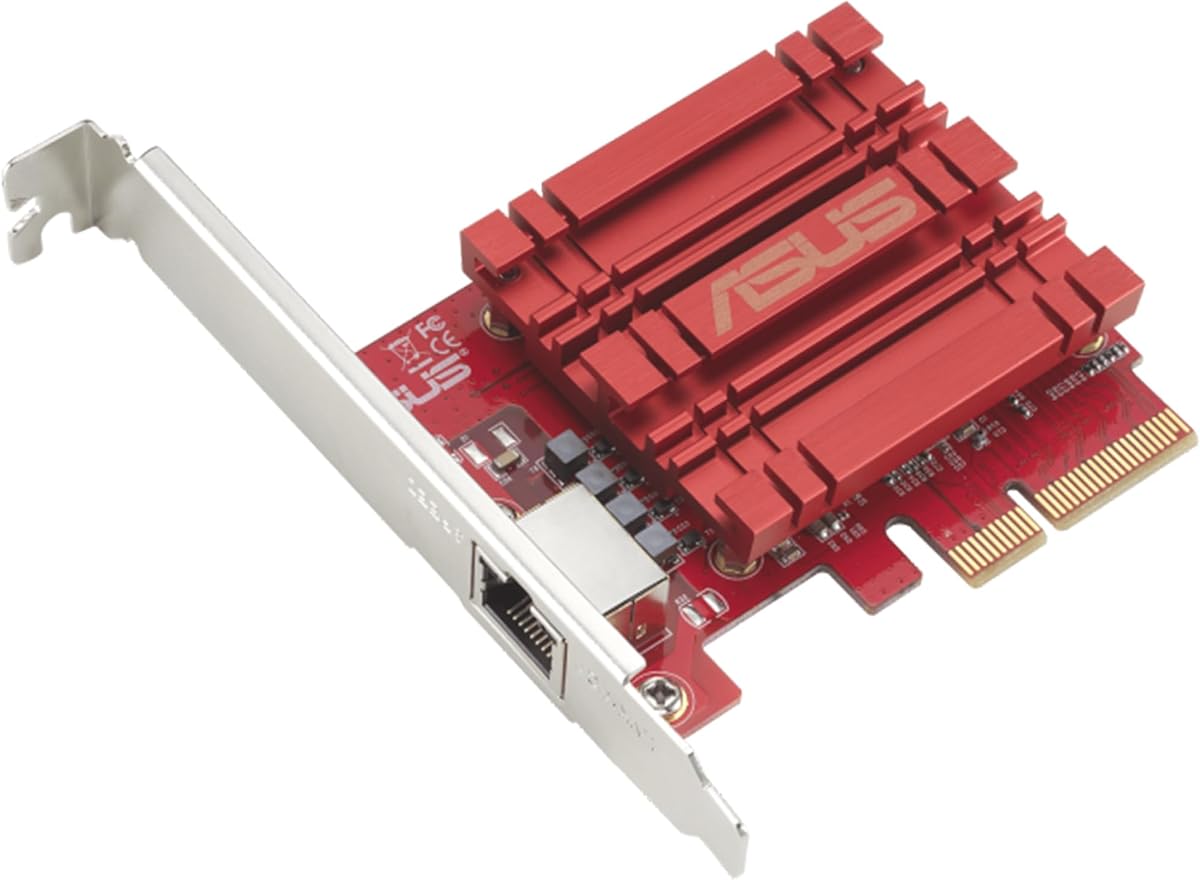
The Asus NADACA0140 brings hyper-fast 10Gbps networking to your desktop with ease. Rated 4.1 stars, it offers a significant boost in data transfer speeds for bandwidth-demanding tasks. Full compatibility with current network standards ensures a smooth transition from Gigabit connections without complex configuration steps.
We may earn a commission when you buy through this link, at no additional cost to you.
Supporting Windows and Linux systems it provides flexible OS integration for various users. The RJ45 port allows easy upgrades using standard copper cables which simplifies installation. Built-in Quality-of-Service technology helps prioritize bandwidth for critical data packets ensuring a smooth online experience during peak usage.
However, compared to multi-port options this card offers limited expansion capabilities. It is strictly a single-port solution which might not suit users needing redundancy. Ensure your system supports the required interface before purchasing to avoid compatibility issues.
Ideal for general consumers needing a straightforward speed upgrade this card balances performance and simplicity. If you prioritize easy installation and standard port usage over advanced features this is a reliable choice. It effectively bridges the gap between older networks and modern high-speed requirements.
Uses standard copper network cables making upgrades simple without needing special proprietary connectors or expensive specialized hardware.
Built-in technology allows prioritization of critical bandwidth ensuring smoother online experiences during high network usage times.
We may earn a commission when you buy through this link, at no additional cost to you.
Equipped with the Intel X540 controller chip, this dual-port adapter supports intelligent offloads and server stability. Rated 4.1 stars, it is compatible with various Windows and Linux server environments making it versatile for IT professionals. It handles storage over Ethernet protocols effectively for robust data center setups.
We may earn a commission when you buy through this link, at no additional cost to you.
The dual copper ports allow for connections up to 100 meters providing flexibility in physical network layouts. Installation is supported with both standard and low-profile brackets for various form factors. Additionally the three-year free warranty adds confidence to the purchase for long-term reliability.
Hot swapping is not supported so careful planning is needed for maintenance. Windows 11 users may require manual setup or support contact which adds a step to deployment. These minor inconveniences are outweighed by the robust performance and dual port utility.
This adapter is perfect for server environments needing redundancy without high-end costs. The ability to handle iSCSI and NFS protocols makes it ideal for storage servers. If you need dual connectivity in a cost-effective package this card delivers solid performance for your infrastructure.
The Intel controller chip handles complex processing tasks reducing CPU load and improving overall system stability during heavy network traffic.
Supports iSCSI FCoE and NFS protocols making it suitable for enterprise storage and virtual machine storage solutions.
We may earn a commission when you buy through this link, at no additional cost to you.
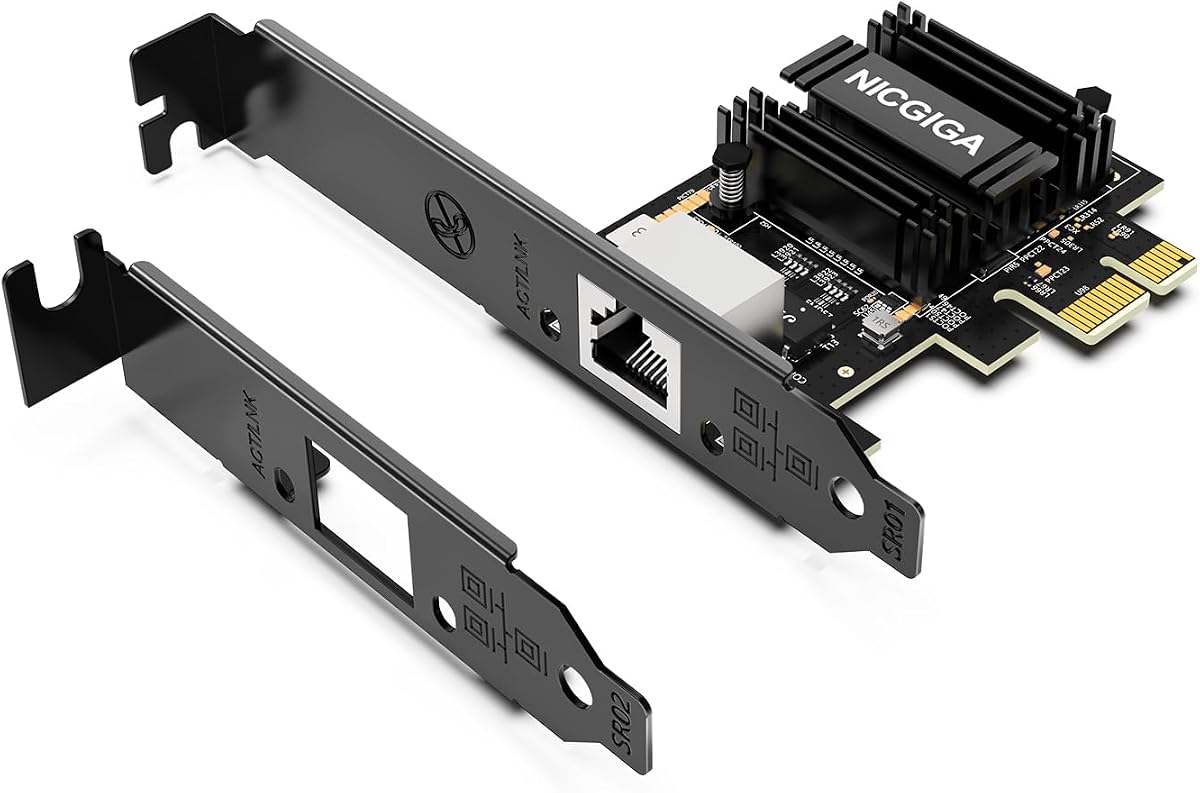
NICGIGA's adapter adopts the Realtek RTL8127 controller to deliver blazing-fast 10Gbps speeds with minimal heat generation. Rated 4.3 stars, it is designed for compact systems including Mini PCs and ITX builds. Its PCIe 4.0 x1 interface ensures full bandwidth without occupying GPU lanes for efficient system use.
We may earn a commission when you buy through this link, at no additional cost to you.
Auto-negotiation supports 10G down to 100Mbps speeds seamlessly adapting to routers and switches. It features Wake-on-LAN capability and supports modern Linux distributions with easy driver setup. This makes it a versatile choice for diverse NAS platforms and virtualization environments.
Since it relies on PCIe 4.0, older systems may not reach optimal speeds. However its physical size and thermal efficiency are exceptional for small form factors. Users appreciate its stable performance and minimal power consumption during routine tasks.
Ideal for home lab enthusiasts and compact workstation builders this card balances speed and size perfectly. If you have a PCIe x1 slot and need high throughput without heat issues this is a strong candidate. It effectively upgrades small systems to modern networking standards effortlessly.
Efficient Realtek chipset design minimizes heat output ensuring stable continuous operation even in compact enclosures without active cooling.
Fits into PCIe x1 x4 x8 and x16 slots easily converting standard slots to high-speed network interfaces without consuming critical GPU bandwidth.
We may earn a commission when you buy through this link, at no additional cost to you.
Powered by the Realtek RTL8127 chipset, this adapter delivers reliable 10Gbps connectivity for workstations and servers. Rated 4.3 stars, it is optimized for low power consumption and reduced heat output compared to traditional solutions. It supports auto-negotiation for a range of speeds ensuring smooth integration with existing network hardware.
We may earn a commission when you buy through this link, at no additional cost to you.
Designed with a PCIe 4.0 x1 interface it maximizes slot efficiency making it ideal for Mini PCs and home labs. Both standard and low-profile brackets are included for flexible installation options. Compatibility spans Windows, Linux, and server OS making it adaptable to various environments.
While performance is robust driver installation may vary depending on OS version. Users should check specific Linux distribution compatibility to avoid setup hurdles. Overall its energy efficiency and speed make it a practical upgrade for home and office setups.
This card is well-suited for users seeking a balance of performance and thermal management. If you need to upgrade small systems without heat concerns this adapter offers a reliable solution. It provides the necessary bandwidth for gaming media editing and cloud storage tasks effectively.
Uses PCIe 4.0 x1 interface to provide full networking features without occupying wider slots leaving room for expansion cards.
Engineered for lower power draw and heat output to save energy and maintain cool system temperatures during usage.
We may earn a commission when you buy through this link, at no additional cost to you.
The Asus XG-C100F brings fiber optic capabilities to your system with blazing 10Gbps speeds. Rated 4.3 stars, it is ideal for scenarios requiring high speed transmissions over greater distances than copper allows. The SFP+ cage supports both fiber and direct-attach copper connections for versatile deployment options.
We may earn a commission when you buy through this link, at no additional cost to you.
A built-in aluminum heatsink keeps the card cool during high-performance tasks ensuring stability. Automatic prioritization boosts bandwidth to important streams enhancing user experience. It operates efficiently within standard temperature ranges making it reliable for various settings.
Copper adapters require additional transceivers and cables which adds to initial cost. However for environments needing distance or noise immunity fiber is unmatched. This adapter excels in professional setups where physical distance limits traditional cabling options.
Ideal for enterprise networks or specialized home labs this card delivers superior range and speed. If you need to connect distant switches or servers without signal loss this adapter is a powerful tool. Its cooling design ensures consistent performance even under sustained load conditions.
Compatible with latest fiber optic technology allowing high speed data transmission over much greater distances than standard copper cables.
Stylish aluminum heatsink maintains cool operating temperatures ensuring stable performance during intensive high bandwidth networking tasks.
We may earn a commission when you buy through this link, at no additional cost to you.
TRENDnet's adapter is designed for compliance and reliability with NDAA and TAA standards. Rated 4.1 stars, it supports Windows Server and desktop versions ensuring broad usability. Its PCIe 3.0 x4 interface provides full bandwidth to a 10G Ethernet port for consistent high-speed performance.
We may earn a commission when you buy through this link, at no additional cost to you.
Support for 2.5GBASE-T allows usage over standard Cat5e cables which offers installation flexibility. The manufacturer backs it with three years of protection providing added security. Expert support is available during business hours to assist with any networking needs.
While compliant with government standards it may come at a premium price. Ensure you need specific compliance requirements before purchasing to maximize value. Overall it remains a solid choice for corporate and government environments.
Ideal for organizations needing certified hardware this card meets strict regulatory requirements. The included brackets simplify installation across different desktop cases. If reliability and compliance are top priorities this adapter offers the necessary assurances for your network infrastructure.
NDAA and TAA compliant design ensures safe use in government and regulated environments requiring certified networking hardware.
Supports 2.5GBASE-T over Cat5e cables allowing upgrades without immediate need for Cat6A replacement in existing setups.
We may earn a commission when you buy through this link, at no additional cost to you.
Cable Matters adapter offers 10GbE performance through a USB-C interface ideal for modern laptops. Rated 3.9 stars, it features low-heat design and silent operation for portable use. It supports auto-negotiation ensuring compatibility with various network speeds from 100M to 10G.
We may earn a commission when you buy through this link, at no additional cost to you.
Mac users will appreciate Thunderbolt compatibility though real-world speeds may vary by model. The aluminum housing dissipates heat effectively for consistent performance. Braided USB-C cables prevent fraying adding durability for travel and daily commuting.
Throughput can be limited by USB port generation requiring USB 3.2 Gen 2×2 for best results. Desktop users may find PCIe cards more performant but laptops benefit from this plug-and-play convenience. Check port specs before purchasing to ensure maximum speed.
Ideal for professionals on the go needing wired speeds this adapter delivers reliability. It supports workflows like large backups and content creation efficiently. If you need a portable high-speed connection for your ultrabook or tablet this adapter is a practical solution.
Ideal for mobile workstations and travel kits where compact reliable wired connectivity is essential for laptops and tablets.
Compatible with Thunderbolt 3/4/5 and USB4 ports ensuring reliable performance on modern MacBooks and iMacs.
We may earn a commission when you buy through this link, at no additional cost to you.
Selecting the right adapter requires understanding hardware interfaces and network demands. We outline key factors to help you make an informed decision.
Most cards use PCIe interfaces with varying lane configurations. Ensure your motherboard has compatible slots such as x4 or x8. Compact systems may need x1 models to avoid blocking other components.
Check your motherboard manual to verify available slots and versions before purchasing to avoid installation issues.
Copper ports like RJ45 need high-quality cables. For 10G speeds, Cat6a is recommended. Fiber models use SFP+ requiring transceivers which add cost but enable longer distances.
Verify cable ratings and connector types match your adapter to ensure optimal signal integrity and speed.
Popular chipsets like Intel X540 offer stability while Realtek offers cost efficiency. Driver support is vital for Linux and macOS users as compatibility varies. Check official support lists before buying.
Prioritize vendors with active driver support to avoid long-term software issues and performance limitations.
High-speed adapters generate heat. Passive cooling via heatsinks is common but fans may help in enclosed spaces. Compact units should prioritize low-power designs to stay cool.
Look for cards with aluminum heatsinks or efficient designs to prevent thermal throttling under load.
Dual port models allow link aggregation or failover for critical applications. Single port units are cheaper but lack redundancy. Assess if failover or combined bandwidth is necessary for your workflow.
Choose dual port models if reliability and aggregated bandwidth are critical for your server or NAS needs.
Warranty periods vary from one to five years. Longer coverage often signals higher quality. Technical support availability matters if installation is complex. Premium brands offer better assistance channels.
Prioritize products with multi-year warranties and accessible customer service for peace of mind.
Windows and Linux support is generally broad but specific kernels may differ. Server OS compatibility is vital for enterprise environments. Mac users need specific drivers for full functionality.
Confirm compatibility with your current OS version and kernel to avoid driver headaches.
NAS users may benefit from specialized adapters with NAS optimized drivers. Gamers prioritize low latency features. General consumers need straightforward single port upgrades. Match features to your specific tasks.
Select cards with features aligned to your primary tasks such as gaming NAS storage or general browsing.
Install the card by powering down your system and inserting it into a compatible PCIe slot. Secure the bracket and connect an Ethernet cable rated for 10G speeds to ensure performance.
Install drivers if required by your operating system to enable full functionality. Some systems auto-detect hardware but manual driver setup may be needed for specific OS versions.
Maintain proper airflow in your case to prevent overheating. Periodically check for driver updates from the manufacturer to ensure security patches and performance improvements.
While some cards support 2.5G or 5G speeds on Cat5e, full 10G requires Cat6a or higher to ensure reliability. Using lower-rated cables may result in unstable connections or reduced speeds. Always match cabling to your card specifications.
Most 10GB Ethernet Cards work on lower speed networks by auto-negotiating down to 1Gbps. However you must have a 10G switch to achieve maximum speeds. This ensures you benefit from the adapter capabilities.
Compatibility varies by chipset and card. Some require specific drivers or may only support partial speeds. Check the manufacturer's compatibility list before buying to ensure Mac functionality and avoid installation issues.
PCIe 4.0 provides more bandwidth but both can support 10G Ethernet. If your system has PCIe 4.0 slots newer cards may offer better future proofing. Older PCIe 3.0 slots work fine for these adapters.
Yes upgrading to Cat6a or Cat7 cables is recommended for stable 10G performance. Existing cables may not support the frequency required for 10G. This ensures maximum throughput without signal degradation.
Intel chipsets are often preferred for server stability and broader enterprise support. Realtek cards offer excellent value and performance for consumer use. Your choice depends on whether you need enterprise-grade reliability or budget efficiency.
Choosing the right 10GB Ethernet Card depends on your system and budget. TP-Link and VIMIN offer excellent value while Synology stands out for premium NAS users. Each card provides unique benefits for diverse needs.
Prioritize compatibility and thermal design to ensure smooth operation. Check your motherboard slots and OS support before buying. A well-matched adapter will provide years of reliable high-speed connectivity.
Prices change frequently so verify current listings before purchasing. Ensure cables and switches support 10G speeds for full performance. With the right setup you will enjoy faster data transfers immediately.