
EurekaMind Lite
4.4Editor score
Free unlimited transcription
Ultra slim design
Smart AI summaries
Compare the top AI Lapel Devices for transcription and note taking in October 2026. Find the best wearable AI recorder for meetings and interviews.
AI Lapel Devices are transforming how professionals capture meetings and interviews. These wearable tools combine high quality microphones with powerful AI to transcribe speech instantly. They help you stay focused on conversation instead of worrying about taking notes manually.
We compared ten leading models based on transcription accuracy battery life and privacy features. Our analysis covers everything from ultra slim pin style recorders to versatile badges with translation support. Each device offers unique strengths for different work styles and industries.
Each pick below highlights key capabilities and real world performance insights. You will find detailed breakdowns of audio quality AI features and ease of use. Remember that pricing and availability can change so always check current listings before buying.
4.4Editor score

4.5Editor score

4.8Editor score
This table provides a side by side overview of all ten devices. You can quickly compare core specifications and key capabilities to find the right fit for your workflow.




The Plaud Note Pro stands out as a top choice for professionals needing reliable transcription and summarization. It earned a solid 4.5 rating from users who appreciate its advanced audio handling and intelligent recording modes. This device combines hardware and software to deliver accurate insights from meetings and calls.
We may earn a commission when you buy through this link, at no additional cost to you.
Its multimodal input system allows you to enrich recordings with typed notes and photos of documents. The Ask Plaud feature lets you query your recordings directly for key points or next steps. Audio quality is enhanced by directional microphones and real time spatial awareness that minimize background noise effectively.
While the device offers extensive features, full functionality relies on the companion app and optional subscription plans. Some users may find the initial setup slightly involved compared to simpler recorders. However, the trade off is a powerful tool that integrates deeply into your workflow for maximum productivity.
This device is ideal for business professionals legal experts and medical practitioners handling sensitive information. Its enterprise grade privacy compliance ensures data security across various industries. We recommend it for anyone who values accuracy, context, and reliability in their AI note taking tools.
You can snap photos of documents or type notes while recording to add crucial context. This ensures transcripts are grounded in richer details for better future reference.
The Ask Plaud feature allows you to chat with your recordings. Ask questions or request summaries without needing to listen to hours of audio manually.
We may earn a commission when you buy through this link, at no additional cost to you.
The Pocket AI Voice Recorder is designed to integrate effortlessly with iPhone workflows through MagSafe compatibility. With a 4.6 rating it appeals to users who want hands free recording without fumbling with devices. It acts as a personal assistant to capture and summarize conversations instantly.
We may earn a commission when you buy through this link, at no additional cost to you.
Recording is as simple as a single tap making it perfect for spontaneous meetings or ideas on the go. The device automatically organizes recordings into clear summaries and structured maps so you spend less time reviewing. Ask Pocket helps you extract key insights and generate next steps quickly.
While the core features are free advanced tools require an optional subscription which may not suit everyone. The reliance on MagSafe limits its versatility for Android users or those without compatible devices. Despite this its convenience for Apple users is unmatched in this category.
If you rely heavily on your iPhone for daily tasks this device offers the smoothest experience. It suits students consultants and anyone who needs quick reliable capture and organization. Choose this if you value seamless integration and simplicity in your AI lapel device.
Attach the device to your iPhone with MagSafe for secure hands free recording. This eliminates the need to hold the device during meetings or calls.
Turn conversations into actionable items with automatic summaries. Get key points and next steps without digging through audio files manually.
We may earn a commission when you buy through this link, at no additional cost to you.
The Plaud NotePin S offers remarkable flexibility with multiple ways to wear it including pin clip necklace or wristband. Rated 4.4 by users it balances portability with powerful transcription capabilities. It transforms raw audio into structured insights using leading AI models for professional results.
We may earn a commission when you buy through this link, at no additional cost to you.
Its lightweight design ensures comfort during long workdays while the physical record button provides tactile control. The device stores up to 64GB locally so you can capture hours of audio without internet. Summaries reflect your priorities and role making it easy to review key points later.
While the battery life is solid it is shorter than the Pro version which might limit all day usage. You will need the app for full transcription and summary features which adds a step to the workflow. However the versatility and privacy features make it a strong contender.
This device is perfect for creative professionals medical staff and business users who need discreet recording. Choose it if you want multiple wearing styles and reliable enterprise grade privacy. It is a practical tool for capturing insights across various environments and languages.
Includes accessories for pin clip necklace or wristband wear. Adapt the device to your workflow instantly for comfortable all day use.
Store up to 64GB of audio locally to ensure capture even offline. Enterprise grade compliance keeps your conversations secure and protected.
We may earn a commission when you buy through this link, at no additional cost to you.
The EurekaMind Lite is an excellent entry point for those seeking powerful AI features without a high upfront cost. Rated 4.4 it offers unlimited transcription and summaries on its free Starter Plan. This makes it accessible for students and professionals who need consistent note taking tools.
We may earn a commission when you buy through this link, at no additional cost to you.
Its ultra slim design at 3mm thin allows it to slide into wallets or adhere magnetically to phones. The built in Ask AI can search the web for deeper insights beyond your recordings enhancing the value of your data. It identifies speakers and highlights action items automatically for easy review.
Advanced features like calendar sync require a subscription which adds ongoing cost if you need full functionality. The lightweight build means it might not be as robust as thicker models in harsh environments. Still the value proposition is strong for everyday productivity needs.
This device is ideal for budget conscious users who prioritize core transcription and AI summaries. It suits daily meetings interviews and lectures where cost matters. Choose it if you want a discreet tool with strong AI capabilities and flexible plans.
Start with essential features included out of the box. Enjoy unlimited transcription and AI summaries on the free Starter Plan without extra cost.
Use built in Ask AI to search the web for deeper insights. Combine your recordings with broader context for smarter productivity and answers.
We may earn a commission when you buy through this link, at no additional cost to you.
The Comulytic Note Pro is designed for professionals who need rapid data sync and industry specific accuracy. With a 4.4 rating it supports up to 113 languages and includes built-in translation for global use. The Starter Plan offers unlimited transcription and basic summaries for free which is a major benefit.
We may earn a commission when you buy through this link, at no additional cost to you.
Wi-Fi sync pushes recordings to the cloud up to ten times faster than Bluetooth saving you time. The triple mic array with AI noise reduction captures clear audio within 5 meters even in crowded rooms. Industry templates help capture specific terms for fields like law finance and real estate.
While the device offers strong capabilities premium tools like Deep Dive Analysis require a paid subscription. Some users might miss Bluetooth for quick local transfers since it relies on Wi-Fi. Yet the speed and accuracy make it a standout for high volume users.
This device fits journalists lawyers and consultants who need reliable transcription and fast cloud access. Choose it if you prioritize sync speed and industry tailored insights. It is a smart upgrade for office gadgets that deliver consistent results.
Forget slow Bluetooth connections. Push recordings to the cloud at up to ten times Bluetooth speed while you keep talking.
Use vertical knowledge bases for precise term capture. Choose from templates for insurance real estate law and consulting fields.
We may earn a commission when you buy through this link, at no additional cost to you.
The Comu Action Pro delivers exceptional performance with a 4.8 rating and automatic document generation capabilities. It turns conversations into editable presentation slides email drafts and to-do lists without needing prompts. This feature alone saves significant time for busy professionals managing complex workflows.
We may earn a commission when you buy through this link, at no additional cost to you.
With a 70 hour battery life it lasts through extended projects without frequent charging. The adaptive six mic setup captures clear sound in various settings using omnidirectional directional and bone-conduction mics. You can sync recordings via Wi-Fi or Bluetooth to access AI content across devices.
While the core features are unlimited advanced automation might require checking subscription tiers for full access. The device relies on internet connectivity for the most powerful AI processing which could limit offline usage. However its productivity tools and battery make it a premium choice.
This device is perfect for executives project managers and anyone drowning in meeting notes. Choose it if you want AI to write drafts and organize tasks automatically. It stands out as a comprehensive solution for turning words into action.
Get professional AI drafted documents without prompts. Turn conversations into slides emails and reminders instantly to save time.
Capture clearest sound with four omnidirectional one directional and one bone-conduction mic. Works seamlessly with motion sensors for optimal audio.
We may earn a commission when you buy through this link, at no additional cost to you.
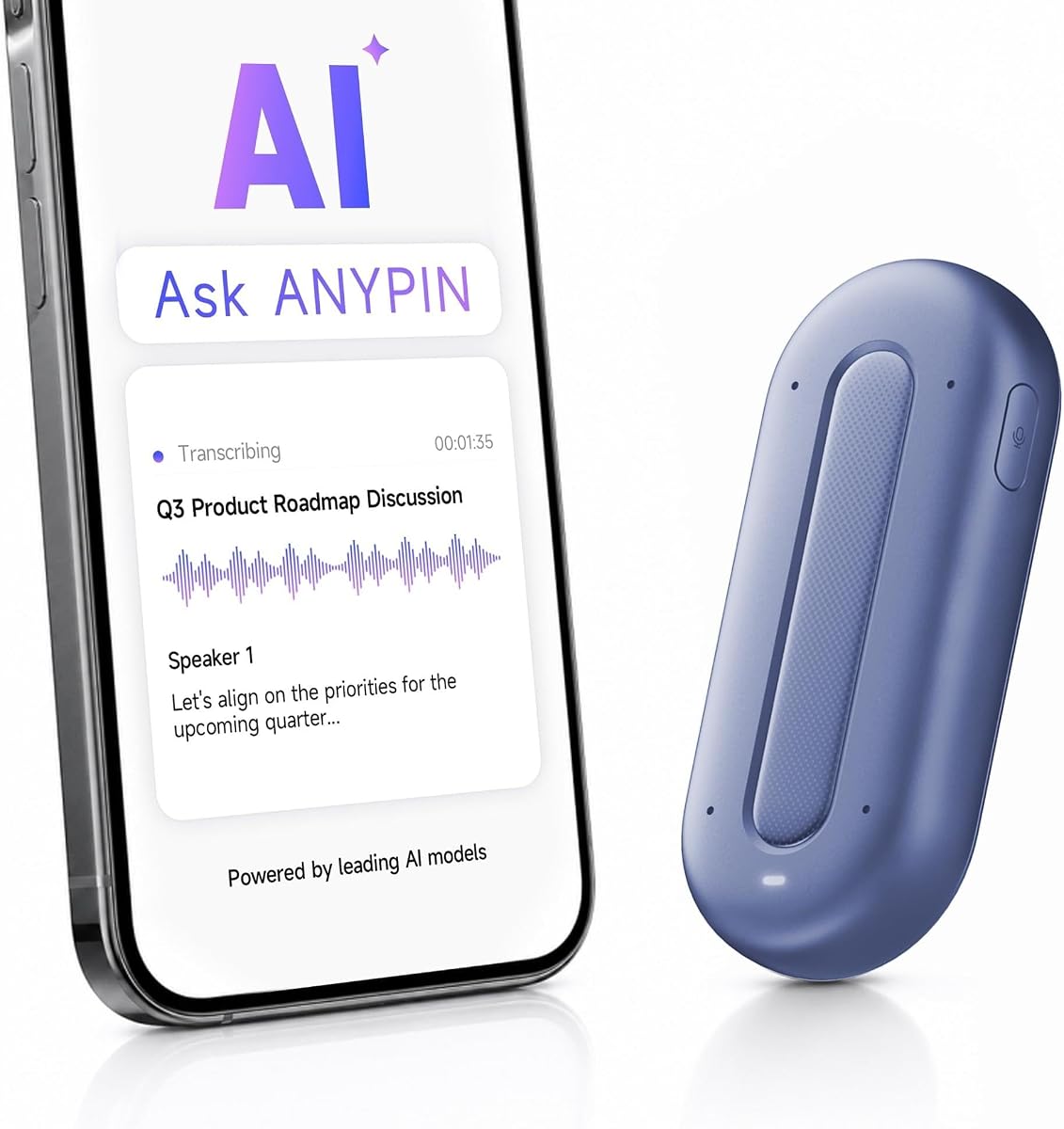
The ANYPIN Note Pod P1 offers extensive language coverage with support for over 120 languages and translation. Rated 3.9 it provides a full year of unlimited AI transcription without subscriptions which is a great start for new users. It keeps data encrypted on-device before syncing to the app for playback.
We may earn a commission when you buy through this link, at no additional cost to you.
It features auto-pause in geo-fenced private zones adding a layer of privacy control for sensitive environments. The wearable design is ultra-slim and light so it stays discreet on your lapel or as a necklace. Four microphones pick up clear audio even from up to 16 feet away.
While the language support is strong the lower rating suggests potential inconsistencies in transcription quality or app performance. USB-C data transfer is not supported which limits direct file access. Still the privacy features and one year plan make it a viable option for travelers.
This device suits multilingual teams and travelers who need instant translation and transcription. Choose it if you want a discreet tool with broad language support and privacy controls. It is a useful companion for cross-language communication and meetings.
Record and convert conversations across 120+ languages with built-in translation. Ideal for multilingual meetings and travel.
Choose when to record with auto-pause in private zones. Data stays encrypted on-device until synced to the companion app.
We may earn a commission when you buy through this link, at no additional cost to you.
The Z01 PRO is unique as a wearable digital badge focused on language practice and offline interaction. Rated 4.2 it supports translation across 102 languages without needing Wi-Fi for core connectivity. All processing happens on-device ensuring your data remains private and secure locally.
We may earn a commission when you buy through this link, at no additional cost to you.
Its HD touch screen allows you to customize wallpapers and patterns making it a stylish accessory. You can ask it practical questions about recipes or travel through the BagiBagi app. It maintains a low-energy Bluetooth connection to your phone for constant access without draining your battery.
While it offers strong privacy features it lacks the robust transcription and summarization found in other lapel recorders. The focus is more on conversation assistance and language learning than meeting notes. However it is excellent for travelers and language learners needing a discreet tool.
This device is ideal for international travelers and language enthusiasts who value privacy. Choose it if you want a stylish offline AI companion for daily interactions. It blends smart functionality with personal expression in a compact form.
Customize your badge with unique wallpapers and patterns. Use the touch screen for intuitive control without needing Wi-Fi.
All processing happens on the device with no cloud uploads. Your data and queries stay securely stored locally for peace of mind.
We may earn a commission when you buy through this link, at no additional cost to you.
The Z02 Wearable Badge achieved a perfect 5.0 rating for combining recording translation and daily tools. It supports instant translation and high quality audio recording to break language barriers. With 8 AI tools like meeting minutes and mind maps it helps organize key points efficiently.
We may earn a commission when you buy through this link, at no additional cost to you.
You can personalize the badge with custom wallpapers or videos to match your style. It includes voice alarms and a life encyclopedia chatbot for daily tasks beyond meetings. The design is lightweight and wearable making it easy to take anywhere for school or work.
To access full intelligent features you need the BagiBagi app and internet connection. This dependency might limit offline use but enhances functionality when online. The lack of hidden fees adds to its appeal as a transparent tool for users.
This device is perfect for students travelers and anyone needing a daily digital assistant. Choose it if you want a versatile tool with strong organization features. It stands out for its user-friendly design and comprehensive tool set.
Features 8 AI tools including meeting minutes and mind maps. Automatically sorts out key points and action items.
Includes voice alarms and encyclopedia chatbot. Make the badge uniquely yours with custom wallpapers and videos.
We may earn a commission when you buy through this link, at no additional cost to you.
The SYNCO AI Mini is designed specifically for Android USB-C creators who need high quality voice capture. Rated 4.2 it offers AI noise reduction and voice enhancement to keep speech clear in noisy environments. You get lifetime free AI tools without subscriptions for summaries and mind maps.
We may earn a commission when you buy through this link, at no additional cost to you.
Auto voice leveling balances your sound automatically when you move or speak at different distances. This saves time fixing uneven audio later. The companion app organizes recordings into ready-to-use ideas helping you plan content faster for vlogs and interviews.
While powerful it is tailored for Android USB-C devices which limits its use for other phone types. It focuses primarily on voice audio rather than broader meeting context features. Still the lack of subscription fees makes it a smart choice for mobile creators.
This device is ideal for YouTubers and podcasters using Android phones. Choose it if you want free tools and consistent voice quality. It is a practical upgrade for creators moving from basic recording to organized content.
Reduce background distractions and keep speech clear. Designed for recording in real environments like cafés and outdoors.
Use AI-powered summaries and mind maps without monthly fees. Helps creators move from recording to organized content faster.
We may earn a commission when you buy through this link, at no additional cost to you.
Choosing the right AI lapel device depends on your specific workflow and privacy needs. Here are the key factors to consider before making a purchase.
Look for devices with high accuracy rates and multiple language support. Fast processing ensures you get actionable summaries quickly after meetings. Check if the device uses advanced AI models like GPT or Claude for better context.
Prioritize models offering real-time processing to maintain workflow efficiency.
Battery life varies from a few hours to several days. Consider your typical recording needs to avoid interruptions. Portability matters for discreet wear so check the weight and form factor.
Choose lightweight options with long battery life for all-day use.
If handling sensitive data verify compliance with standards like ISO 27001 or HIPAA. Local encryption and clear data policies protect your recordings. Ensure the device allows you to control who accesses the data.
Select devices with strong privacy certifications for professional reliability.
Check if the device uses Wi-Fi or Bluetooth for syncing files. Wi-Fi often offers faster transfer speeds for large audio files. Ensure compatibility with your existing apps and platforms.
Opt for fast Wi-Fi sync to save time after long sessions.
Local storage allows you to record without internet. Look for devices with at least 64GB for extended use. This ensures you never lose data due to connectivity issues.
Choose models with ample local storage for offline reliability.
The companion app should offer intuitive navigation and useful tools like summaries and task generation. Check for features like speaker recognition and action items. Free plans can save costs initially.
Ensure the app provides all essential features for your workflow.
Comfort is key for long meetings so check the weight and clip quality. Some devices offer multiple wearing styles like necklace or pin. A discreet design helps in professional settings.
Pick comfortable models with secure clips for all-day wear.
Evaluate upfront costs versus ongoing subscription fees. Some devices offer lifetime free plans which reduce long-term expenses. Consider if premium features are necessary for your needs.
Balance initial cost with long-term subscription requirements wisely.
Start by charging your device fully before first use. Attach it securely to your lapel or clothing using the included clips or magnets. Ensure it is positioned close to the main speakers for best audio quality.
Press the record button to capture meetings and conversations. Use the companion app to sync and organize your files regularly. Review summaries and edit action items to keep your notes accurate.
Keep the device clean and avoid exposure to moisture or extreme temperatures. Update firmware as available to ensure optimal performance. Store it in a protective case when not in use to prevent damage.
Yes many devices offer enterprise grade privacy compliance like ISO 27001 and HIPAA. Data is often encrypted locally and in transit to protect your information. Always check specific security standards before choosing.
Some devices offer free Starter Plans with unlimited transcription. Others require subscriptions for advanced tools or longer history. Check the product details for included features before buying.
Most support over 100 languages with translation features. Some models offer over 120 languages for global use. Check the device specs to confirm language coverage.
Some devices allow local recording and storage without internet. However full transcription often requires sync to an app online. Look for offline features if internet access is limited.
Battery life ranges from 20 to 70 hours depending on the model. Some offer days of standby time for long projects. Choose one that matches your daily recording needs.
Yes some devices like the SYNCO Mini are designed for Android USB-C. Most others work with iOS via Bluetooth or Wi-Fi. Check connectivity options for your phone type.
The top picks for November 2026 include the Plaud Note Pro for overall performance and the Comu Action Pro for document automation. Each device offers unique strengths tailored to different professional needs and workflows.
Prioritize features like battery life privacy compliance and language support based on your priorities. Consider whether you need a budget-friendly tool or a premium assistant with advanced automation.
Remember to check current availability and any updates from manufacturers before buying. These tools evolve quickly so staying informed ensures you get the best value for your needs.