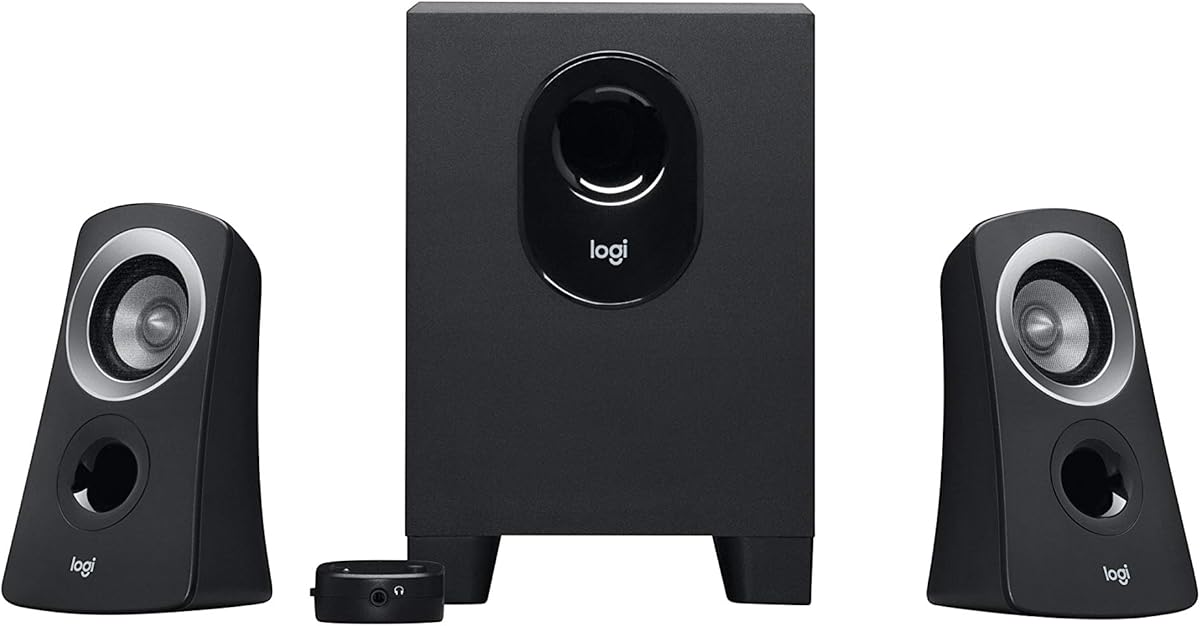
Logitech Z313 2.1 Multimedia Speaker System with Subwoofer – Black
4.4Editor score
Convenient Control Pod
25 Watts RMS Output
Compact Subwoofer Design
This guide compares the top 2.1 Channel Desktop Speakers for audio quality, bass response, connectivity, and value to help you find the perfect desktop sound
Finding the right audio setup for your workspace can transform your daily computing experience significantly. A good 2.1 channel desktop speaker system provides rich sound and deep bass that standard monitor speakers simply cannot match.
We evaluated ten leading models based on power output, driver quality, connectivity options, and user feedback. Our analysis focuses on real-world performance for gaming, music, and multimedia consumption across different budget ranges.
Each selection below highlights key features and trade-offs to help you make an informed decision. Please note that product availability and pricing can change frequently, so verify current details before purchasing.
4.4Editor score

4.5Editor score
4.2Editor score
The following table provides a side-by-side comparison of all ten featured speaker systems. It highlights critical specifications and design elements to help you quickly identify the model that best fits your specific desktop audio requirements and space constraints.


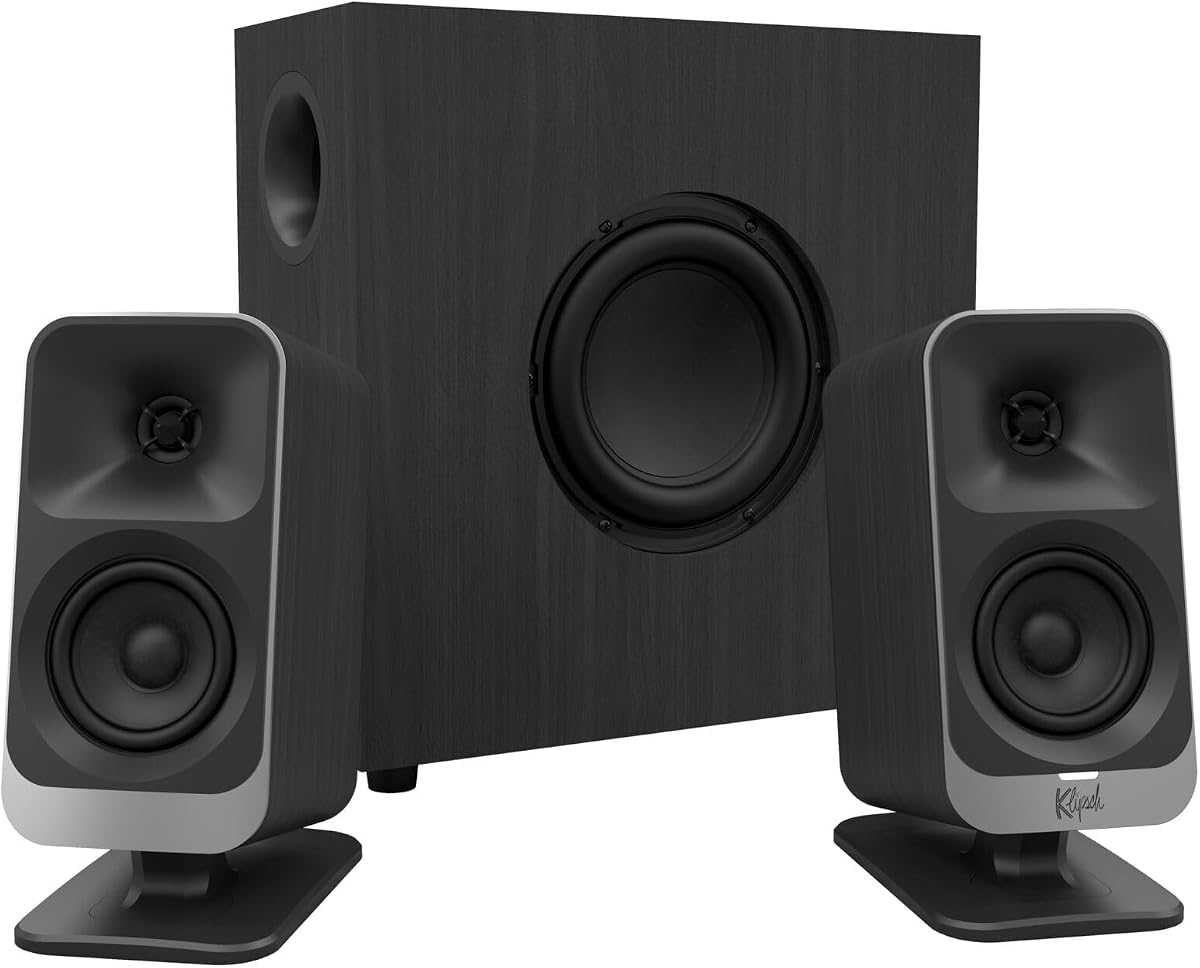
The Klipsch ProMedia 2.1 THX Certified system stands out as the top choice for those seeking legendary sound quality. With a 4.5 rating, it delivers an immersive audio experience that fills the room with incredible clarity for gaming movies and music.
We may earn a commission when you buy through this link, at no additional cost to you.
Its MicroTractrix horn technology ensures efficient sound reproduction while the 6.5 inch side firing subwoofer provides full bandwidth bass you can feel. The 200 watts of peak power allows for dynamic volume without distortion even at high levels.
While the price is higher than budget options the performance justifies the investment. The only trade-off is the size of the subwoofer which requires floor space but the sound quality makes it worth the footprint.
This system is perfect for audiophiles and gamers who prioritize audio fidelity. If you want a timeless setup that combines power with precision this Klipsch model is the definitive recommendation for desktop audio.
THX certification ensures that the audio meets strict standards for clarity and dynamic range across all listening environments.
The dedicated subwoofer handles low frequencies independently allowing satellites to focus on mids and highs for a balanced sound.
We may earn a commission when you buy through this link, at no additional cost to you.
The Logitech Z313 offers an accessible entry point into quality 2.1 audio. With a 4.4 rating it provides balanced sound and a dedicated subwoofer for desktop users who need better audio than built-in speakers offer.
We may earn a commission when you buy through this link, at no additional cost to you.
Its 25 watts of RMS power ensures enough volume for small to medium rooms. The convenient control pod makes adjusting volume and power simple without reaching behind the computer or monitor.
While it lacks the power of premium systems it delivers clear audio for everyday tasks. The compact subwoofer fits under most desks easily making it ideal for users with limited floor space.
This is the best choice for budget conscious buyers needing reliable sound. It balances cost and performance well making it a top pick for offices dorms and basic home setups.
The remote control pod allows for easy access to volume and power adjustments without interrupting your workflow.
Both the satellites and subwoofer are designed to fit neatly on or under a desk saving valuable workspace.
We may earn a commission when you buy through this link, at no additional cost to you.
The Klipsch ProMedia Lumina reimagines a classic with modern features and stunning aesthetics. It delivers big bass in a small package perfect for gamers who want immersive sound and visual flair.
We may earn a commission when you buy through this link, at no additional cost to you.
Its USB-C and Bluetooth 5.3 connectivity ensures flexible device pairing. The built-in RGB lighting allows you to customize your desk vibe with the included control app for a personalized experience.
The low profile subwoofer maximizes desk space while maintaining impact. The only downside is the higher cost which is justified by the build quality and advanced features offered.
Buy this if you want a centerpiece audio system. It is ideal for modern gaming setups where style and performance are equally important and you have the budget for a premium device.
USB-C allows direct digital audio connection while Bluetooth 5.3 ensures stable wireless streaming for phones and tablets.
Use the desktop app to adjust lighting colors and modes to match your system or mood seamlessly.
We may earn a commission when you buy through this link, at no additional cost to you.
The Logitech Z623 is a powerhouse designed for immersive audio in large entertainment rooms. With 400 watts peak power and THX certification it brings movies and games to life with studio quality sound.
We may earn a commission when you buy through this link, at no additional cost to you.
Its ability to drive up to three devices simultaneously via RCA and 3.5mm inputs makes it versatile. The sound is big enough to fill large spaces without losing clarity or depth.
The size of the satellites and subwoofer means it needs significant space which might not suit small desks. However for those with dedicated media rooms the audio performance is unmatched.
This is the top pick for home theater enthusiasts. If you need volume and power that exceeds standard desktop limits this system provides a cinematic experience right at your desk.
With 400 watts peak power this system delivers room filling sound that rivals standalone home theater setups.
Multiple inputs allow you to connect a computer console and media player at the same time for easy switching.
We may earn a commission when you buy through this link, at no additional cost to you.
The Creative Pebble X Plus brings a modern aesthetic to desktop audio with USB-C and RGB features. It offers a balanced audio experience with punchy bass for its compact size and 4.2 user rating.
We may earn a commission when you buy through this link, at no additional cost to you.
Its USB-C connection allows for easy integration with newer devices while Bluetooth 5.3 supports wireless streaming from phones. The RGB lighting adds a vibrant touch to your setup without cluttering the desk.
While it is powerful for its size it requires a higher wattage adapter for maximum volume. The bass is punchy but may lack the depth of larger subwoofers in a small room.
Ideal for users wanting style and simplicity. It is a great fit for modern workspaces where aesthetics matter as much as sound quality and USB-C convenience.
The USB-C connection simplifies cabling and power delivery for a cleaner desktop setup with modern hardware.
Six lighting presets allow you to match your desk theme or mood with customizable color combinations.
We may earn a commission when you buy through this link, at no additional cost to you.
Bluedee speakers deliver clear balanced sound tuned by DSP for comfortable listening. They provide deep bass without muddiness making them suitable for movies gaming and music in a single setup.
We may earn a commission when you buy through this link, at no additional cost to you.
The all-in-one control knob simplifies daily use for volume playback and lighting adjustments. Bluetooth 5.4 ensures stable wireless connections while multiple ports allow wired flexibility when needed.
While the brand is newer the features are competitive at this price point. The RGB lighting adds a modern look that enhances workspace aesthetics without being overly distracting.
Choose this for a straightforward user-friendly experience. It is perfect for those who want easy controls and reliable performance without complex menus or setups.
Built-in digital signal processing reduces distortion for smoother audio that is easy on the ears.
A single knob manages volume playback and lighting so you do not need multiple buttons.
We may earn a commission when you buy through this link, at no additional cost to you.
The Cyber Acoustics CA-3090 is a straightforward budget option for those needing basic audio improvements. It includes a subwoofer and control pod to offer better sound than built-in speakers.
We may earn a commission when you buy through this link, at no additional cost to you.
Its 18W peak power is sufficient for quiet office environments. The side firing subwoofer helps produce bass despite its compact size though the volume levels remain moderate.
The flat panel design keeps the footprint small on your desk. While not suitable for loud gaming the utility of its cost makes it a reasonable choice for secondary setups.
Ideal for students or basic office users. If you need to add sound without spending much this system provides essential functionality at a minimal price point.
This model offers the basic features of a 2.1 system at a very low cost for entry level users.
Flat panel speakers save desk space while still providing a dedicated subwoofer for low end.
We may earn a commission when you buy through this link, at no additional cost to you.
The Creative Pebble Plus uses a unique design with elevated drivers and a down-firing subwoofer. It ensures optimal sound direction while providing depth for a small desktop footprint.
We may earn a commission when you buy through this link, at no additional cost to you.
Its USB powered nature simplifies cable management by eliminating the need for wall sockets. The high gain mode can increase volume if you use a higher wattage adapter for stronger bass.
Volume controls on the front provide easy access during use. While the total power is low the design optimizes listening angles for an immersive experience close to the screen.
Best for laptop users needing simple audio. It works well for casual listening and media where convenience and space saving are key priorities over raw power.
Drivers angled at 45 degrees aim sound directly at your ears for a better soundstage and clarity.
Flip a switch to boost power output and bass response when using a compatible USB adapter.
We may earn a commission when you buy through this link, at no additional cost to you.
The CA-3610 balances performance and price with titanium drivers and a powerful subwoofer. It delivers 62W of peak power ensuring crisp highs and warm mid-tones for all types of media.
We may earn a commission when you buy through this link, at no additional cost to you.
The down-firing subwoofer puts out deep bass while the satellites remain clear. A convenient headphone jack allows for private listening without turning off the main speakers.
Its compact design fits easily under desks without dominating the space. While the build is basic the audio quality offers good value for those seeking stronger sound than budget options.
Choose this for balanced performance. It is ideal for users who want noticeable improvement over standard speakers without paying premium brand prices.
Dual 2-inch titanium drivers provide crisp highs and warm mid-tones for detailed audio playback.
A 3.5mm headphone jack on the satellite allows for private listening without disturbing others.
We may earn a commission when you buy through this link, at no additional cost to you.
The Logitech Z407 stands out for its wireless control dial allowing you to manage sound from across the room. It offers immersive sound with deep bass and clarity for gaming and media.
We may earn a commission when you buy through this link, at no additional cost to you.
Its 80W peak power ensures enough volume for most rooms. The dual-position satellites can be placed vertically or horizontally to fit your desk layout and aesthetic preference.
Multiple inputs allow connecting three devices via Bluetooth micro USB and aux. While the dial is convenient some users find it requires fine motor control for precise adjustments.
Ideal for those valuing convenience. If you want to control volume and playback wirelessly without leaning over your desk this is a top choice.
The 30m line of sight control dial allows you to adjust volume and play pause wirelessly.
Oval shaped satellites can be oriented vertically or horizontally to match your desk layout.
We may earn a commission when you buy through this link, at no additional cost to you.
Selecting the right speaker system requires considering several factors to ensure compatibility with your setup and listening habits.
Power output measured in watts RMS and peak determines how loud and clear the speakers can get. Higher wattage ensures better sound quality at higher volumes without distortion.
Look for at least 20 watts RMS for decent desktop performance.
The subwoofer handles low frequencies and adds depth to your audio experience. Larger woofers generally produce deeper and more impactful bass.
Choose a size that fits your available floor space while meeting your bass expectations.
Modern speakers often offer Bluetooth USB and 3.5mm inputs. Ensure the system supports the connections available on your computer or devices.
Prioritize models with multiple inputs for flexible device switching.
Control pods or wireless remotes make adjusting volume and bass easier during use. Some systems also include app control for advanced settings.
Look for intuitive controls that match your workflow.
Materials like wood or high grade plastic affect durability and sound resonance. Sturdy cabinets reduce unwanted vibrations during playback.
Check customer reviews for long term reliability.
Measure your available desk and floor area before buying. Some subwoofers require significant space and may not fit under small desks.
Consider compact models if space is limited.
Certifications like THX ensure audio meets specific quality standards. These can indicate better sound tuning and performance.
Opt for certified systems if audio quality is a priority.
Prices range from budget to premium options. Determine how much you can spend and prioritize features that matter most to you.
Balance cost with performance to get the best value.
Place your satellites on either side of your monitor to create a stereo image. Keep them at ear level for optimal sound direction and clarity.
Position the subwoofer on a firm floor surface to allow the bass to resonate properly. Avoid placing it in corners to prevent overwhelming low frequencies.
Clean the speakers with a soft dry cloth to remove dust and protect the drivers. Avoid using water or harsh chemicals that could damage the finish or electronics.
Most desktop 2.1 systems come with a built-in amplifier in the subwoofer or a control pod. You typically only need to plug them into a power outlet and your device.
Yes, most 2.1 speakers have 3.5mm or USB inputs compatible with laptops. Bluetooth models also connect easily to modern laptops with wireless capabilities.
RMS represents continuous power handling while peak indicates maximum short-term output. Higher RMS means sustained volume without distortion compared to just peak power.
Many systems include bass knobs to adjust subwoofer levels. You can tweak this to suit your room size and personal preference for low end response.
While great for multimedia they are generally not studio monitors. Professional work usually requires reference speakers with flatter frequency response and calibrated output.
Use models with multiple inputs or Bluetooth pairing. Some systems allow you to switch between sources via a control pod or software application.
Yes, if your console has a headphone or optical audio output. You may need an adapter if the console outputs digital audio only.
We reviewed ten excellent systems ranging from budget to premium options. Each offers unique strengths for different needs like portability power or wireless control.
Prioritize factors like power output and connectivity to match your setup. Whether you choose Klipsch or Logitech ensure the model fits your space and workflow.
Always verify current pricing and availability as models update frequently. We hope this guide helps you find audio that enhances your daily computing experience.