
WoneNice USB Laser Barcode Scanner
4.5Editor score
Plug and play setup
200 scans per second
Compatible with Windows and Mac
This guide compares ten top barcode scanners for Square POS systems, evaluating compatibility, speed, connectivity, and value for retail and small business
Finding the right barcode scanner for your Square setup is essential for smooth checkout experiences. A good scanner reads codes quickly, connects reliably, and works seamlessly with your Square hardware.
We compared ten highly rated scanners based on compatibility, scan speed, connectivity options, and durability. Each model offers distinct features suited to different business needs and budgets.
This list shows detailed specs, pros, and cons for every product. Please note that prices and availability may change over time, so check current listings before purchasing.
4.5Editor score

4.5Editor score
4.3Editor score
The following table provides a side-by-side comparison of all ten scanners. Review each model's key specifications to identify the best fit for your workflow.


The Symbol Zebra LS2208 Series is a top-rated barcode scanner designed for high-volume retail environments. With a 4.5 rating, it is widely recognized for its durability and speed in processing transactions smoothly.
We may earn a commission when you buy through this link, at no additional cost to you.
Its standard range laser technology ensures rapid decoding of common 1D barcodes. The USB cable connection provides a stable link to your Square system without worrying about battery levels or wireless interference.
While it is limited to wired connectivity and does not support 2D codes like QR, these trade-offs are acceptable for businesses focused on traditional UPC and EAN scanning. The included gooseneck stand enhances counter organization.
This scanner is ideal for shops and businesses using Square Stand or Register that need a dependable tool. Its reliability and seamless integration make it a recommended choice for daily checkout operations.
Designed for high-volume retail use, this scanner maintains consistent performance throughout the day without needing charging or setup.
The USB connection ensures it works instantly with Square hardware, minimizing downtime and setup effort for new terminals.
We may earn a commission when you buy through this link, at no additional cost to you.
The NETUM Bluetooth Barcode Scanner offers versatile connectivity with support for 2.4G wireless, Bluetooth, and wired modes. It features a 4.4 rating and is designed for high-resolution decoding of various barcode types.
We may earn a commission when you buy through this link, at no additional cost to you.
It boasts a strong recognition ability, capable of reading worn or tightly spaced codes. The 2600mAh battery allows for extensive use without frequent charging, making it suitable for inventory and warehouse environments.
However, the product data explicitly notes it does not work with Square POS systems. This limitation is significant for users relying on Square. Additionally, users must scan specific barcodes to configure settings initially.
For businesses needing flexibility in connectivity and long battery life, this scanner is a strong contender. Just ensure your POS system matches its compatibility requirements before purchasing.
Support for Bluetooth, 2.4G wireless, and wired connections provides adaptability for different device types and operational needs.
The high-resolution CCD sensor engine rapidly decodes damaged or stacked barcodes, ensuring accuracy in varied conditions.
We may earn a commission when you buy through this link, at no additional cost to you.
The WoneNice USB Laser Barcode Scanner is an affordable option with a 4.5 rating for small businesses needing simple plug and play functionality. It delivers fast scanning speeds with a 200 scans per second rate.
We may earn a commission when you buy through this link, at no additional cost to you.
This laser scanner works with Windows, Mac, and Linux systems, offering broad compatibility. Its design includes a stylish look and a 6ft cable, which provides reasonable reach for countertop setups.
The scanner is robust enough to withstand a 1.5m drop on concrete. While it is limited to wired 1D scanning, its speed and ease of use make it a cost-effective solution for standard retail needs.
Ideal for shops with tight budgets, this scanner simplifies checkout without compromising on core performance. Its wide software support ensures it works seamlessly with existing business tools.
At an accessible price, it delivers professional-grade scanning speeds suitable for efficient checkout lines and quick inventory tasks.
No drivers or software installation are needed, making it ready to use as soon as the USB cable is connected.
We may earn a commission when you buy through this link, at no additional cost to you.
The ScanAvenger Wireless Portable scanner offers both 1D and 2D scanning capabilities, making it versatile for QR codes and digital displays. It has a 4.4 rating and includes a smart charging stand.
We may earn a commission when you buy through this link, at no additional cost to you.
With three connection modes, it connects to computers and mobile devices easily. The built-in rechargeable battery and vibration feedback enhance usability in various environments like warehouses or busy retail stores.
While it does not support Maxicode, it covers most common barcode types including PDF417. The smart stand simplifies charging and storage, reducing clutter on your workspace.
Businesses looking for portable 2D scanning without extra software will find this model appealing. Its balance of features and convenience supports efficient inventory management.
Ability to scan both 1D and 2D codes like QR and PDF417 makes it adaptable for modern digital payment and product tracking needs.
The Next Gen Smart Charging Stand provides wireless transmission and charging, ensuring the device is always ready for use.
We may earn a commission when you buy through this link, at no additional cost to you.
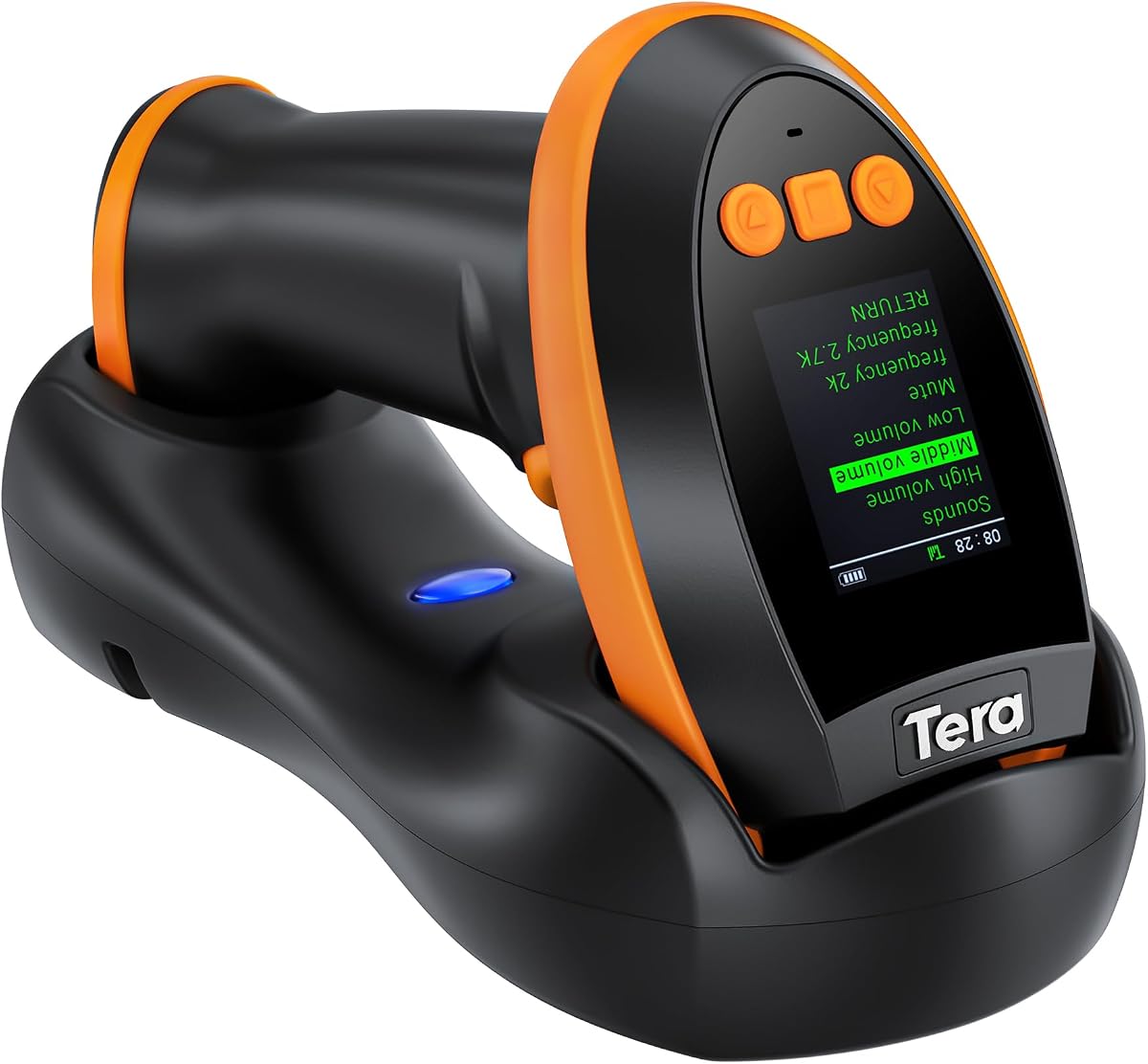
The Tera Barcode Scanner Wireless with Screen offers advanced customization with a unique screen setting display. Rated 4.3, it features 3-in-1 connectivity and strong performance with challenging barcodes like driver licenses.
We may earn a commission when you buy through this link, at no additional cost to you.
It includes a built-in 2.4G receiver in the charging cradle, eliminating the need for extra dongles. The 2500mAh battery ensures all-day operation, and it supports Bluetooth, 2.4G, and wired connections.
While more expensive than basic models, its premium features like the keypad and display provide flexibility for professional settings. Compatibility across Windows, Mac, and mobile systems is excellent.
Businesses that value advanced configuration and portability will appreciate this model. Its ability to handle various code types with minimal setup makes it a standout premium option.
The dedicated screen allows users to adjust language, volume, and connection options directly on the device for tailored control.
The 2.4G receiver is integrated into the cradle, streamlining setup and reducing hardware clutter at the checkout counter.
We may earn a commission when you buy through this link, at no additional cost to you.
This bundle includes a cash drawer, Epson receipt printer, and a Symbol USB barcode scanner tailored for Square Register setups. With a 4.6 rating, it offers a complete solution for retail checkout environments.
We may earn a commission when you buy through this link, at no additional cost to you.
The scanner and printer connect via USB ports on the Square Stand, requiring no installation. The cash drawer connects directly to the printer for automatic opening during transactions, improving efficiency.
While priced higher as a bundle, it saves the hassle of sourcing compatible components separately. The 2-year warranty and lifetime tech support add significant value for business continuity.
For new or expanding Square users needing a reliable all-in-one setup, this kit provides seamless integration. It ensures your printer and scanner work harmoniously with your Square system from day one.
Designed specifically for Square Register and Stand, this bundle ensures all components work together without extra configuration steps.
The cash drawer opens automatically via the printer connection, streamlining the payment process and reducing manual handling.
We may earn a commission when you buy through this link, at no additional cost to you.
This scanner is designed specifically for Square Stand and Register, offering guaranteed compatibility with these systems. It includes a hands-free stand and USB cable for efficient counter use.
We may earn a commission when you buy through this link, at no additional cost to you.
With a 4.1 rating, it provides solid performance for standard checkout needs. The Symbol LS2208 base ensures reliable reading of common barcodes during daily transactions.
While it lacks 2D code support, it excels in seamless integration with Square hardware. The included stand allows for hands-free scanning, which speeds up busy checkout lines.
Ideal for Square users who want a dedicated scanner without compatibility worries, this model fits directly into their setup. Its simplicity and direct connection make it a practical choice.
Built to work with Square Stand and Register, this scanner removes uncertainty about connectivity and performance with Square terminals.
The included stand enables hands-free operation, allowing staff to focus on customers while the scanner reads codes quickly.
We may earn a commission when you buy through this link, at no additional cost to you.
The Eyoyo EYH2 is a wired 2D scanner capable of reading codes from mobile screens. With a 4.3 rating, it is designed for quick use in POS environments and inventory tracking.
We may earn a commission when you buy through this link, at no additional cost to you.
It supports multiple barcode types including QR and PDF417, making it suitable for mobile payments. The ergonomic design and shock resistance ensure it can handle drops in busy retail spaces.
While it lacks wireless functionality, its ability to read digital wallets and coupons enhances customer checkout options. The 6ft cable provides flexibility for counter placement.
Businesses needing affordable 2D scanning for mobile payments will find this model useful. Its simplicity and screen reading capability offer modern functionality at a budget-friendly price.
Capable of scanning barcodes from smartphone screens, this scanner supports modern mobile payment and loyalty card usage.
The anti-shock ABS construction withstands repeated drops, ensuring longevity even in high-traffic retail environments.
We may earn a commission when you buy through this link, at no additional cost to you.
The NetumScan Desktop Barcode Scanner offers omnidirectional scanning for high-volume retail environments. With a 4.6 rating, it uses auto-sensing technology to activate when items pass through its scanning window.
We may earn a commission when you buy through this link, at no additional cost to you.
Its base is designed to be stable and anti-slip, ensuring the scanner remains in place during busy shifts. The device reads damaged and colorful barcodes effectively, reducing checkout errors.
While not compatible with Square POS systems, it excels in standalone environments where hands-free operation is critical. The non-slip design minimizes accidental movement or damage.
For businesses needing to streamline repetitive scanning tasks without staff handling the device, this model is excellent. Its efficiency and ease of use save significant time over manual scanners.
Auto-sensing technology triggers scans as items move across the scanner, freeing hands for other tasks at checkout.
The omnidirectional sensor captures damaged or distorted barcodes reliably, ensuring fewer errors during inventory and sales.
We may earn a commission when you buy through this link, at no additional cost to you.
This Bluetooth wireless handheld scanner offers both 2.4G and Bluetooth connectivity for flexible use with multiple devices. It has a 3.8 rating and supports a wide range of 1D and 2D codes.
We may earn a commission when you buy through this link, at no additional cost to you.
The ergonomic design weighs only 110g, reducing fatigue during extended use. It includes offline storage for up to 50,000 codes, allowing inventory tracking without constant connection to a computer.
While it does not work with Square, it is useful for general inventory and logging tasks on laptops and mobile devices. The auto-reconnect feature ensures quick recovery after disconnection.
For users managing inventory across various platforms needing offline capability, this model provides practical utility. Its lightweight and dual connectivity options make it versatile for different workflows.
Support for both 2.4G and Bluetooth ensures it can pair with computers, tablets, and phones easily for different uses.
With offline storage for thousands of codes, it supports inventory tasks in areas with limited internet access.
We may earn a commission when you buy through this link, at no additional cost to you.
Selecting the right scanner involves evaluating compatibility with Square POS systems and your specific workflow needs.
Ensuring the scanner works with your specific Square hardware is crucial. Some models explicitly note incompatibility with Square or Register. Always verify the product description or manual before purchasing to avoid returns.
Choose models that confirm support for Square Stand or Register to ensure seamless integration.
Connectivity options range from USB wired to Bluetooth and 2.4G wireless. Wired models offer stability, while wireless options provide mobility. Consider your workspace size and need for flexibility.
Select connectivity that matches your device ports and operational layout.
Different scanners read different barcode formats. 1D laser scanners handle UPC and EAN codes, while 2D scanners read QR codes and PDF417 on digital screens. Modern businesses often need 2D support.
Opt for a scanner that reads the specific codes your products and customers use.
Wireless scanners depend on battery life. Models with rechargeable batteries and long run times reduce downtime. Wired scanners draw power from the USB port.
Prioritize long-lasting batteries for high-volume or remote scanning tasks.
Retail environments can be rough on equipment. Look for scanners with shock resistance and anti-slip designs to withstand drops. Durability ensures longevity in busy settings.
Choose rugged builds to minimize repair or replacement costs.
Budget models offer basic functionality while premium ones include advanced features like customizable displays. Check warranty terms to protect your investment against defects.
Balance upfront cost with long-term reliability and support features.
Fast scan rates reduce checkout wait times. Look for scanners that decode quickly and support high-volume tasks. Speed affects customer satisfaction directly.
Select models with high scans per second for busy retail operations.
Plug and play scanners require no software installation. Complex configurations may demand technical time and training. Consider how easily staff can begin using the device.
Choose models that minimize setup complexity for quick deployment.
Connect the scanner to your Square Stand or Register via USB port. Ensure the device is recognized before starting checkout. Some wireless models may need initial pairing with the host system.
Keep the scanning window clean and free of dust. Wipe gently with a soft cloth to maintain optimal readability. Avoid harsh chemicals or liquids that might damage the lens.
For wireless models, charge the battery fully before first use and monitor levels regularly. Store the device in a cool, dry place when not in use to preserve battery health and functionality.
No, not all barcode scanners are compatible with Square systems. Some third-party models explicitly list incompatibility with Square POS. Always verify the product description confirms support for Square Stand or Register before purchasing.
Only 2D barcode scanners can read QR codes. Laser scanners typically read 1D barcodes like UPC. If your business uses digital coupons or mobile wallets, ensure the scanner supports 2D scanning.
Wired scanners offer stability and constant power but lack mobility. Wireless scanners provide flexibility but need battery management. Choose based on your workspace layout and movement needs.
Check if the scanner is supported by Square first. Ensure all cables are connected properly and ports are functional. Try testing the scanner with another device to isolate hardware or software issues.
Most wireless scanners require initial pairing via Bluetooth or 2.4G dongles. Follow the manufacturer’s instructions to configure settings. Once paired, they should reconnect automatically when in range.
Laser scanners read 1D barcodes and are generally faster for standard retail codes. Image scanners read 2D codes like QR and work with digital screens. Choose based on the types of codes you scan.
Battery life varies by model. Many scanners last days to weeks on a charge. Monitor usage levels and recharge before depletion to ensure uninterrupted operations during busy periods.
Regular cleaning of the scanning window and checking cables for wear are essential. Avoid dropping the device or exposing it to moisture. Store in a dry place when not in use.
The Symbol Zebra LS2208 Series and NETUM Bluetooth offer strong options for different needs. Review the top picks to match your specific budget and workflow requirements.
Prioritize compatibility with Square systems first to avoid integration issues. Consider connectivity and code types based on your retail and inventory demands.
Always check current listings for pricing and availability updates. Selecting the right scanner improves checkout speed and overall customer experience effectively.