
BOYI GMK67
4.5Editor score
Hot-swappable mechanical switches
Triple mode wireless connectivity
Gasket-mounted design
This comprehensive guide compares the top ten barebones keyboard kits available in October 2026, evaluating features like connectivity, customization options
Barebones keyboard kits offer enthusiasts the chance to build a custom mechanical keyboard tailored to their specific needs. These kits provide the essential components while allowing you to choose switches and keycaps for a personalized experience.
We evaluated ten leading kits based on connectivity options, programmability, build quality, and value. Our analysis focuses on real-world usability for both gaming and productivity workloads across different operating systems.
Each pick highlights unique strengths and trade-offs to help you find the right fit. Please note that product availability and pricing may change frequently, so verify details before purchasing.
4.5Editor score

4.6Editor score

4.8Editor score
The following comparison table outlines the key specifications and features of each kit to help you quickly identify the best option for your setup.



The GMK104 Barebones kit stands out as a top choice for enthusiasts seeking a balance of features and build quality. With a high user rating and robust features, it offers a premium typing experience right out of the box.
We may earn a commission when you buy through this link, at no additional cost to you.
This kit shines due to its smart display and knob feature which allows real-time image updates and volume control. The full-size layout ensures no compromise on functionality, making it suitable for office work and gaming alike.
While the software offers extensive customization, users may find the learning curve steep if they are new to QMK or VIA. Additionally, the full-size design requires significant desk space which might not suit compact setups.
Ideal for users who want a complete custom solution with display capabilities, this kit delivers reliability and personalization. We recommend it for those prioritizing feature richness and full-size functionality.
The integrated screen allows for real-time customization of images and status indicators, adding a unique interactive element to your desk setup.
Tri-mode connectivity ensures you can switch between Bluetooth wireless and wired connections effortlessly, supporting up to three devices simultaneously.
We may earn a commission when you buy through this link, at no additional cost to you.
The BOYI GMK67 is an exceptional budget option that does not compromise on essential features. It delivers a solid typing experience with gasket mounting and hot-swap capabilities at a very competitive price.
We may earn a commission when you buy through this link, at no additional cost to you.
What makes this kit stand out is the combination of tri-mode connectivity and hot-swap support which allows easy switch replacement. The 65% layout saves space while retaining arrow keys and essential navigation.
Users should note that the white version may show dust more easily than darker variants. Also, the lack of a numpad makes it less ideal for heavy data entry tasks.
For gamers and typists seeking a compact and affordable custom keyboard, this kit is a strong recommendation. It offers the best balance of price and performance in this roundup.
The 65% layout removes the numpad and function row, freeing up significant desk space for mouse movement and other peripherals.
With VIA software support, you can remap keys and create macros without needing to flash firmware manually, simplifying the customization process.
We may earn a commission when you buy through this link, at no additional cost to you.
The GMK104 in white finishes the list as the premium option with the highest user rating. It combines full-size utility with aesthetic appeal through its pristine white casing and smart screen.
We may earn a commission when you buy through this link, at no additional cost to you.
Key strengths include the real-time screen customization and the premium metal knob which adds tactile feedback. The battery capacity ensures long wireless usage making it perfect for mobile or quiet office environments.
The higher price reflects the added features and finish quality which might not be necessary for all users. Additionally, white surfaces require more frequent cleaning to maintain their appearance.
If you value aesthetics and premium features, this kit is the clear winner. It is best suited for users who want a standout desk setup with full functionality.
The white finish provides a clean and professional look that pairs well with modern minimalistic desk setups and high-end peripherals.
The large capacity battery supports extended wireless sessions without frequent charging ensuring consistent performance across multiple devices.
We may earn a commission when you buy through this link, at no additional cost to you.
The GMK108 offers an extended layout with additional keys that provide extra functionality for power users. Its solid build and hot-swap features make it a reliable choice for custom setups.
We may earn a commission when you buy through this link, at no additional cost to you.
The inclusion of a dedicated function row and full-size layout supports complex macros and media controls. It also offers reliable tri-mode connectivity for versatile use cases.
However, it has a slightly lower rating compared to similar models which may indicate minor usability issues or software quirks. The bulk size also requires ample desk space.
This kit is recommended for users who need the extra keys without sacrificing wireless features. It is ideal for productivity workflows that rely on extensive function keys.
The 108 key layout adds a dedicated function row allowing for easier access to macro keys and media controls.
Gasket mounting provides a cushioned feel that reduces noise and impact during typing sessions for a more comfortable experience.
We may earn a commission when you buy through this link, at no additional cost to you.
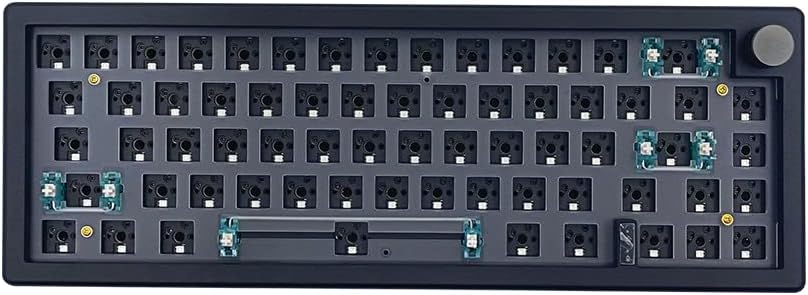
The black version of the GMK67 offers the same robust features as the white model but with a sleeker darker finish. It is an excellent choice for those who prefer low-key aesthetics.
We may earn a commission when you buy through this link, at no additional cost to you.
It supports hot-swappable switches allowing you to experiment with different mechanical switches without soldering. The 65% layout remains compact enough for most desks while retaining essential keys.
While the battery life is strong, the layout lacks a numpad which might be a limitation for spreadsheet work. The black casing may show fingerprints depending on the finish texture.
This kit is best suited for gamers and typists who prefer a dark aesthetic without sacrificing performance. It delivers value and features similar to the white variant.
The black finish provides a professional and understated look that blends well with dark desk mats and gaming setups.
Hot-swappable terminals allow quick changes of mechanical switches enabling users to customize tactile feel and sound easily.
We may earn a commission when you buy through this link, at no additional cost to you.
The GMK87 in white features a TFT LCD screen that offers interactive customization options like images and time display. It fits well in setups that need a balance between size and functionality.
We may earn a commission when you buy through this link, at no additional cost to you.
The TKL layout provides a compact footprint while retaining arrow keys and a numpad. The gasket mount ensures a comfortable typing experience with reduced vibration noise.
The lower rating suggests potential issues with build quality or software stability that users should be aware of. The battery capacity is also slightly lower than other models in this list.
We recommend this kit for those prioritizing screen features in a compact form factor. It is suitable for users who want visual customization without a full-size layout.
The TFT screen allows dynamic updates for images and system info adding a unique visual element to your workflow.
Gasket mounting reduces vibrations and noise providing a smoother typing experience compared to traditional fixed plate designs.
We may earn a commission when you buy through this link, at no additional cost to you.
The M87 Kit in black focuses on a quiet typing experience with sound absorption foam and a gasket-mounted design. It is a solid choice for shared spaces or quiet offices.
We may earn a commission when you buy through this link, at no additional cost to you.
It features a 75% layout that balances compactness with full navigation keys. The hot-swappable PCB allows easy switch replacement making it a flexible platform for customization.
The software offers basic customization which might not satisfy power users seeking advanced macro features. The limited color options restrict aesthetic choices compared to other models.
This kit is best for users who prioritize silence and simplicity over advanced features. It delivers a reliable and quiet typing experience at a competitive price point.
Built-in foam and silicon pads absorb keystroke noise ensuring a whisper-quiet experience suitable for office environments.
The 75% layout removes the numpad while keeping function keys and arrows offering a streamlined typing experience.
We may earn a commission when you buy through this link, at no additional cost to you.
The GMK87 in black mirrors the white version with its TFT LCD screen and TKL form factor. It provides a visually engaging experience with a dark finish suitable for gaming setups.
We may earn a commission when you buy through this link, at no additional cost to you.
This model supports tri-mode connectivity ensuring versatility across devices. The gasket mount offers a comfortable typing experience with reduced noise and vibration.
Like the white variant, it has a lower rating score which might indicate minor stability issues. Users should consider testing the software thoroughly before heavy use.
We recommend this for those who want the screen features in a dark aesthetic. It is suitable for users needing a compact yet functional keyboard with visual customization.
The smart screen allows you to display images and status indicators adding a dynamic layer to your keyboard interface.
Tri-mode support allows switching between wireless and wired modes ensuring reliable connectivity for various use cases.
We may earn a commission when you buy through this link, at no additional cost to you.
The BOYI GMK67Pro offers a mini custom layout that prioritizes portability and performance. It includes robust battery life and programmability features suitable for mobile use.
We may earn a commission when you buy through this link, at no additional cost to you.
Key strengths include QMK and VIA support which allow deep customization of keymaps and macros. The gasket mount ensures a premium typing feel despite the compact size.
The lack of a numpad makes it less suitable for data entry tasks. Users accustomed to full-size keyboards may need time to adjust to the smaller layout.
This kit is ideal for users who want a portable and highly customizable solution. It is best suited for those prioritizing mobility and compact design.
The 65% layout is compact enough to fit in most bags making it ideal for on-the-go work or travel.
QMK support allows advanced users to create complex macros and keymaps for optimized workflows.
We may earn a commission when you buy through this link, at no additional cost to you.
The M87 Kit in white offers a bright aesthetic with the same functional features as the black model. It prioritizes silence and simplicity with sound absorption foam and hot-swap support.
We may earn a commission when you buy through this link, at no additional cost to you.
It features a 75% layout that balances compactness with full navigation keys. The hot-swappable PCB allows easy switch replacement making it a flexible platform for customization.
The lower rating score suggests potential minor issues that users should consider before purchasing. The white finish also requires regular cleaning to maintain its appearance.
This kit is best for users who prioritize bright aesthetics and simplicity over advanced features. It delivers a reliable and quiet typing experience at a competitive price point.
The white finish provides a bright and clean look that pairs well with lighter desk setups and accessories.
Silent foam pads absorb noise ensuring a quiet typing experience suitable for shared workspaces.
We may earn a commission when you buy through this link, at no additional cost to you.
Choosing the right barebones keyboard kit requires understanding several key factors that influence typing experience, durability, and customization potential.
Layout determines the physical footprint of your keyboard. Full-size models include a numpad and function row while 65% and 75% layouts save space. Select a size that fits your desk and usage patterns.
Choose based on desk space and whether you need a numpad for data entry. Compact layouts are ideal for gaming setups while full-size suits productivity workloads.
Most barebones kits feature hot-swappable PCBs that allow you to change switches without soldering. Ensure the PCB supports 3-pin and 5-pin switches for maximum flexibility.
Check that the kit supports the switch type you prefer such as Cherry MX or Gateron. Hot-swap capability ensures you can experiment with different tactile feels over time.
Tri-mode connectivity offers Bluetooth 5.0 2.4GHz wireless and wired Type-C connections. This ensures flexibility across multiple devices and reliable input during gaming.
Prioritize kits with robust wireless support if you use multiple devices. Wired connections remain important for low-latency scenarios and charging capability.
VIA and QMK support allow deep customization of keymaps macros and lighting effects. This is crucial for users who want a fully tailored input experience.
Look for software that allows on-the-fly remapping without flashing firmware. Advanced programmability ensures you can adapt the keyboard to specific tasks easily.
Gasket mounting uses foam or rubber gaskets between the plate and case to reduce vibration and improve typing sound. This feature often correlates with premium feel and sound quality.
Choose kits with solid cases and high-quality foams. Gasket mounting significantly enhances comfort and acoustic performance during long typing sessions.
Extras like knobs for volume control or small screens for customization add functionality. While not essential, these features can enhance the overall user experience.
Evaluate whether features like knobs or screens are worth the added cost. These are useful for power users who value visual feedback and quick controls.
Wireless kits require large batteries to ensure long usage between charges. Models with 4000mAh capacity typically support several weeks of moderate use.
Check battery capacity if you plan to use the keyboard wirelessly. A larger battery ensures fewer interruptions and consistent performance throughout the day.
Barebones kits range from budget-friendly options to premium models with advanced features. Determine which features are essential for your use case before comparing prices.
Balance cost with features. Often the best value comes from kits that offer gasket mounting and hot-swap support at a mid-range price point.
When assembling your kit start by installing the switches carefully into the hot-swap sockets. Ensure they are fully seated and locked in place before attaching keycaps.
Connect the keyboard via USB-C or pair it via Bluetooth to your device. Use the provided software to configure macros or lighting settings to suit your workflow.
Clean your keyboard regularly with compressed air to remove dust between switches. Wipe the surface with a soft cloth to maintain appearance and avoid liquid spills on the PCB.
A barebones kit typically includes the case PCB plate switches and RGB components but excludes keycaps and pre-installed switches. You will need to source these separately or use existing switches you own.
Yes most barebones kits use standard MX-compatible switch stems allowing you to use existing keycaps. Ensure your keycaps fit the stem size and profile of your chosen switches for proper installation.
Gasket mounting reduces vibration and noise providing a softer and more satisfying typing experience. It also enhances the acoustic quality of the keyboard making it sound more premium.
Most kits use VIA or QMK software to manage firmware updates. Download the software from the official website and follow the flashing instructions provided with the product documentation.
Yes most kits support both Windows and macOS out of the box. You can switch modes or remap keys using the software to ensure functionality across different operating systems.
Yes all kits listed feature hot-swappable PCBs that allow you to replace switches without soldering. Simply pull out the old switch and insert a new one directly into the socket.
The top picks highlight the diversity available in the market from compact 65% layouts to full-size models with screens. Each option offers unique benefits depending on your specific needs.
Prioritize factors like hot-swap support and programmability to ensure long-term satisfaction. These features allow you to adapt your keyboard as your preferences evolve.
Always verify the current price and availability before purchasing. The market changes quickly and stock may vary so double-check the details on the retailer site.