
ASRock DeskMini X300 2.5G Series Mini PC
4.2Editor score
Ultra compact 1.92L design
Supports AMD AM4 socket CPUs
Dual M.2 and SATA storage
This guide compares ten top barebone PCs with AMD processors, highlighting performance, connectivity, and expandability for gamers and professionals in October
Barebone PCs with AMD processors offer a unique blend of flexibility and power for users who want to customize their systems. These compact machines come without RAM storage or an operating system allowing you to build a setup tailored to your specific needs. Whether you are looking for gaming performance or workstation capabilities, an AMD barebone kit provides a strong foundation.
We have evaluated ten leading barebone PCs featuring AMD Ryzen processors to help you make an informed decision. Our comparison focuses on key aspects such as CPU architecture, expansion options, connectivity ports, and cooling efficiency. By examining real-world specifications and user feedback, we aim to highlight the strengths and limitations of each model in this diverse market.
Each selection in this guide showcases a distinct approach to mini PC design and AMD integration. You will find details on processor generations, graphical capabilities, and storage potential to understand how each unit performs under load. Please note that availability and pricing can change frequently so always verify the latest offers before making your final purchase decision.
4.2Editor score

4.0Editor score

3.1Editor score
The following table provides a side by side overview of the ten barebone PCs evaluated in this guide. It highlights essential specifications and unique features to help you quickly identify which model aligns best with your performance and connectivity requirements.




The AOOSTAR MACO stands out as a top contender in the barebone PC market with its robust AMD Ryzen 7 PRO 8845HS processor. This model delivers impressive performance for both creative tasks and gaming due to its Zen 4 architecture and Radeon 780M graphics. Its flexible barebone design allows users to install their preferred RAM and storage configurations.
We may earn a commission when you buy through this link, at no additional cost to you.
One of the standout features is the inclusion of an OCuLink port which provides low latency connectivity for external GPUs. This ensures that users can achieve near desktop performance levels when paired with high end graphics cards. Additionally, the dual USB4 ports offer versatile connectivity for high speed data transfer and display outputs.
While the performance is commendable, the lack of included RAM and SSD means buyers must budget for these components separately. Users may also find the BIOS settings somewhat complex when configuring power modes or display options. These trade offs are acceptable given the overall power and flexibility offered by this compact system.
This mini PC is ideal for users who want a powerful customizable platform for gaming or professional workflows. Its efficient cooling and eco friendly build make it a sustainable choice for high performance computing. If you prioritize expandability and cutting edge connectivity, the AOOSTAR MACO is a strong recommendation.
The dual USB4 and OCuLink ports ensure future proof connectivity for high speed peripherals and external graphics solutions.
A VC heat spreader and turbo fans keep temperatures low even during intense workloads ensuring stable performance.
We may earn a commission when you buy through this link, at no additional cost to you.
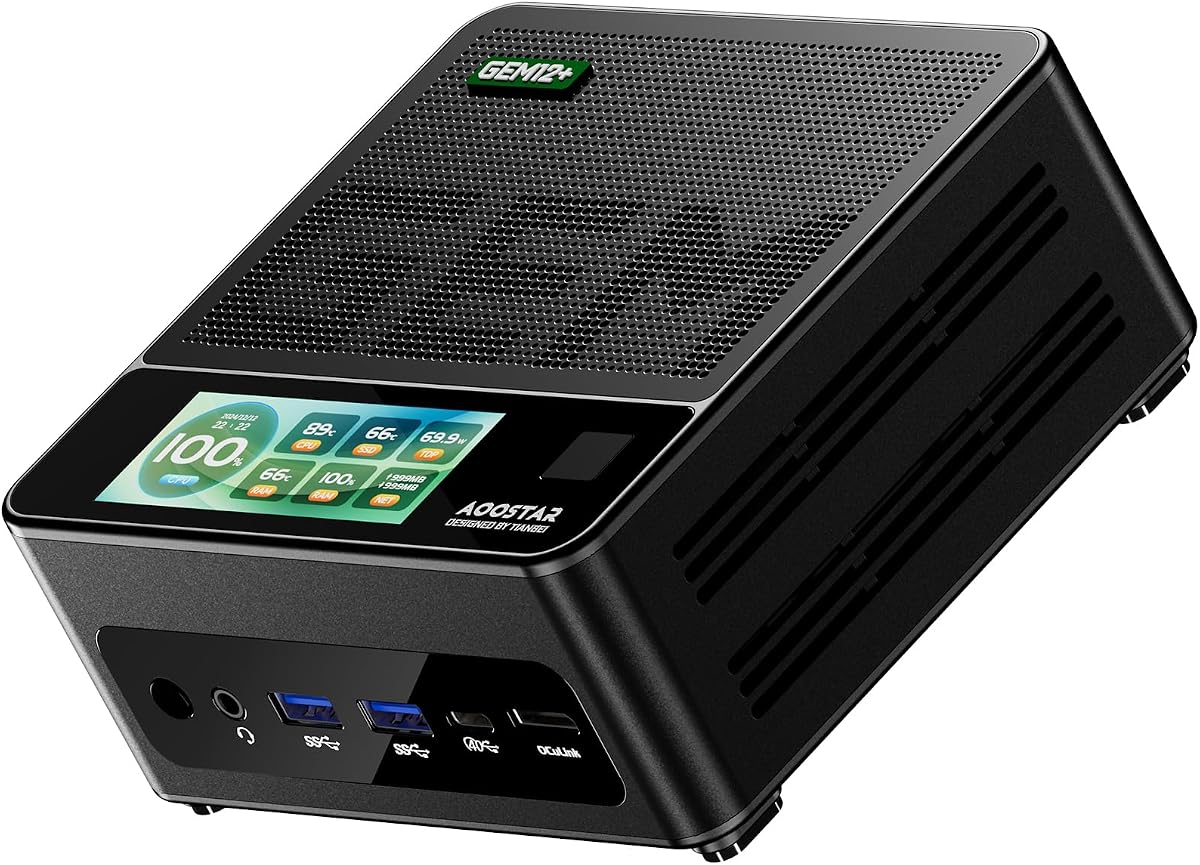
The AOOSTAR GEM12+ is a powerful barebone mini PC that excels in multi screen environments with support for four 4K displays. It is powered by the AMD Ryzen 7 PRO 8845HS processor which delivers robust performance for multitasking and content creation. The included OCuLink port enhances gaming capabilities by allowing direct external GPU connections.
We may earn a commission when you buy through this link, at no additional cost to you.
Its cooling system utilizes a vapor chamber to efficiently dissipate heat ensuring that the device remains quiet and stable under load. The energy saving architecture helps reduce power consumption which is beneficial for continuous operation. This makes it a suitable choice for home offices or media centers that require high visual fidelity.
However, users should note that the OCuLink port does not support hot swapping requiring a system restart for GPU changes. The barebone nature means all memory and storage must be purchased separately which adds to the initial setup time. These limitations are minor compared to the flexibility and performance the unit provides.
This model is highly recommended for users who need extensive display support and high performance in a compact form. Its efficient design and strong connectivity options make it a versatile tool for both work and entertainment. If multi screen productivity is a priority, the GEM12+ is an excellent choice.
Connect up to four 4K screens simultaneously for enhanced productivity and immersive media experiences.
A vapor chamber cooling system ensures reliable performance during long hours of intensive use.
We may earn a commission when you buy through this link, at no additional cost to you.
The AOOSTAR GEM12+ PRO builds on the GEM12+ platform by adding a built in fingerprint scanner for enhanced security and quick access. It shares the same powerful Ryzen 7 PRO 8845HS processor and Radeon 780M graphics ensuring excellent performance for gaming and professional tasks. The barebone design allows full customization of memory and storage components.
We may earn a commission when you buy through this link, at no additional cost to you.
Its OCuLink port provides high bandwidth connectivity for external graphics cards making it ideal for users who want desktop class graphics in a small footprint. The vapor chamber cooling system effectively manages heat allowing for sustained high performance without noise. Support for four 4K displays further enhances its utility for demanding workflows.
Despite its strengths, the unit requires manual installation of RAM and SSD which may inconvenience some users. The OCuLink port also lacks hot swap support meaning you must power down the device to change GPUs. These factors are trade offs for the compact size and high connectivity options available.
This mini PC is perfect for users who value security and customization in a high performance barebone system. Its combination of features makes it a strong candidate for home offices and gaming setups. If you need secure access and powerful graphics support, the GEM12+ PRO is a top pick.
A built in fingerprint sensor allows instant system login without the need for complex passwords.
OCuLink support enables seamless connection to external GPUs for superior visual performance.
We may earn a commission when you buy through this link, at no additional cost to you.
The ASRock DeskMeet X300 is a unique barebone kit that offers a full size PCIe 3.0 x16 slot for hardware expansion. It supports a wide range of AMD AM4 socket processors including the Ryzen 5000 series for versatile performance options. The included 500W power supply ensures reliable energy delivery for internal components.
We may earn a commission when you buy through this link, at no additional cost to you.
Its storage flexibility is a major highlight with support for two M.2 slots and multiple SATA ports for HDDs. This setup is ideal for users who need significant storage capacity or wish to install a dedicated graphics card. The triple display output options further enhance its utility for professional multi screen setups.
One drawback is that it is larger than typical mini PCs which may impact desk space usage. Additionally, since it does not include an integrated CPU or GPU users must purchase these components separately. These considerations are worth it for the level of customization and power this system provides.
This kit is best suited for users who require PCIe expansion and significant storage in a compact desktop chassis. Its robust power delivery and broad CPU compatibility make it a flexible foundation for custom builds. If you need expandability beyond standard mini PC limits, the DeskMeet X300 is a great choice.
Install a dedicated graphics card or other expansion cards with the included PCIe 3.0 x16 slot.
Dual M.2 and multiple SATA ports allow for extensive internal storage configurations.
We may earn a commission when you buy through this link, at no additional cost to you.
The MINISFORUM X1 Lite-255 offers a budget friendly entry into the AMD barebone PC market with a capable Ryzen 7 255 processor. It features Radeon 780M graphics which provides solid performance for everyday tasks and light gaming. The unit supports DDR5 memory and offers multiple M.2 slots for fast storage expansion.
We may earn a commission when you buy through this link, at no additional cost to you.
Its connectivity suite includes a USB4 port and an OCuLink port allowing for high speed data transfers and external GPU support. The triple display output supports flexible work environments where multiple screens are needed for productivity. Advanced PCM cooling ensures the system runs efficiently even under moderate loads.
Users may find the OCuLink implementation requires an adapter plate which can add a step to setup. The overall rating suggests that there may be some inconsistencies in build quality or support compared to premium models. These factors should be weighed against the affordable price and feature set.
This model is ideal for users seeking a cost effective mini PC that still offers modern features like Wi-Fi 6e and USB4. Its expansion capabilities make it a viable option for small offices or home entertainment centers. If you want value without sacrificing core performance, the X1 Lite-255 is worth considering.
USB4 and OCuLink ports ensure compatibility with the latest high speed peripherals and displays.
PCM phase change material and a bottom fan work together to keep memory and SSDs cool.
We may earn a commission when you buy through this link, at no additional cost to you.
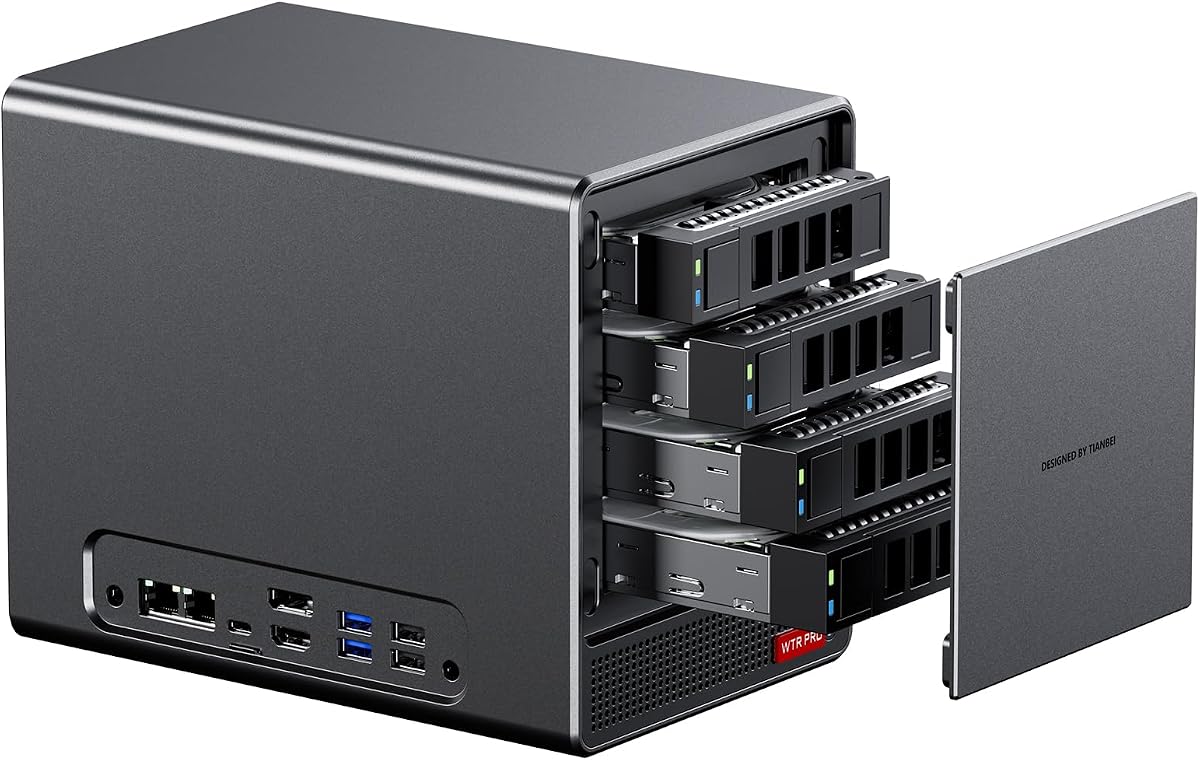
The AOOSTAR WTR PRO is designed specifically for users who want to build a home network attached storage solution. It features a Ryzen 7 5825U processor which provides ample power for file management and light media transcoding. The four 3.5 inch SATA bays allow for massive storage capacity up to 88TB.
We may earn a commission when you buy through this link, at no additional cost to you.
Its low power consumption makes it ideal for 24/7 operation in a home or small office environment. The inclusion of dual M.2 NVMe slots enables fast cache storage or OS installation alongside the larger SATA drives. The cooling system uses a large 12CM fan to ensure silent and stable performance.
Some users may encounter SATA link power management issues under Linux which require configuration adjustments. As a barebone unit, it does not include RAM or drives so additional purchases are necessary to get started. These minor issues do not detract from its core value as a dedicated NAS platform.
This mini PC is the top choice for DIY NAS enthusiasts who need expandable storage in a compact form. Its balanced performance and connectivity options make it a strong foundation for home servers. If you are looking to centralize your data storage, the WTR PRO is a practical and efficient solution.
Four 3.5 inch bays support up to 88TB of total storage capacity for large data sets.
The through-the-wall cooling design ensures the system runs quietly even during prolonged use.
We may earn a commission when you buy through this link, at no additional cost to you.
The ASRock DeskMini X300 is an ultra compact barebone kit that measures just 1.92 liters in volume making it perfect for tight spaces. It supports a wide range of AMD AM4 socket processors allowing users to choose the CPU that fits their budget and needs. The inclusion of a 2.5G LAN port ensures fast network connectivity.
We may earn a commission when you buy through this link, at no additional cost to you.
Its storage configuration includes two M.2 slots and two 2.5 inch drive bays offering flexible options for SSDs and HDDs. This balance of size and expandability makes it a versatile choice for home offices or media centers. The design also includes a slot for a Wi-Fi module so wireless connectivity is easily added.
The system is limited to DDR4 memory which is slower than DDR5 but still sufficient for most applications. Users must also purchase a CPU separately as the kit does not include one. These limitations are minor given the incredibly small footprint and flexible architecture of the unit.
This model is ideal for users who need a powerful yet incredibly small PC for a desk or entertainment center. Its broad CPU support and good connectivity make it a practical option for many home users. If space is a premium, the DeskMini X300 is a highly effective solution.
The 1.92L form factor saves desk space while still supporting high performance AMD processors.
A 2.5G LAN port and Wi-Fi slot ensure the system stays connected for modern network needs.
We may earn a commission when you buy through this link, at no additional cost to you.
The ASUS ExpertCenter PN54 is a premium barebone mini PC designed for those who want the latest connectivity and AI capabilities. It supports AMD Ryzen AI 300 Series processors which bring advanced neural processing units to the platform. The ultra thin 0.6L chassis is ideal for environments where space and aesthetics are critical.
We may earn a commission when you buy through this link, at no additional cost to you.
Its inclusion of Wi-Fi 7 and Bluetooth 5.4 ensures that the system is ready for future wireless standards and high speed data transfer. The toolless design allows for easy upgrades and maintenance without the need for special tools. Support for up to four 4K displays makes it a powerful option for multimedia workflows.
The higher price tag may be a barrier for some users especially given the low number of existing reviews. As a barebone unit, the cost of adding RAM and storage further increases the total investment. However, for those prioritizing future proofing and premium features, it offers significant advantages.
This model is best suited for professionals or early adopters who need cutting edge features in a sleek package. Its advanced connectivity and design make it a standout in the mini PC market. If you want a machine that will stay relevant for years, the PN54 is a strong candidate.
Wi-Fi 7 and Bluetooth 5.4 provide unmatched speed and low latency for wireless connections.
The ultra thin eco conscious chassis is built for reliability and looks great in any setting.
We may earn a commission when you buy through this link, at no additional cost to you.
The AOOSTAR WTR PRO 4+2 offers an expanded storage configuration with four SATA bays and two M.2 slots for a total of six drive options. It is powered by a Ryzen 7 5825U processor which delivers strong performance for virtualization and file serving tasks. The dual 2.5G LAN ports ensure fast network throughput for multiple users.
We may earn a commission when you buy through this link, at no additional cost to you.
Its low power consumption of 15W to 25W makes it highly efficient for continuous operation as a home server or soft router. The triple 4K output support allows for flexible use as a workstation or media player. A full metal chassis and intelligent fan system keep temperatures low and noise minimal.
Users should be aware that Linux users may need to adjust settings to maintain full SATA performance. Like other barebone units, it requires manual installation of memory and drives before use. These requirements are standard for the category and do not detract from its overall utility.
This mini PC is excellent for users who need a versatile platform for home labs or network storage. Its balance of power, connectivity, and efficiency makes it a robust choice for small office environments. If you need a reliable and expandable server, the WTR PRO 4+2 is a top contender.
A combination of SATA and M.2 bays allows for diverse storage configurations and RAID setups.
Dual 2.5G LAN ports provide reliable and fast connectivity for multi user environments.
We may earn a commission when you buy through this link, at no additional cost to you.
The ASUS ExpertCenter PN54-S1 is a barebone kit that emphasizes ease of use with a tool-free design for quick component upgrades. It supports AMD Ryzen 200 Series processors and features Radeon 740M graphics for balanced performance in daily tasks. The ultra-thin 34mm chassis is built for reliability and eco-conscious durability.
We may earn a commission when you buy through this link, at no additional cost to you.
Its connectivity includes Wi-Fi 7 and Bluetooth 5.4 ensuring the system is ready for modern wireless standards. Support for up to four 4K displays makes it a powerful option for creative professionals who need multiple screens. The robust chassis allows for 24/7 operation which is essential for work environments.
The higher price point may not fit every budget but the build quality and convenience features justify the investment. As a barebone unit, it requires separate purchase of CPU RAM and storage. These upfront efforts are rewarded with a flexible and durable system that stands the test of time.
This model is ideal for users who want a premium DIY experience with modern wireless capabilities and expandability. Its sleek design and reliable performance make it a strong choice for home or office use. If you prioritize ease of upgrades and build quality, the PN54-S1 is a great option.
The tool-free design allows you to access and upgrade parts without special tools or hassle.
Wi-Fi 7 and Bluetooth 5.4 provide top-tier speeds for the latest wireless devices and networks.
We may earn a commission when you buy through this link, at no additional cost to you.
Selecting the right barebone PC with an AMD processor requires careful consideration of several key factors to ensure it meets your specific needs.
The processor is the heart of your system so choose a generation that aligns with your performance needs. Newer Zen 4 chips like the Ryzen 7040HS series offer better power efficiency and integrated graphics compared to older Zen 3 models.
Prioritize the latest architecture for future proofing and better support for modern software and gaming.
Check how many RAM slots and M.2 slots are available to accommodate your desired capacity and speed. Some models support up to 128GB of DDR5 memory which is essential for heavy multitasking and content creation.
Ensure there is enough room for SSDs or HDDs based on your storage requirements.
Look for a mix of USB ports Thunderbolt or USB4 and HDMI or DisplayPort outputs to match your peripherals. Models with OCuLink ports offer superior external GPU performance compared to standard Thunderbolt connections.
Verify that the number of ports meets your setup needs to avoid needing extra docks or hubs.
Compact PCs often struggle with heat so a good cooling system is vital for stable performance. Vapor chambers and large fans help maintain low temperatures even under sustained loads.
Choose a model with effective thermal management to prevent throttling during intensive tasks.
Barebone PCs often run continuously so low power consumption helps reduce electricity costs and heat output. Look for models with energy-saving features or efficient TDP ratings.
Efficient power use is key for silent operation and environmental impact.
Ensure the system supports the latest Wi-Fi and Bluetooth standards such as Wi-Fi 6E or Wi-Fi 7 for best wireless speeds. Bluetooth 5.3 or higher ensures better compatibility with modern peripherals.
Modern wireless standards improve reliability and data transfer rates for your devices.
Consider whether you need the PC for gaming home server tasks or office work as each requires different features. Ensure the chassis supports your intended components like large GPUs or multiple drives.
Match the specs to your specific use case to maximize value and performance.
Start by installing compatible DDR4 or DDR5 RAM modules into the designated slots and securing them firmly. Ensure the modules click into place to avoid connection issues.
Install an M.2 SSD or HDD into the available storage slots to provide space for your operating system and files. Use the included screws or tools to secure the drives properly.
Connect your display via HDMI or DisplayPort and plug in the power adapter. Turn on the unit to initialize the system and install your chosen operating system.
You will typically need to purchase RAM memory storage drives like SSDs or HDDs and an operating system separately. Make sure to check the compatibility of these components with the specific barebone model you choose.
Yes many models feature strong integrated graphics or support external GPUs via OCuLink for gaming. Check the specific CPU and GPU specs to ensure they meet the requirements of the games you want to play.
Most barebone PCs allow you to upgrade RAM and storage as long as they remain accessible. Look for models with user friendly access panels and clear documentation to make future upgrades easier.
OCuLink offers higher bandwidth and lower latency for external GPU connections compared to standard USB ports. This is ideal for users who want near desktop performance without a full desktop tower.
Some barebone kits include a power supply while others do not so check the product details carefully. Ensure the power supply matches the wattage requirements of your CPU and other components.
Not all models come with built-in Wi-Fi so verify whether the unit includes a Wi-Fi card or has a slot to add one. You may need to purchase and install a wireless card separately if it is not included.
You can use a USB drive with a Windows or Linux installer to set up the OS after installing your storage drive. Follow the setup wizard to partition the drive and complete the installation.
Many models use vapor chambers or large fans to manage heat efficiently in a compact chassis. These solutions help maintain stable performance even during high load tasks.
We have reviewed ten top barebone PCs with AMD processors offering a range of options for different needs. The AOOSTAR MACO and GEM12+ models stand out for their advanced connectivity and performance while the ASRock DeskMini provides a compact budget friendly solution.
When choosing prioritize factors like CPU generation connectivity ports and thermal performance to ensure you get a system that meets your requirements. Consider your budget and the additional cost of components like RAM and storage before making a final decision.
Prices and availability can change so it is wise to check the latest offers on the product pages before buying. By selecting the right model you can build a powerful and flexible PC tailored to your unique usage scenario.