
Time Clocks for Employees H3
4.1Editor score
Standalone operation no WiFi
Includes 5 RFID cards
No monthly fees required
This guide compares the top biometric fingerprint scanner time clock systems for small businesses, evaluating features, security, and payroll integration
Finding the right time tracking solution is essential for modern businesses aiming to streamline operations and ensure accurate payroll processing. A biometric fingerprint scanner time clock offers superior security and efficiency by eliminating buddy punching and manual entry errors. These devices use advanced sensors to verify employee identity quickly, providing peace of mind for managers and fairness for staff.
We have carefully evaluated ten leading models to help you select the perfect system for your specific operational needs. Our comparison focuses on key aspects such as recognition speed, data security, connectivity options, and ease of integration with existing payroll software. Each product offers unique strengths whether you prioritize cloud access offline storage or multi-modal authentication methods.
Each pick in this list highlights distinct advantages that cater to different business sizes and workflow requirements. We detail the core features and potential trade-offs to ensure you make an informed decision based on your budget and technical environment. Please note that product availability and pricing can change frequently so verify current details before purchasing.
4.1Editor score

4.7Editor score

4.1Editor score
The following table provides a side-by-side overview of all ten products evaluated in this guide to help you quickly identify the model that best fits your business requirements.




This NGTeco model stands out as the top choice for small businesses seeking a balance of speed and reliability. With a high rating of 4.7 stars it delivers consistent performance that minimizes employee wait times during clock in. The system is designed to be user-friendly for both staff and managers.
We may earn a commission when you buy through this link, at no additional cost to you.
Its standout feature is the advanced sensor that authenticates fingerprints in just 0.5 seconds whether they are wet or dry. This speed ensures smooth transitions between shifts without creating bottlenecks at the entrance. The real-time punch detection guarantees accurate attendance records which simplifies administrative tasks significantly.
While the system requires devices to be on the same local network for instant sync it offers sufficient flexibility for most office environments. The integrated backup ensures that no data is lost during power outages which is critical for maintaining payroll accuracy. This trade-off is minor compared to the overall stability provided.
Business owners who value precision and ease of use will find this device to be an ideal investment. It eliminates manual errors and provides a secure method for tracking hours. We recommend it for teams that need fast reliable tracking without heavy cloud dependencies.
Managing shifts becomes effortless with the auto-calculated work hours feature. It handles overnight schedules automatically which reduces the risk of administrative miscalculations. This level of automation allows managers to focus on core business operations instead of time sheet corrections.
The high-performance sensor ensures that even challenging fingerprint conditions like wetness or dryness do not impede recognition speed.
Export timesheets via email or USB allows for error-free and fast payroll processing aligned with any cycle schedule.
We may earn a commission when you buy through this link, at no additional cost to you.
The H3 Standalone Biometric Clock is an excellent option for businesses looking to avoid ongoing subscription costs. It functions independently without needing WiFi or network setups ensuring that all data remains within your local environment. This approach appeals to privacy-conscious owners who prefer direct control over their records.
We may earn a commission when you buy through this link, at no additional cost to you.
Its primary advantage is the complete absence of monthly fees making it highly cost-effective for long-term use. The automatic hour calculations eliminate the need for manual entry reducing the likelihood of payroll errors. Setup is straightforward with video tutorials available to guide you through the process quickly.
The lack of cloud connectivity means you cannot check attendance remotely which may limit flexibility for distant managers. However for on-site operations this limitation is often negligible compared to the security and cost savings offered. The included RFID cards provide an alternative if biometric scanning is inconvenient.
This device is perfect for small to mid-sized businesses that need reliable time tracking without complex IT requirements. It supports up to 1000 employees and handles diverse workplace environments well. We recommend it for offices and factories prioritizing simplicity and affordability.
Multi-language support ensures that staff from diverse backgrounds can use the device comfortably. The interface allows easy switching between languages like Spanish German and French. This inclusivity helps maintain accurate records across international or multilingual teams efficiently.
Data remains local and secure via USB transfer ensuring your employee records are not exposed to external servers.
Ready to use out of the box with no software installation and no monthly fees to worry about.
We may earn a commission when you buy through this link, at no additional cost to you.
This premium biometric time clock offers a comprehensive suite of features designed for robust workforce management. It supports face palm fingerprint badge and PIN authentication providing unmatched flexibility for different employee preferences. The system integrates seamlessly with web-based reporting tools to streamline administrative workflows.
We may earn a commission when you buy through this link, at no additional cost to you.
Its standout capability lies in the remote accessibility features allowing you to monitor workforce activity from anywhere. The mobile app adds value with geo-fencing capabilities ensuring employees clock in only when they are at the job site. This level of control helps prevent time theft effectively.
The requirement for a subscription after a 30-day free trial might be a consideration for businesses on tight budgets. However the automated alerts and detailed reporting tools often justify the cost for growing companies. The lifetime warranty provides additional peace of mind regarding hardware longevity.
Businesses needing detailed job tracking and location verification should strongly consider this model. It reduces paperwork and manual errors significantly through automation. We recommend it for organizations that prioritize security and real-time data visibility over absolute lowest cost.
Payroll processing becomes more efficient with automated alerts for early late punches and approaching overtime. These features help managers stay ahead of labor costs and compliance issues. The CSV export function allows easy integration with existing accounting systems.
Multiple authentication options like face palm and fingerprint reduce the risk of buddy punching and unauthorized access.
Keep tabs on your workforce no matter where you are with this web based punch in clock for employees.
We may earn a commission when you buy through this link, at no additional cost to you.
This standalone model is built for businesses that want simplicity and durability without complex configurations. It allows you to get started in minutes with no need for WiFi or specialized software. Data export via USB makes it easy to integrate records into your payroll system quickly.
We may earn a commission when you buy through this link, at no additional cost to you.
The internal backup system preserves every punch during unexpected power loss ensuring that no data is ever lost. This reliability is crucial for maintaining accurate employee records without constant maintenance. The industrial-grade materials ensure the device withstands daily wear and tear in demanding environments.
While it supports up to 500 users it may not be suitable for larger enterprises with growing teams. However for expanding small businesses this capacity is often sufficient to handle current needs. The paperless design also helps reduce supply costs and supports eco-friendly initiatives.
Ideal for warehouses retail counters and offices this device installs anywhere with a compact design. It provides consistent performance regardless of the physical location where it is placed. We recommend it for businesses prioritizing ease of use and hardware durability.
Ready-to-use Excel reports simplify payroll integration significantly. You do not need to manipulate data extensively before using it with your accounting software. This feature saves valuable time for HR and finance teams during end of month processing.
Get started in minutes with no WiFi or complex software to configure for basic operations.
An internal backup system preserves every punch during unexpected power loss keeping records secure.
We may earn a commission when you buy through this link, at no additional cost to you.
The uAttend JR2000 simplifies employee time tracking with a cloud-based system designed for efficiency. Its intuitive interface makes it accessible for first-time users and tech-savvy managers alike. The system allows you to view track and manage attendance in real-time from any device.
We may earn a commission when you buy through this link, at no additional cost to you.
Cloud backups ensure that your employee data is secure and always available when needed. This feature provides peace of mind against local hardware failures or accidental data loss. The comprehensive reporting tools give you valuable insights into productivity and labor costs effectively.
While the subscription service adds to the operational cost it enables remote management and robust reporting. For businesses that need frequent access to data without on-site visits this is a worthwhile investment. The flexibility it offers supports growing teams effectively.
This device is well-suited for companies looking to automate payroll tasks and handle tax filings easily. The switching process is designed to be straightforward allowing for minimal disruption. We recommend it for teams that value remote management capabilities.
Gain valuable insights into attendance trends with detailed reports provided by the system. These reports help identify patterns and optimize staffing levels for better efficiency. The cloud service delivers premium features that free options often lack.
View track and manage employee attendance in real-time from any device providing flexibility and control.
Keep your employee data secure and always available with automatic cloud backups providing peace of mind.
We may earn a commission when you buy through this link, at no additional cost to you.
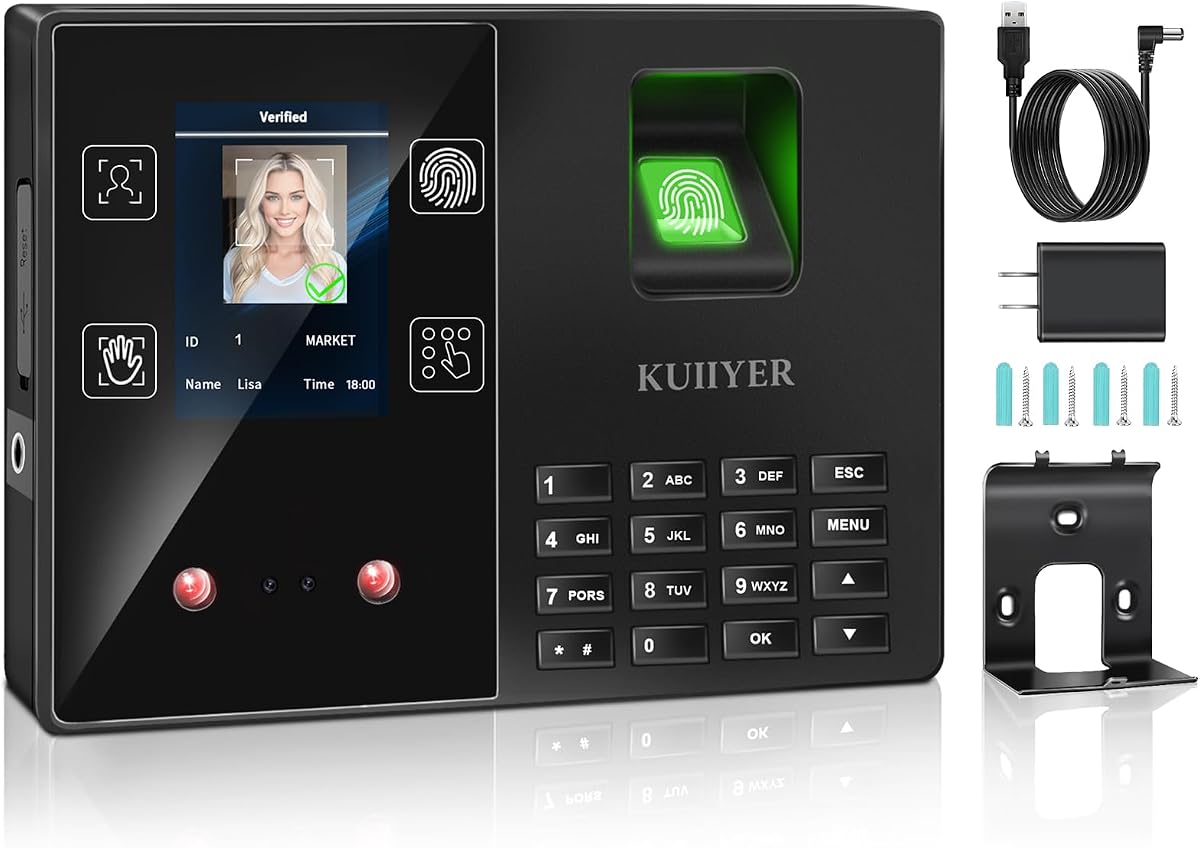
KUIIYER offers a cost-effective solution with four biometric modes for varied employee access needs. It supports face palm fingerprint and PIN identification allowing teams to choose their preferred method. The infrared camera ensures quick identification even in dim environments which enhances usability.
We may earn a commission when you buy through this link, at no additional cost to you.
The TFT color LCD display and intelligent voice support improve the user experience significantly. Employees can see their verified ID and time while hearing a voice announcement confirming their status. This feedback loop reduces confusion and ensures everyone knows their status clearly.
While the recognition speed is slightly slower than top-tier models it remains efficient for most settings. The offline nature means no app or network is required which simplifies the setup process. This independence makes it ideal for businesses without complex IT infrastructure.
Small to medium-sized businesses within 1000 employees will find this system meets diverse needs well. It includes features like auto accurate hour calculations and data security with power loss protection. We recommend it for schools hotels and factories needing simple reliable tracking.
No monthly fees and unconditional returns make this a low-risk option for new users. The 24-month promise for quality issues ensures long-term reliability for your business. Customer support handles issues within 12 hours ensuring minimal downtime.
Supports max 1000 user capacity with 4 ways to punch clock including face and fingerprint.
TFT color LCD display and multi-language intelligent voice for easy to use interfaces.
We may earn a commission when you buy through this link, at no additional cost to you.
This compact USB device offers a convenient way to add biometric security to existing systems. Its lightweight design makes it easy to place on any office desk without taking up much space. It connects directly to computers allowing for quick setup and reliable operation.
We may earn a commission when you buy through this link, at no additional cost to you.
The device supports multiple user enrollments ensuring that everyone in your team can be added easily. Compatible with most attendance software it integrates smoothly into your current workflow. This versatility makes it a practical choice for businesses already using software solutions.
Since it relies on a computer for operation it is less independent than standalone units. However for small offices where a PC is always present this is not a significant issue. It provides a secure method for employee verification without complex hardware.
Ideal for businesses looking to upgrade from key cards or manual logs this device fits well. It reduces the risk of unauthorized access through reliable biometric verification. We recommend it for small teams needing a simple affordable security upgrade.
Fast recognition ensures that employees can verify their identity efficiently without delay. The stable performance helps maintain consistent security standards throughout the day. This reliability is key for maintaining accurate attendance records.
Compact and lightweight design makes it convenient for office desktop use and portable access control.
Compatible with most attendance and access control software for workplace security.
We may earn a commission when you buy through this link, at no additional cost to you.
NGTeco TC1 offers a powerful cloud solution with free access to core management features. It allows you to access real-time punch data from anywhere using any web browser. This remote capability is highly beneficial for managers who need flexibility in their schedule.
We may earn a commission when you buy through this link, at no additional cost to you.
Bank-grade security ensures that your data is stored securely on AWS servers with encryption. The device supports offline functionality so no data is lost during network outages. Once the network is restored the system syncs automatically to keep records current.
Customizable shifts allow you to configure complex workflows such as split shifts or rotations. This feature eliminates manual scheduling errors and supports part-time staff effectively. However some advanced management features may require a subscription which is worth considering.
Global teams will appreciate the multi-language support which accommodates diverse workforces. The free management app provides essential tools without additional costs for basic operations. We recommend it for businesses needing secure remote attendance tracking.
The large storage capacity supports up to 30000 logs which is ample for most operations. Offline capture ensures continuity even when internet connections are unstable. This reliability helps maintain accurate records in all conditions.
Allows you to access real-time punch data from anywhere benefit from accurate hour calculations.
Offline punch capture syncs automatically to the cloud once network is restored no data loss.
We may earn a commission when you buy through this link, at no additional cost to you.
The H1 model provides a straightforward way to track hours without network complexity. It keeps your data private and fully under your control without needing internet access. This security-focused approach is ideal for businesses concerned about data privacy and local management.
We may earn a commission when you buy through this link, at no additional cost to you.
Automatic tracking eliminates manual calculations ensuring that payroll records are always precise. The system supports multiple languages making it accessible for diverse teams. Setup is simple with step-by-step video guides available to help you get started quickly.
While it offers a limited feature set compared to cloud systems it excels in reliability. The lack of monthly fees makes it an affordable choice for long-term use. Customer support is available to assist with any questions or issues that may arise.
Perfect for growing teams this device is designed to handle small to mid-sized business needs. It is suitable for a variety of workplaces from retail to offices. We recommend it for businesses seeking a secure low-maintenance solution.
Keep your data private and fully under your control with this offline management approach. The secure export via USB ensures that records are safe from external breaches. This reliability provides peace of mind for your payroll operations.
Keep your data private and fully under your control. This standalone time clock works without WiFi or internet.
Skip subscriptions and hidden costs. This time clock is ready to use right out of the box.
We may earn a commission when you buy through this link, at no additional cost to you.
This cloud time clock features dual-band WiFi ensuring stable connectivity for uninterrupted performance. Managers can monitor attendance and generate reports through an intuitive web portal or app. This remote access is vital for overseeing teams efficiently without physical presence.
We may earn a commission when you buy through this link, at no additional cost to you.
The built-in 2000mAh battery ensures that the device continues to function during power outages. This prevents data loss and maintains continuous tracking which is critical for accurate payroll. AWS cloud storage protects your records with end-to-end encryption and compliance standards.
Flexible overtime rules and shift customization allow you to align tracking with your policies. However full access to advanced features may require a subscription. For businesses needing robust reporting this investment often pays off in reduced administrative work.
Ideal for offices needing stable internet connections this model offers high reliability and security. It supports diverse workflows with configurable shift and overtime rules. We recommend it for businesses prioritizing connectivity and data protection.
Say goodbye to connection lags and ensure smooth attendance tracking for your daily office operations. The stable connectivity supports reliable performance even during peak usage times. This consistency helps maintain trust in your timekeeping system.
Equipped with both 2.4GHz and 5GHz WiFi this cloud time clock delivers fast stable connectivity.
Built-in 2000mAh battery keeps the time clock running even during power cuts.
We may earn a commission when you buy through this link, at no additional cost to you.
Selecting the right biometric time clock requires evaluating several key factors that align with your business size and operational needs.
Modern systems offer various biometric methods including fingerprint face and palm recognition. Fingerprint scanners are common and cost-effective but face recognition offers higher security and hygiene. Consider which method best suits your environment and employee preferences for efficient clock-ins.
Choose a system that supports multiple authentication modes for added flexibility and accessibility.
Standalone devices store data locally which enhances privacy and reduces dependency on internet connections. Cloud-based systems allow remote access and real-time reporting which is useful for managing distributed teams. Decide based on your need for remote management versus data sovereignty.
Evaluate if your business requires remote access or prefers local data storage for security.
Some devices rely on WiFi or LAN to sync data with servers which enables real-time updates. Others use USB drives for manual data transfer which eliminates the need for internet. Ensure the connectivity method matches your office infrastructure and technical capabilities.
Verify that your office has the necessary network setup or choose a USB-export option.
The number of user profiles a device can store is critical for growing businesses. Look for systems that support at least 500 to 1000 users to accommodate expansion. Consider future hiring plans to ensure the device remains useful for years.
Select a model with sufficient user capacity to avoid hardware upgrades in the future.
Seamless integration with payroll software saves time and reduces manual entry errors. Some systems offer built-in integration while others export data in compatible formats like CSV. Check if the device supports direct export or requires additional software layers.
Prioritize systems that simplify payroll processing to save administrative resources.
Comprehensive reporting tools help track attendance trends overtime and labor costs effectively. Look for real-time data access and automated alerts for late punches or overtime. Detailed reports allow managers to make informed decisions about workforce allocation.
Choose a system that provides actionable insights to optimize your workforce efficiency.
Data encryption and secure storage protocols are vital to protect sensitive employee information. Cloud systems should comply with global data protection standards to ensure compliance. Local systems must have physical security to prevent unauthorized access to the device.
Ensure the system meets security standards to protect employee and business data.
Reliable customer support and warranty coverage are essential for addressing technical issues promptly. Look for companies offering lifetime or extended support to minimize downtime during problems. Check the availability of resources like manuals and video tutorials for easy setup.
Invest in a system backed by robust support to ensure long-term reliability.
To ensure accurate tracking enroll employees by guiding them through the registration process carefully. This typically involves scanning fingerprints multiple times to create a high-quality template for future matches. Provide clear instructions to staff on how to properly position their hands or faces for best results.
Regularly update employee records by adding or removing profiles as your workforce changes. Use the provided software or web portal to manage these profiles efficiently. Sync data frequently to ensure all attendance records are current and available for review.
Clean the scanner lens gently with a soft cloth to maintain recognition speed and accuracy. Avoid using harsh chemicals that could damage the sensor surface over time. Keep the device in a stable environment to prevent extreme temperature or humidity issues.
Yes they are highly suitable for small businesses due to their accuracy and ability to prevent buddy punching. They eliminate manual errors and reduce administrative workload which is crucial for smaller teams. Many models are designed specifically for small business needs with easy setup and no complex IT requirements.
Not all devices require internet as standalone models can operate using local storage and USB transfer. However cloud-based systems need a connection to sync data and enable remote access. Choose based on whether you prioritize privacy or real-time remote management capabilities.
The device captures the ridges and valleys of your fingerprint and converts them into a digital template. This template is stored securely and compared against future scans to verify identity. Advanced algorithms handle variations in pressure or orientation to ensure accurate recognition every time.
Yes multiple employees can be enrolled on the same device up to its capacity limit. This limit varies from 500 to 1000 users depending on the model. Sharing a single device reduces costs and simplifies installation compared to individual terminals.
Most modern devices have internal backup batteries or capacitors to preserve data during outages. This ensures that attendance records are not lost even when the power is interrupted. Once power is restored the device continues recording without gaps in the data log.
Some models require a subscription for cloud services and advanced features while standalone units do not. Look for options that offer one-time purchases if you want to avoid recurring costs. Always review the pricing terms to ensure they fit your budget constraints.
Data is secured through encryption and secure storage methods depending on the system type. Cloud systems use protocols compliant with data protection standards while local devices rely on physical security. Regular updates and strong authentication help maintain high security for your records.
Yes most systems allow data export via USB drives or cloud downloads in formats like CSV or Excel. This facilitates easy transfer to your accounting or payroll software. Check the supported formats to ensure compatibility with your existing workflow tools.
Choosing the right biometric time clock can transform your workforce management by improving accuracy and security. The NGTeco models and uAttend systems offer robust features that cater to different business needs and preferences. Each product reviewed provides a reliable way to track attendance without manual errors or inefficiencies.
Prioritize features that align with your specific operational goals such as remote access or offline storage. Consider the importance of budget friendly pricing and security protocols when making your decision. Selecting a system that grows with your team ensures long-term value and performance.
Always check current prices and availability before purchasing to ensure you get the best deal. Product details and offers may change so verifying with the retailer is essential. With the right choice you can streamline your time tracking and focus on growing your business.