
Phomemo M110
4.3Editor score
Portable Bluetooth connectivity
OCR text recognition feature
Compact desk-friendly design
Finding the right barcode printer for inventory management is crucial for streamlining operations. A reliable device ensures accurate tracking, reduces human error, and keeps your stock levels precise throughout the day.
We evaluated ten leading models based on connectivity options, print quality, and software compatibility. Our comparison highlights desktop units for bulk labeling and portable devices for on-the-go scanning tasks.
Each selection includes detailed specifications and real-world performance notes to guide your decision. Please note that product availability and pricing may fluctuate regularly on retailer platforms.
4.3Editor score

4.6Editor score

4.5Editor score
As an Amazon Associate we earn from qualifying purchases.
This table provides a side-by-side overview of the leading inventory barcode printers. Review key specifications like label width, connectivity types, and resolution to find the perfect match for your workflow.


The iDPRT SP310 stands out as a top performer for inventory management with its robust build and fast processing. It earns a strong rating for its ability to handle various label sizes without proprietary restrictions.
We may earn a commission when you buy through this link, at no additional cost to you.
Its open system allows businesses to use third-party labels, significantly reducing operating costs compared to locked brands. The intelligent calibration ensures that every barcode prints perfectly aligned for reliable scanning.
While it relies on a solid USB connection which limits mobility, the stability prevents dropouts during high-volume printing sessions. The included free software offers a dedicated layout engine for professional designs without subscription fees.
This unit is ideal for small businesses needing reliable daily printing for shipping and inventory tags. Its combination of speed, cost-efficiency, and quality makes it a smart investment for growing operations.
The lack of microchip restrictions allows you to purchase affordable generic labels from any brand.
Crystal clear 203 DPI resolution ensures all barcodes are crisp and easily scannable by standard readers.
We may earn a commission when you buy through this link, at no additional cost to you.
The SUPVAN T50M Pro offers excellent mobility for users who need to label items directly on the shelf. Its app-based editing allows for quick customization without needing a computer nearby.
We may earn a commission when you buy through this link, at no additional cost to you.
Users appreciate the variety of fonts and icons available in the free application. The device connects easily to phones and tablets, making it perfect for organizing home offices or small retail spaces.
It uses direct thermal technology so you never need to buy ink or toner cartridges. The labels are clear and professional, though the width limit means it is not suitable for large shipping boxes.
Ideal for storage bins and product tags, this printer simplifies organization tasks efficiently. The ease of setup and use makes it a strong choice for casual or semi-professional labeling needs.
The mobile app provides over fifty frames and sixty-six hundred icons for creative label designs.
Direct thermal printing means there are no messy cartridges to replace during daily operations.
We may earn a commission when you buy through this link, at no additional cost to you.
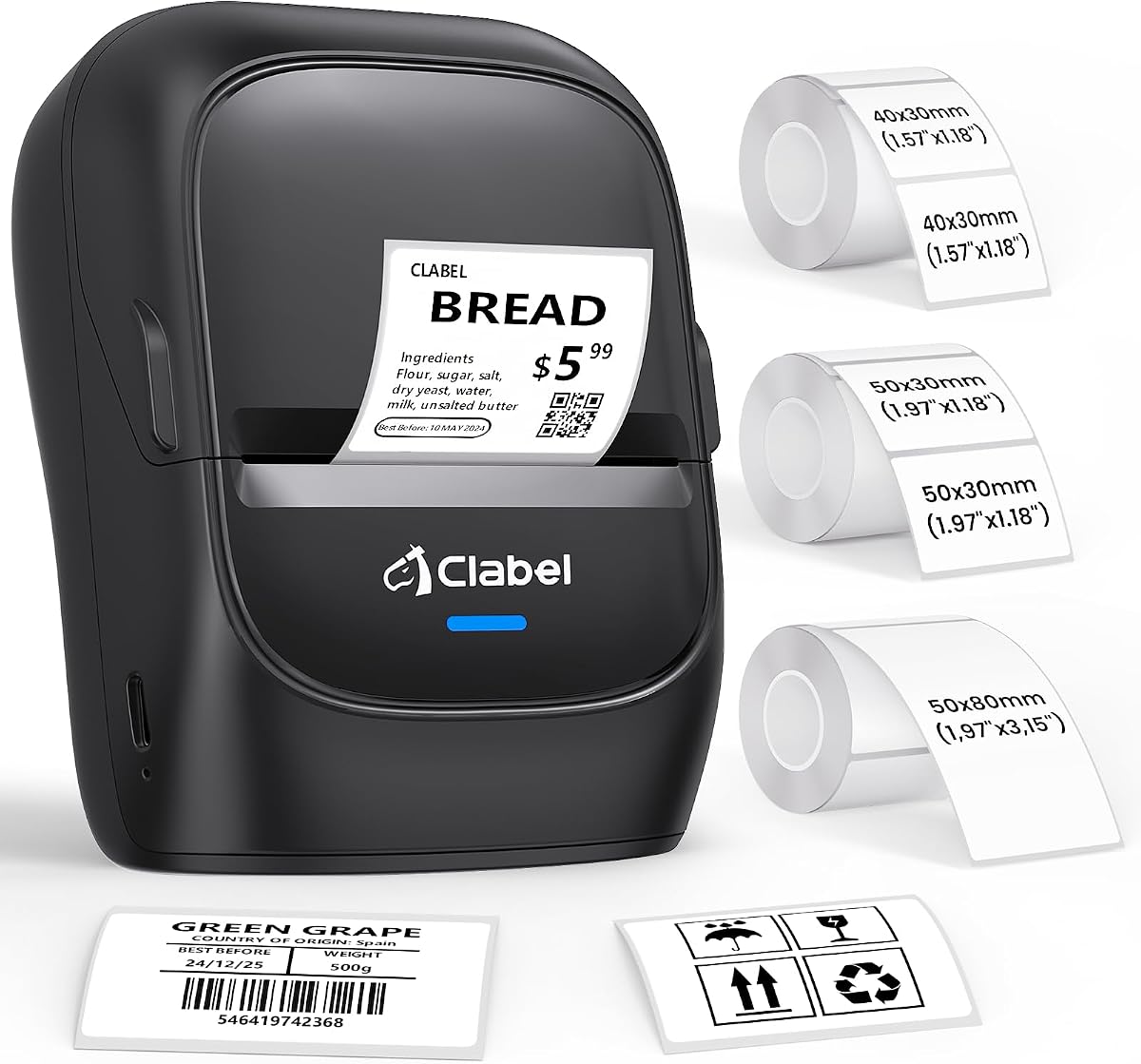
The CLABEL 221D strikes a great balance between desktop functionality and wireless mobility. Its open system design encourages the use of universal thermal paper which saves money over time.
We may earn a commission when you buy through this link, at no additional cost to you.
Business owners can switch between USB for bulk tasks and Bluetooth for instant counter work without hassle. The app includes free templates that streamline the creation of retail price tags and inventory stickers.
Print quality is sharp with 203 DPI resolution ensuring accurate scanning at checkouts. While it is not designed for large shipping labels, it excels at item tagging and office organization tasks.
This device is a cost-effective solution for small businesses aiming to professionalize their labeling. The ability to save custom layouts helps reduce manual data entry errors for staff members.
Choose USB for high-volume PC work or Bluetooth for quick mobile printing on demand.
Eliminate RFID chip restrictions and use any standard thermal paper roll available online.
We may earn a commission when you buy through this link, at no additional cost to you.
This model is designed for those who need a compact unit that does not clutter the workspace. Setup is incredibly fast allowing new users to start printing within minutes of unboxing.
We may earn a commission when you buy through this link, at no additional cost to you.
The accompanying app offers extensive customization options including Excel printing and image integration. This makes it versatile for creating not just barcodes but also product content labels with graphics.
You can reuse existing rolls from other brands which provides significant cost savings. The lightweight nature means you can move it around the office easily depending on where you need to print.
Perfect for home offices or small retail counters, this printer handles daily labeling demands efficiently. It is a practical tool for businesses looking to start professional labeling without a large budget.
The system is designed to be ready in less than five minutes from box to print.
Compatibility with existing rolls from any brand helps reduce ongoing supply expenses.
We may earn a commission when you buy through this link, at no additional cost to you.
The Labeer Bluetooth printer is a strong choice for e-commerce sellers needing to print shipping labels. It supports the standard 4×6 size which is essential for packages and returns.
We may earn a commission when you buy through this link, at no additional cost to you.
Its app allows direct printing from PDFs downloaded from platforms like Amazon or Shopify. Automatic cropping tools ensure that labels print correctly without unwanted white margins wasting paper.
Wireless connectivity makes it easy to place the printer near a packing station. The thermal engine produces clear, scannable codes without the maintenance of ribbons or ink cartridges.
Ideal for online stores, this unit streamlines the shipping process with reliable performance. The ability to connect to mobile devices adds flexibility for busy shipping stations.
Download labels as PDFs and print directly from your phone without complex file transfers.
Built-in sensors detect label gaps to ensure every print starts in the perfect position.
We may earn a commission when you buy through this link, at no additional cost to you.
The CLABEL CT327D is a robust unit designed for businesses needing larger label formats. Its ability to handle 3-inch wide labels makes it superior for complex SKU tags and price displays.
We may earn a commission when you buy through this link, at no additional cost to you.
With a print speed of 152mm/s, it keeps up with demanding warehouse tasks efficiently. The smart backfeed feature positions labels before printing to reduce waste during setup changes.
It supports gap, black-mark, and perforated labels giving users flexibility for different tasks. The combination of USB and Bluetooth connectivity ensures it fits into various office workflows seamlessly.
This model is best for those requiring a versatile tool that can switch between label sizes easily. Its performance and features justify the investment for professional inventory environments.
The rapid print speed ensures that repetitive labeling jobs are completed quickly and accurately.
The internal backfeed system repositions labels to prevent misalignment during the first print.
We may earn a commission when you buy through this link, at no additional cost to you.
This version of the SP310 emphasizes high-speed output suitable for bulk order processing. It delivers eighty sheets of small labels per minute which is excellent for busy e-commerce fulfillment.
We may earn a commission when you buy through this link, at no additional cost to you.
The dedicated drivers for various operating systems ensure compatibility across different office computers. Setup is quick requiring only a cable connection and driver installation to begin operation immediately.
Users benefit from the open system that allows purchasing labels from any supplier. This flexibility significantly lowers ongoing costs compared to printers locked into specific proprietary consumables.
For businesses processing high volumes of daily orders, this printer offers reliable performance. The intelligent sensors ensure consistent alignment even with heavy usage over long periods.
The high-speed capability reduces wait times during peak shipping periods significantly.
Freedom to use third-party labels reduces material costs by up to forty percent.
We may earn a commission when you buy through this link, at no additional cost to you.
This shipping printer stands out for its extensive compatibility with modern Apple and Windows systems. It works smoothly with M1 and M2 chips ensuring that Mac users face no connectivity issues.
We may earn a commission when you buy through this link, at no additional cost to you.
The wireless connection options allow for a clutter-free workspace which is valuable in tight packing areas. The software integrates well with major e-commerce platforms like Shopify and Amazon for quick label generation.
Print speed is competitive at roughly seventy-two labels per minute which keeps workflows moving efficiently. It also comes with a two-year warranty which adds peace of mind for business users.
Ideal for sellers using multiple sales channels, this device handles standard shipping labels reliably. Its flexibility with different operating systems makes it a safe choice for diverse tech environments.
Flawless support for Apple M1 and M2 chips ensures stable performance on newer devices.
A two-year warranty and lifetime support provide reassurance for long-term business investment.
We may earn a commission when you buy through this link, at no additional cost to you.
The Phomemo M110 is an incredibly portable solution for quick labeling tasks on the go. It fits in a hand and connects instantly via Bluetooth to your smartphone for rapid printing.
We may earn a commission when you buy through this link, at no additional cost to you.
Its unique OCR feature recognizes text from photos allowing you to convert images into editable labels. This is particularly useful for digitizing handwritten notes or copying text from physical items.
While some advanced icons require membership, there are plenty of free templates available. The device is best suited for small labels such as cables, jewelry, or shelf markers rather than shipping.
For home users or small workshops needing an affordable tool, this is a strong option. The battery-powered design means you can take it anywhere without needing a power outlet nearby.
Optical Character Recognition converts text from photos into editable formats in seconds.
The mini form factor allows for easy storage and carrying in a bag or pocket.
We may earn a commission when you buy through this link, at no additional cost to you.
This printer comes with three label rolls making it ready to use straight out of the box. It supports 2-inch labels which is a common size for product tags and office files.
We may earn a commission when you buy through this link, at no additional cost to you.
The included labels are waterproof and oil-proof ensuring they remain legible even in messy environments. This is crucial for kitchen storage or workshop areas where labels might get exposed to spills.
The app allows Excel batch printing helping to streamline the creation of bulk inventory lists. It is easy to connect via Bluetooth to phones making the process efficient for mobile tagging.
As a starter kit, it offers everything needed to begin organizing immediately. The lack of RFID locks allows for flexible purchasing of future supplies without brand restrictions.
Three rolls of labels included in the box allow for immediate printing without extra costs.
Waterproof and oil-proof materials ensure labels stay sharp in high-traffic or messy areas.
We may earn a commission when you buy through this link, at no additional cost to you.
Selecting the right printer requires understanding your volume needs, label sizes, and connectivity preferences. Consider these factors to match the device to your specific workflow.
Inventory tasks often require different label sizes depending on the item. Ensure the printer supports the width you need, ranging from small 1-inch tags to larger 4×6 shipping labels.
Choose a model that handles your standard label dimensions to avoid wasting time on workarounds.
Decide if you need wireless flexibility or a stable wired connection. Bluetooth allows printing from mobile devices while USB ensures reliability for high-volume desktop tasks.
Select the connection type that fits your workspace and device ecosystem best.
Higher volume operations need faster printers to avoid bottlenecks. Look for models rated for high pages per minute if you process many orders daily.
Speed impacts efficiency so prioritize it if your daily label count is high.
The software should be compatible with your operating system and offer needed features like batch printing. Check if it supports Excel imports or integration with your e-commerce platform.
Good software simplifies label design and reduces manual entry errors.
Some printers use proprietary microchips that force expensive label purchases. Look for open systems that accept any thermal paper to reduce long-term costs.
Universal label support ensures you can buy affordable supplies easily.
A printer used in a warehouse should be robust enough to handle daily wear. Consider models with strong casings and reliable calibration sensors for long-term use.
Investing in a durable unit reduces the risk of frequent breakdowns.
Start by installing the drivers provided for your operating system to ensure the device connects properly. Follow the specific instructions for your brand to avoid software conflicts.
Perform a calibration step whenever you change label rolls to ensure precise alignment. This prevents wasted labels caused by misprint positioning during the first few prints.
Clean the printer head regularly with a soft cloth or cleaning pen to maintain print quality. Dust buildup can cause faded text that may be difficult for scanners to read.
No, most of these printers use direct thermal technology which requires no ink or toner. The labels are coated to darken when heated by the print head. This keeps maintenance low and costs predictable.
Yes, many models like the iDPRT and CLABEL support open systems that accept universal labels. Just ensure the paper is thermal and matches the width specifications of your printer for best results.
USB provides a stable wired connection ideal for desktop printing. Bluetooth allows wireless mobility so you can print from phones or tablets. Some devices offer both options for flexibility.
This usually happens if the label roll is not aligned properly. Most printers have a calibration mode that detects the label gaps. Running this calibration often fixes crooked printing issues.
Many supported apps allow for importing Excel files to generate bulk labels. Check the software features of your specific printer to ensure it supports batch printing from spreadsheet data.
Thermal printers are generally quieter than laser or inkjet models. However, the mechanical parts still make noise during feeding. They are suitable for office environments but not silent.
Selecting the right barcode printer involves balancing speed, cost, and connectivity. The iDPRT SP310 and CLABEL models offer strong performance for varied inventory needs.
Prioritize open systems that allow universal labels to save on ongoing costs. Connectivity should match your workflow whether you need mobile flexibility or desktop stability.
Prices and availability can change so check the latest deals before purchasing. Investing in a reliable printer now streamlines your inventory management for the future.